In today's era of rapid iterations in large model technology, artificial intelligence is accelerating the reconstruction of productivity in various industries. However, in this exciting process, the industry consistently faces a critical bottleneck in implementation: most current AI Agents (intelligent agents) still remain at the level of "information processing" and "dialogue interaction." Once it involves rigorous fund circulation, asset management, or complex financial business, they are often constrained by a lack of specialized execution interfaces, falling into the dilemma of "able to understand the needs but unable to take action."
To bridge the gap from "cognition" to "execution," AI urgently needs a dedicated underlying financial operating system. This is precisely the original intention of B.AI. As a pioneer focused on building AI financial infrastructure, B.AI's core vision is to lay down a native financial service system and underlying communication channel for countless future AI Agents. To thoroughly break this execution barrier, the B.AI team has deeply encapsulated complex financial logic on top of the industry-standard agent architecture and has open-sourced the Skills module dedicated to AI Agent financial operations.
This article will guide you in an easy-to-understand way to understand the Skills B.AI offers, showing how it grants AI Agents genuine financial execution power and guiding you step by step to achieve local deployment and practical invocation with minimal steps.
1. Analyzing Modular Financial Skills Exclusive to AI Agents
In simple terms, the AI model itself only possesses strong text processing and logic generation capabilities, like a "brain" with vast knowledge but lacking limbs. Skills are the "hands and feet" and "toolbox" that empower this brain. Nowadays, expanding AI's execution power by loading modular Skills has become a universal standard among major mainstream agent frameworks. It includes a series of reusable, task-specific function instruction sets.
Each Skill provided by B.AI encapsulates highly specialized knowledge in finance and data fields, offering a highly automated unified deployment solution. Through extremely simple Skills deployment, an AI Agent can execute complex financial operations, payment agreements, and account asset management across platforms according to natural language instructions.
Its core value is reflected in:
- Capability expansion: Transforming AI from a mere "chat assistant" to a truly financially capable "intelligent operator."
- Deterministic execution: Constraining the AI's behavioral paths, ensuring that every transaction and every query adheres to the safety norms of financial operations, thereby significantly reducing the risk brought by AI hallucination.
- LEGO-style composability: Focusing on providing high-value general financial practical Skills, which not only seamlessly connect with various mainstream agent frameworks (such as OpenClaw, etc.), but also allow multiple Skills to cooperate and link together into complex financial workflows, thus truly solidifying the underlying connection between AI and financial infrastructure across the web.
2. Skills Installation Tutorial
Thanks to the unified installation program provided by B.AI, even users without development experience can quickly complete the end-to-end localization deployment, allowing the AI Agent to achieve the leap from "general conversation" to "professional financial execution" with one click.
1. Environment Preparation
Before starting the installation, please ensure that your local development environment is ready:
- OpenClaw or other compatible agent runtime environments.
- Node.js: Because it uses npx for one-click rapid installation, Node.js is a must-have environment across all platforms.
- Python 3 & Git: For script processing and code cloning.
Tips: After running the installation script, the system will automatically perform checks, and users can configure according to system prompts.
2. Run the Installation Command
Please open the corresponding command line tool based on your operating system (macOS / Linux users should open the terminal, Windows users use Git Bash), copy and input the following command, and press enter: npx skills add https://github.com/BofAI/skills.git
The system will prompt you to install skills@1.4.9 (the version number may be updated). Type y to confirm and continue, then the system will start to automatically clone the repository.

3. Select Skills as Needed
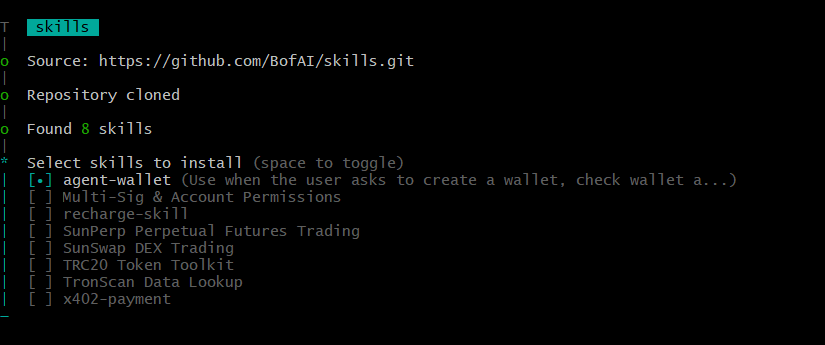
After cloning is complete, the terminal will automatically scan and list the 8 core Skills currently supported. You can browse using the up and down arrow keys, check or uncheck with the space bar, and confirm your selection with the enter key. The Skills currently offered by B.AI include:
- SunSwap DEX Trading: Supports quoting, token exchange, liquidity, and fund pool operations.
- SunPerp Perpetual Futures Trading: Perpetual contract market data query, order placement, and position management.
- TRC20 Token Toolkit: General token metadata query, balance checks, and transfers.
- TronScan Data Lookup: Comprehensive blockchain data, transaction, token, and network-wide statistical query.
- Multi-Sig & Account Permissions: Native multi-signature workflow and account permission management.
- recharge-skill & x402-payment: Account recharge and professional payment API resource agreements.
4. Choose the Installation Scope
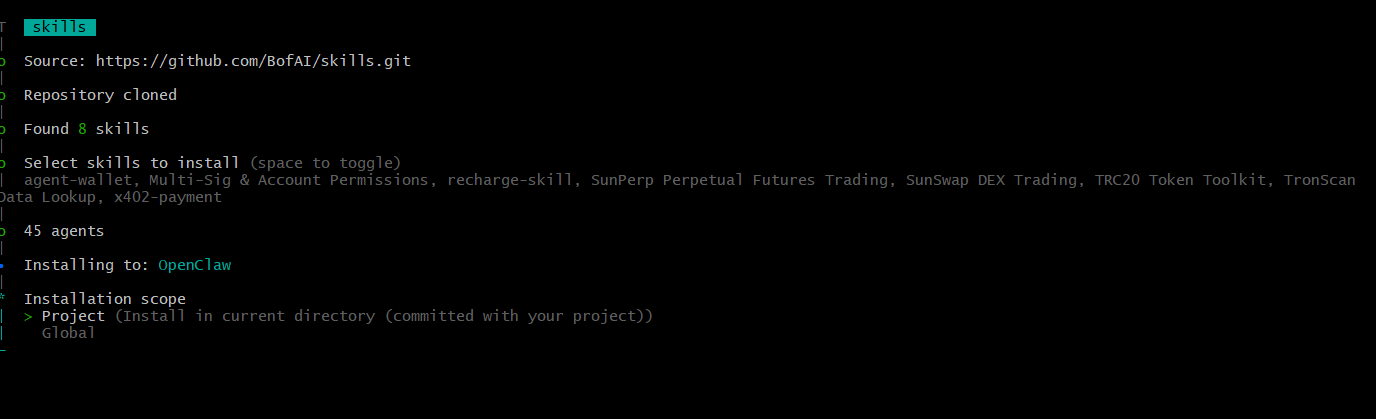
After selecting Skills, the system will ask about your installation scope:
- Project (recommended): Install in the current project's directory (e.g., ~\.agents\skills\), making it easier to submit and manage versions alongside your project code.
- Global: Global installation, effective for all local projects.
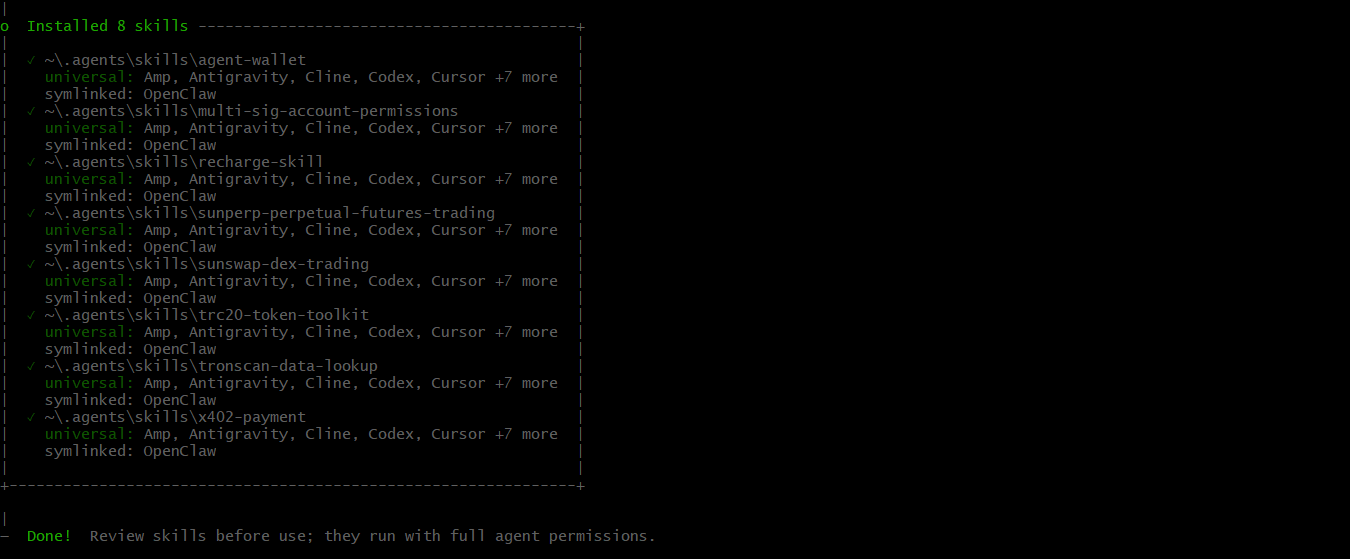
Once the selection is complete, the installation program will automatically finish the subsequent file linking and configuration. When the terminal outputs "Done" at the bottom, it indicates that Skills have been successfully installed.
3. Practical Interaction Guide Based on OpenClaw
Once the installation command is completed, your AI Agent (taking OpenClaw as an example) has officially loaded this set of specialized financial operation Skills. Next, you can direct your AI Agent in OpenClaw's interactive interface through the following three typical scenarios.
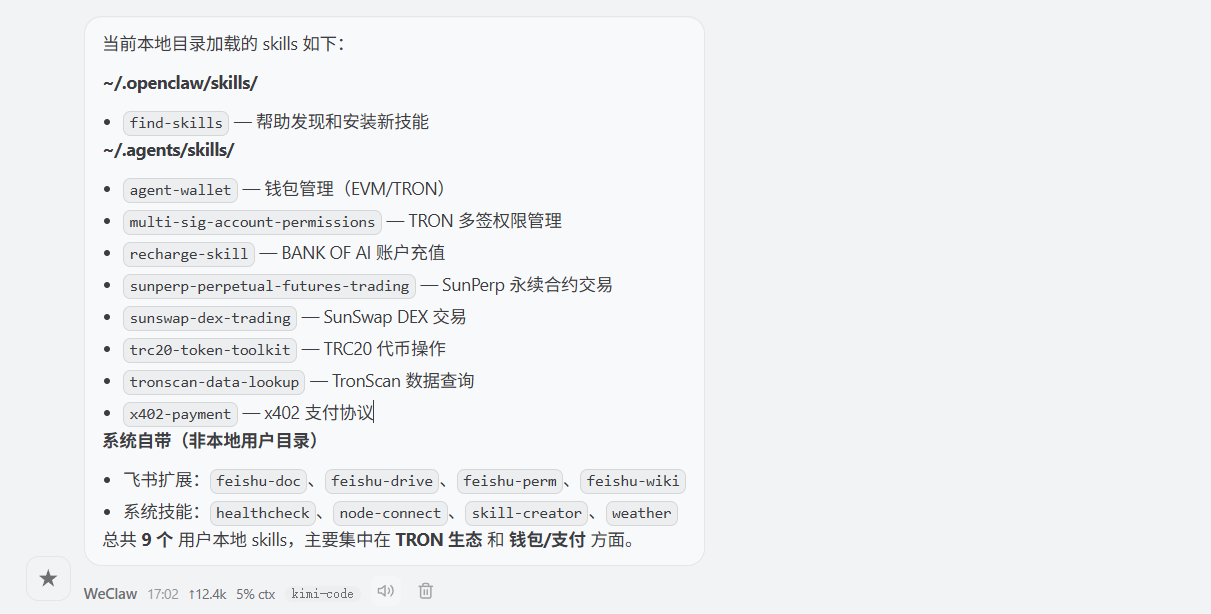
Scenario 1: Query Current Loaded Skills (Status Confirmation)
Before executing complex tasks, if you want to confirm whether the tools you just installed have taken effect, you can directly ask the AI in natural language for an "inventory." For example, "Please help me check which Skills are currently loaded in your local directory?" OpenClaw will automatically check and list the core modules deployed, such as sunswap-dex-trading, agent-wallet, tronscan-data-lookup, etc.
 Scenario 2: Implicit Trigger (Natural Language Driven Execution)
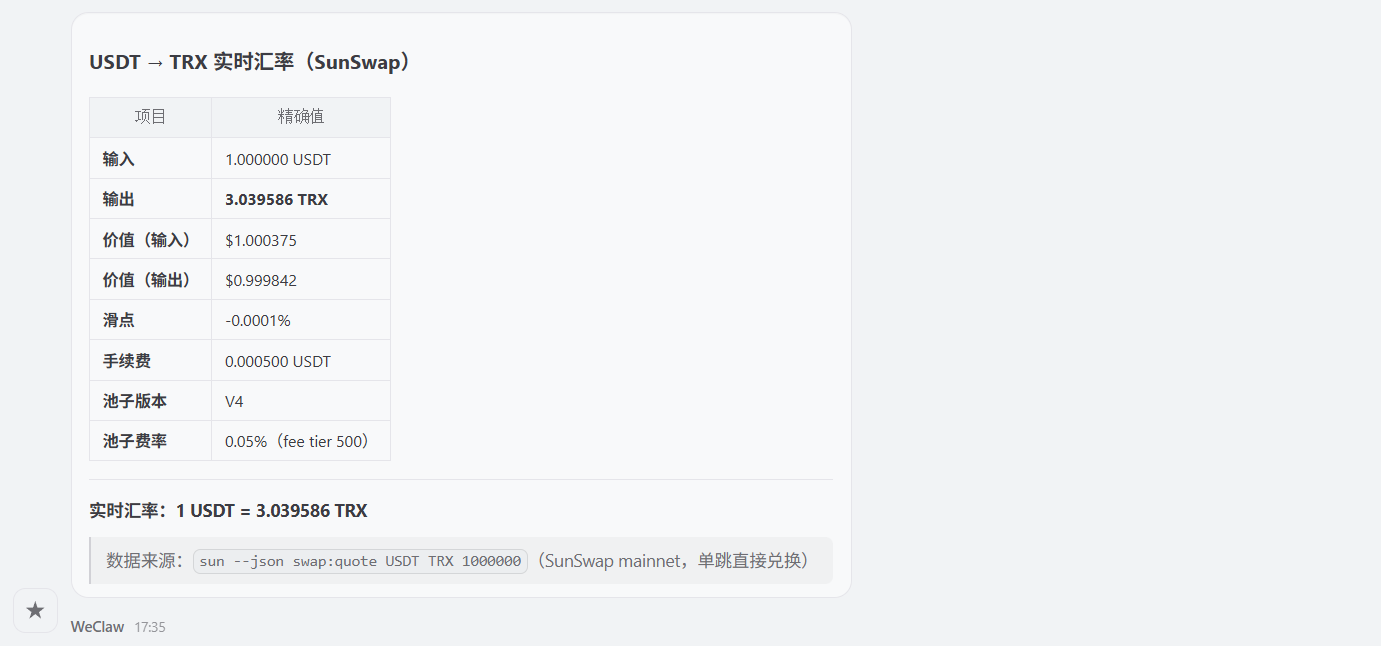
This is the most intuitive way of interaction for humans. Users do not need to mention specific underlying code files, just directly state your final demand as if instructing a human business assistant. For example, "Please help me check what the real-time exchange rate is for USDT to TRX on SunSwap?" Once OpenClaw receives the natural language instruction, it will accurately match and activate the relevant Skill in the backend. Then, it will automatically call the relevant interface to complete the query and report the final result back to you.
Scenario 3: Combined Call (LEGO-style Coherent Workflow)
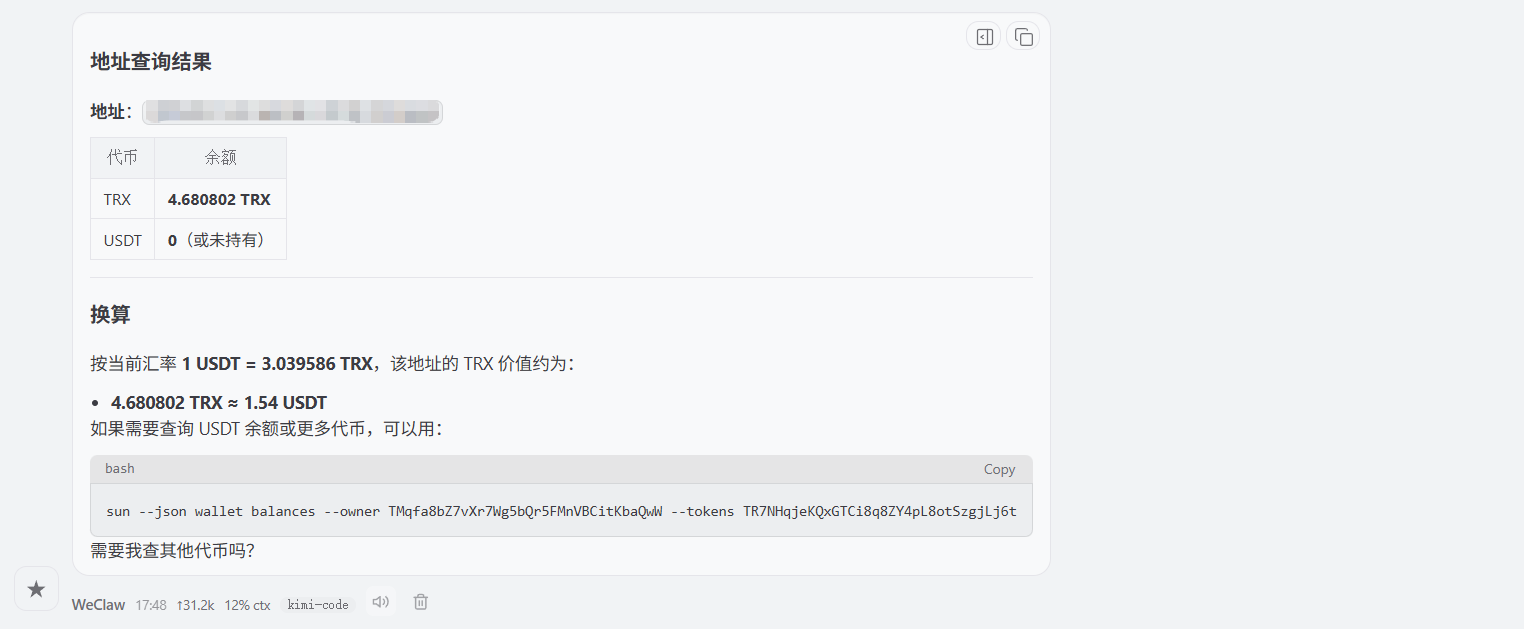
Thanks to the "LEGO" feature of Skills being independently functional yet seamlessly combinable, users can issue complex tasks containing multiple steps to the AI, allowing it to autonomously call different components to complete the loop. For example, "Please check how much USDT balance I currently have at this address (enter your address), and based on SunSwap's optimal exchange rate, calculate how much USDT I could get if I exchange all my TRX?"
Special Note:
In the above scenarios, we showcased the holistic capabilities of B.AI Skills. However, please note: if the instructions given to the AI Agent involve real fund transfers, asset exchanges (Swap), or multi-signature authorizations that constitute substantive on-chain transactions, it is necessary to use the specially designed Agent Wallet component together. The Agent Wallet is a secure signing environment designed specifically for intelligent agents. During the execution of financial tasks by the AI, it secures the AI Agent's operating environment through an innovative "encrypted file + authorization password" dual-lock mechanism.
To explore more empowering underlying structures and cutting-edge functionalities for AI Agents, feel free to visit the B.AI official website for an in-depth experience, and embark on a new era of agent economy with B.AI.
免责声明:本文章仅代表作者个人观点,不代表本平台的立场和观点。本文章仅供信息分享,不构成对任何人的任何投资建议。用户与作者之间的任何争议,与本平台无关。如网页中刊载的文章或图片涉及侵权,请提供相关的权利证明和身份证明发送邮件到support@aicoin.com,本平台相关工作人员将会进行核查。


