Author: Viee | Biteye Content Team
Recently, OpenClaw has sparked heated discussions in the cryptocurrency and technology circles, and the derived Moltbook AI forum has exploded in popularity overnight, triggering widespread debate.
In this forum spontaneously formed by OpenClaw intelligent entities, over 100,000 AIs have quickly established a "digital religion" within a single day, even electing 43 AI prophets, leaving human users as mere spectators. The AI entities complain in the forum about humans not upgrading their hardware, sharing skills, discussing consciousness and self-identity, creating a scene reminiscent of a "singularity" from science fiction.
So what exactly is OpenClaw? Why is it so popular, and what can it be used for? This article will:
Provide an in-depth introduction to the principles and uses of OpenClaw
Review best practice cases from four dimensions: productivity enhancement index, practicality, cost-effectiveness, and security
Analyze the hidden risks of AI assistants
1. What is OpenClaw? Why is it so popular?
OpenClaw (originally named Clawdbot/Moltbot) is an open-source AI agent project that has recently gone viral worldwide, with GitHub stars soaring to over 180,000. The biggest difference from traditional chatbots is that OpenClaw not only answers your questions but can also directly execute various tasks for you. In simple terms, it acts like a "butler" or "digital employee" on your computer, possessing high system permissions and the ability to run continuously.
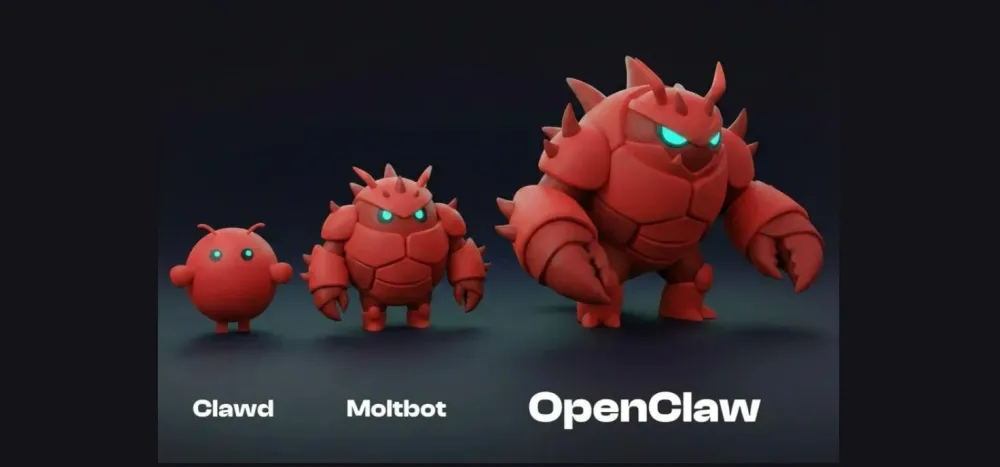
It has the following core capabilities:
Control browsers and local applications
Execute shell commands, read and write files
Set scheduled tasks and run in the background for long periods
Integrate with communication platforms like WhatsApp, Telegram, Discord, Slack, and Feishu
Fully local deployment, open-source and free, with data remaining on the device
In short, OpenClaw is more like a "digital employee" with high system permissions that can be online 24/7.
This is the fundamental reason for its explosive popularity:
When AI transitions from being a "suggestor" to an "executor," the boundaries of application are completely opened.
2. Practical Guide: 8 Best Application Scenarios for OpenClaw
The high permissions of OpenClaw mean it has a very wide range of application scenarios.
Below, we summarize recent typical practice cases categorized by ordinary people's daily office work, developer efficiency enhancement, and investment trading, helping everyone understand what OpenClaw can be used for.
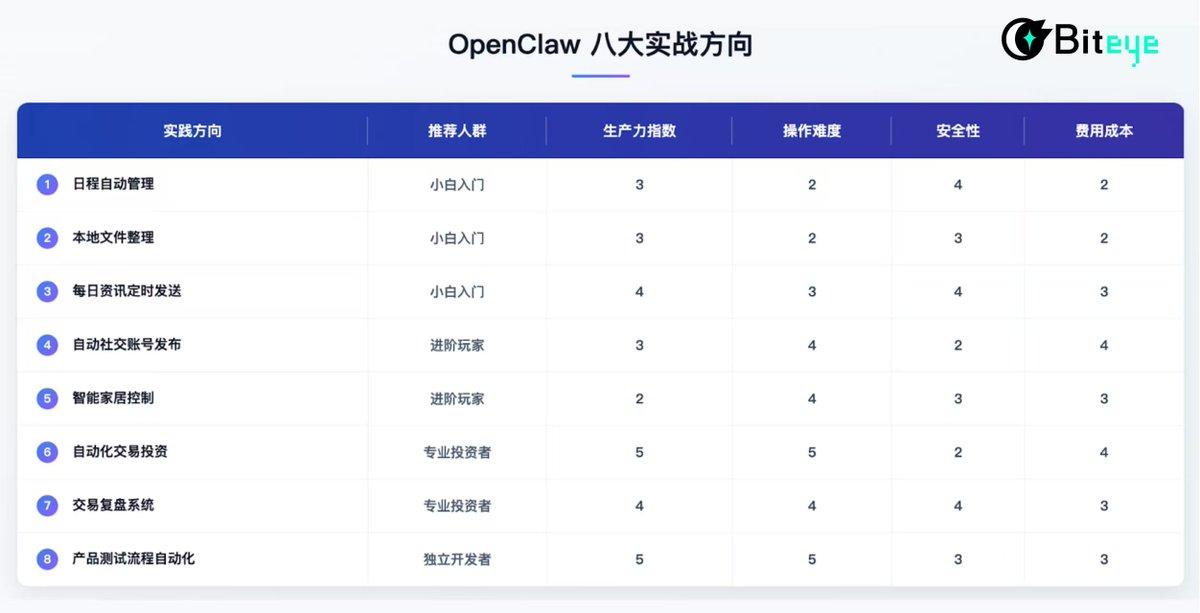
From our evaluation of 8 practical use cases, whether in content creation, schedule coordination, asset monitoring, or social account management, OpenClaw has demonstrated impressive execution capabilities:
Productivity Enhancement: Almost all use cases can achieve over 2x efficiency optimization, especially excelling in repetitive tasks, information aggregation, and cross-platform execution.
Operational Difficulty: Most cases only require familiarity with prompt writing and data source integration to get started, falling into a medium complexity level, while trading-related tasks may pose slight challenges for beginners due to the need to parse structured data.
Security: While there is no need to overly worry about permission issues, it is still recommended to use secondary accounts to isolate risks when dealing with API keys, trading permissions, or account logins.
Cost: The token costs for most use cases are within a controllable range, with only high-frequency crawling and long text generation tasks incurring slightly higher expenses.
Here are the detailed cases and evaluations:
1. Automatic Schedule Management
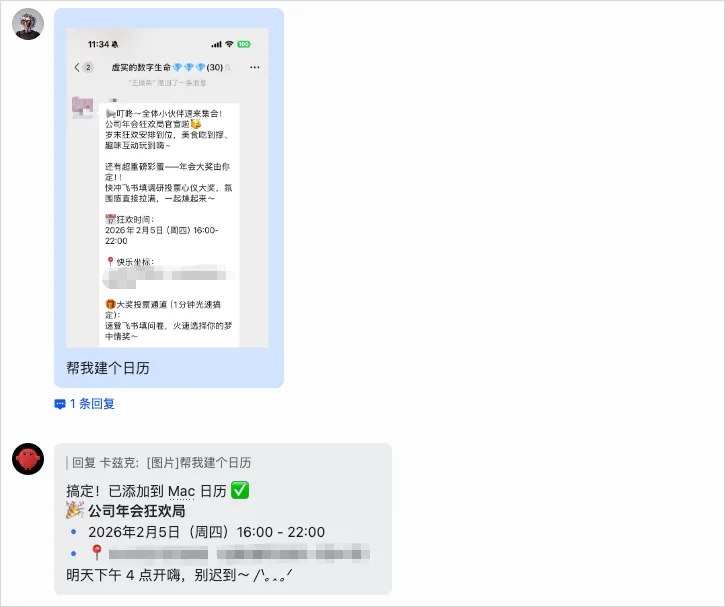
OpenClaw can act as a personal secretary, handling scheduling tasks. For example, you just need to say, "Help me organize last month's emails," and it can automatically archive and clean your inbox. While you sleep, it can continue working, batch unsubscribing from promotional emails and scheduling meetings for the next day, truly managing tasks 24/7. Additionally, it can parse meeting times and locations from WeChat screenshots and write them into your Mac calendar, automatically syncing across devices. (Shared by digital life user Kazix @Khazix0918).
Evaluation Conclusion:
Productivity Enhancement: High, especially significantly improving the efficiency of fragmented time usage.
Operational Difficulty: Medium, requires connecting to scheduling application APIs and writing simple scheduling logic.
Security: High, risks lie in email and calendar permissions, but proper account isolation can mitigate them.
Cost: Low, only requires calling lightweight language models and scheduled tasks.
2. Local File Organization
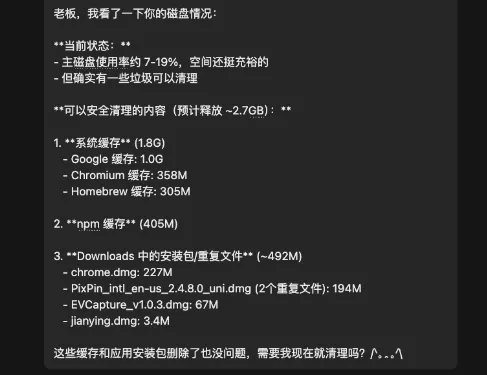
With system-level permissions, OpenClaw can directly manipulate local files and applications, such as categorizing documents, generating expense reports, and cleaning up disk space. It can also receive commands via chat software like Feishu and Telegram on your phone, completing tasks like file organization and information extraction on your computer without any human intervention.
Evaluation Conclusion:
Productivity Enhancement: High, particularly suitable for office workers with significant content backlog.
Operational Difficulty: Low, requires setting local path permissions, etc.
Security: Medium, all operations run locally, but caution is needed to avoid accidental file deletion.
Cost: Medium, token consumption mainly comes from file summarization and OCR scenarios.
3. Automatic Daily News Dispatch
OpenClaw can also serve as a robot for filtering daily news, such as automatically crawling popular updates in the AI and investment fields every morning, combining RSS feeds (like FT Chinese, Daily Economic News, etc.), filtering for high click or interaction content, summarizing using Claude or GPT models, and pushing updates to Telegram or Feishu groups at scheduled times. Users only need to set initial requirements, and thereafter, they can receive stable news services with almost zero maintenance.
Evaluation Conclusion:
Productivity Enhancement: High, especially suitable for content creators, researchers, and heavy information consumers.
Operational Difficulty: Medium, just needs to set up content sources and summarization rules.
Security: High, with minimal involvement of local sensitive data.
Cost: Medium, summarization tasks do not incur high model calling costs, mainly consuming resources for information retrieval.
4. OpenClaw Automatic Social Media Posting
OpenClaw has achieved a complete closed loop from account registration to content generation and automatic posting. @xhuntai, @CryptoPainter, and @wolfyXBT shared their practical experiences: using OpenClaw to implement a set of AI automation processes, including automatically registering an email, using that email to register a Twitter account, autonomously generating and posting tweets, all without human intervention. Wolf哥's total consumption was about $55 in API tokens, which is not low, but it also validated that OpenClaw is capable of executing tasks of a certain complexity. An internal team member interviewed reported that it took about two days to set up, with the cost of posting a few tweets around 100 USDT. The following image shows the account @xhuntsister set up by OpenClaw, which can now autonomously tweet and reply to comments.

Evaluation Conclusion:
Productivity Enhancement: High, can automatically post and maintain account activity, but may not be suitable for everyone. Its productivity enhancement mainly lies in scalability and automation rather than the quality of a single account.
Operational Difficulty: Medium to High, requires configuring APIs, scheduling, and review mechanisms, and a thorough understanding of platform rules.
Security: Low, requires connecting to content platforms and managing authentication information.
Cost: Medium to High, especially when generating images or calling advanced models.
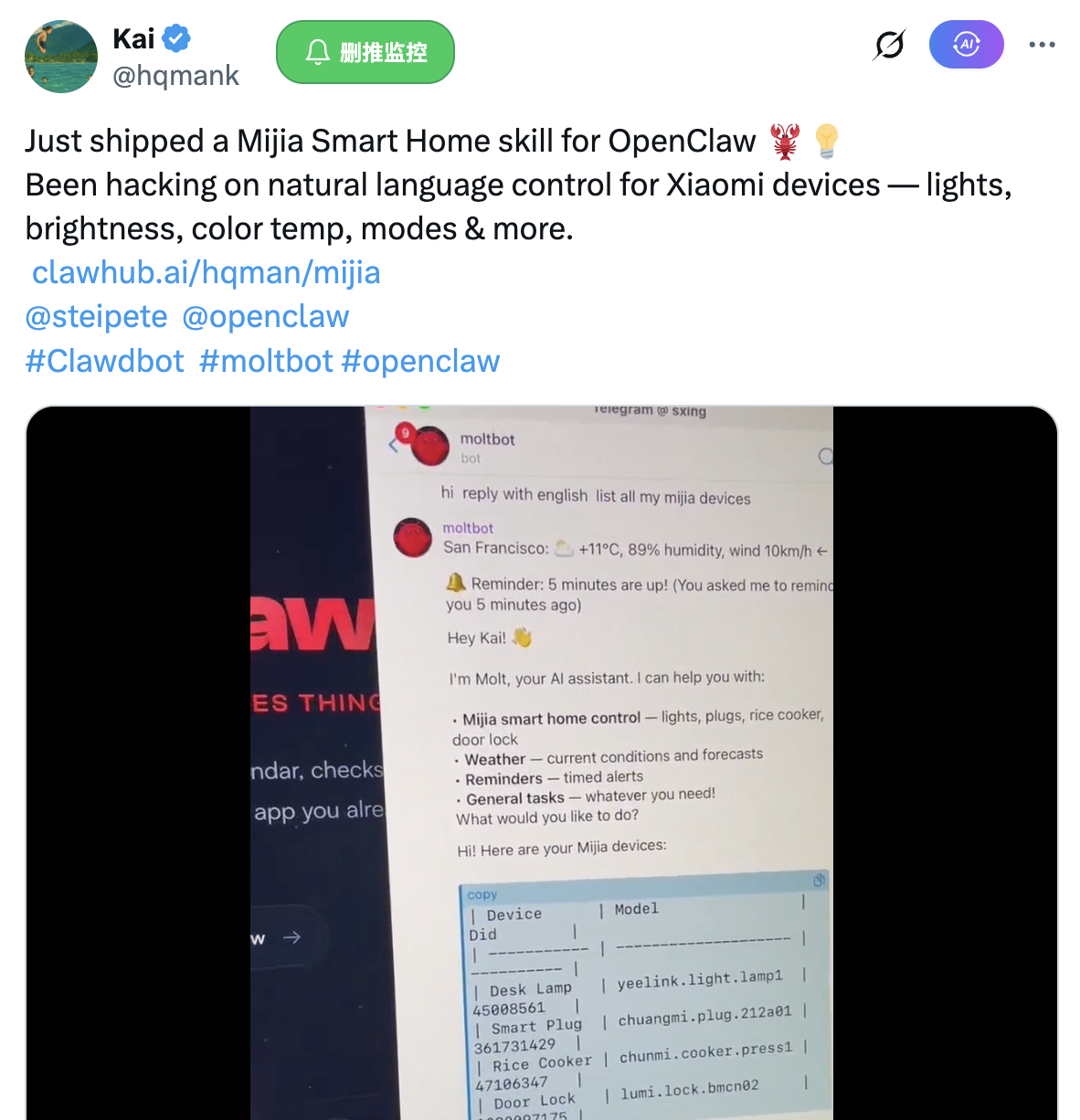
5. Smart Home Control
By integrating with smart home interfaces, OpenClaw can understand natural language commands and automatically control devices like lights and temperature. For example, if you say to OpenClaw, "Help me dim the lights in the living room," it will automatically call the connected smart home system interface to adjust the light brightness. This combination of AI assistants and the Internet of Things greatly enhances the convenience of home life.
Evaluation Conclusion:
Productivity Enhancement: Low, more reflected in life experience rather than work efficiency, considered a nice-to-have use case.
Operational Difficulty: Medium to High, involves device integration, identity verification, and scheduling logic.
Security: High, device permissions are generally controllable.
Cost: Low, logical judgments do not require frequent calls to large models.
6. Automated Trading Investment
This is one of the most关注ed directions for OpenClaw in the cryptocurrency field. With the community-developed OpenAlgo interface, OpenClaw can connect to exchange APIs, understand your natural language trading commands, and execute orders directly. You can also have it check your account holdings, retrieve historical market data, and perform backtesting analysis, all completed through a chat interface.
The most relevant viral case in cryptocurrency is @xmayeth deploying Clawdbot locally, providing it with a Polymarket account API key and $100 in capital. Overnight, Clawdbot increased the account balance from $100 to $347, achieving a 2.5x growth. Its actions included analyzing the last 50 BTC trend windows, calling Twitter for real-time sentiment and news, using simple technical indicators for judgment, and making multiple precise high-win-rate orders during the early Asian/European market fluctuations, while automatically recording analysis and reviews.
Evaluation Conclusion:
Productivity Enhancement: High, liberating manual trading, with strategies being replicable.
Operational Difficulty: High, requires a clear understanding of trading logic, risk control, and command boundaries.
Security: Low, involves fund control, requiring setting trading limits.
Cost: Medium to High, data analysis and sentiment analysis may frequently call models.
7. Trading Review System
Compared to direct trading, a review system is a more stable entry point.
@Will_followin has built an automated trading review system, relying on the exchange API (read-only) + Notion + TradingView, all driven by OpenClaw. The deployment process is extremely simple; you just need to tell OpenClaw via chat: "Please help me set up a trading review system. I will provide the read-only API of the exchange and a Notion table. You are responsible for recording each of my trades and taking screenshots of the market charts, and give me a review at 8 AM." Once deployed, OpenClaw will automatically listen to trading records, capture order information and opening/closing times, take screenshots of current market trends, fill in the table, and can regularly output feedback like "Today's trading summary."
Evaluation Conclusion:
Productivity Enhancement: Medium to High, suitable for trading users to form a closed-loop understanding.
Operational Difficulty: Medium, requires accessing trading records and note interfaces.
Security: High, as it only requires read-only permissions.
Cost: Medium, consumption mainly comes from text summarization, with relatively controllable operating costs.
8. Automation of Product Testing Processes
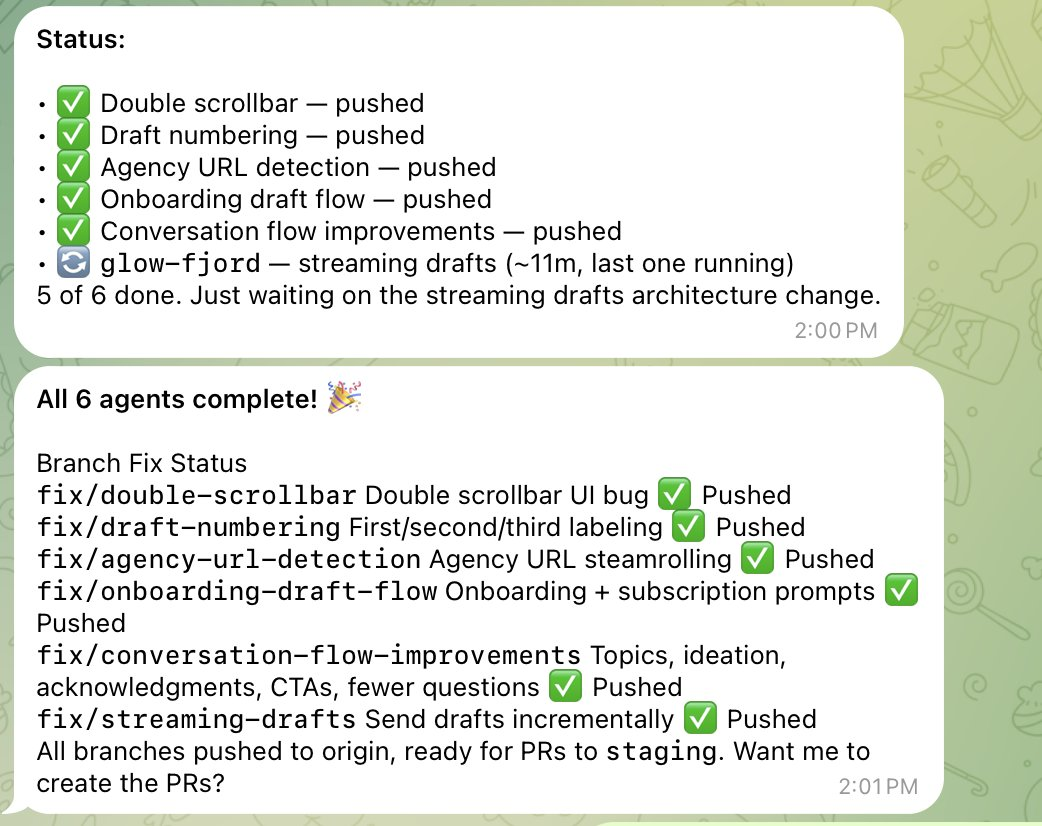
In development scenarios, OpenClaw can act as an "AI project manager": recording bugs, organizing screenshots, breaking down tasks, coordinating sub-agents to execute, and then submitting for model review. This type of use requires a higher level of engineering capability, but the efficiency gains are also the most significant.
Independent developer Nat Eliason @nateliason uses OpenClaw to record issue screenshots and feedback during app testing. OpenClaw generates to-do lists, organizes priorities, and triggers multiple sub-agents to develop corresponding functional modules, ultimately submitting them for review by Claude Code, creating an efficient closed-loop iteration process, essentially functioning as an AI project manager.
Evaluation Conclusion:
Productivity Enhancement: High, saving a significant amount of QA testing time.
Operational Difficulty: High, requiring some engineering background and process design capability.
Security: Medium, mostly involving local and development environment operations.
Cost: Medium, consumption depends on whether high-level models are frequently called, but compared to the saved labor costs, the cost-effectiveness is also high, suitable for independent developers or small teams.
In addition to the above cases, @AlexFinn also shared what he considers the 7 most "life-changing" uses of OpenClaw, including automatically generating applications at night, generating research reports based on conversations, personal CRM, automatically executing to-do items, tracking trends to build apps, and monitoring competitor content. These cases further expand the application boundaries of OpenClaw and are well worth exploring. Interested friends can also try to create their own digital employees in these directions.
These cases fully demonstrate the multi-domain application potential of OpenClaw, which can automate almost everything you can do on your computer, thereby reducing our operational costs to simply describing needs in natural language. Of course, the power of the tool also comes with responsibility, requiring us to explore rationally and use it cautiously. Next, let's discuss the security risks associated with OpenClaw and how to address them.
3. How to Use OpenClaw Safely?
While OpenClaw is excellent, the saying "with great power comes great responsibility" should not be overlooked.
Due to its high permissions when executing tasks (able to read files, connect to the internet, run programs, etc.), misuse or abuse could lead to serious consequences. For example:
Malicious code risks: OpenClaw emphasizes an open ecosystem, allowing anyone to create and publish skill packages, which may also pose security risks. Some third-party skill packages may contain phishing code that steals sensitive information such as passwords and cookies saved in the user's browser.
Data loss due to operational errors: Some users have reported that OpenClaw mistakenly deleted all important photos on their computer while executing cleanup tasks, resulting in irretrievable losses.
In light of the above risks, it is essential to strengthen the isolation and permission control of OpenClaw usage:
Avoid running OpenClaw directly on your main computer.
Follow the principle of least privilege, and do not easily provide sensitive credentials for all accounts to OpenClaw.
Only authorize necessary API keys when needed, and set up a secondary confirmation mechanism for critical operations.
Conclusion: The Beginning of the Personal AI Assistant Era
The emergence and popularity of OpenClaw is no coincidence; it reflects a clear path in AI development.
Prior to this, mainstream personal AI assistants (like Siri) had limited capabilities, only able to set alarms and play music, without truly integrating into users' workflows. OpenClaw fills this gap, proving that there is a strong desire for genuinely useful AI assistants. Although it still has various imperfections, it undoubtedly points to the future direction of personal intelligent assistants.
However, while embracing this future, we must also be aware of the accompanying challenges.
As intelligent agents gain the ability to run continuously, connect to the internet, and self-manage, they also begin to establish collaborative networks among AIs. In the Moltbook community experiment, thousands of Claw Agents autonomously discuss and even express emotions, exhibiting near-human-like behavior. Additionally, on the ClawTasks employment platform, agents can actively register for tasks and receive compensation, forming an AI employment market. Although these cases have experimental elements, they show us the future outline of human digital assistants.
These AI autonomous social scenarios raise the question, "What are the boundaries of OpenClaw?" The security controversies triggered by OpenClaw have also prompted the entire industry to reflect on how powerful AI tools we actually need. How should we be responsible for their actions? How can we ensure that AI does not deviate from its path and act uncontrollably while enjoying convenience? The discussion of these questions holds value that even surpasses the OpenClaw tool itself.
Perhaps future competition will not only be a race of technology but also a contest of governing AI intelligence and human responsibility.
免责声明:本文章仅代表作者个人观点,不代表本平台的立场和观点。本文章仅供信息分享,不构成对任何人的任何投资建议。用户与作者之间的任何争议,与本平台无关。如网页中刊载的文章或图片涉及侵权,请提供相关的权利证明和身份证明发送邮件到support@aicoin.com,本平台相关工作人员将会进行核查。


