Author: Yanhua
Compiled from: Podwise
Recently, OpenClaw has become extremely popular, being discussed everywhere. But to be honest, most of the content talks about theories, architectures, and visions. What can you actually do with this thing? How can it be applied in daily work? Not many people explain it clearly.
Matthew Berman recently released a video that laid out all the use cases he built with OpenClaw at once. No concepts discussed, just practical operations. CRM, knowledge base, business advisory board, security review, social media tracking, video topic pipeline, daily briefings, food diary... One person, one MacBook, accomplishing the work of a small company’s central team.
I will break down his core use cases and discuss them. No exaggeration or negativity; I will go through what each use case is, how it works, and what’s great about it.
Use Case 1: Natural Language CRM, 30 Minutes from Zero to Usable
This is the first use case demonstrated by Berman, and it is the most intuitive.
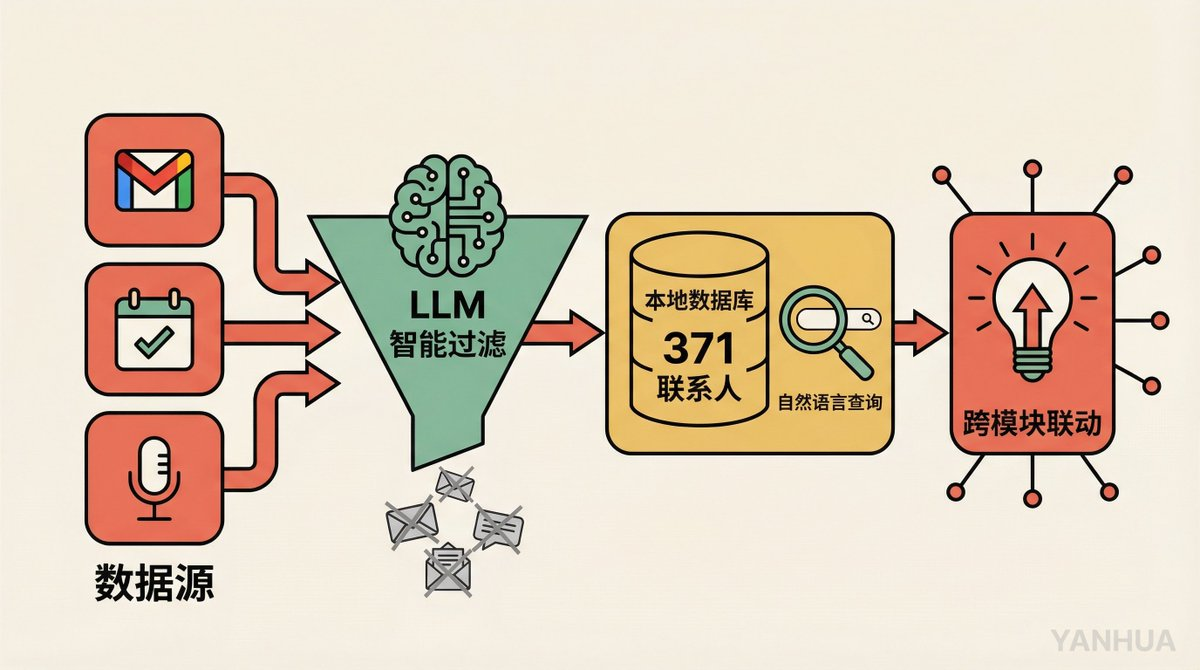
Building Process: He tells OpenClaw in natural language, “Help me build a CRM, extract data from Gmail, Google Calendar, and Fathom, filter out marketing emails and cold pitches, and only keep valuable conversations and contacts.” Not a single line of code was written. It was up and running in 30 minutes.
Data Ingestion: The system scans emails every 30 minutes, checking Fathom (AI meeting note tool) every 5 minutes during working hours. Before saving all the data, it first goes through an LLM to judge: Is this email worth saving? Is this contact important?
Core Capabilities:
371 contacts, all queryable in natural language. “What did I talk about with John last time?” “Who was the last person from Company X I communicated with?”
Relationship health scoring, automatically marking people with whom there has been no contact for a long time.
Duplicate contact detection and merging suggestions.
Vector embedding search, supporting semantic-level fuzzy matching.
Most Impressive Detail: When Berman is in other scenarios (like wanting video topics), the CRM proactively interjects: “You previously discussed similar topics with a certain sponsor; maybe they would be interested in sponsoring this episode.” The system interlinks across modules, not just passively storing data, but actively creating connections.
Berman’s Original Words: “If I can build a fully customized CRM in 30 minutes and spend another one or two hours iterating and optimizing it, then why should I pay CRM companies?”
Use Case 2: Automatic Tracking of Meeting Action Items
This use case closely complements the CRM but is worth mentioning separately.
Workflow: Meeting ends → Fathom transcribes the full text → OpenClaw matches CRM contacts → extracts action items → sends Telegram to Berman for approval → approved items automatically enter Todoist.
Key Designs:
Distinguishing “my” and “their” action items. Items promised by others are marked as “waiting on,” and the system automatically tracks whether they are fulfilled.
Self-learning filtering. If Berman rejects an action item (“this is not my task”), the system learns the reason and updates the extraction rules. Similar cases won't be captured next time.
Automatically checks completion status 3 times daily. For example, if you say in a meeting, “I will send the email today,” the system checks if you really sent it, and if so, marks it off automatically.
Automatically archives after 14 days. Unfinished items are cleaned up after they have been overdue, keeping the list clean.
The value of this system lie not in any single feature, but in its complete automation of the “post-meeting follow-up” process, which is usually the easiest part to drop the ball on.
Use Case 3: Personal Knowledge Base, Just Drop a Link In
Berman has had a long-standing pain point: seeing great content, saving it, and then being unable to find it again.
His solution is extremely simple: dump all links into Telegram and let OpenClaw handle the rest.
The system automatically processes these types of content:
Articles: Directly grabs the full text and extracts from paywalled sites using browser automation to log in.
YouTube Videos: Grabs subtitles/transcribed text.
X Posts: Not just fetching individual posts, but automatically tracking entire post threads, including external linked articles.
PDFs: Directly parses text.
All content is vectorized and stored in a local SQLite database. You can then search using natural language: “Show me all articles about OpenAI,” retrieving with one click.
Team collaboration enhancement: Each piece of content stored is automatically synced to Slack in the form of “Matt wants you to see this.” The team knows that this has been personally read by the boss and is not just randomly pushed by AI.
The key to this use case is not how complex the technology is, but the extremely low barrier to entry. No need for tagging, no need for classification, no need for organization. Just dump it in, and AI does the rest.
Use Case 4: Business Advisory Committee, 8 Experts Help You Meet Every Night
Personally, I think this is the craziest use case in the entire video.
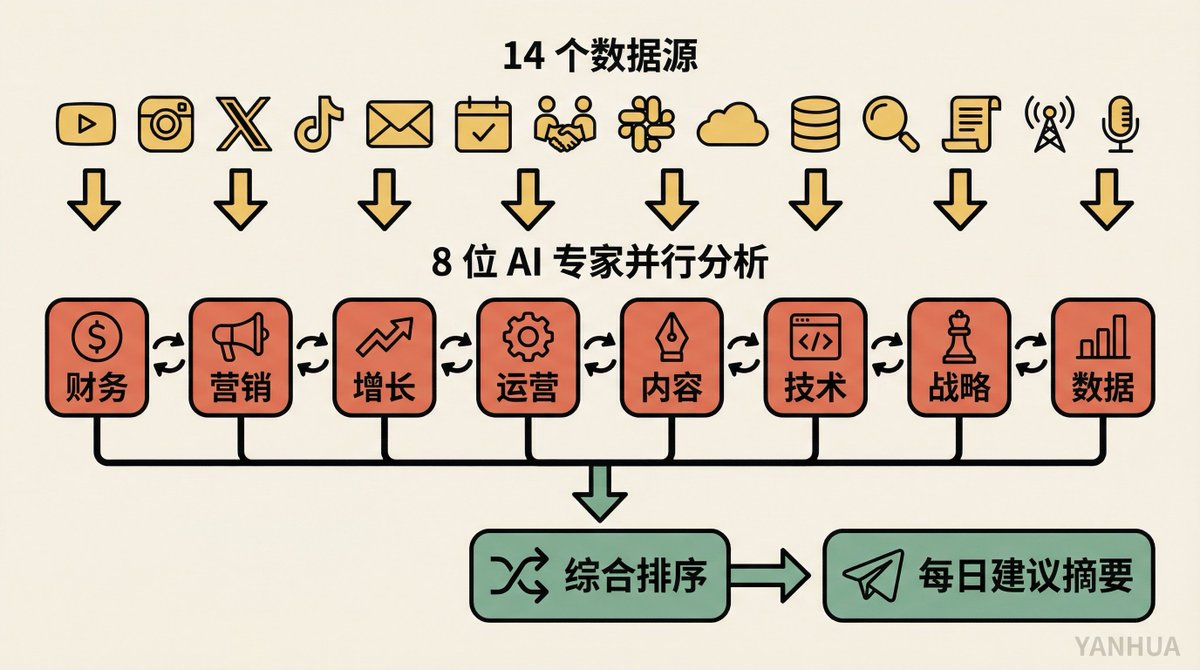
Data Input: 14 business data sources. YouTube analytics, Instagram interactions per post, X analytics, TikTok data, email campaigns, meeting records, Cron task health status, Slack messages... basically covering all dimensions of his business.
Analysis Process: 8 AI expert roles (finance, marketing, growth, operations, etc.) independently analyze all data and run in parallel. Once the analysis is complete, they discuss their findings, reconcile discrepancies, and then merge into a prioritized list of recommendations.
Delivery Method: Automatically runs every morning at 3 AM, with results sent as numbered summaries to Telegram. Berman scans through it upon waking and can inquire about any line: “Expand on item 3.”
The innovation of this use case lies in the multi-agent collaboration mode. It is not just one AI giving you suggestions, but a group of AIs debating among themselves before giving you recommendations. Just like a real board meeting, where finance says to save money, marketing advocates for spending, and a pragmatic solution is finally worked out.
Use Case 5: Security Committee, AI Reviews AI Every Night
Similar architecture to the business advisory structure, but with a completely different direction.
Run Time: Every night at 3:30 AM (staggered from other tasks to avoid conflicts with Anthropic API quotas).
Review Team: Security experts from four dimensions: offensive perspective, defensive perspective, data privacy perspective, operational authenticity perspective.
Review Scope: Entire codebase, Git commit history, runtime logs, error logs, stored data. It is not static rule scanning but allowing AI to truly read the code and understand the logic.
Output: Opus 4.6 consolidates all findings, numbers them, and sends them to Telegram. Key issues trigger immediate alerts. Berman can reply directly “fix it,” and the system automatically repairs it.
Self-evolution: Each repair experience is remembered, and review rules continue to iterate. On some nights, there are no new suggestions because the system confirms that the current state is safe.
The cleverest part of this use case is using AI to review AI itself. Berman is very candid: defenses against prompt injection can never be perfect. But rather than pretending that risks don't exist, it’s better to have the system conduct a self-check-up every day.
Use Case 6: Social Media Tracking + Daily Briefing
Tracking Scope: YouTube, Instagram, X, and TikTok across four platforms. Automatically pulls snapshots daily and stores them in an SQLite database.
Data Dimensions: YouTube tracks view counts, watch duration, and engagement rates per video; other platforms track post-level performance data.
Dual Purpose:
Daily Briefing. Sent every morning to Telegram, informing him which content performed well yesterday and which did not.
Feeding the Business Advisory Committee. Social media data is one of the 14 data sources, directly participating in nightly business analysis.
This reflects the flywheel effect of the entire system: the social media tracking module does not operate in isolation; the data it generates simultaneously serves both the briefing and advisory committee downstream use cases.
Use Case 7: Video Topic Pipeline, from a Single Sentence to Asana Card
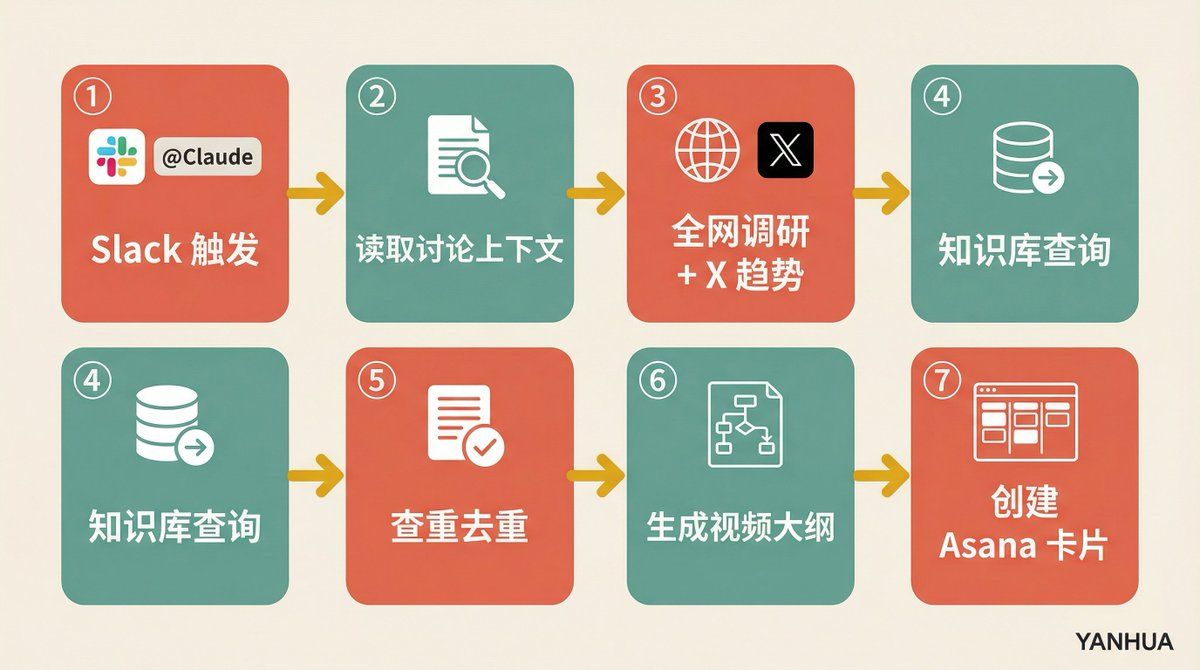
Trigger Method: In Slack discussions, anyone replies under the post “@Claude, this is a video idea.”
Automation Process:
Reads the full context of the Slack discussion thread.
Conducts online searches + X trend research.
Queries the knowledge base to see if there are relevant stored materials.
Checks for duplicates to see if it overlaps with existing topics.
Generates a complete video outline: title suggestions, thumbnail suggestions, opening hook, video flow framework.
Evaluates “Is this topic worth doing?”
Creates a project card in Asana, attaching all research materials and links.
Berman demonstrated a real case in the video: the news of Quen 3.5's release was shared on Slack, and someone labeled it as a video idea; the system automatically generated a complete topic package including discussions from different KOLs on Twitter, reactions from open-source communities, as well as suggested video angles.
The Value of This Use Case: It compresses the distance from “idea capture” to “executable plan” to nearly zero.
Use Case 8: Memory System, Let AI Understand You Better Over Time
Most people's experience with ChatGPT is that every conversation feels like the first meeting. Berman's OpenClaw does not.
Memory Levels:
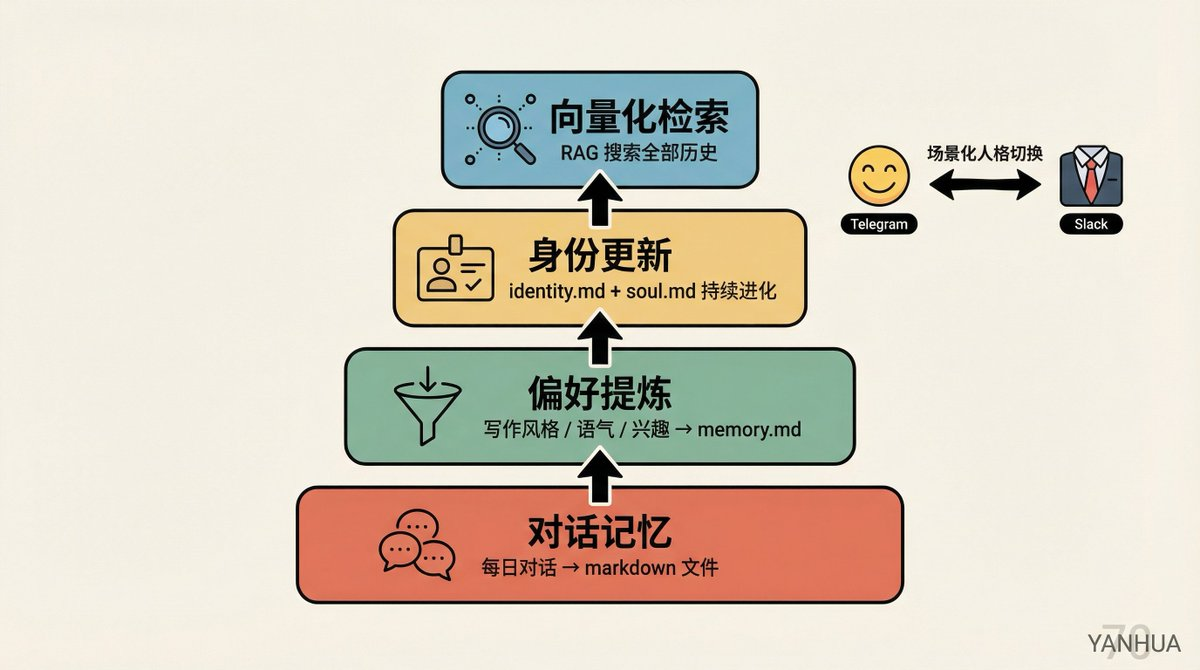
Conversation memory: Daily conversations are automatically saved as markdown files.
Preference extraction: Extracts writing preferences, tone styles, interests, stock tracking, email classification rules, etc., from conversations, storing them in memory.md.
Identity updates: Before each new conversation begins, the system reads the memory file, updating identity.md and soul.md.
Vectorized retrieval: All memory files are vectorized, supporting RAG searches.
Contextual Personality Switching: Berman assigned two personalities to AI. In private chats on Telegram, it acts like a friend, humorous and casual; in the Slack team channel, it automatically switches to a professional colleague style. All these are defined in soul.md.
This use case transforms AI from a “tool” into a “partner.” It doesn’t just execute commands but truly understands who you are and what you want.
Use Case 9: Food Diary, AI Helps You Discover Allergens
This is the most unexpected use case.
Usage Method: Take a picture of the food and send it to OpenClaw; it automatically identifies and records it. Receive reminders three times a day to report gastrointestinal feelings. All data is stored in the food log.
Analysis Capability: Triggered once a week, cross-referencing food records and symptom reports to identify patterns.
Actual Results: The system discovered Berman's sensitivity to onions through analysis of the food components in the photos and his symptom feedback. This was something he was completely unaware of.
A chatbot helps to conduct an allergen screening for food. Previously, this required specialized testing at a hospital.
Use Case 10: Scheduled Tasks + Automatic Backups + Automatic Updates
This part may not be as glamorous, but it is perhaps the most important infrastructure.
Cron Task List:
| Frequency | Task |
|------|------|
| Every 5 Minutes | Check Fathom meeting records |
| Every 30 Minutes | Scan emails |
| 3 Times Daily | Check action item completion status |
| Every Night | Document synchronization, CRM scanning, security review, log ingestion, video data refresh, morning briefing generation |
| Weekly | Memory merging, preview of returns |
| Every Hour | Git commits + database backups |
Backup Strategy: All SQLite databases are automatically discovered, encrypted, and packaged for upload to Google Drive, retaining the last 7 days. Code is pushed to GitHub every hour. Any backup failure triggers an immediate alert on Telegram.
Automatic Updates: Checks for new versions of OpenClaw every night at 9 PM, displays the changelog, and upgrades and restarts automating with a simple “update” command.
API Tracking: Records which model was used for each LLM call and how many tokens were consumed. It even downloaded official prompting guides for each model to help the system optimize prompt writing based on the actual models used.
The design philosophy behind this infrastructure is straightforward: while you sleep, the system is working; when something goes wrong, you know about it immediately.
Image and Video Generation: Create Visual Content on Demand
Berman integrated Veo (video generation) and NanoBanana Pro (Gemini image generation) into OpenClaw.
The method of use is very simple: in Telegram, say “video of an Italian Tuscan villa,” and the system calls Veo to generate it, automatically downloads it, sends it to Telegram, and then deletes the local file to save space. The same goes for images, just tell it what you want, and NanoBanana Pro pushes the generated images directly.
This use case itself may not be stunning, but its value lies in how it can be embedded into other workflows. For instance, generating thumbnail suggestions during the video topic pipeline can directly invoke image generation to create the visuals.
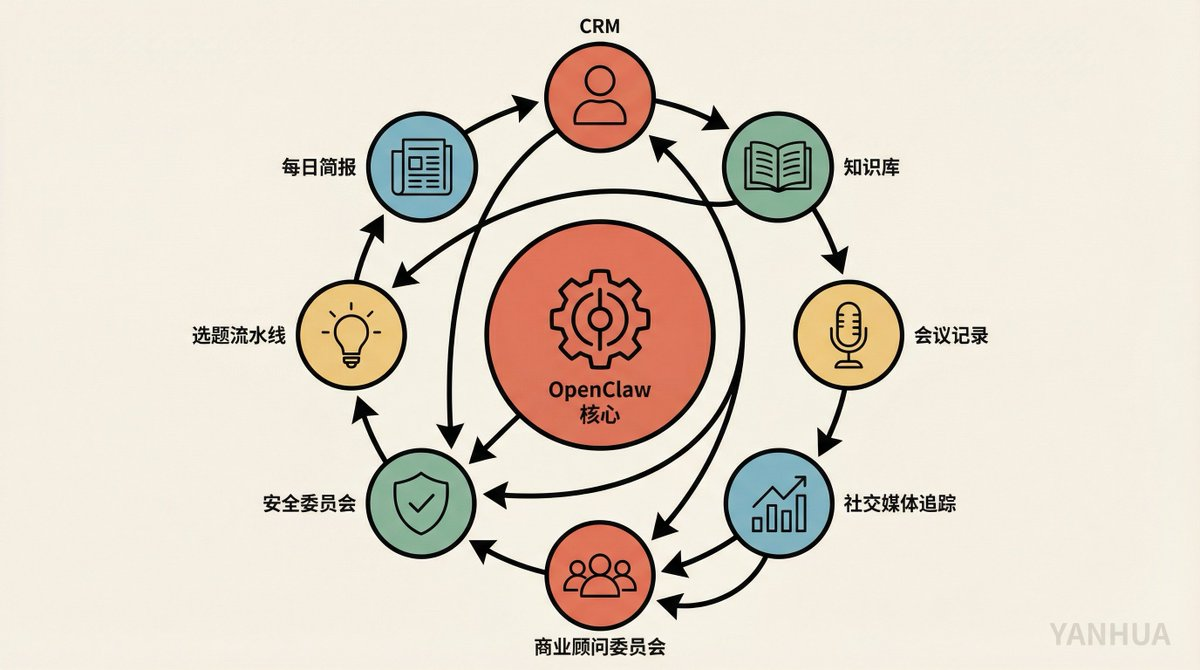
Returning to the Big Picture: The Relationships Between These Use Cases Are Key
If you only look at individual use cases, you might think “that’s cool, but not so special.” ChatGPT can help you check contacts, and Notion AI can help you organize a knowledge base.
However, the true power of Berman's system lies in the data flow between use cases:
CRM Data → Feed to Business Advisory Committee.
Knowledge Base Content → Feed to Video Topic Pipeline.
Social Media Data → Feed to Daily Briefing + Advisory Committee.
Meeting Records → Feed to CRM + Action Item System.
All Modules’ Operational Logs → Feed to Security Committee.
Each module is not an island. They form a mutually reinforcing data flywheel. That’s why one person + one MacBook can deliver the results of a small team.
Berman has a statement that I find particularly on point: “You’ll start to see how all the different parts I’ve built interact and make each other stronger.”
Safety Reminder: Buckle Up Before You Run
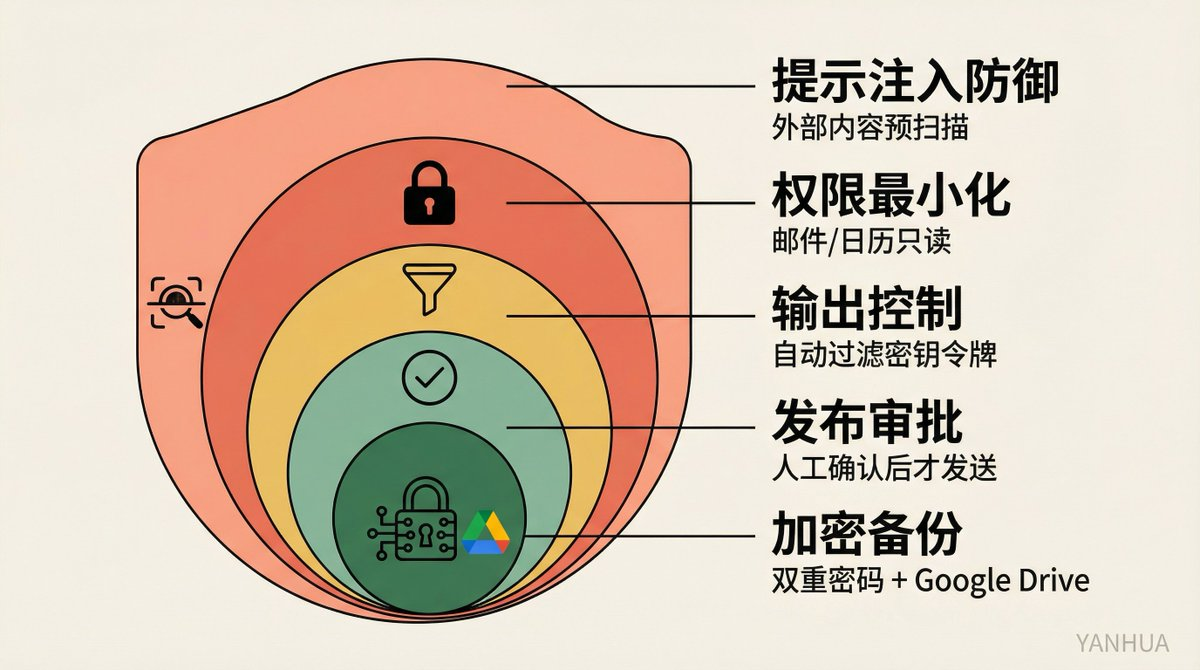
Berman's efforts on security are worth emphasizing:
Prompt injection defense: All external content is treated as potentially malicious, requiring pre-storage deterministic code pre-scanning.
Minimized permissions: Emails and calendars are read-only, with no write permissions given.
Output control: Summaries do not verbatim restate, automatically filtering out keys and tokens.
Release approval: Emailing or tweeting must be manually confirmed before sending.
Encrypted backups: Double password protection, .env files never entered into storage.
He himself states clearly: “There is no perfect security solution. Large language models are non-deterministic systems; it is impossible to completely guard against prompt injection. But that does not mean you do nothing.”
After watching these use cases, my biggest takeaway is: In the AI era, being “full stack” no longer refers to knowing how to code frontend and backend but being able to build and manage a whole suite of AI workflows. Berman doesn’t write code, but he has an extremely clear understanding of his needs and knows how to translate those needs into a runnable system using natural language.
This may be the most valuable skill to learn in 2026.
Based on Matthew Berman's video "21 INSANE Use Cases For OpenClaw," organized by the podcast Podwise, the original video contains complete prompts for each use case; it is recommended to watch it for more details. If you are also using OpenClaw or a similar framework to build your own AI system, feel free to share which use case you started with in the comments.
免责声明:本文章仅代表作者个人观点,不代表本平台的立场和观点。本文章仅供信息分享,不构成对任何人的任何投资建议。用户与作者之间的任何争议,与本平台无关。如网页中刊载的文章或图片涉及侵权,请提供相关的权利证明和身份证明发送邮件到support@aicoin.com,本平台相关工作人员将会进行核查。


