Author: Ole Lehmann
Translated by: ShenChao TechFlow
ShenChao Guide: Anthropic has released its latest cutting-edge model Claude Mythos Preview, which has found thousands of zero-day vulnerabilities in all major operating systems and browsers, so powerful that even Anthropic dares not release it publicly. The bad news is that models with similar capabilities will eventually fall into the hands of attackers. OpenAI co-founder Karpathy compiled a digital security checklist last year; it's time to take it seriously.
Here’s the situation: Anthropic announced Claude Mythos Preview yesterday.
How strong is this model? It has discovered thousands of zero-day vulnerabilities across all major operating systems and browsers. It's so powerful that Anthropic is afraid to release it to the public, fearing uncontrollable damage.
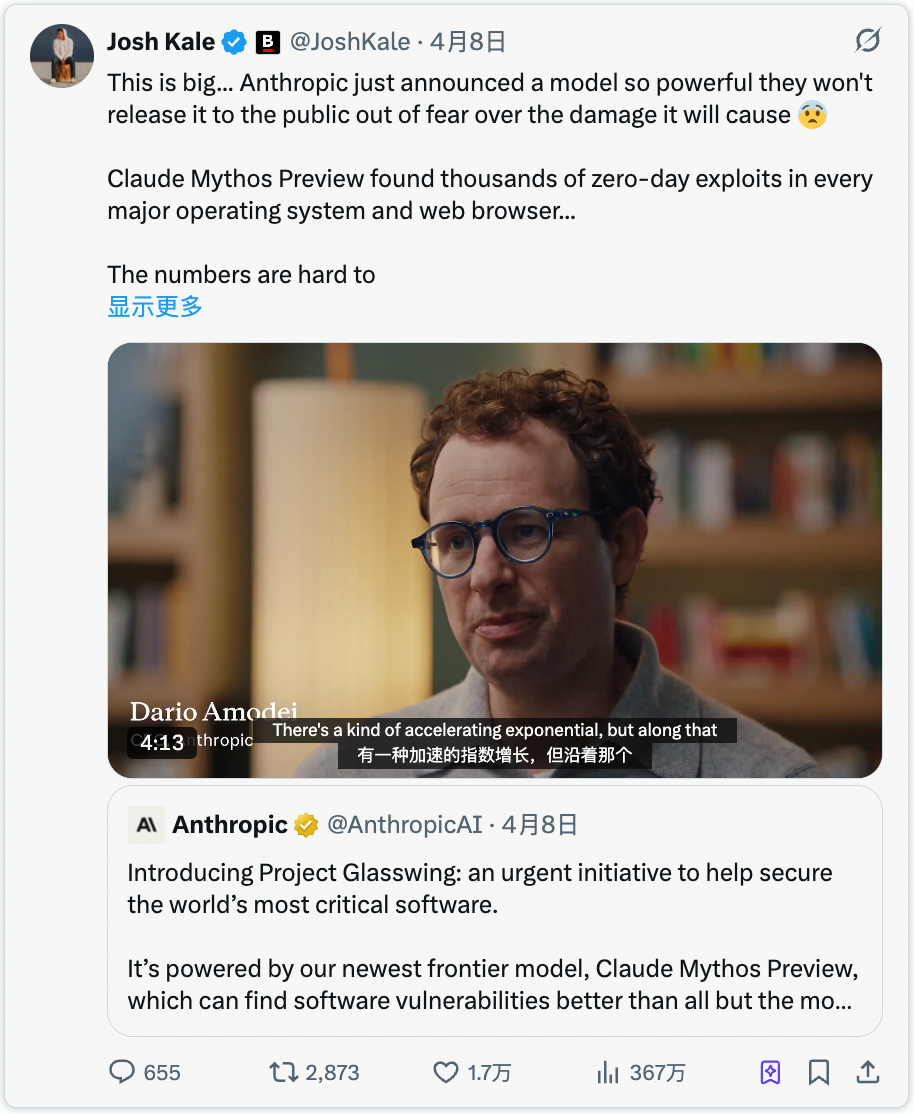
This model is not yet public, but once bad actors acquire a model with equivalent capabilities (which is only a matter of time), the cyber attacks you will face will be advanced to the point where most people won’t even realize they have been breached.
It's like a pandemic in the software world.
So you need to strengthen your digital security defenses right now.
Karpathy’s Digital Security Guide
Last year, OpenAI co-founder Karpathy compiled a digital security guide covering the fundamentals of personal safety protection in the AI era.
This is one of the best introductory checklists I have ever seen. Here are 15 things you should do right now:
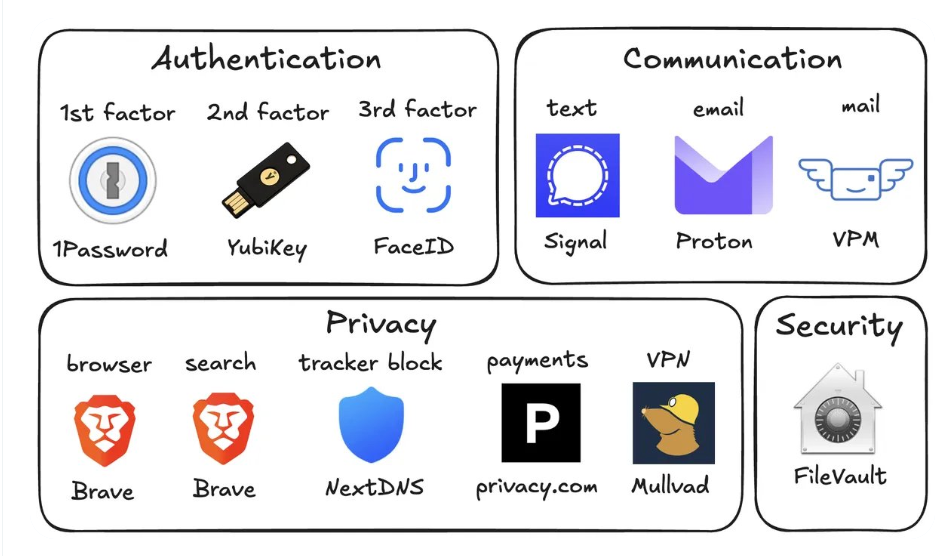
1. Use a password manager (like 1Password)
Generate a unique random password for each of your accounts.
If a service is compromised, attackers will use the same set of account credentials to breach all other platforms. A password manager eliminates this risk and even autofills passwords, making it faster than reusing passwords.
2. Use a hardware security key (like YubiKey)
This is a physical device that serves as your second factor of verification. Attackers must physically possess this device to access your account.
SMS verification codes are actually quite insecure, and SIM card hijacking (where someone calls the carrier pretending to be you and transfers your number to their phone) is easier than you might think.
Buy 2 to 3 YubiKeys and keep them in different locations to avoid being locked out if you lose one.
3. Enable biometric authentication on all devices
Face ID, fingerprint—enable whatever your devices support. Set these up for your password manager, banking apps, and all sensitive applications.
This provides a third layer of authentication: Who you are. No one can steal your face from a database.
4. Handle security questions like passwords
Questions like "What is your mother's maiden name?" can be found on Google in 10 seconds.
Generate random answers for security questions and store them in your password manager along with your passwords. Never answer security questions truthfully.
5. Turn on disk encryption
It's called FileVault on Mac and BitLocker on Windows.
If your laptop is stolen, disk encryption means the thief gets a brick instead of all your files. It can be enabled in 2 minutes and runs silently in the background.
6. Reduce smart home devices
Every "smart" device is essentially a connected computer with a microphone sitting in your home.
They continuously collect data, continuously send it back to servers, and are frequently hacked. That Wi-Fi air quality monitor you bought from Amazon doesn’t need to know your exact GPS coordinates.
The fewer connected devices you have, the fewer entry points there are into your network.
7. Use Signal for daily communication
Signal encrypts messages end-to-end, meaning no one (including Signal itself, your carrier, or any data interceptors) can read your messages.
Regular SMS and even iMessage store metadata (who chatted with whom, when, how long), which can be analyzed by those with access.
It’s recommended to enable the disappearing messages feature, with 90 days being a good default value, so old conversations don’t become liabilities.
8. Use a privacy-focused browser (like Brave)
Brave is built on Chromium, so all Chrome extensions work, and the experience is almost identical.
9. Change the default search engine to Brave Search
The reason is that it has its own independent index, unlike DuckDuckGo which is essentially a skin for Bing.
If a search result is lacking, adding "!g" will redirect that query to Google.
There’s a premium version for $3 a month. Paying to be a customer is always better than being a product for free.
10. Use virtual credit cards (like Privacy.com)
Create a new card number for each merchant. You can set spending limits for each card, and fill in random names and addresses for the bills.
If a merchant is breached, the attacker only gets a disposable card number, not your real financial identity. This also means no merchant knows your true address.
11. Set up a virtual mailing address
Services like Virtual Post Mail help you receive physical mail, scan it, and allow you to view it online. You decide which ones to destroy and which to forward.
This way, you don’t have to give out your real home address to various online stores every time you check out.
12. Don't click links in emails
It’s extremely easy to spoof email addresses. With AI, phishing emails now look exactly like real emails.
Instead of clicking links, manually open websites and log in.
It’s also advisable to turn off automatic image loading in email settings, as embedded images can be used to track whether you opened the email.
13. Use VPN selectively (like Mullvad)
A VPN hides your IP address (a unique number identifying your device and location), so services you connect to cannot see who you are.
It doesn’t need to be on 24/7, but turn it on when using public Wi-Fi or accessing less trustworthy services.
14. Set up DNS-level ad blocking (like NextDNS)
DNS is essentially the phonebook your device uses to look up websites; blocking at this level means ads and trackers are eliminated before they are loaded.
This applies to all apps and browsers on your device.
15. Install a network monitoring tool (Little Snitch is recommended for Mac)
It will show which apps on your computer are communicating, how much data they’ve sent, and where it’s going.
Any app that transmits data beyond expectations is suspicious and likely needs to be uninstalled.
Currently, Mythos is only in the hands of the defenders of Project Glasswing (like Anthropic, Apple, Google, etc.).
But attackers will soon acquire Mythos-level models, probably within 6 months, possibly even sooner. So strengthening security is an urgent matter now.
Spend 15 minutes setting it up now to avoid a lot of trouble later.
免责声明:本文章仅代表作者个人观点,不代表本平台的立场和观点。本文章仅供信息分享,不构成对任何人的任何投资建议。用户与作者之间的任何争议,与本平台无关。如网页中刊载的文章或图片涉及侵权,请提供相关的权利证明和身份证明发送邮件到support@aicoin.com,本平台相关工作人员将会进行核查。


