Hey friends, do you want to have your own trading "secret weapon"? Don't worry about difficult code or annoying programming. This tutorial will guide you from scratch, using the simplest way to start your journey with custom indicators! Follow me step by step, and I guarantee you will understand, learn, and be able to use it right away!
Step 1: Preparation, super easy!
1. Download AICoin PC version: https://www.aicoin.com/zh-Hans/download
2. Find the custom indicator entry: Open AICoin, go to the "Market K-line" page, scroll to the bottom, and click on "Custom Indicator."
Step 2: Start with "Moving Averages" to understand the secrets of indicators
The MA moving average is one of the most classic indicators in trading, so let's take it as an example and learn while playing. First, let's look at the three uses of moving averages, which are simple and practical:
1. Single Moving Average: Compare the K-line with a single moving average: When the K-line crosses above the moving average, it may go up (buy signal); when the K-line crosses below the moving average, it may go down (sell signal).
2. Double Moving Averages: Two moving averages play "crossing": When the short-term moving average crosses above the long-term moving average, it's called a "golden cross," and you can consider buying; conversely, when it crosses below, it's called a "death cross," and you can consider selling.
3. Multiple Moving Averages: Multiple moving averages lined up: Short-term moving average > Medium-term moving average > Long-term moving average is called a "bullish arrangement," indicating a bullish trend; the opposite is called a "bearish arrangement," indicating a bearish trend.
Step 3: Two ways to create your first indicator
As a beginner, we can start with the simplest single moving average indicator. Here are two methods to help you quickly write custom indicators.
Method 1: Let AI write it for you, a blessing for the lazy!
Don't want to code? No problem! Just tell AI your idea, and it will instantly become your "code assistant."
Tip: The more detailed your logical description, the more accurate the generated code!
Example: You can tell AI: "Help write an indicator that judges a buy signal when the K-line crosses above MA120, prompts golden cross text, and gives a warning; when the K-line crosses below MA120, judges a sell signal, prompts death cross text, and gives a warning." AI will interpret and generate the corresponding code.
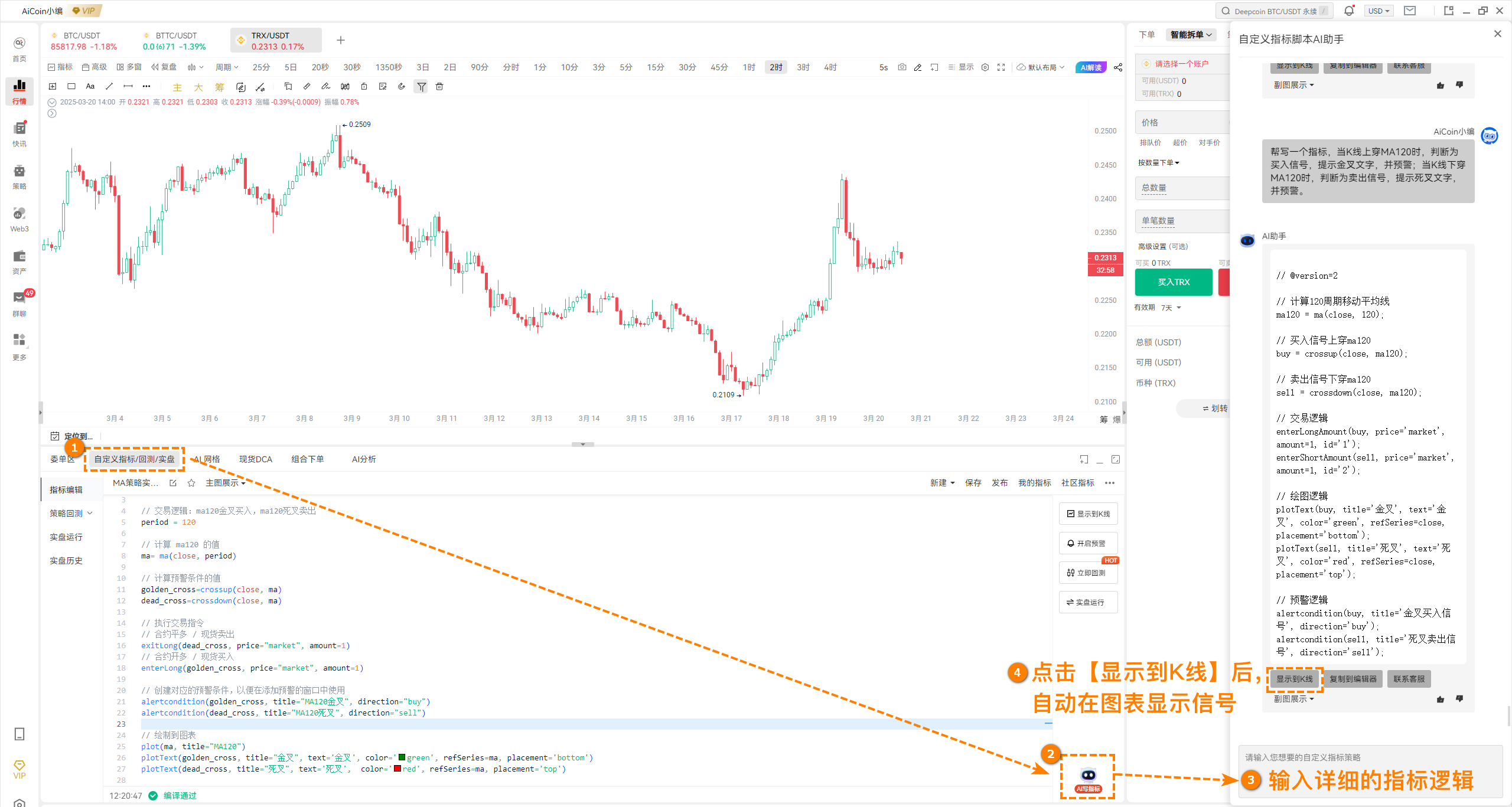
Experience AI writing indicators now and free your hands: https://www.aicoin.com/vip/
Method 2: Follow the template and modify it yourself!
Want to learn more? Then let's modify the template step by step, which is super rewarding!
Path: Market K-line bottom → Custom Indicator → My Indicators → Programming Indicator Template → Search → Select a template and click "Use Now."
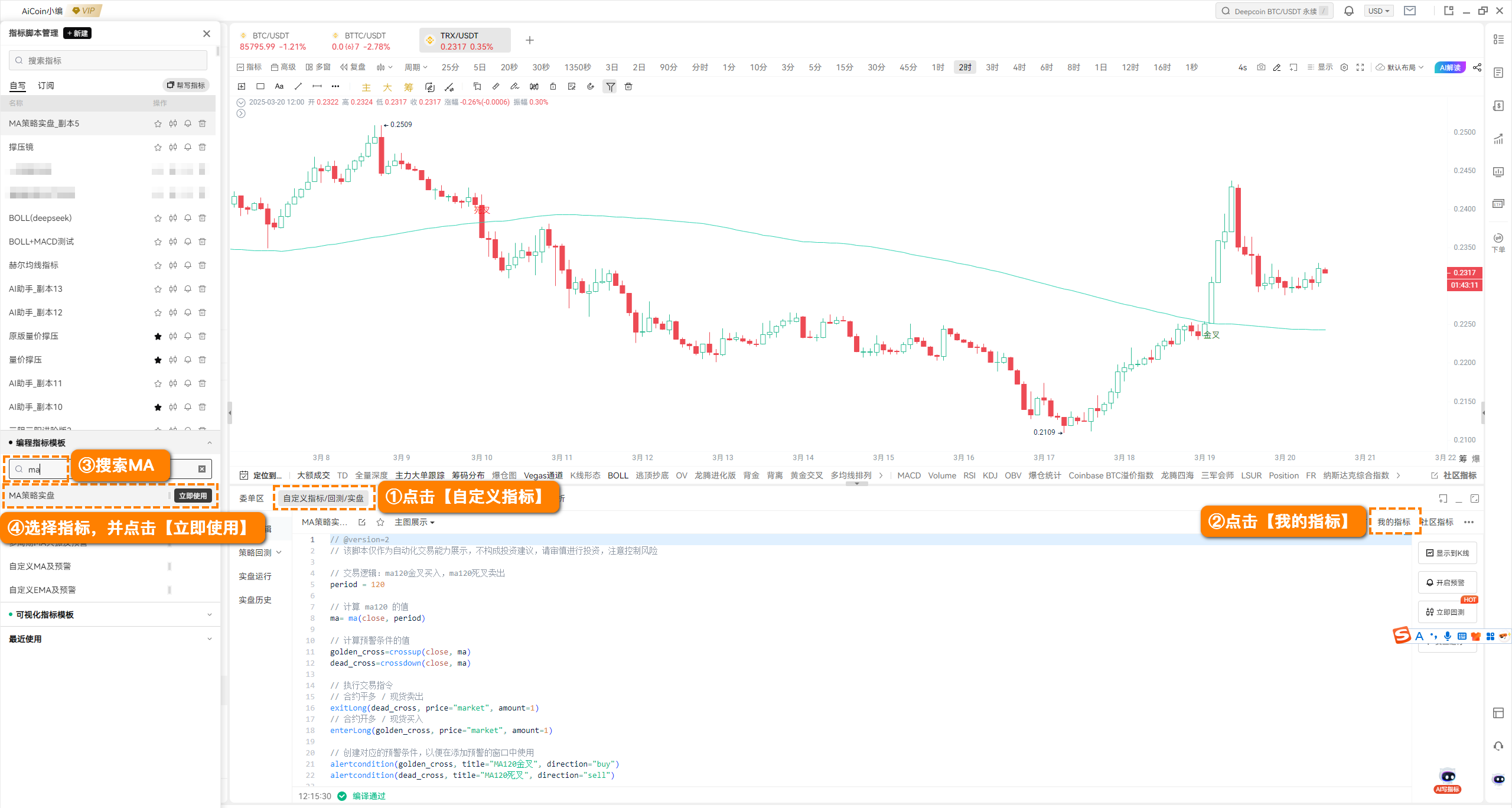
Taking MA120 as an example, let's break down how to modify it:
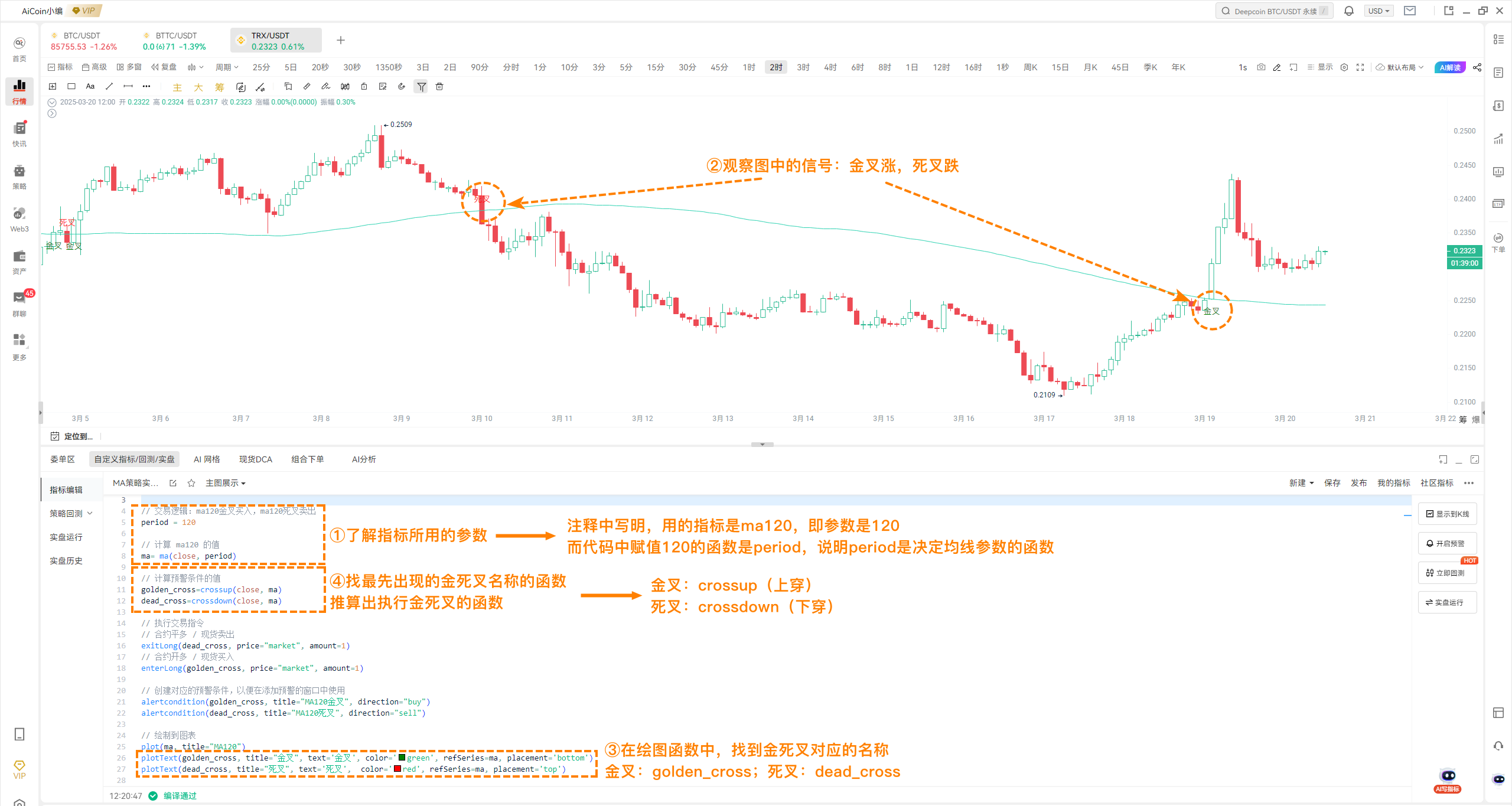
1. Understand the indicator parameters
In the template code, there is a "period= 120," which is the period for MA120. If you want to change it to MA50, simply change 120 to 50!
Tip: In the code, you will see some comments (comment function: //), which will tell you the meaning of the parameters or functions used in the code.
2. Observe the meaning of the signals
In the chart, you will see some labeled signals, such as a green golden cross indicating a bullish trend and a red death cross indicating a bearish trend. These signals are generated by the drawing functions in the code.
Green "Golden Cross" = Bullish (K-line crosses above MA120).
Red "Death Cross" = Bearish (K-line crosses below MA120).
3. Find the parameters for the golden cross and death cross
In the code, find the parameters corresponding to the golden cross and death cross:
Golden Cross:
golden_crossDeath Cross:
dead_cross
4. Find the functions for executing the golden cross and death cross
The execution functions for the golden cross and death cross are:
Golden Cross:
crossup(cross above)Death Cross:
crossdown(cross below)
In the single moving average indicator, crossup(close, ma) indicates that the K-line price crosses above the moving average, and crossdown(close, ma) indicates that the K-line price crosses below the moving average. Here, close represents the closing price of the K-line, and ma represents the moving average.
5. Understand trading and alert commands
In the code, you will also see some trading and alert commands:
exitLong: Close long position / Sell spot
enterLong: Open long position / Buy spot
alertcondition: Alert command used to pop up buy/sell signal reminders on the APP or PC.
Step 4: Summary of commonly used functions, take it and don't thank me!
Through the above steps, we can summarize the usage of the following commonly used functions (first know what functions to use, and later understand the meaning of each parameter in detail):
close: Real-time price (or closing price)
crossup: Achieve K-line crossing above the moving average, or double moving averages, MACD, KDJ golden cross, etc.
crossdown: Achieve K-line crossing below the moving average, or double moving averages, MACD, KDJ death cross, etc.
plot: Used for drawing lines, such as drawing moving averages
plottext: Used for text signals, displaying "buy" or "sell" relies on it
alertcondition: Used for alerts, to remind buy/sell signals on APP or PC
enterLong: Opening trade function, representing buying spot or opening long
exitLong: Closing trade function, representing selling spot or closing long
Step 5: Practice makes perfect!
Pick any method, such as using AI to generate an indicator for "MA60 golden cross buy, death cross sell," or modify a template to create an "MA200 trend tracker." Try running historical data to see the effect, and once you find the feel, you will be one step closer to creating your personal strategy!
Remember, practice is the best teacher. Try more, modify more, and you will become more proficient!
Custom Indicator Tutorial Resources:
Custom Indicator Tutorial: https://www.aicoin.com/article/355031.html
Custom Indicator Alert Tutorial: https://www.aicoin.com/article/355033.html
Custom Indicator Function Documentation: https://www.aicoin.com/article/355796.html
Quick Start for Automated Live Trading: https://www.aicoin.com/article/373213.html
The content is for reference only. If you have any questions, feel free to join the 【Indicator Enthusiasts】 group for discussion~
Custom indicators: Customer Service Yingying, Customer Service KK
免责声明:本文章仅代表作者个人观点,不代表本平台的立场和观点。本文章仅供信息分享,不构成对任何人的任何投资建议。用户与作者之间的任何争议,与本平台无关。如网页中刊载的文章或图片涉及侵权,请提供相关的权利证明和身份证明发送邮件到support@aicoin.com,本平台相关工作人员将会进行核查。