Original Author: BitMEX
BitMEX is pleased to announce that we have launched a new address book whitelist feature to enhance the security and convenience of asset withdrawals for users on the platform.
Feature Overview
Add whitelist addresses at the network level, covering all assets under that network
Prevent unauthorized withdrawals to ensure fund security
Detailed Introduction
What is the address book whitelist feature?
With the address book feature, BitMEX users can store specific addresses and name them for easier use when initiating withdrawal requests.
Users can now convert their address book into a whitelist, allowing only addresses on the whitelist to make withdrawals. This means that addresses not listed on the whitelist will not be able to withdraw.
By using the address book feature, users can enjoy the following two major advantages:
Network-level address addition: Users can add whitelist addresses for specific networks, for example, adding a whitelist address for the Ethereum network allows withdrawals for all assets under that network (such as ETH, BMEX, USDT, AAVE, APE, etc.).
Prevent unauthorized withdrawals: Users can set a cooling-off period to ensure that newly added addresses are unavailable for a period of time, further enhancing asset security.
How to enable the address book whitelist feature
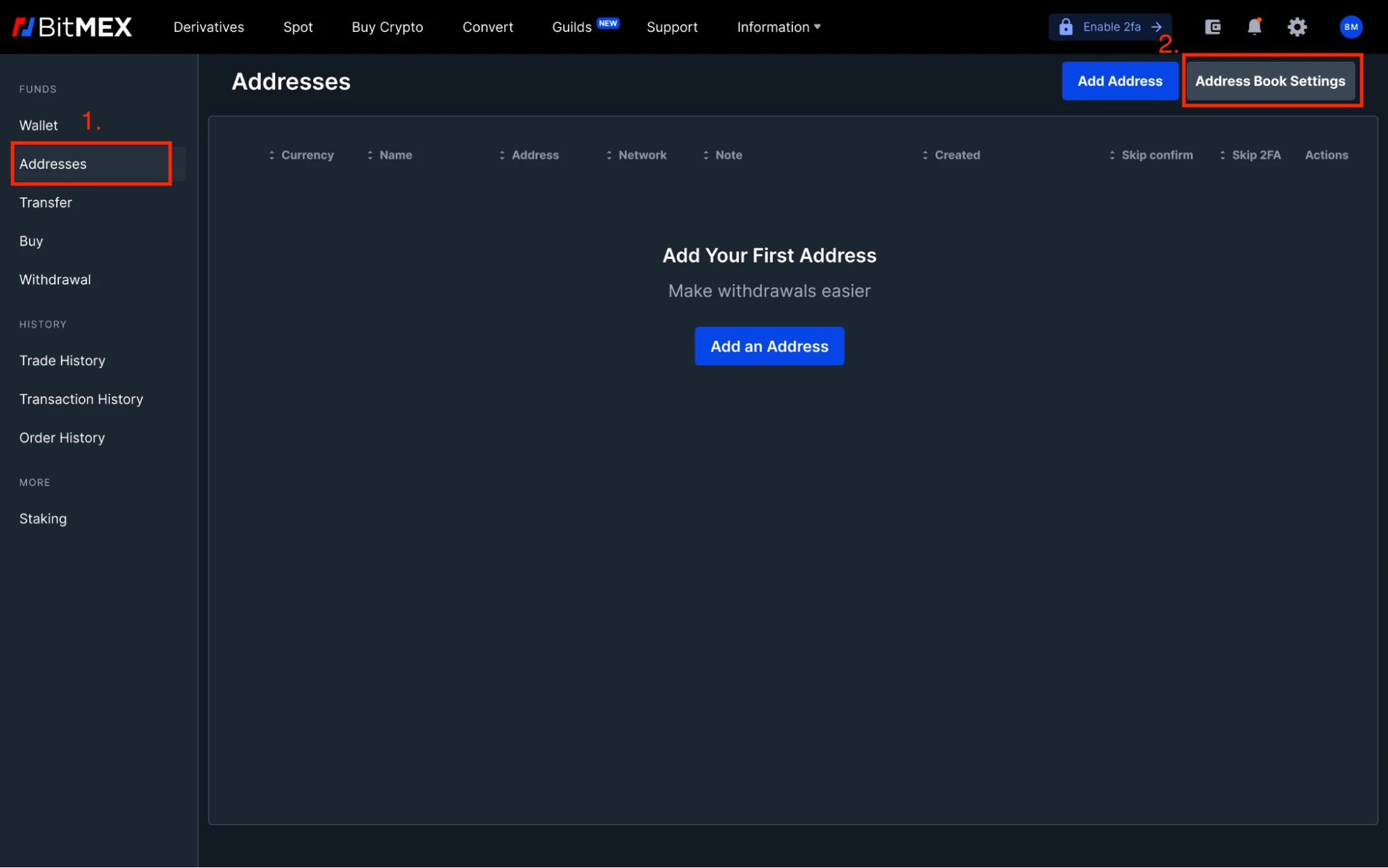
Go to the "Wallet" page and click on "Addresses" under "Funds".
Click on "Address Book Settings".
Select "Address Book as Whitelist".
a. Specify the cooling-off period for the new address (in hours).
b. Enter your BitMEX two-step verification code.Click "Update Address Settings".
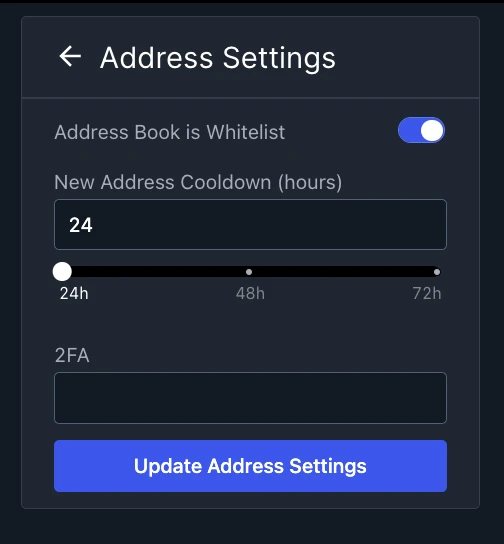
* The cooling-off period will be explained in detail in the next section, as it relates to enhancing the security of asset withdrawals.
Once the address book settings are updated, you can add whitelist addresses for your chosen network or currency and set specific two-step verification conditions. We encourage users to take advantage of the new address book whitelist feature to improve the convenience of fund withdrawals and strengthen the protection of BitMEX assets.
We will explain these two advantages in detail below:
Enhancing Convenience: Adding Network Addresses for Withdrawals
Through the address book feature, users can now create whitelist addresses at the network level. This means users no longer need to create new whitelist addresses for each asset under the same network.
If you add a whitelist address for the Ethereum network, you can use that address to withdraw all assets under that network (such as ETH, BMEX, USDT, AAVE, APE, etc.).
You only need to add one whitelist address for the Ethereum network to cover withdrawals for all tokens under that network.
How to add a network address
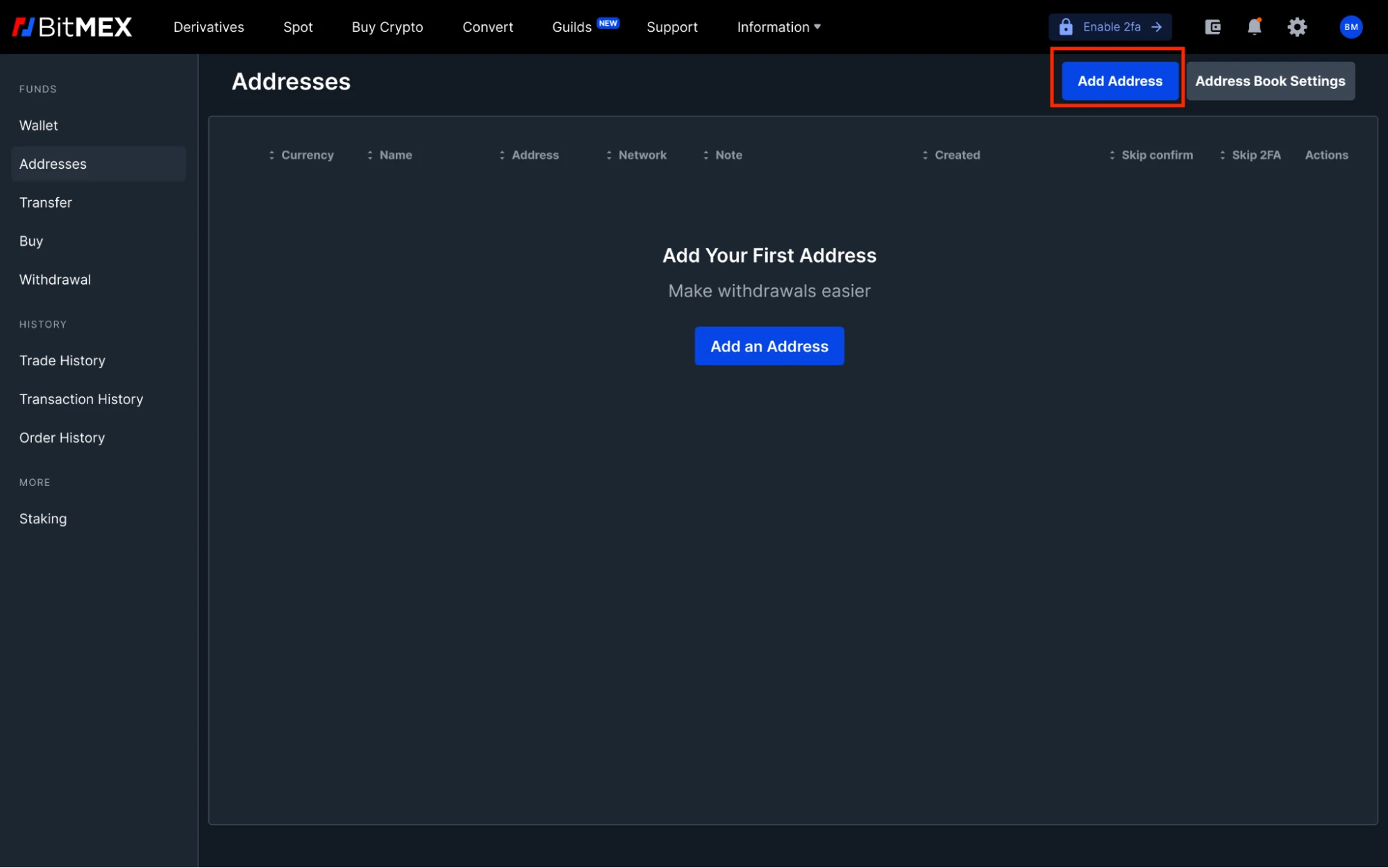
Go to your address book page.
Click "Add Address".
Select "Network Address" from the dropdown menu.
a. Choose the network for which you want to add a whitelist address (e.g., BTC, ETH, etc.) and enter the address.
b. Name the address for easier identification in the future.Choose your withdrawal security options - whether you want to require email confirmation and 2FA verification every time you withdraw to the newly created whitelist address.
Enter your two-step verification code and click "Add Address".
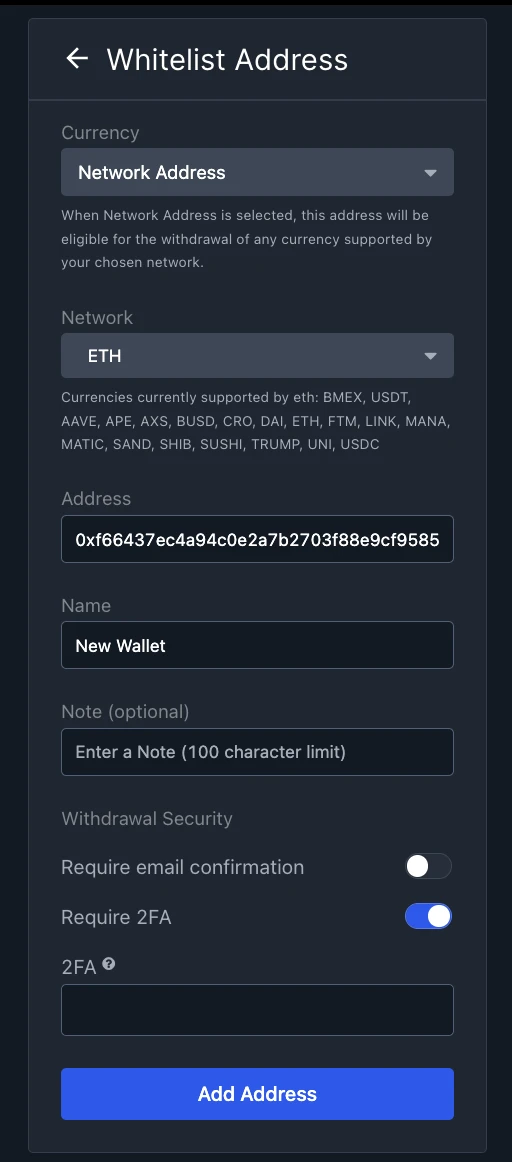
After adding the network address, you can find that address in the address book, showing its associated network and name.
Enhancing Security: Preventing Unauthorized Withdrawal Requests
Another advantage of the address book whitelist feature is that users can enhance the security of asset withdrawals through a cooling-off period.
As mentioned above, when enabling the address book whitelist feature, users must specify a cooling-off period of at least 24 hours, during which the newly added whitelist address will be unavailable. The length of the cooling-off period can be determined based on user preference, but it must be at least 24 hours.
Once a request to add a new whitelist address is submitted, the system will send an email to the user for confirmation. This gives real users enough time to confirm or block the request to add the address. If the account is hacked, the hacker will not be able to withdraw funds without prior notification to the user and at least 24 hours to block the request.
To get the latest listing information, product releases, giveaways, and other news, feel free to join our online community. For real-time updates, you can also follow us on Twitter or read our blog and website announcements. If you have any questions, please contact our 24-hour customer service team.
Official link: https://blog.bitmex.com/address-book-whitelists/
免责声明:本文章仅代表作者个人观点,不代表本平台的立场和观点。本文章仅供信息分享,不构成对任何人的任何投资建议。用户与作者之间的任何争议,与本平台无关。如网页中刊载的文章或图片涉及侵权,请提供相关的权利证明和身份证明发送邮件到support@aicoin.com,本平台相关工作人员将会进行核查。


