Author:Denise | Biteye Content Team
Recently, Jidream Seedance 2.5 has officially launched, becoming one of the most关注的 models in the field of AI video creation. Compared to version 2.0, it has made significant improvements in duration, controllability, multimodal reference, and professional editing capabilities, advancing the creative experience from "generating a clip" to "completing a full creation."
The official documentation has been updated with the Leihsu document "【Jidream】Seedance 2.5 User Manual," which covers model positioning, core upgrades, timestamp control, white model and green screen, multi-reference usage methods, and various practical suggestions.
The document contains a lot of information, and I have carefully organized the entire manual, extracting the most核心 and practical content, compiled into this summary to help everyone quickly grasp the correct way to use 2.5, truly achieving“point where to strike”.
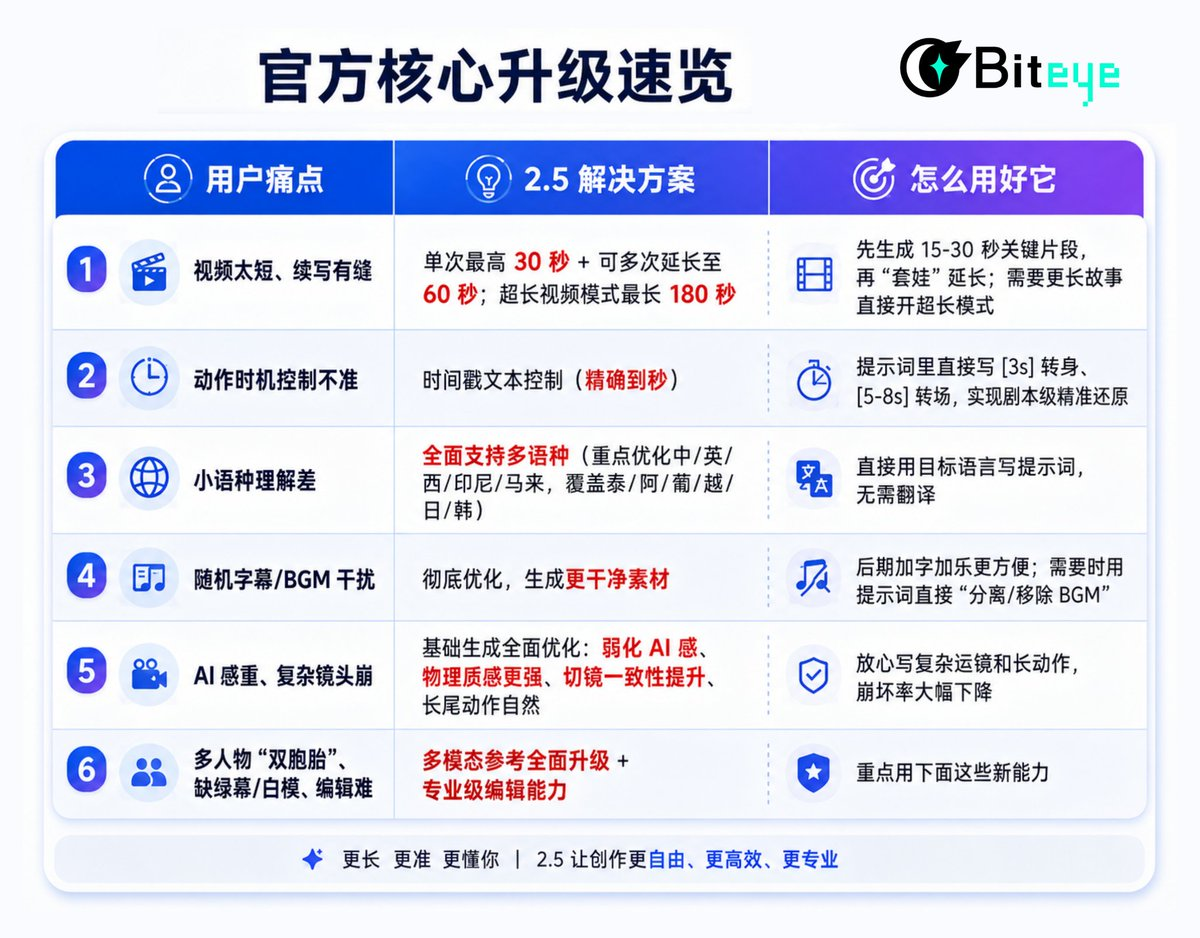
Official core upgrade overview👇
1. Duration and Narrative Ability: Truly Achieving One-Shot Video
Seedance 2.5 increases the duration of a single native generation to 30 seconds and supports multiple rounds of extension.
After generating a video within 30 seconds, multiple "nesting" extensions can be performed, with a maximum extension of 60 seconds. Additionally, a super long video mode has been added, supporting up to 180 seconds.
Usage Suggestions:
For complete story arcs like advertisements, shorts, and product displays, prioritize generating 20-30 seconds of continuous content directly.
If a longer narrative is needed, first lock the core 15-30 second clip (ensuring character, style, and rhythm stability), and then use the extension feature to naturally connect the subsequent content.
For super long content (teaching, complete short scenes), you can directly activate super long video mode, but it is recommended to plan the overall rhythm with timestamps in advance to avoid drifting in the second half.
The biggest value of this upgrade is reducing the issues of cut and consistency caused by previous splicing, allowing the story to unfold completely from setup, advancement, twist to conclusion.
2. Timestamp Text Control: Script-Level Precise Restoration
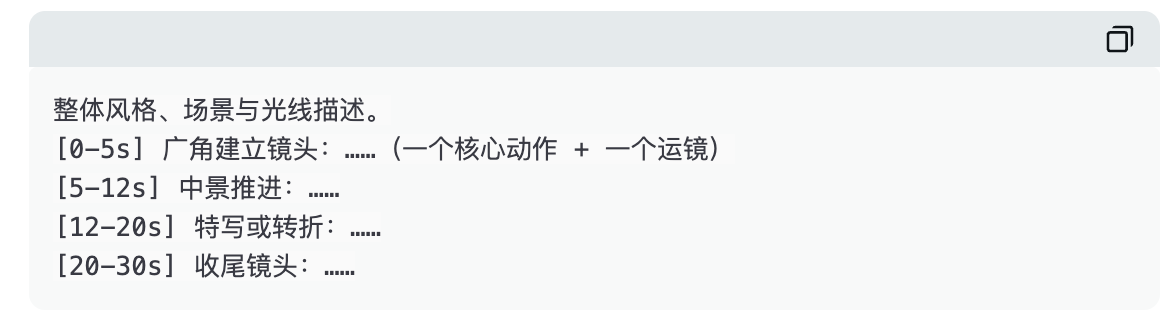
This is one of the core control capabilities of 2.5. It supports precisely specifying timestamps (down to the second) in the prompt, controlling the evolution of actions, camera changes, and scene transitions in the visuals.
Recommended prompt structure:
Practical Tips:
Try to include one core action + one camera movement in each time window to avoid information overload.
It is recommended that the window duration ≥3 seconds, as too short might lead to unstable execution.
Camera movements, sound effects, and dialogues can be directly written into the corresponding time segments.
After generation, targeted modifications can still be made for specified time segments (characters, actions, sounds, plot), keeping coherence before and after.
Timestamp turns the model from "random interpretation" to "script execution."
3. Comprehensive Upgrade of Multimodal References: Professional-Level Control Toolbox
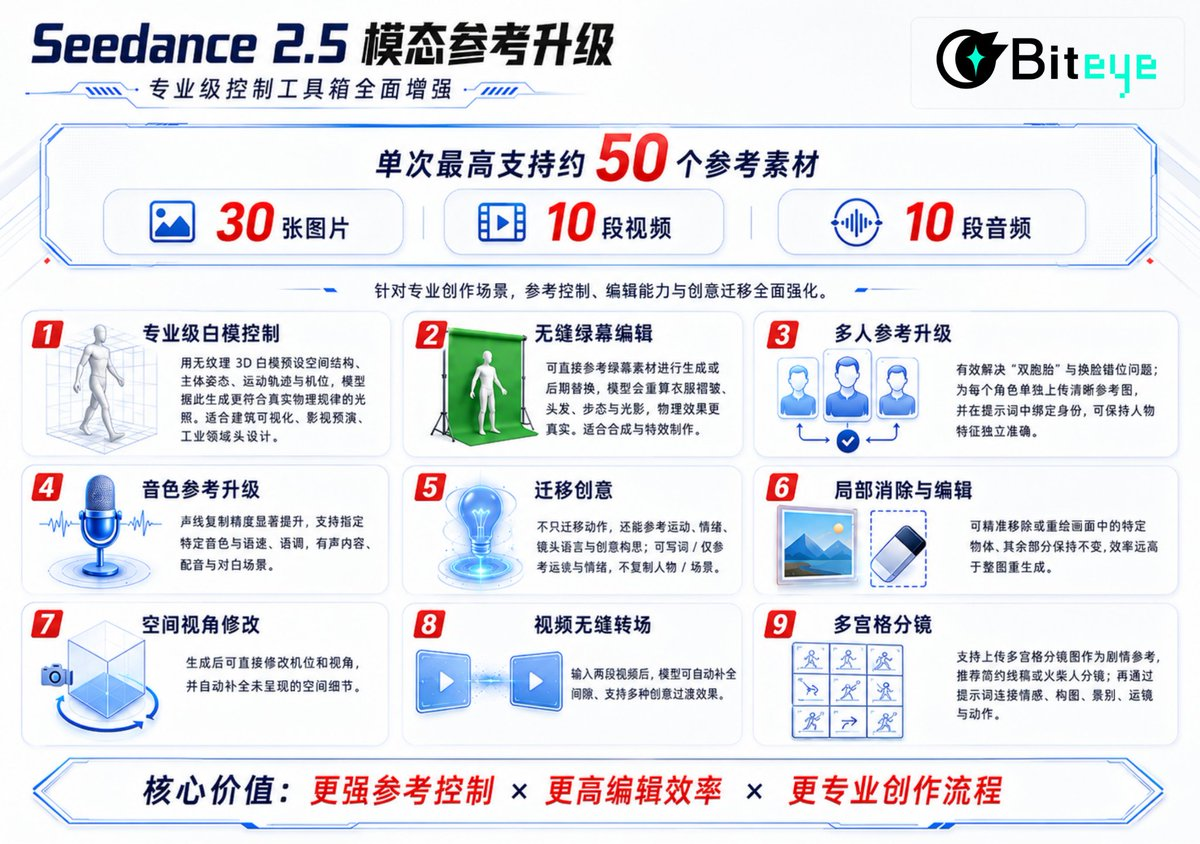
Reference Usage Principles:
Upload in order of importance—core character/product identity image → white model or storyboard → camera movement reference video → tone → scene and style.
The role of each reference must be clearly specified in the prompt (e.g., " @Image1 lock character identity and clothing " " @Video1 only reference camera movement ").
4. Other Key Optimizations
Remove irrelevant subtitles and BGM: Default generation is cleaner, making it more convenient to add text and music in post-production. When needed, you can directly prompt "separate/remove background music, keep vocals."
Basic generation effects fully optimized: AI sense significantly reduced, physical texture stronger, consistency in cuts improved, complex long-tail actions more natural and smooth. You can boldly attempt complex camera movements and multi-character interactions.
Multilingual support: You can write prompts directly in the target language without translation, covering mainstream foreign languages.
5. Complete Recommended Workflow
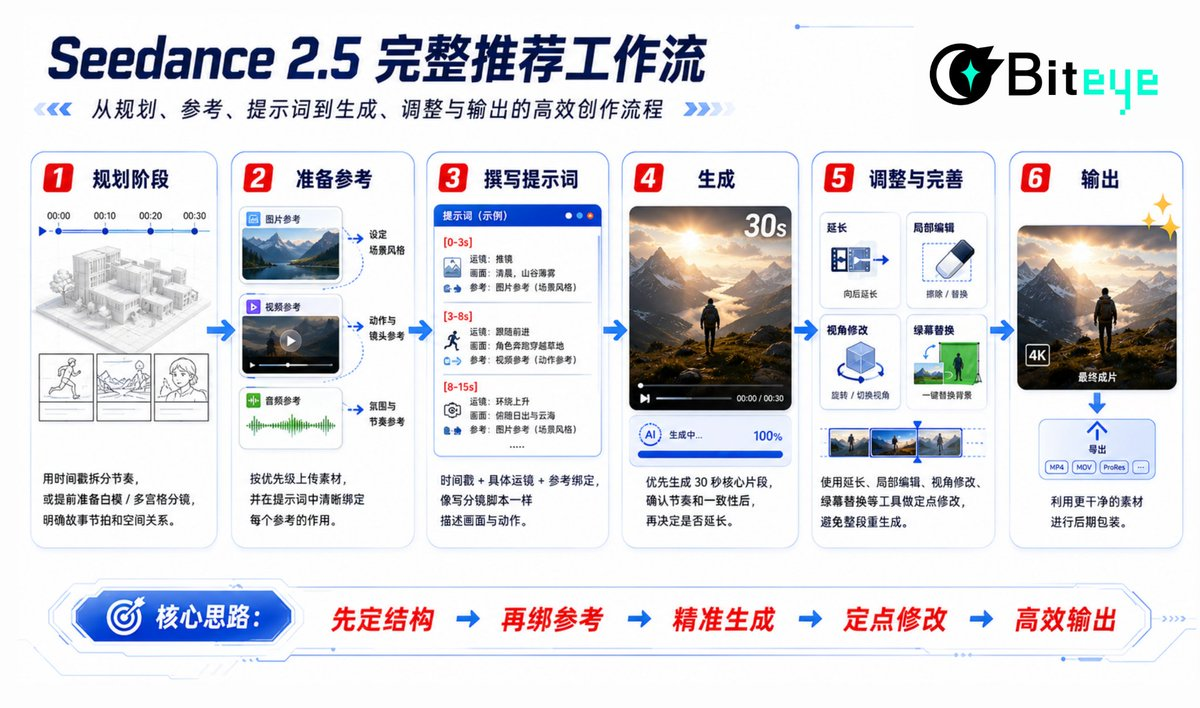
Planning Stage
Use timestamps to split rhythm or prepare white models/multi-panel storyboards in advance to clarify story beats and spatial relationships.
Prepare References
Upload materials according to priority and clearly bind the role of each reference in the prompt.
Write Prompts
Timestamp + specific camera movement + reference binding, describe like writing a storyboard script.
Generate
Prioritize generating a 30-second core clip, confirm rhythm and consistency before deciding whether to extend.
Adjust and Perfect
Use tools such as extension, local editing, perspective modification, green screen replacement for targeted modifications to avoid re-generating the entire segment.
Output
Use cleaner materials for post-production packaging.
6. Core Principles of Prompts
Treat prompts as storyboard scripts rather than static image descriptions.
Timestamp division + one core action per window.
Clearly specify specific camera movement vocabulary (slow push, circling follow-up, low angle, handheld stabilizer, etc.).
References must be bound to functions.
When clean output is needed, proactively restrict "no random subtitles, no extra BGM".
7. Quick Lookup for Applicable Scenarios
30 seconds continuous advertisement/short → Timestamp + core reference
Multi-character interaction → Multiple references + clear identity binding
Complex camera movements and spatial adjustments → White model control
Background replacement and special effects → Green screen editing
Long narrative → 30 seconds + extension / super long mode
Overseas content → Use target language directly
In Conclusion
The core value of Seedance 2.5 lies in achieving "controllable" genuinely: timestamps control rhythm, white models control space, multiple references ensure consistency, and precise editing facilitates fine-tuning.
Combining these capabilities maximizes the model's potential, truly realizing "point where to strike". The above content is fully extracted and organized from the user manual for your practical reference.
免责声明:本文章仅代表作者个人观点,不代表本平台的立场和观点。本文章仅供信息分享,不构成对任何人的任何投资建议。用户与作者之间的任何争议,与本平台无关。如网页中刊载的文章或图片涉及侵权,请提供相关的权利证明和身份证明发送邮件到support@aicoin.com,本平台相关工作人员将会进行核查。


