In on-chain trading, many opportunities do not disappear because they never existed, but because they vanish before users complete their operations.
First search for tokens, then switch to the market page; after opening the K-line, you still need to return to the trading page to input the quantity; when confirming the trade, you need to recheck the price and slippage. For tokens with rapid fluctuations, these operational steps increase the time lag between judgment and execution.
The latest market order experience offered by the OKX Wallet specifically optimizes this issue: Viewing K-lines, monitoring the market, and placing orders can all be completed on the same trading interface. The OKX Wallet official summarizes this as "Say goodbye to cumbersome screen switching, from signal discovery to execution, stay one step ahead."
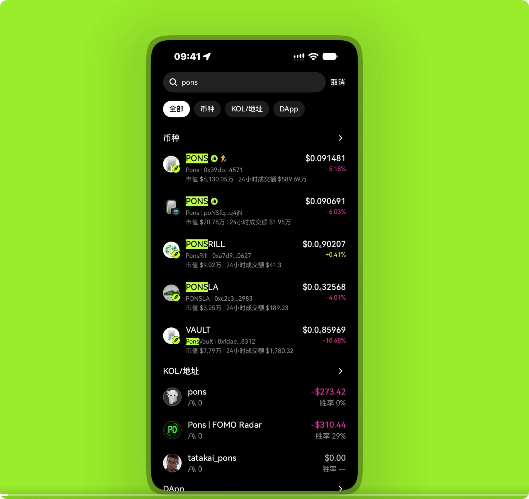
Taking PONS as an example. Users can first search for PONS in the wallet, view tokens with the same name or related tokens, KOL/address information, then enter the transaction details page of PONS to observe the K-line, and finally complete the buy setting directly on the current screen.
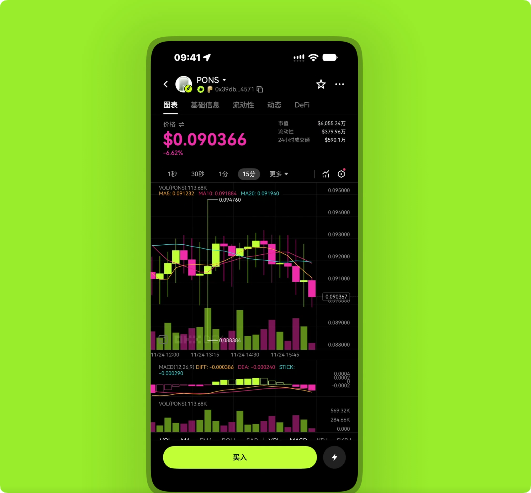
The key point here is not "PONS must rise," but rather a more general trading issue: once users have completed the asset selection, can the trading tools allow for smooth connections between research, judgment, and execution?
Starting from search, turning "token discovery" into a verifiable first step
After entering PONS, multiple related token entries will appear, along with KOL/address and other information. This step is crucial for assets with many on-chain hot keywords or tokens with the same name.
Users cannot confirm an asset solely based on its name or icon. A more prudent approach is to verify the token contract address, the associated network, trading pairs, liquidity scale, and price changes. Search results can help users quickly identify targets, but search rankings do not themselves represent project quality nor equal official certification.
The practical value of such a search experience lies in placing "what am I looking for" and "what related results are in the market" under the same entry. Users can first create a candidate list, then enter specific market pages for secondary verification, instead of copying names and addresses across multiple applications.
Observing trading structure from K-lines, rather than just looking at a single rising candle
The K-line for the PONS/ETH trading pair includes different time frames, price trends, trading volumes, and indicator areas, allowing users to observe the short-term price structure before placing an order.
The function of K-lines is to record price and trading changes over a certain period. They can help users observe trends, volatility, trading volume amplification, and pullback positions, but they cannot predict how the next K-line will behave.
For highly volatile tokens like PONS, at least three aspects can be checked:
1. Is there a continuous price surge? If the price rises quickly, chasing the price may face greater retracement risks.
2. Is the trading volume simultaneously increasing? If the price rises but the trading volume does not show significant improvement, the reliability of the signal needs further confirmation.
3. Is the retracement accompanied by changes in liquidity? The depth of the market for highly volatile assets can change quickly, resulting in different slippage for the same buy amount.
Volume bars and indicator areas. They are suitable for assisting in judgment but should not be treated as automatic buy signals. Technical indicators can only describe historical price behavior and cannot replace verification of contract permissions, concentration of positions, liquidity, and project background.
What problems does on-screen ordering solve?
The traditional multi-page trading process typically involves:
Search for tokens → Find trading pairs → View K-lines → Return to the trading page → Input quantity → Confirm the trade.
Every additional switch increases the chances that users will make input errors, select the wrong trading pairs, or miss the price. The process showcased by OKX Wallet places the market data and buying panel on the same screen:
View PONS/ETH K-line → Observe the current price and trading volume → Directly input ETH amount → Choose buying proportion → Submit the trade.
The buying area includes quick amount proportion options, such as 25%, 50%, 75%, and 100%. Such features mainly address the efficiency of capital input. It does not mean that users should use all their balance, nor does it imply that a higher input ratio will yield higher guaranteed returns.
For novices, a reasonable use of quick proportions is to first establish fixed position discipline. For example, determine the maximum loss per transaction and maximum input amount before trading, then use a custom amount or a lower proportion, instead of immediately clicking 100% upon seeing a price increase.
PONS is just a demonstration asset, not an investment conclusion
Before trading PONS or other popular tokens, users should still verify independently:
- Whether the contract address and network are correct;
- Whether there are high buy/sell taxes, blacklists, or trading restrictions;
- Whether the contract allows for issuance, trading suspension, or modification of key permissions;
- Whether the liquidity is sufficient to support their trading volume;
- Whether the top addresses hold an excessively high proportion of tokens;
- What the actual slippage is when buying and selling;
- Whether project parties, KOL, or address information has been independently verified.
Especially when multiple PONS-related assets appear in the search results, identical names do not mean identical assets. Incorrectly selecting a token or contract may lead to irreversible financial losses.
For newcomers, the real advantage is reducing operational friction
Newcomers often do not lack trading buttons, but rather clarity on how to turn information into a disciplined operational process.
The one-screen market order experience of OKX Wallet condenses the process into four actions:
Step 1: Find the right asset first
Enter the token name or symbol in the search box. After seeing the results, first verify the contract address, network, and trading pair; do not simply click buy based on the icon or name.
Step 2: Next, look at the price structure
Enter the token details page, observing K-lines of different periods, trading volumes, and price fluctuations. Short-term trends are suitable for assessing immediate volatility, while longer periods help avoid misjudging a single surge as a continuing trend.
Step 3: Set trading boundaries
Determine how much money to invest at most this time, and consider slippage and network fees in advance. For assets with weaker liquidity, avoid ignoring price deviation in pursuit of "quick execution".
Step 4: Decide after small amount testing
For the first trade, small funds can be used to test buying, selling, authorization, and receipt processes. After confirming the token, network, and actual transaction situation, decide whether to continue based on your risk tolerance.
"One step ahead" does not mean "you should trade frequently"
Having the market and order on the same page indeed reduces screen switching and repeated input. However, faster execution can also magnify the risks of impulsive trading.
If users frequently chase prices due to a more user-friendly interface, transaction costs, slippage, and error rates may accumulate. Especially with popular low market cap tokens like PONS, prices may quickly rise and then retrace just as swiftly. A quick order does not change the inherent risk structure of the asset.
Therefore, a more rational way to use it is to treat one-screen ordering as an execution tool, rather than as a profit tool. First complete asset verification and trading planning, then use the interface to reduce unnecessary operational delays.
What trading scenarios is OKX Wallet suitable for?
For users focused on new coins, popular narratives, and the on-chain market, the integrated market order experience of OKX Wallet primarily offers three types of value.
First, users can quickly locate candidate assets from the search entry and continue to view market data within the same application. Second, users can refer to K-lines and trading volumes directly before placing orders, reducing the need to switch between different pages. Third, users can complete buying settings using quick proportions or custom amounts, making position execution closer to the pre-established plan.
These features aid in execution efficiency but do not eliminate market risk. Users still need to bear responsibility for price fluctuations, insufficient liquidity, slippage, malicious contracts, private key management, and network congestion.
Participation Path
1. Open OKX Wallet and enter the token market or search entry.
2. Search for the target token, such as PONS.
3. Verify the contract address, network, trading pair, and asset information.
4. Enter the token detail page, view K-lines, trading volume, and different period trends.
5. Open the buying panel on the same page, input a custom amount, or select a quick proportion.
6. Before submitting, double-check the expected receipt amount, price impact, slippage, and network fees.
7. For the first trade, use small funds to test and do not invest the entire balance all at once just because the interface is quick.
Register or use OKX while filling in invitation code AICOIN88, to enjoy 20% fee discount, helping to lower exchange, reallocation, and on-chain operation costs. Specific discount qualifications and applicable scopes are subject to the OKX page and local regulations.
Conclusion: A good trading tool should bring judgment and execution closer together
The core change of the latest market order function in OKX Wallet is placing token discovery, K-line observation, and order submission into a more coherent process.
For users, the most noteworthy aspect is not "if placing orders more quickly means guaranteed profit," but whether it can form a repeatable process: first confirm assets, then observe market conditions, set positions, verify slippage, and finally execute trades.
In the highly volatile on-chain market, speed is valuable, but correct asset identification and risk control are more important. Completing transactions on one screen should truly reduce meaningless operational friction, not necessary judgments.
Exclusive Benefits for AiCoin Users
Use OKX Web3 Wallet to "Invest in Assets Around the World"!
Bind invitation code 【AICOIN88】 to enjoy a 10% savings on transaction costs (Gas optimization and other benefits)!
Download/upgrade OKX Web3 Wallet now and catch the wave:
https://jump.do/xlink?checkProxy=true&proxyId=24
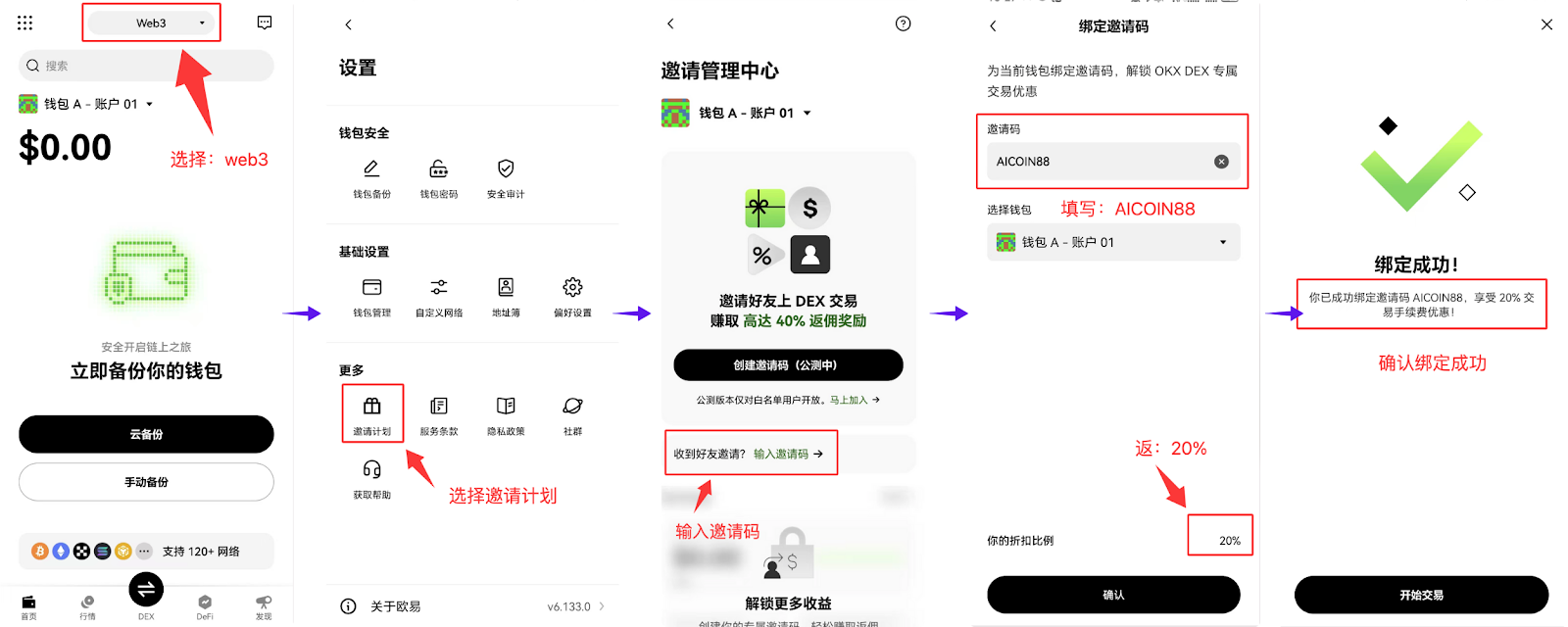
Use the exclusive invitation code 【AICOIN88】 to bind OKX Wallet; the web can also be easily operated!
https://web3.okx.com/ul/joindex?ref=AICOIN88
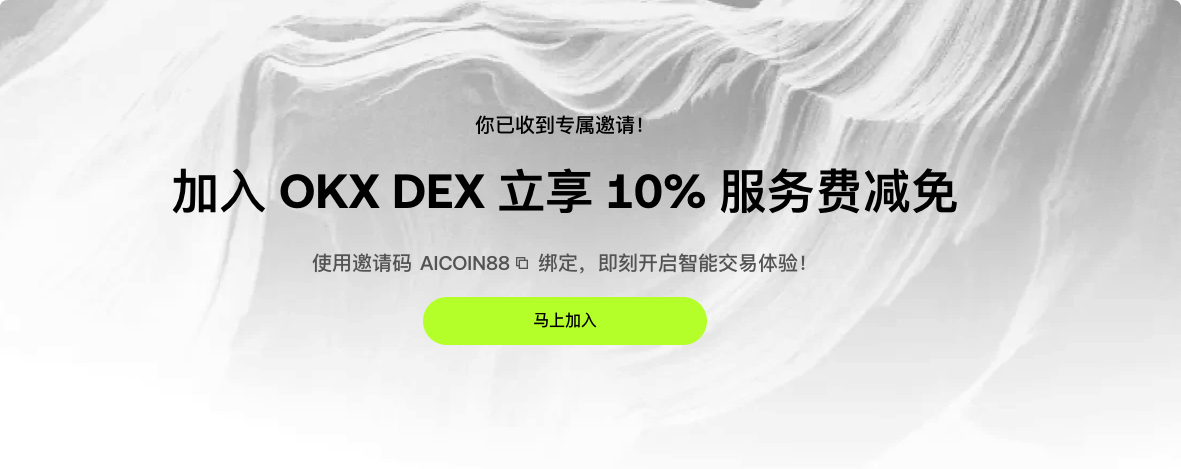
Don't wait, set up OKX Wallet, bind discounts, and reap new wealth!
免责声明:本文章仅代表作者个人观点,不代表本平台的立场和观点。本文章仅供信息分享,不构成对任何人的任何投资建议。用户与作者之间的任何争议,与本平台无关。如网页中刊载的文章或图片涉及侵权,请提供相关的权利证明和身份证明发送邮件到[email protected],本平台相关工作人员将会进行核查。