The funds are still in the crypto account, but the trading opportunities for Hong Kong and US stocks may vanish in an instant. Selling coins may interrupt existing positions; converting USDT into USD and then transferring may also take several hours or even multiple business days.
At UMX, users can apply for credit using the available margin in their crypto account to enhance the purchasing power of their securities account for Hong Kong and US stocks, without needing to sell coins or transfer assets.
This article takes 50,000 USDT as an example to explain the credit limit calculation, activation process, interest rules, repayment and recovery methods, as well as passive recovery and liquidation mechanisms.
1. First, understand credit: Keep assets in the original account while increasing purchasing power
By using UMX credit, users can lock in the available margin of their crypto account to obtain USD credit in their securities account, enabling direct trading of stocks and options without having to sell coins or transfer assets.
Before using, please understand three points:
· Increasing purchasing power does not equal obtaining withdrawable cash.
· Applying for the limit does not mean interest starts to accrue, interest is only charged on the actual amount of credit used.
· Repayment does not equal recovery of credit. After clearing the debt, recovery must still be initiated to unlock USDT.
The credit amount will increase the available funds, maximum purchasing power, and remaining liquidity in the securities account, but it will not be included in the estimated total securities assets, total securities value, estimated cash amount, or leverage calculations. A negative securities asset will not affect the use of credit.
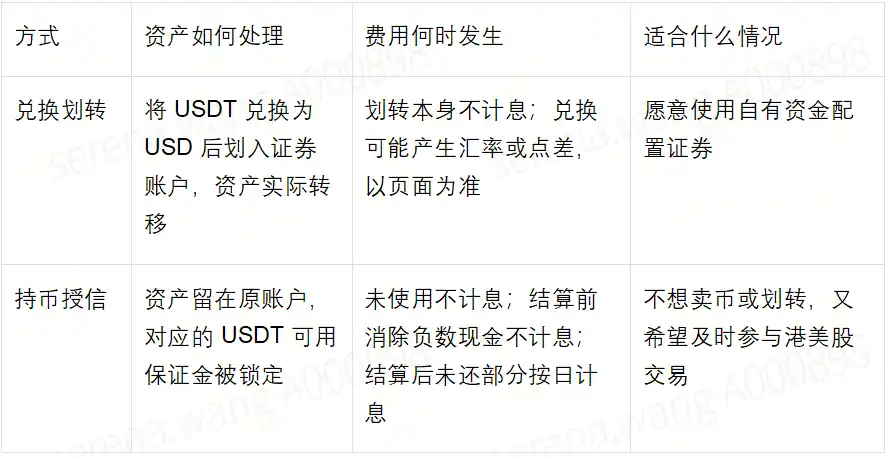
What is the difference between exchange and credit?
Both methods can supplement funds to the securities account; the difference lies in whether the money has been moved and when the fees start to accrue.
2. With 50,000 USDT available margin, how much credit can be obtained?
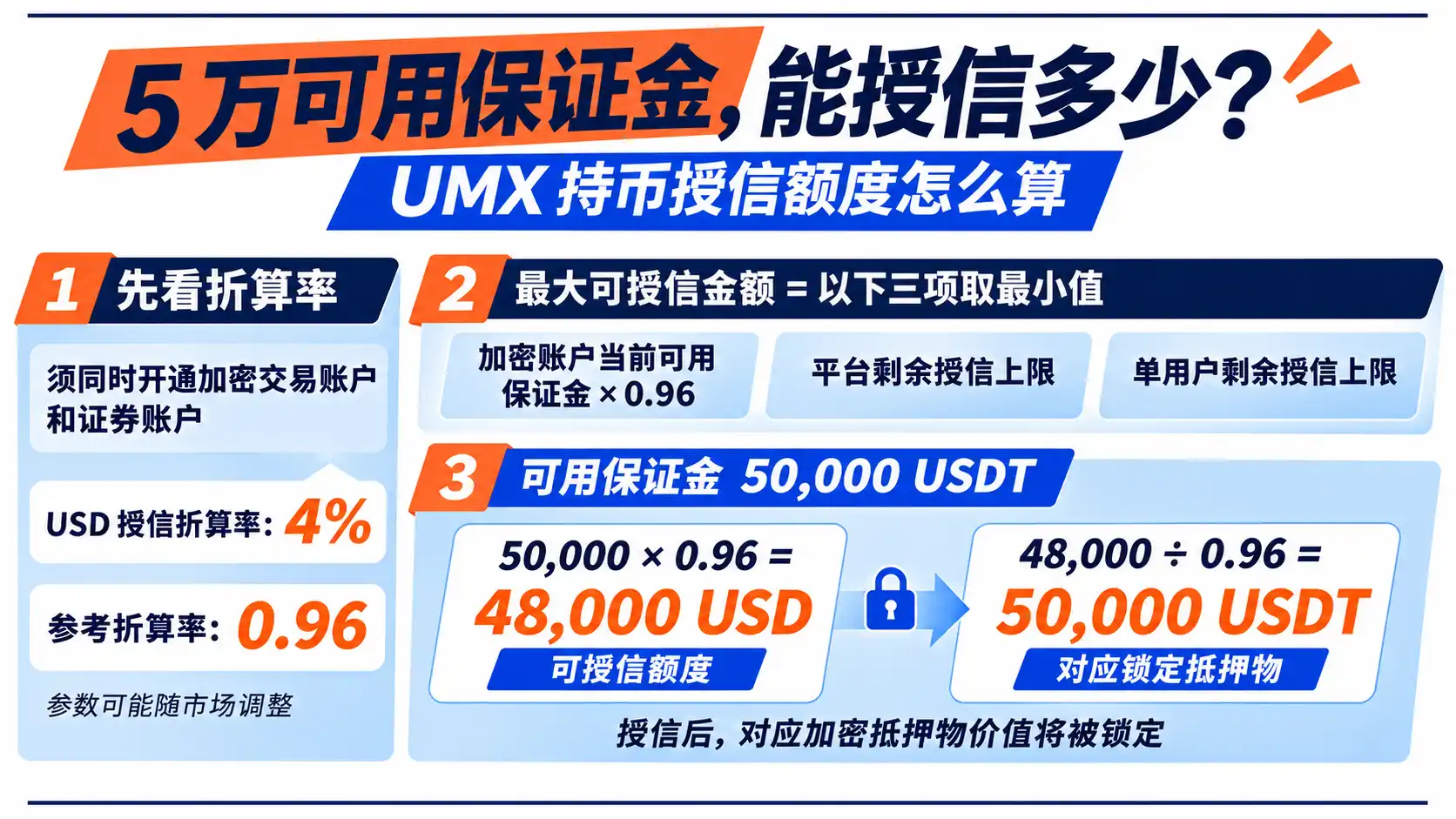
The current USD credit conversion rate is 4% (the reference conversion rate is 0.96), and this parameter may adjust with market conditions.
The actual credit amount will be the minimum of the following three items:
· Current available margin in the crypto account × 0.96
· Remaining credit limit on the platform
· Remaining credit limit per user
For example, if the available margin is 50,000 USDT, and both the platform and individual remaining limits are higher than the conversion result:
· Credit limit: 50,000 × 0.96 = 48,000 USD
· Corresponding locked margin: 48,000 ÷ 0.96 = 50,000 USDT
The maximum credit limit per user is 10 million USD, and the platform credit limit is 100 million USD. The actual available limit is subject to the page display and audit results.
Once credit is successfully obtained, the available funds, maximum purchasing power, and remaining liquidity in the securities account will increase accordingly; however, the credit amount will not be included in the estimated total securities assets, total securities value, estimated cash amount, or leverage calculations.
3. How to activate and check credit?
Both the App and Web support credit operations, but currently do not support activating or recovering credit via API; trading can still be conducted using the securities API after activation.
Activation steps:
· Users who have not activated a securities account should complete the account opening process first.
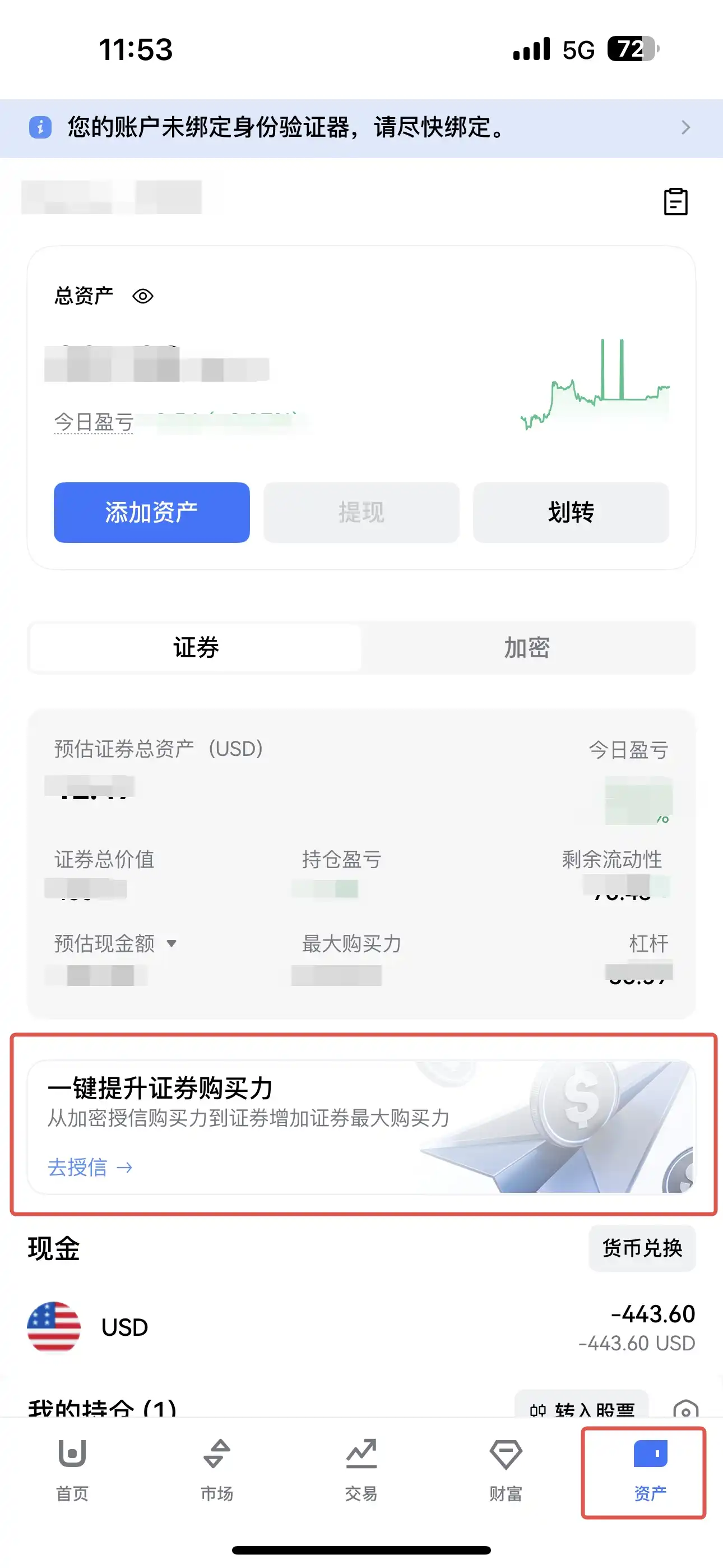
· Go to the "Assets" menu and click the credit function entrance; you can also click on the asset page banner "One-click to enhance securities purchasing power" or go to "Assets → Transfer → Credit".
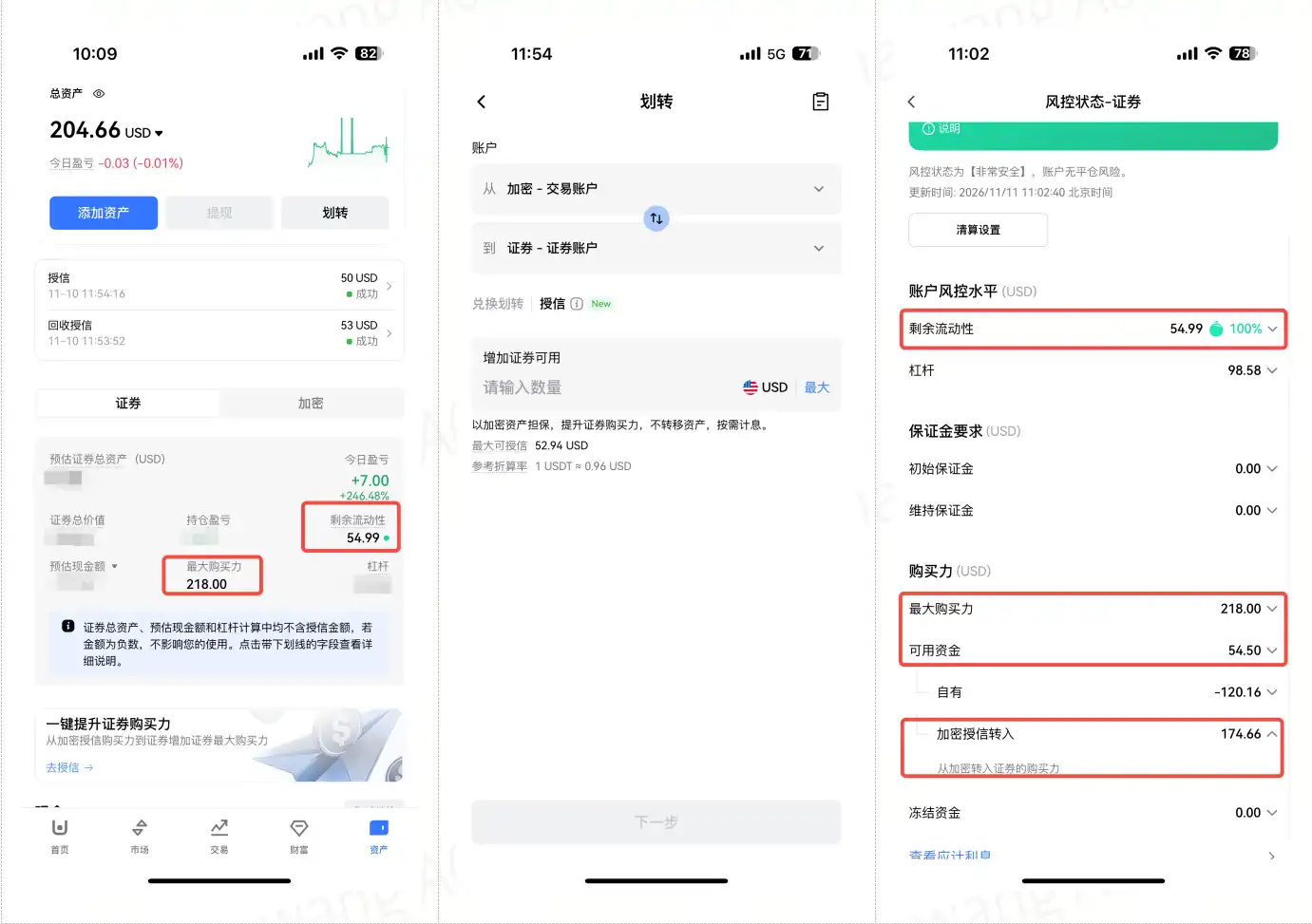
· Select "Crypto - Trading Account" to transfer to "Securities - Securities Account", choose "Credit" and enter the amount.
· Review the risk estimates before and after the credit to confirm and submit. If there are changes in market price or account balance, the application may fail.
Credit entrance:
Check credit assets:
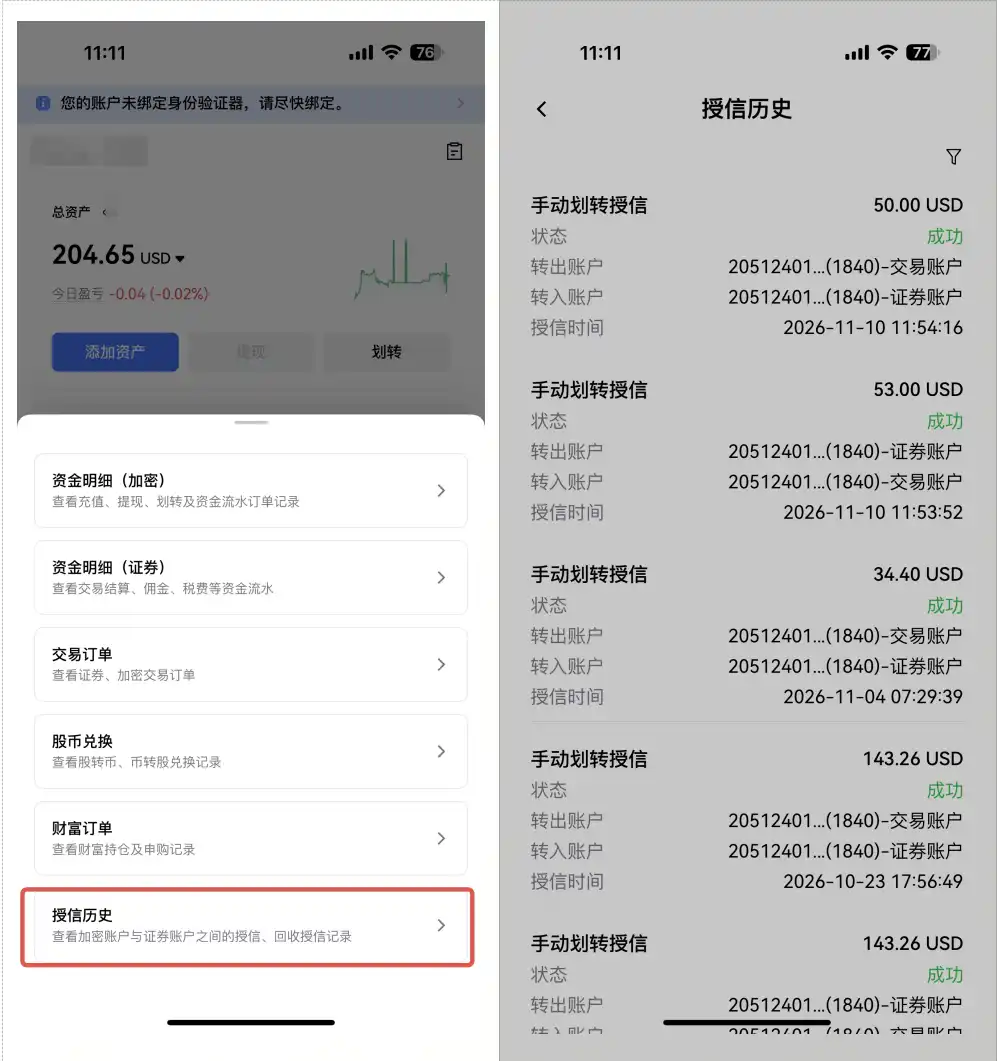
After successful credit, you can view the following on the "Assets → Securities Account" overview page and account details page:
· Crypto credit transfer amount
· Available funds
· Maximum purchasing power
· Remaining liquidity
Note: The credit amount does not count towards estimated total securities assets, total securities value, estimated cash amount, or leverage calculations. Even if the securities asset is negative, it will not affect the use of credit.
View credit records:
Go to "Order Center → Credit History" to view active credit, active recovery, and passive recovery records.
4. Buy stocks with 50,000, when is the interest zero?
Applying for credit incurs no additional fees; securities trading fees are still charged according to account rules.
Interest is only calculated based on the actual amount of credit used, and will not accrue interest on the total limit applied for. When the account has cash, the system will prioritize using cash before utilizing the credit limit.
The applicable interest rate follows the user's personal VIP financing rate, for example, the VIP 7-year interest rate is 5.60%, subject to page display. For details, please refer to "UMX VIP Financing Rate System".
The following situations do not incur interest:
· Credit limit has not been used.
· Orders have not been executed.
· Opening and closing positions on the same day, with cash balance not less than 0.
Interest is calculated daily, with the system automatically settling the accrued interest at the end of each month and deducting it at the beginning of the next month. The accrued interest will not generate additional interest.
Transaction examples:
· Example 1: No interest. Open a position of 50,000 USD and close it at 51,000 USD the same day, cash balance is +1,000 USD, no interest accrued for the day.
· Example 2: Interest incurred. Open a position of 50,000 USD and close it at 49,000 USD the same day, cash balance is -1,000 USD. If there is still 1,000 USD owed after settlement, interest will start accruing from the settlement date.
Note the stock settlement time
Selling stocks does not equate to immediate repayment; you must wait for fund settlement to complete before the debt is considered settled.
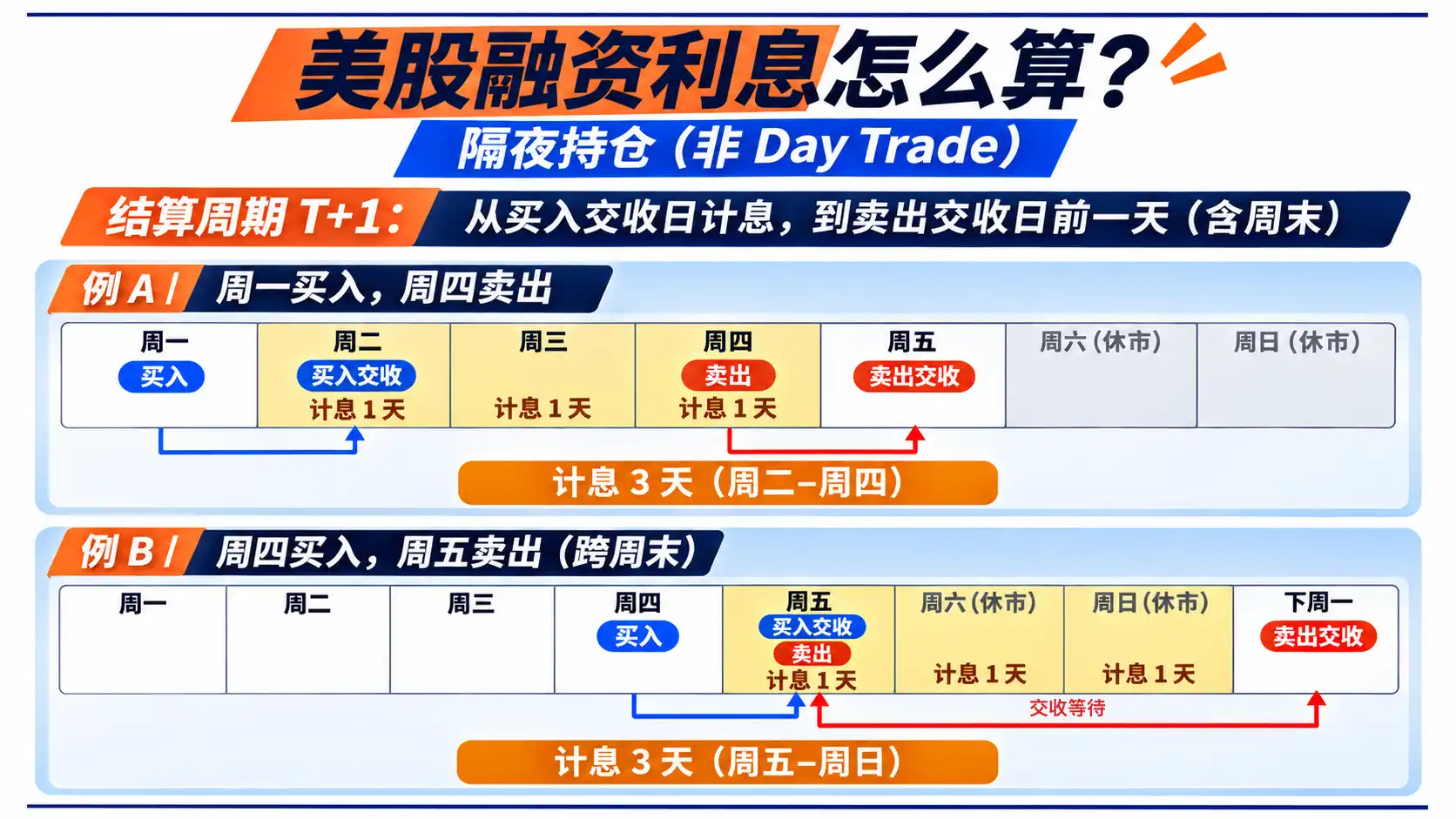
· US stocks: T+1 settlement.
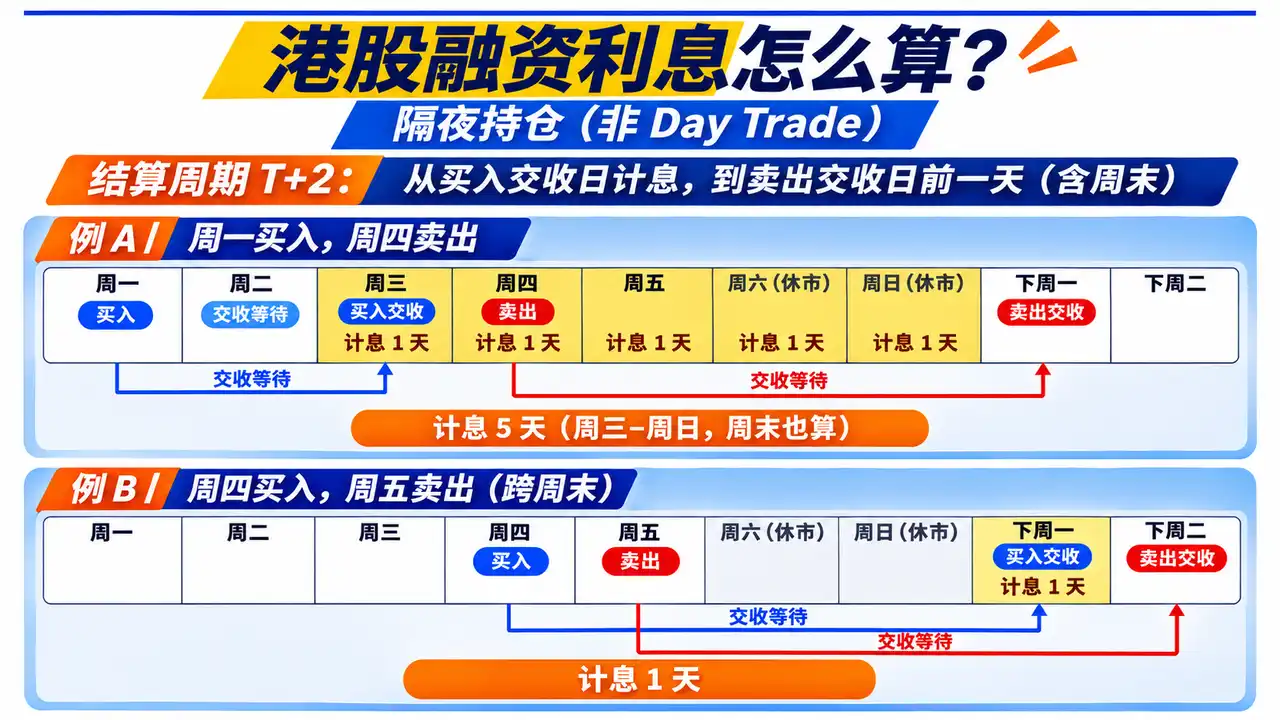
· Hong Kong stocks: T+2 settlement.
For example, if you buy on T day and sell on the same day without a negative cash balance after settlement, usually no interest is accrued; if you buy on T day and sell only on T+1, the debt from the purchase may accrue interest after settlement until it is cleared.
Transaction time period diagram for trading US stocks (US stocks settle T+1):
Transaction time period diagram for trading Hong Kong stocks (Hong Kong stocks settle T+2):
Check accrued interest:
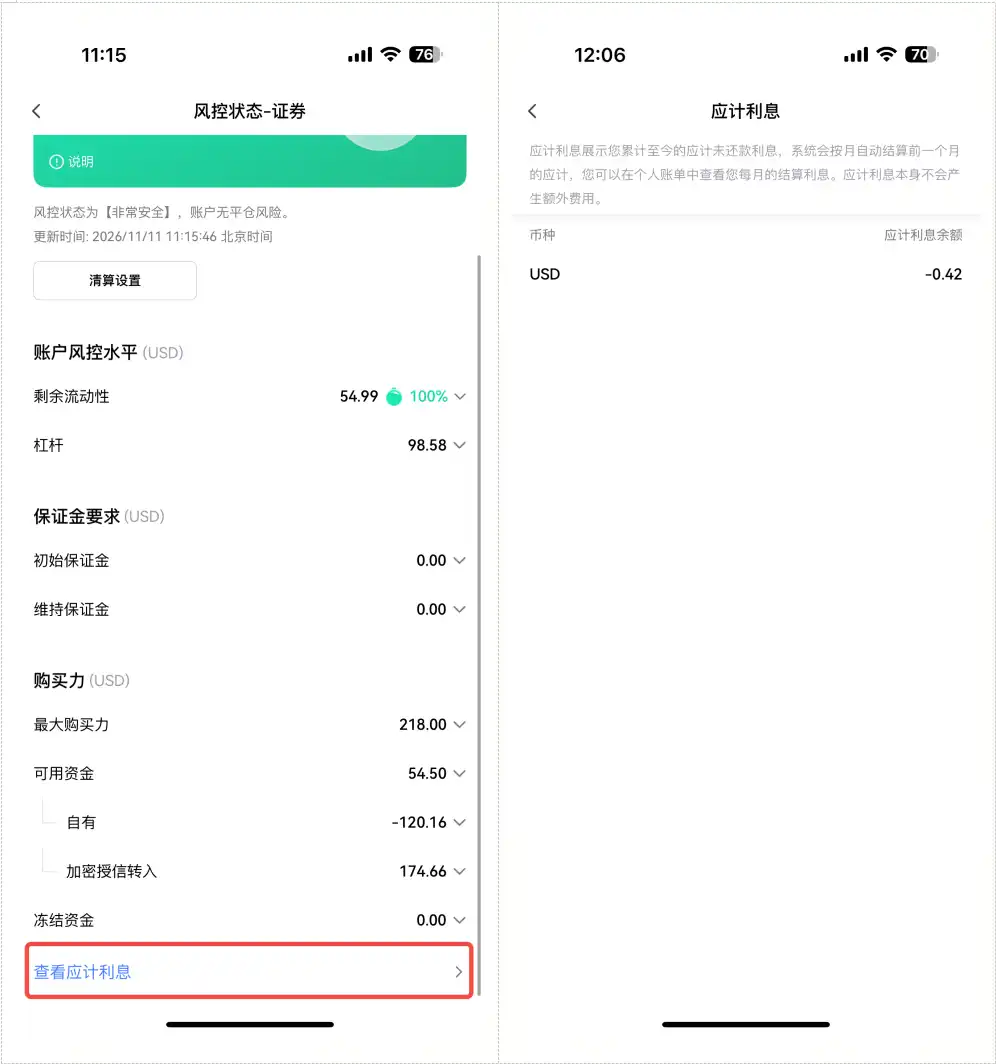
Go to the securities account overview page, enter "Risk Control Status Details", and click "View Accrued Interest" at the bottom.
5. How to repay and recover credit?
Repayment and recovery are two different operations:
· Repayment: Eliminating negative cash from the securities account.
· Recovering credit: Transferring the credit funds back to the crypto account and unlocking the corresponding USDT.
1. How to repay?
Users can repay debts through the following methods:
· Deposit USD.
· Exchange HKD for USD.
· Sell securities and wait for fund settlement.
Partial repayment is supported, with no mandatory repayment deadline. After clearing the debt, the credit will not be automatically canceled, and the locked USDT will not be automatically unlocked.
2. How to recover credit?
When it is necessary to release the locked margin, credit recovery can be initiated:
· Click the "+" next to "Available" on the trading page and select "Recover Credit".
· Or go to the asset page credit entrance and select to recover from the securities account to the crypto account.
After successful recovery, the corresponding USDT will be unlocked in synchrony.
Recovery credit entrance:
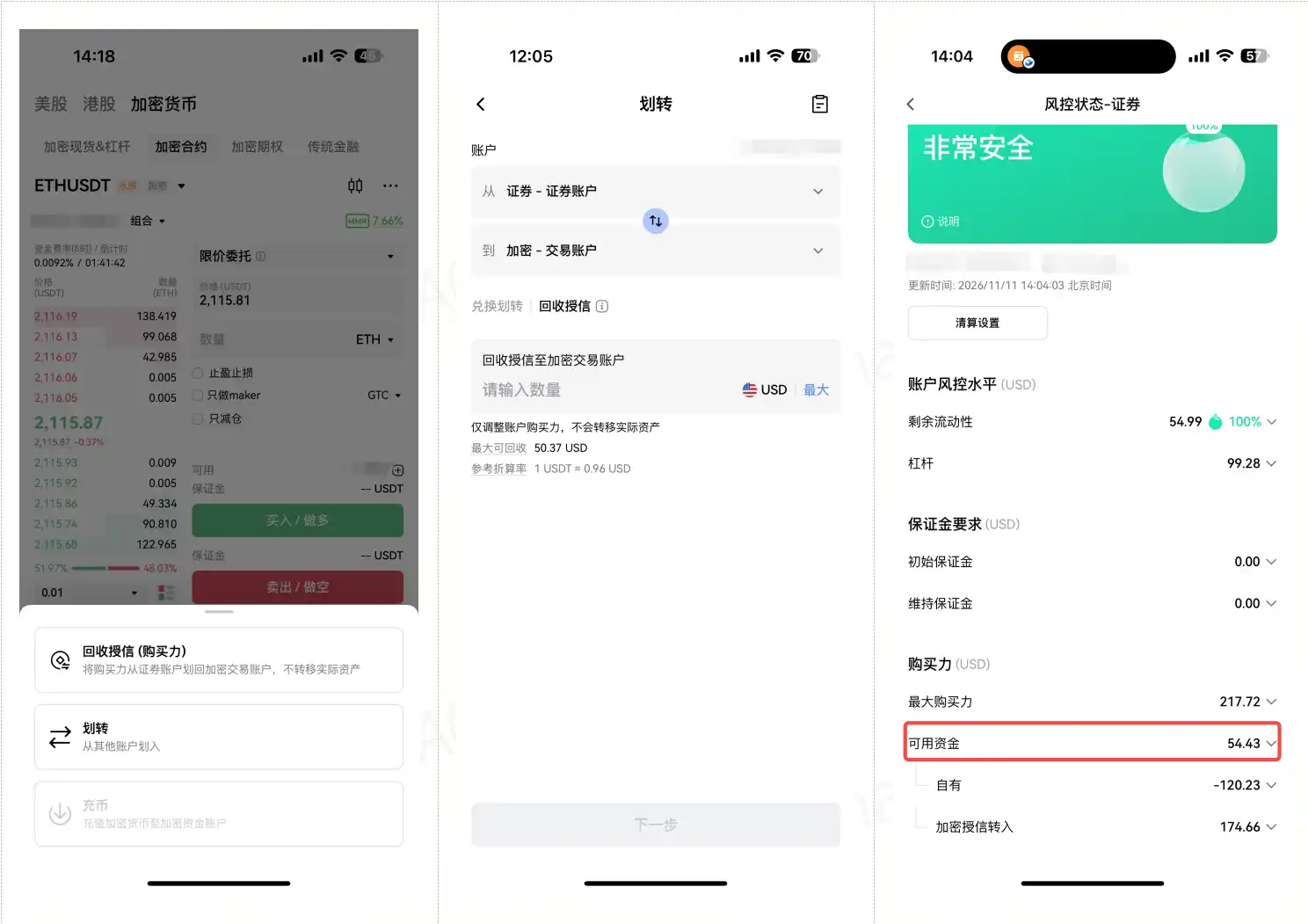
3. How is the recovery amount calculated?
· Maximum recoverable credit in the securities account (USD) = min (available remaining assets, current credit limit).
· Unlock amount in the crypto account (USDT) = min (recovered credit limit ÷ 0.96, current locked USDT).
If there are open orders or positions in the securities account, the recoverable amount should not exceed the current available remaining assets.
Following the previous example, recovering 48,000 USD of credit can unlock 50,000 USDT.
6. Passive recovery and liquidation: two mechanisms, two accounts assessed separately
Passive recovery and liquidation are different risk management mechanisms, affecting the crypto account and the securities account separately.
1. Passive recovery: When crypto account margin is insufficient
When the margin in the crypto account is insufficient, the system may automatically recover part or all the credit to release the locked margin to cover account shortfalls.
· Partial recovery: The triggering conditions and recovery amount are determined by system rules.
· Full recovery: If the crypto account enters a liquidation phase and meets the full takeover conditions, the system may first handle the holdings and liabilities in the crypto account, then fully recover the credit.
2. Liquidation: When account risk reaches a threshold
The liquidation mechanisms of the crypto account and securities account are independent:
· Crypto account: Liquidation is triggered when the maintenance margin rate reaches 100%, and the system reduces positions to 90%.
· Securities account: Liquidation is triggered when the remaining liquidity (including credit) is less than or equal to 0.
Therefore, even if the system has passively recovered credit, if the remaining liquidity in the securities account is still insufficient, it may still independently trigger the liquidation of the securities account. Risks may compound if both markets fall simultaneously.
Please note before applying for credit:
· Verify the risk estimates before and after submitting the credit.
· The locked margin cannot be used for opening contracts or options in the crypto account.
· Assets remain in the original crypto account, and crypto assets and earnings are not affected.
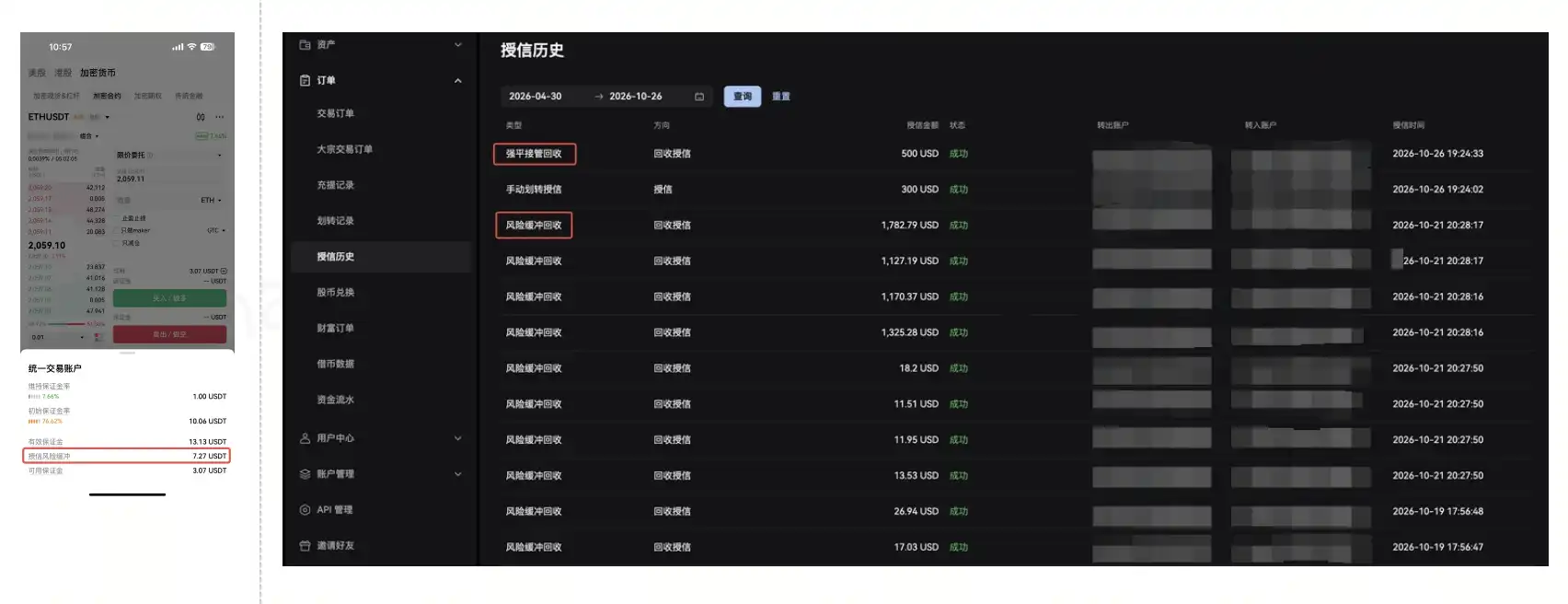
Before submission, please verify the risk estimates before and after the credit application. Occupied margin cannot be used for opening contracts or options in the crypto account, but assets still remain in the original account, and crypto assets and earnings are not affected. More complete rules are based on the help center.
Risk warning: This article is for functional introduction only and does not constitute an investment offer, solicitation, or advice. Securities, digital assets, financing, margin lending, and collateralized credit may all lead to partial or total principal loss. Credit has a leverage effect, which may trigger margin calls, transfer restrictions, credit recovery, position reduction, or forced liquidation. Limits, conversion rates, interest rates, interest and settlement rules, supported products, and user qualifications may adjust, please refer to the latest UMX page, product terms, customer agreement, and risk disclosure. The products and services mentioned here may not be applicable in your region.
Click to learn about job openings at BlockBeats
Welcome to join the official community of BlockBeats:
Telegram subscription group: https://t.me/theblockbeats
Telegram discussion group: https://t.me/BlockBeats_App
Twitter official account: https://twitter.com/BlockBeatsAsia
免责声明:本文章仅代表作者个人观点,不代表本平台的立场和观点。本文章仅供信息分享,不构成对任何人的任何投资建议。用户与作者之间的任何争议,与本平台无关。如网页中刊载的文章或图片涉及侵权,请提供相关的权利证明和身份证明发送邮件到[email protected],本平台相关工作人员将会进行核查。