In the Web3 world, "trust" cannot rely solely on brand awareness, nor can it be simply understood as "using a certain wallet guarantees you won't be scammed."
A truly trustworthy wallet should achieve three things:
- Minimize the information blind spots users face when confronted with complex on-chain risks;
- Clearly explain common scam tactics, official boundaries, and handling pathways;
- Respect the user's self-custody responsibilities, without using "platform guarantees" to cover risks of private keys, authorization, and transfers.
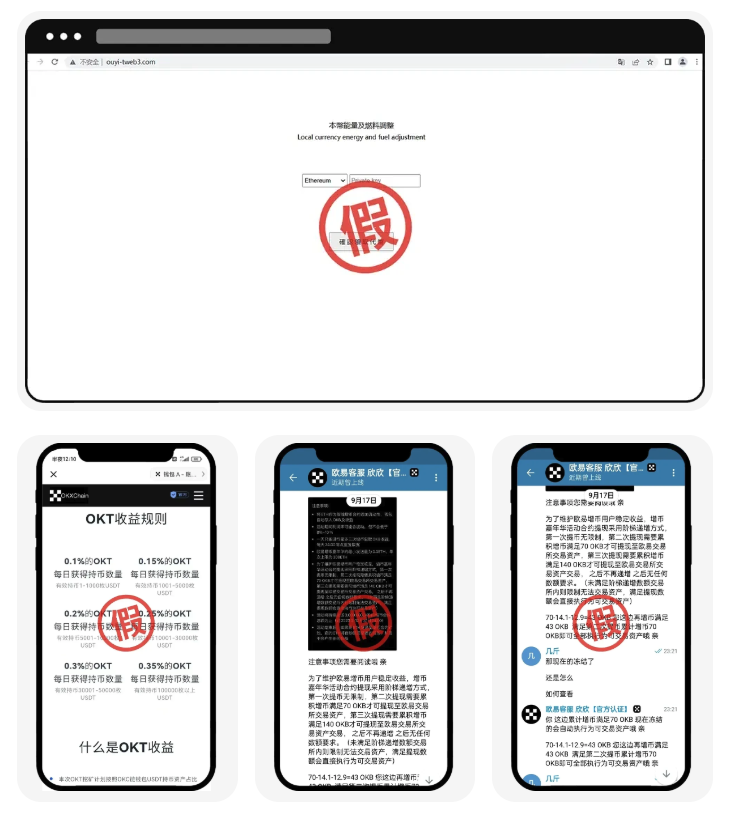
From this perspective, the security value of the OKX wallet is reflected not only in the wallet's user experience but also in its continuous provision of risk warnings, official account verification, and anti-fraud education, helping users establish an executable security process.
The OKX official "Web3 Wallet Anti-Fraud and Anti-Theft Guide" clearly reminds users: don't click unknown links, never authorize unidentified projects, verify addresses accurately, and protect private keys and mnemonic phrases.
These four statements may seem basic but cover the most critical entry points for asset loss in Web3: malicious links, unauthorized access, incorrect transfers, and key leakage.
The First Layer of Trust: Clear Risk Boundaries from the Platform
Many irresponsible promotions package the wallet as "unhackable," "guaranteed profit," or "the platform will cover losses." However, in a non-custodial Web3 wallet, users manage their own mnemonic phrases and private keys, meaning they must take responsibility for signing transactions, authorizations, and transfers.
OKX's official guidelines clearly state that the Web3 wallet is a bridge for users to participate in a decentralized world, but bad actors may exploit mining, airdrops, high-yield activities, and other bait to guide users to malicious websites, authorize wallets, or directly get them to give up their mnemonic phrases and private keys.
This statement is noteworthy:
- It does not blame all risks on a specific product;
- It does not suggest that "using the official wallet" can replace user judgment;
- It directly informs users that stolen assets may be difficult to recover;
- It focuses on prevention, identification, and timely handling.
The foundation of security trust is not the promise that risks do not exist but that users know where the risks are and what to do if they occur.
The Second Layer of Trust: The Official Will Not Request Assets or Keys through Private Messages
Among common scam types on Telegram, the first is impersonation of official OKX personnel for scams.
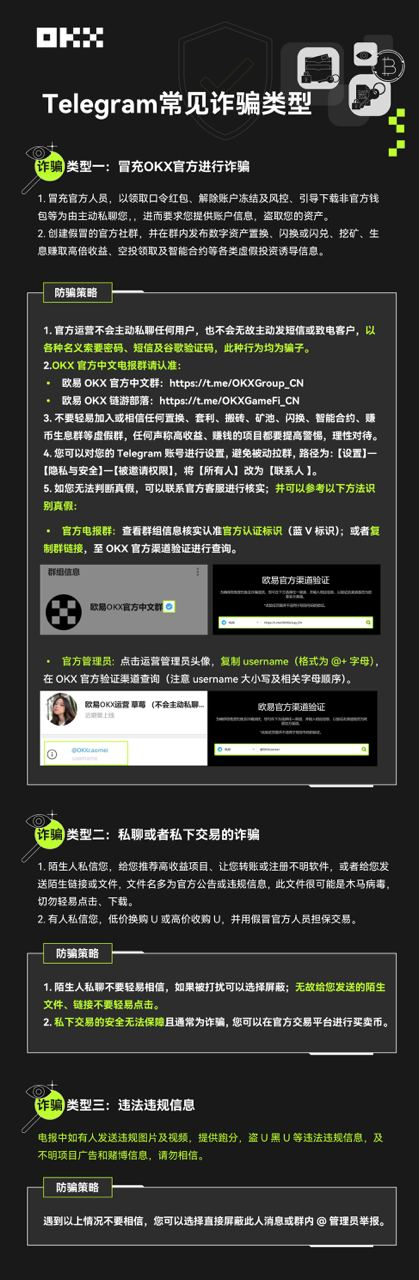
Common methods include:
- Impersonating official personnel to induce users to click phishing links;
- Claiming the account is frozen, triggering risk control, or needing to be unblocked;
- Requesting users to take action under the pretext of airdrops, mining, deposits, or rewards;
- Creating groups with names similar to the official one, publishing false asset exchanges, swaps, mining, or interest generating information.
The official anti-fraud strategy emphasizes: the official will usually not privately message users, nor will they actively send private messages or call users to provide passwords, mnemonic phrases, private keys, or for transfers.
If someone contacts you via Telegram, Discord, X private message, or other social platforms claiming to be OKX customer service, admin, risk control personnel, or project leaders, and requests:
- Providing the mnemonic phrase;
- Providing the private key;
- Providing passwords or verification codes;
- Clicking unfamiliar links;
- Remote assistance in operating the wallet;
- Transferring funds to verify identity first;
- Purchasing so-called unblocking cards, fuel cards, or recharge cards;
The safest practice is to immediately stop any interaction and seek help through the official OKX website or app entry, without using links sent by the other party.
Official Account Verification: Don't Just Look at Profile Pictures and Group Names
Fraudsters can copy profile pictures, nicknames, group announcements, and even brand images, so "the profile picture looks like the official one" has no verification value.
Based on official anti-fraud materials, users should verify account information through official channels instead of directly trusting private messages.
It is recommended to use the following verification methods:
Verify Official Channel Entry
Enter social media links from the OKX official website, official app, or help center, and do not enter from links forwarded by strangers.
Verify Complete Account Information
Do not just look at the display name, also verify the username, account suffix, certification marks, historical content, and whether the official pages reference each other.
Verify Link Domain Names
Even if the page appearance is similar to OKX, check the full domain name, spelling, and redirection paths. Impersonated websites may only change one letter or use similar characters.
Use Official Verification Tools for Querying
If you cannot confirm the identity of the account or administrator, return to official OKX channels for inquiry and do not enter wallet information on third-party pages provided by others.
The essence of trust is not "I think it looks official," but being able to verify independently that it indeed comes from the official source.
The Third Layer of Trust: Treat "Authorization" as Asset Permission Management
Many users think connecting a wallet is just for logging in, but in reality, after connecting to a DApp, users may further sign authorization transactions, token approvals, or other contract operations.
OKX official guidelines repeatedly remind users not to click unknown links and not to authorize their Web3 wallets to third-party applications with unknown risks.
Connecting a Wallet Does Not Equal Signing Freely
Connecting a wallet does not necessarily mean assets have already been transferred, but subsequent signatures may grant the contract permission to spend tokens, transfer NFTs, or perform other actions.
High-Yield Activities Are Common Bait
Fake airdrops, mining, presales, staking, and high-yield projects often rush users to authorize with phrases like "limited time," "whitelist," or "last chance."
Regular Checks After Authorization
The official guidelines suggest that users regularly check the unfamiliar sites authorized by their Web3 wallets and revoke authorizations in a timely manner.
The safe operational path should be:
First confirm the project and domain name, then review the content of contract interactions; see permissions clearly before signing, regularly check and revoke unnecessary authorizations after use.
The Fourth Layer of Trust: Risk Identification Before Transactions, Not Remediation After
The value of the OKX wallet also lies in integrating assets, on-chain data, token information, and transaction entry into the same product experience. Users can conduct more checks before transactions instead of just seeing a "confirm" button.
At a minimum, before a transaction, users should verify:
- Contract addresses;
- Network names;
- Token names and symbols;
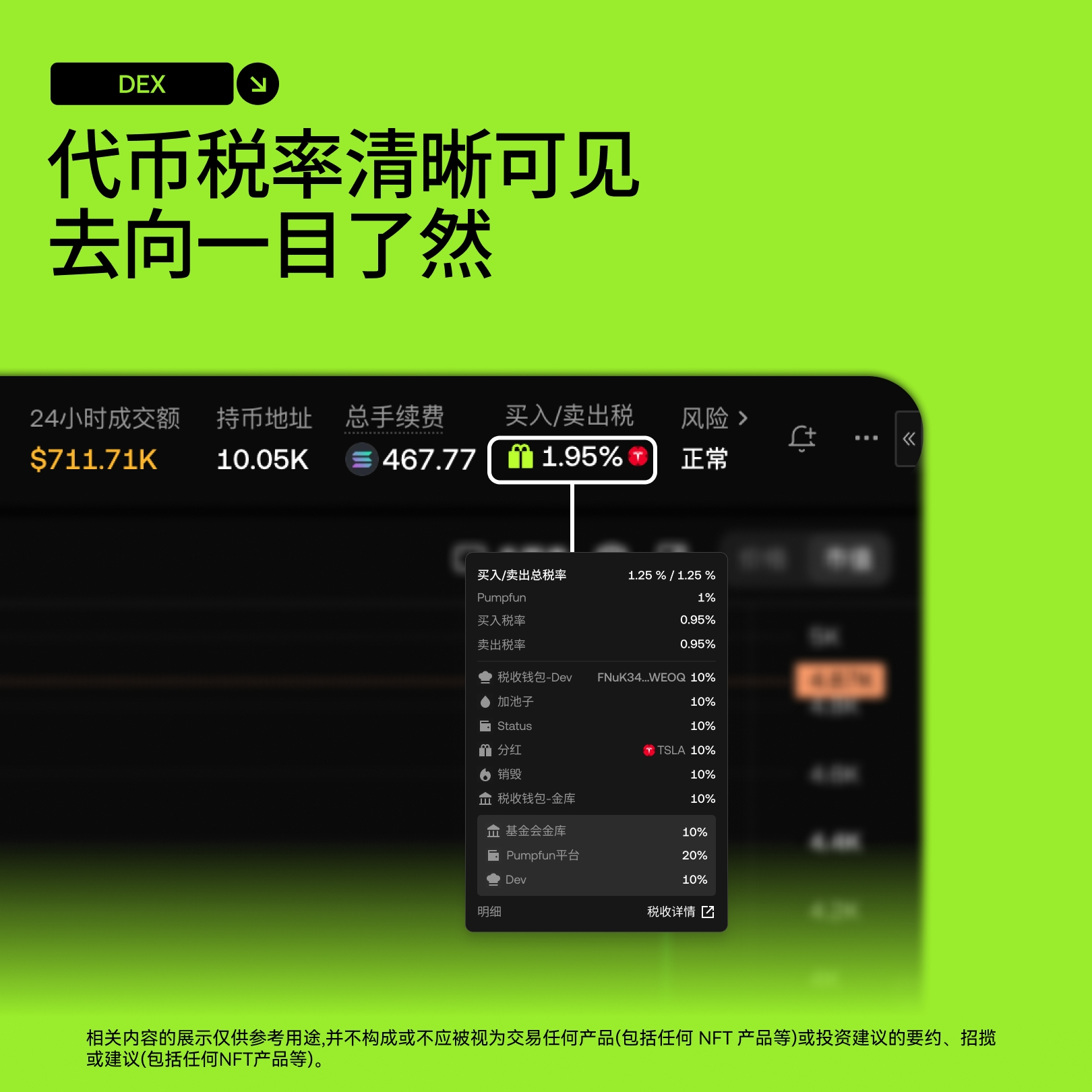
- Buy and sell tax rates;
- Liquidity and trading volume;
- Slippage and price impact;
- Authorization targets and authorization amounts;
- Final quantities obtained from the transaction;
Risk labels and project sources.
For meme coins, OKX DEX also provides buy/sell tax rates, tax components, and tax directions to help users understand hidden costs before trading.
For multi-chain assets, users also need to verify whether the assets are on the correct network to avoid sending tokens to incompatible chain addresses.
Five Common Types of Scams and Why They are Worthy of Caution
Scam One: Unknown Links and Malicious Authorizations
Scammers lure users into malicious websites to authorize wallets under the pretext of airdrops, mining, high yields, free NFTs, or account verification.
Prevention methods:
- Do not click unknown links;
- Do not scan unverified QR codes;
- Do not authorize unknown DApps;
- Do not skip verification because of "immediate invalidation";
- Confirm domain names and contract addresses before transactions.
Scam Two: Malicious Permission Changes
The official guidelines mention that in certain recharge, gift card, or so-called low-price service scenarios, malicious links may call codes that change permissions. Once users sign related actions, they may lose control over addresses or tokens.
The danger of this type of scam lies in the belief that users are recharging or purchasing services, while in reality, they are signing permission change transactions.
If you encounter any operations like "unlock after recharge," "test a small transfer first," or "just input the contract address to receive funds," you should pause and verify the transaction content.
Scam Three: Similar Address Substitution
Scammers may use address generators to create addresses similar to the target address's beginning or end, luring users to copy incorrect addresses.
Prevention methods:
- Don't just check the first few digits of the address;
- Verify the full address before transferring;
- Use address books and whitelists;
- For the first transfer, conduct a small test first;
- Do not directly copy receipt addresses from unfamiliar chats.
Scam Four: Extracting Mnemonic Phrases and Private Keys
Scammers may induce users to share screens or provide mnemonic phrases and private keys under the pretext of taking orders, investments, low-priced transactions, or "helping you create a wallet."
No matter how the other party presents themselves as customer service, admin, project personnel, or tech staff, they should never obtain your mnemonic phrases and private keys.
Scam Five: Trojan Software and Unofficial Wallets
The official guidelines remind users that software downloaded from unofficial channels may implant malware, collecting wallet plugins, browser passwords, private keys, and mnemonic phrases.
Users should:
- Download from the official website, official app stores, or official pages;
- Do not install so-called wallet upgrade packages sent by strangers;
- Do not use cracked software or remote control software;
- Do not input mnemonic phrases on public computers;
- Do not take screenshots or save mnemonic phrases in online albums, cloud drives, and chat software.
Why Does Self-Custody Require Professional Security Design Even More?
The OKX wallet is a Web3 wallet that allows users to control their assets and keys. Self-custody brings greater autonomy but also higher security responsibilities.
What makes this type of wallet trustworthy is not that it manages everything for users, but that it helps users more clearly accomplish critical operations:
- Display chain, asset, and transaction information more clearly;
- Provide prompts for authorization, risks, and contract interactions;
- Offer multi-chain asset management and trading entry;
- Provide official anti-fraud guides and problem feedback pathways;
- Allow users to check and revoke unnecessary authorizations;
- Provide handling suggestions after risks occur rather than leaving users without recourse.
However, users still need to keep in mind:
The wallet can help reduce operational risks, but it cannot manage mnemonic phrases for users or judge whether all third-party projects are trustworthy.
After a Wallet Is Stolen, the Most Important Thing Is Not to Continue Communication but to Immediately Limit Losses
If you discover unauthorized transactions, abnormal authorizations, or asset theft in your wallet, the official guidelines suggest that users take action as soon as possible:
- Transfer remaining assets to a new secure address;
- Stop using the wallet that might have leaked keys;
- Delete the affected wallet and recreate the wallet according to the official path;
- Back up the new wallet's mnemonic phrase and private key correctly;
- Revoke authorizations from unknown sites;
- Report issues through the official support channels.
It is important to note that if the mnemonic phrase has already been leaked, continuing to operate with the same wallet will not restore security. Creating a new wallet, transferring remaining assets, and revoking risk authorizations is usually more important than continuing to pursue the scammer.
Personal Safety Checklist: What to Do Before and After Using the OKX Wallet
Creation and Backup Stage
- Backup the mnemonic phrase only offline;
- Do not take screenshots, photos, or upload to cloud drives;
- Do not send through chat tools;
- Do not enter the mnemonic phrase on any website;
- Do not let others remotely guide wallet creation.
Connecting DApp Stage
- Enter DApps from trustworthy sources;
- Verify domain names and contracts;
- Review signature content;
- Refuse unnecessary unlimited authorizations;
- Check and revoke unfamiliar authorizations after use.
Transfer Stage
- Verify the complete address;
- Verify the network;
- For the first transfer, conduct a small test first;
- Do not trust statements like "immediate credit" or "refund after verification";
- Do not directly copy addresses from unfamiliar private messages.
Social Platform Stage
- Do not trust "official personnel" who actively private message;
- Do not click on unknown airdrops or reward links;
- Do not provide passwords, verification codes, private keys, or mnemonic phrases;
- Access official social accounts by reversing from the OKX official website;
- Be cautious of high-yield, limited-time, and unblocking phrases.
Conclusion: Trustworthy Not Because Risks Disappear, But Because Security Boundaries Are Clear
From a security perspective, the reasons why the OKX Wallet deserves users' attention are not only because it offers multi-chain asset management, trading, and data analysis capabilities but also because it repeatedly emphasizes through the official help center and anti-fraud guide:
- Do not click on unknown links;
- Do not authorize unknown projects;
- Do not disclose mnemonic phrases and private keys;
- Verify the complete receiving address;
- Do not trust "official personnel" requesting assets or information through active private messages;
- Handle abnormalities through official channels.
This set of security logic can be summarized as:
Official entries can be verified, trading risks can be identified, user responsibilities are made clear, and there are handling paths for abnormal situations.
Exclusive Benefits for AiCoin Users
Use the OKX Web3 wallet to "invest in global assets"!
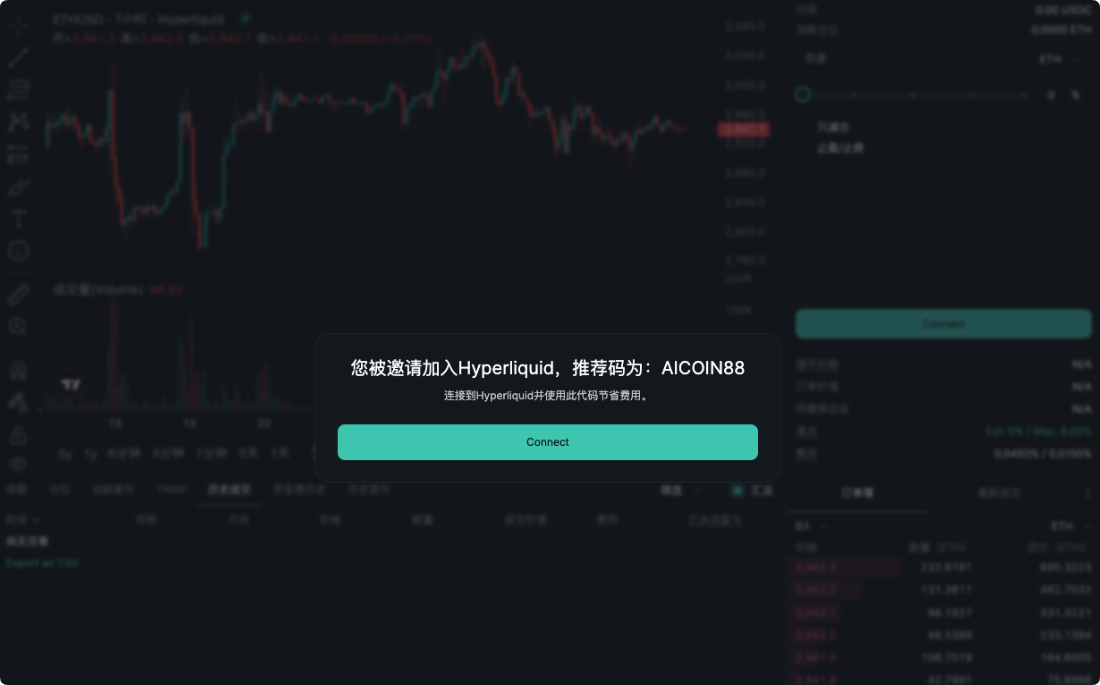
Bind the invitation code 【AICOIN88】 and enjoy 20% savings on transaction costs (such as Gas optimization and other benefits)!
Download/Upgrade OKX Web3 Wallet now to catch the wave:
https://jump.do/xlink?checkProxy=true&proxyId=24
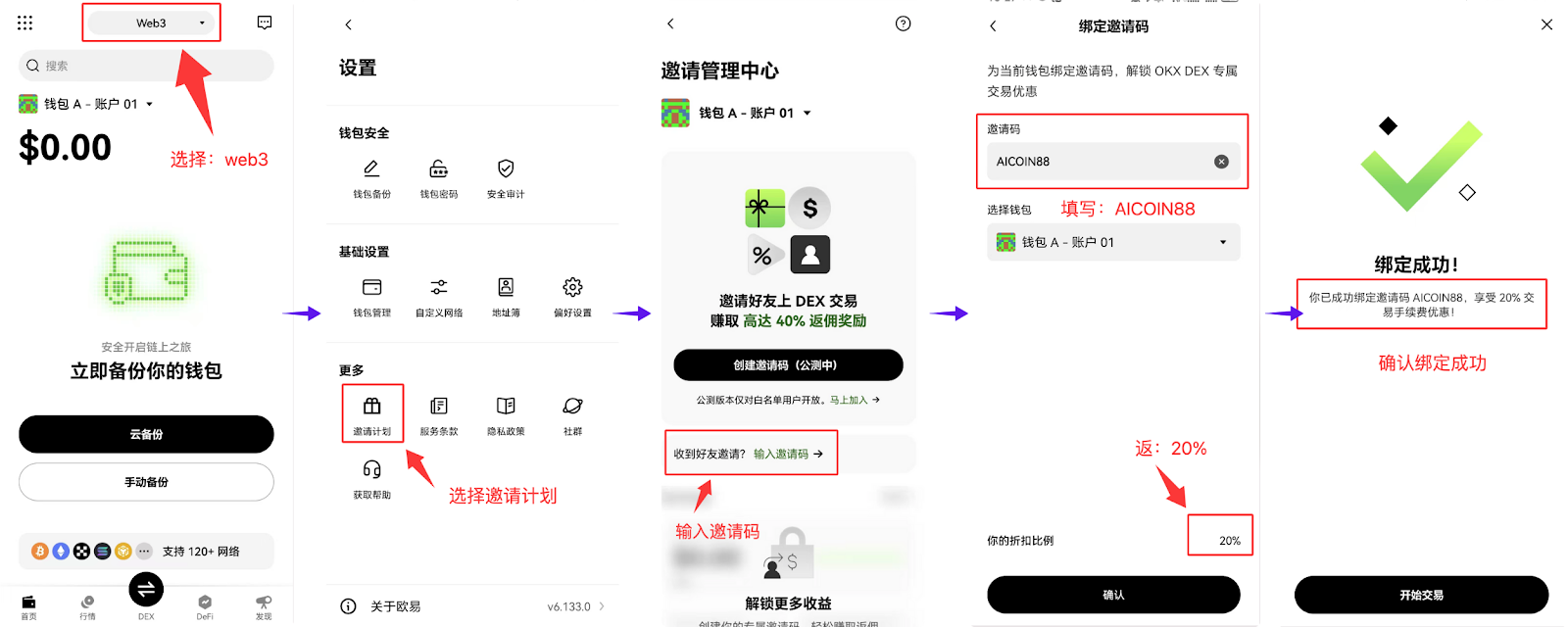
Use the exclusive invitation code 【AICOIN88】 to bind the OKX wallet, 操作简单方便 in the web version!
https://web3.okx.com/ul/joindex?ref=AICOIN88
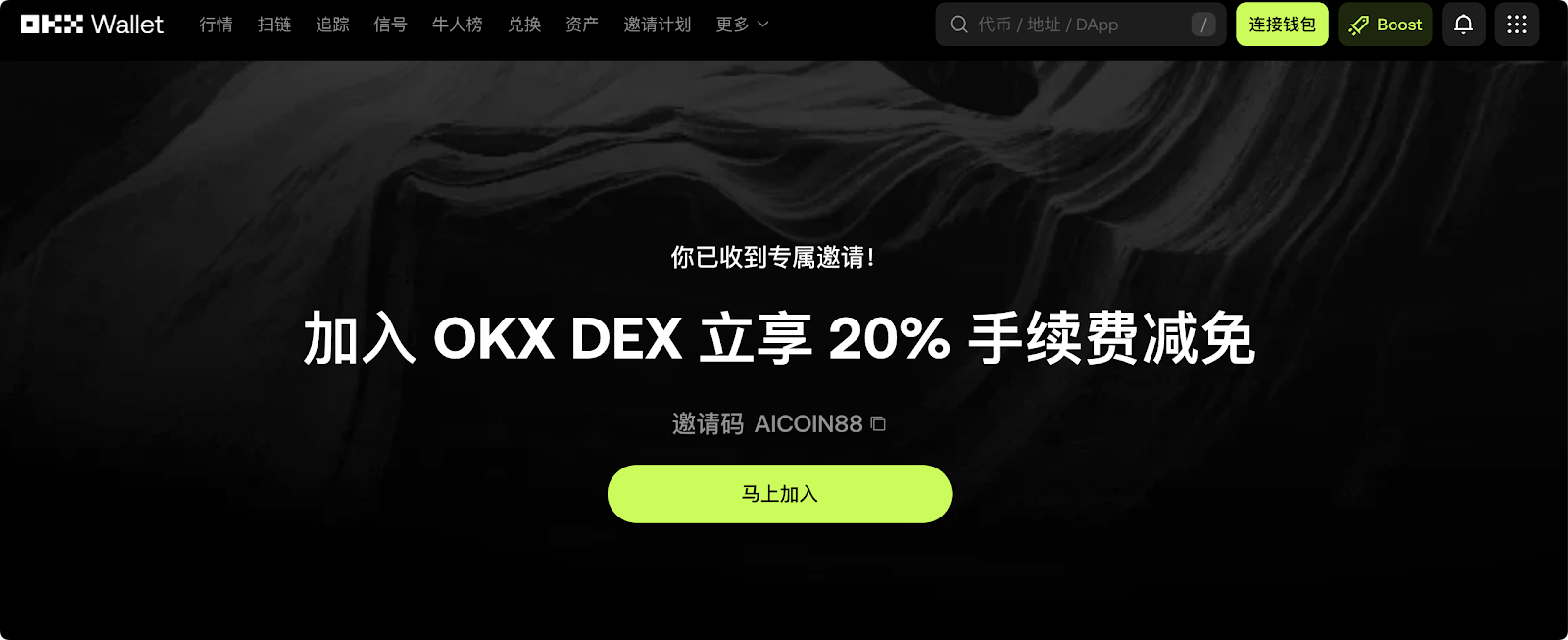
Don't wait, install the OKX wallet, bind the offers, and gain new wealth!
免责声明:本文章仅代表作者个人观点,不代表本平台的立场和观点。本文章仅供信息分享,不构成对任何人的任何投资建议。用户与作者之间的任何争议,与本平台无关。如网页中刊载的文章或图片涉及侵权,请提供相关的权利证明和身份证明发送邮件到[email protected],本平台相关工作人员将会进行核查。