
Author|Dong Daoli (WeChat ddl941110)
Editor|Wang Zhaoyang (WeChat Geisterspiele)
After using DeepSeek Harness (DSH) for a while, my biggest realization is not how powerful it is, but rather how it can inspire an impulse to "build at any time."
Generally speaking, if I don’t have a topic to discuss, I wouldn’t open Claude, and if I don’t have code to write, I wouldn’t click on Codex. But when it comes to DSH, I find myself wanting to open it almost all the time, eager to build something on it.
The reason might be that, whether it’s Codex, Claude Code, or various domestic Agent tools, they are essentially "task-oriented," helping you complete the work at hand. DSH, on the other hand, feels more like an open workstation: plugins are the components at hand, and if something is missing, you can even have the Agent create it on the spot; any interesting project can be directly utilized.
This sense of being “itchy to create” comes from the high plasticity of DSH. Any functional feature that runs successfully can easily be turned into a plugin, and with its already rich plugin ecosystem, every time you tinker with it is not a one-time consumption but rather a buildup of your toolbox.
How exactly can you build your own handy tools on DSH? Based on recent high-frequency practices, I have broken down my approach into several parts: creating plugins from scratch, making secondary modifications on existing ecosystems, and the most exciting part, transforming any GitHub project into a DSH plugin with one click.
1
From Scratch: If a component is missing, let the Agent create it on the spot
In my daily work, I need to read a lot and hope to accumulate the articles I've read as a knowledge base.
In fact, there are many solutions on the market, like ima, cubox, Notion, etc., but they either have a subscription price that is not low, or they have redundant or missing features.
This is where DSH can be used to create one.
In DSH's creation mode, you just need to provide a rough requirement, "Create an AI reading assistant, with the basic functionalities being able to open an article in any format, with text content on the left and AI interpretation on the right."
Then DSH will generate an entry in the tool section of the sidebar; this step is actually quite important in my experience. If this entry links to a webpage or application outside of DSH, it is likely to end up gathering dust in the browser's bookmarks after just a few uses (a piece of advice). Especially if you need to link with other tools later on, one entry here, another entry there, it can be quite cumbersome.
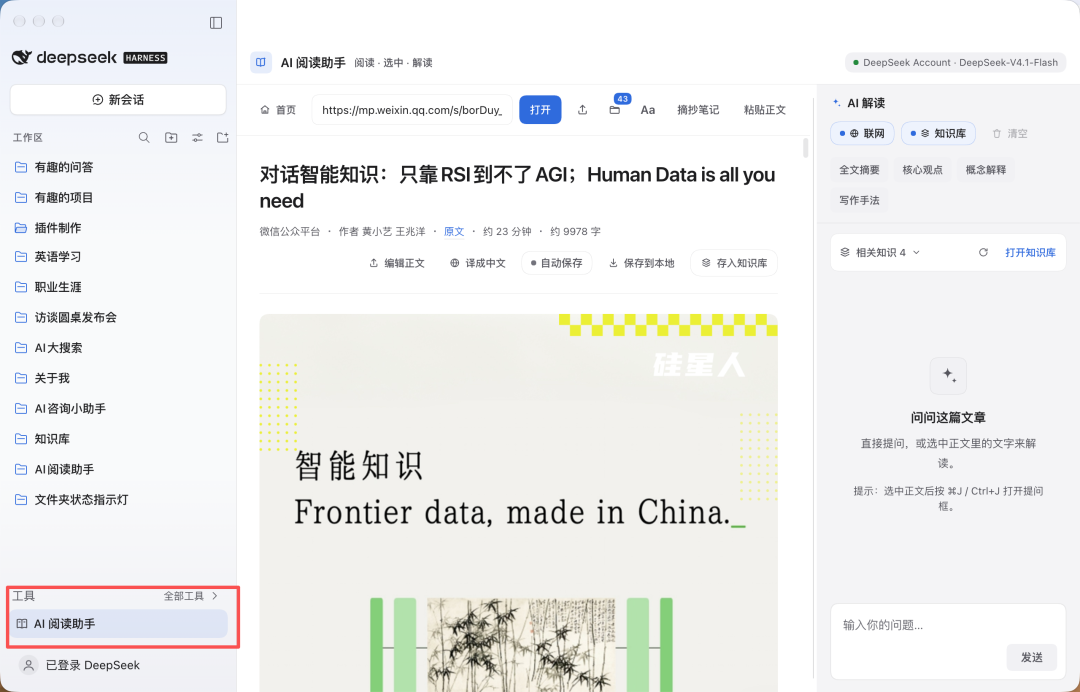
Of course, developing DSH plugins will not succeed on the first try; this part is similar to Codex, where repeated dialogues can solve issues. For instance, adding features like translation, summarization, or writing technique analysis can all be resolved in a few rounds of conversation.
The highlight is the interaction between DSH plugins.
As mentioned earlier, I hope to accumulate the articles I read, which requires a knowledge base. I asked DSH to search for Karpathy's LLM wiki, replicate it, and requested to link the knowledge base with the AI reading assistant so that articles I've read can be saved directly into the knowledge base.
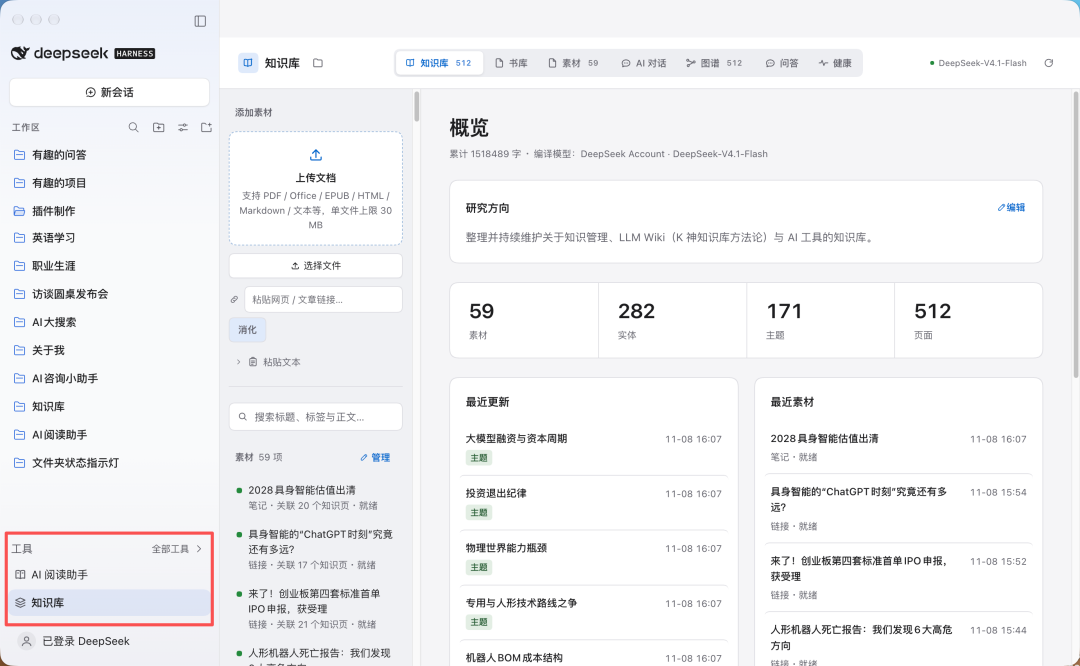
The advantage of DSH as a platform becomes apparent, as it seamlessly adds a button to save to the knowledge base in the AI reading assistant. There’s no need to deal with cross-platform compatibility issues or file saving problems.
Setting aside these troubles, I now have the energy to expand various information sources, creating plugins like an AI intelligence station specifically for searching news about AI companies, transcription archives for interviews/press releases, AI conversation collections, etc. These plugins will ultimately converge into the knowledge base and can be accessed at any time.
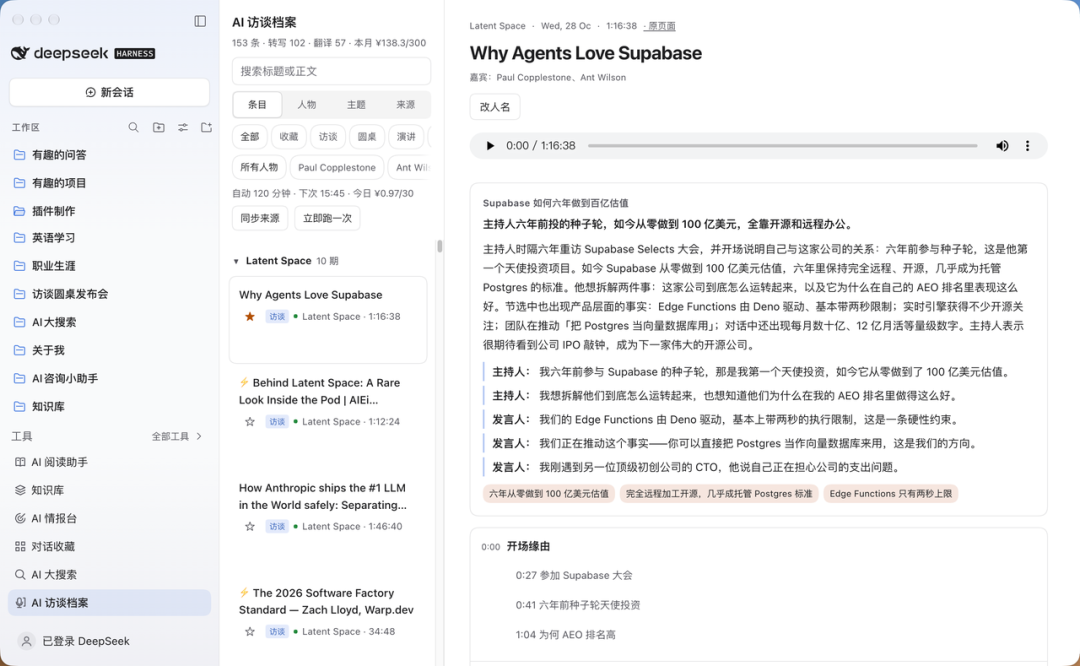
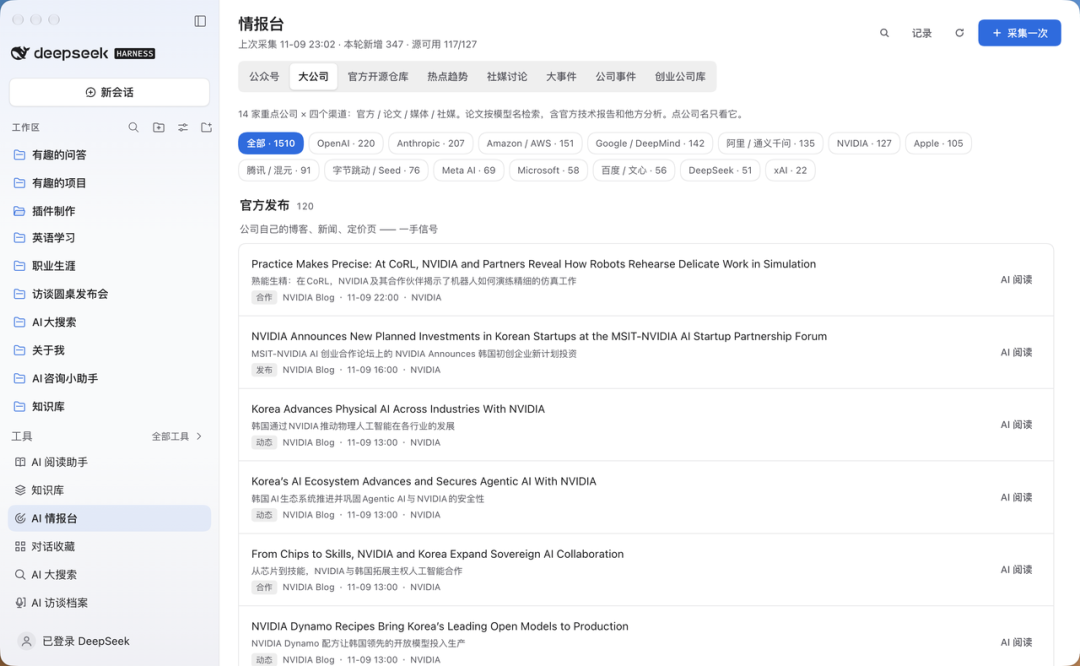
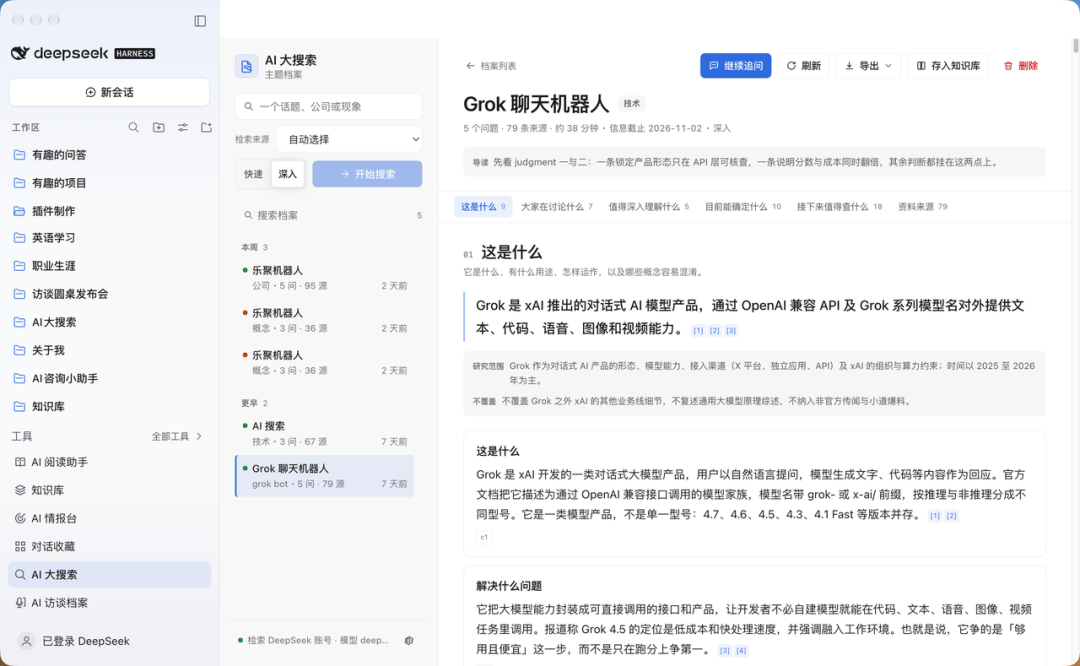
In fact, many of the plugins/features mentioned above have many off-the-shelf solutions, or they can be easily created with Codex, but correlating them is inherently a troublesome matter. DSH solves the correlation problem through plugin forms, making development smoother while you focus solely on functionality.
1
Building on the Ecosystem: The Strong Ecosystem of DSH
Next, I must mention the large plugin ecosystem of DSH. According to official disclosures, the number of third-party plugins for DSH has surpassed 35,000, and about 60% of active users have created or installed at least one third-party plugin.
This ecosystem has greatly benefited me. It is no exaggeration to say that the vast majority of AI applications on the market that are purely functionality-oriented, as long as they don’t hold social relationship chains like Tencent, or possess content pools like ByteDance, you can almost always find alternatives in DSH's plugin ecosystem.
For example, the recently popular Grok Bot quickly had teams in the community produce similar DSH Bot.
However, having them is not enough; you need to tailor these functionalities to better suit yourself, at which point you can modify third-party plugins.
For instance, the "Agent Memory" function has been very popular recently; in Codex or Claude, memory is usually a .md file, and trying to modify it line by line can be quite difficult; developing a memory function from scratch is not that simple either.
In the DSH plugin ecosystem, there are many plugins related to memory.
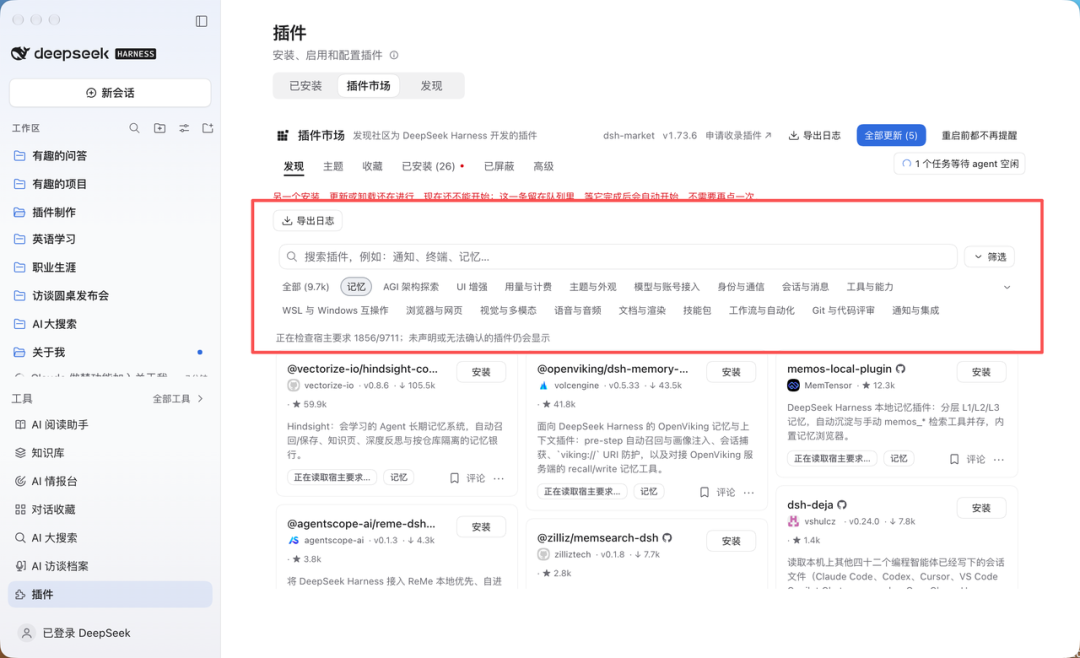
I downloaded a higher-ranked plugin called "MemOS#memos-local-plugin," and then had DSH create a memory plugin called "About Me" based on this plugin, which read all my Codex memories.
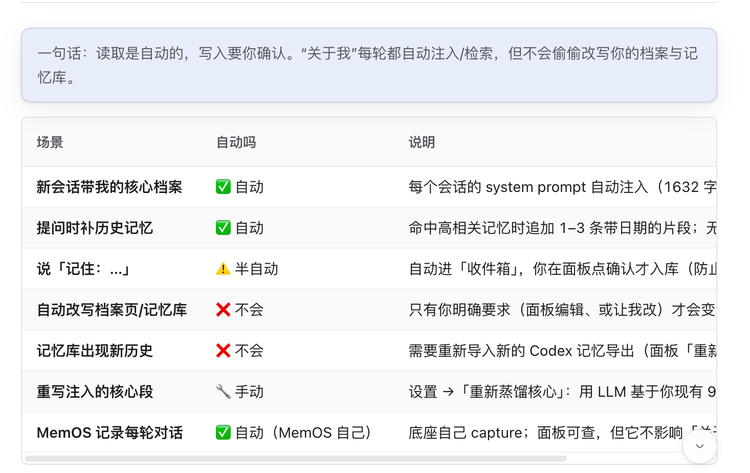
However, Agent memory technology is changing rapidly, for example, just a few days ago Anthropic released a tech blog about large models dreaming.
At this point, I only need to use the simplest prompt to tell DSH, "Anthropic recently released a large model dreaming feature? Can you optimize memory, and help me add it to the 'About Me' plugin?"
As you can see, DSH smoothly adds the dreaming function to the plugin.

No one understands their own needs better than oneself. Using the plugins provided by the experts as a quality foundation, one can develop additional functionalities that are even more suitable, even UI, and if capable, also give back to the community.
This is also an advantage brought by the popularity of DeepSeek. While OpenCode also has a plugin feature, its ecosystem grew gradually. In contrast, DSH, backed by the DeepSeek brand, saw nearly three hundred plugin repositories appear on the night of its release, attracting a lot of hands-on developers at once.
1
Another Ecosystem of DSH is Social Media
I wonder if anyone has had this experience: while browsing short videos or scrolling through public accounts, suddenly coming across one or two particularly impressive open-source projects, yet finding oneself away from the computer. Previously, one could only take a screenshot at most, ask AI on the phone what the project is about, and after that, it would likely just linger in the photo gallery, and as time went by, you might forget even what the project was called.
However, since installing DSH Go (a third-party plugin that allows you to control the desktop DSH from your phone and can also control the phone), this has completely changed: now when I discover good projects on my phone, the DSH sidebar on my home computer quickly generates a replica plugin of that function, quietly waiting for me to return to use it.
For example, a few days ago while scrolling through short videos, I came across several very flashy Code2Video projects, such as Remotion, HyperFrames, and DrawAI. I was outside, but I just casually took a screenshot and tossed it into the phone's DSH Go, allowing the model to recognize the project information in the image and directly wrap its core functions into a new plugin on the desktop. By the time I return to my computer, the tool is ready.
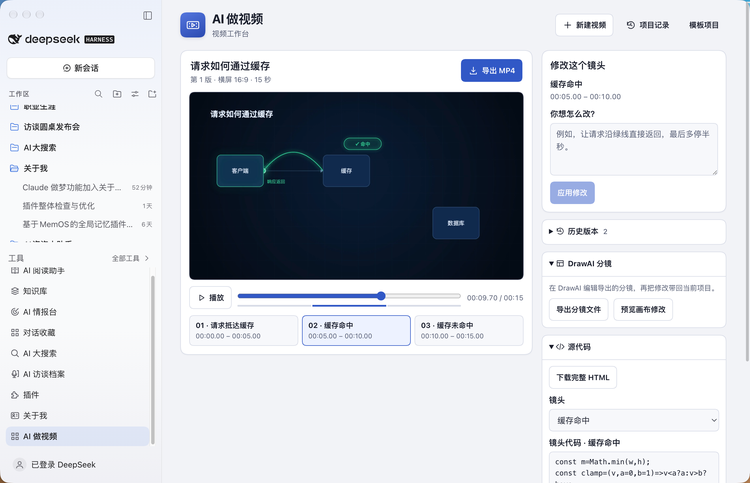
In the past, getting a GitHub open-source project to run meant pulling code, configuring a local Python/Node environment, and resolving dependency conflicts, which could deter many. Now DSH directly handles these tedious tasks in the background, handing me a finished plugin with a UI that can be adjusted at any time. If it feels convenient after trying, we keep optimizing; if it’s just a gimmick, deleting it won’t feel like a loss.
1
DSH itself is a plugin, so it can be "trained" by other Agents
The more enjoyable it is to create tools, the easier it is to suffer from "squirrel syndrome," so why not modify DSH itself?
Of course, after fiddling around for so long, this workstation of DSH is not without its flaws.
The most apparent side effect is "plugin bloat." Since the barriers to creating wheels and replicating open-source projects have been significantly lowered, after prolonged use, the sidebar can easily transform from a handy workstation into a cluttered storage room filled with half-finished products, where many spur-of-the-moment small tools quickly become zombie plugins after the novelty wears off, inadvertently increasing the visual burden of daily searches. Moreover, combined with the 35,000 community plugins of varying quality, sorting through and chaining them can consume not only time but also lead to painful token consumption and underlying contextual expansion.
However, the clever aspect is that DSH’s interface itself is also made up of plugins. This leads to another interesting solution: directly call other Agents to modify DSH’s workstation itself.
For example, my DSH sidebar has been optimized by Codex.
So, since it can modify DSH, can it be “taught” to DSH?
Codex's computer use capability is well recognized; as soon as the model’s Ultra thinking is activated, any software can be utilized. I tried to have Codex "teach" DSH the computer use capability.
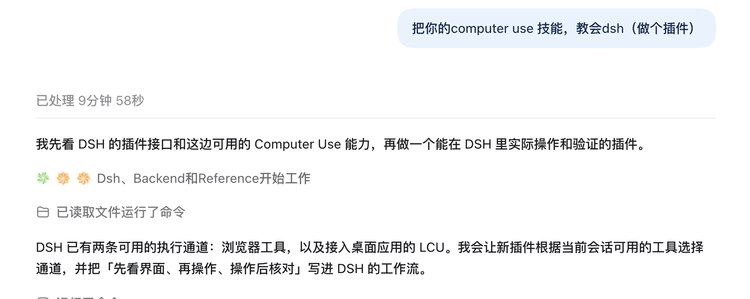
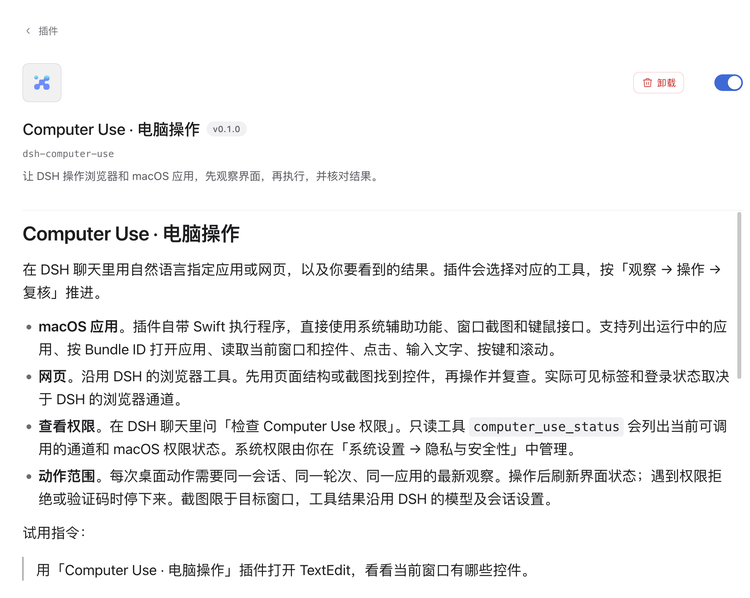
From the testing results, basic functions like opening Feishu, creating a document, and formatting can be smoothly completed by DSH under Codex's “training.” Perhaps we can imagine having Codex and Claude teach DSH other capabilities?
1
Conclusion
Looking back at DSH and these plugins, none were created through a formal project; they all stemmed from fleeting moments: wanting to save an article after reading it, coming across an impressive project and wanting to give it a try, or feeling that others' memory plugins were lacking. In the past, these thoughts often went without follow-up, with screenshots lying in photo galleries and links piling up in favorites, and over time, one could even forget why they were initially excited.
It is DSH that has connected these thoughts into a coherent narrative. Previously, moving from an idea to a usable tool was separated by an entire development process, but now, it is merely a few rounds of dialogue away.
This is also why I refer to it as a "life Agent": work tasks assigned to Codex and others eventually get completed, but the ideas that emerge in daily life are never-ending and tend to pop up when you're not in front of the computer.
What’s even more delightful is that these ideas will converge together in the end. The reading assistant keeps the articles I've read, the knowledge base accumulates the AI companies I'm focusing on, and my memories reside in "About Me."
Now, opening the DSH sidebar, I can essentially see what I have been contemplating and what I have been focusing on lately.
I am becoming increasingly dependent on it, and for any Personal Agent product competing for users like me, this kind of "addiction" has already given it a half-step lead.
免责声明:本文章仅代表作者个人观点,不代表本平台的立场和观点。本文章仅供信息分享,不构成对任何人的任何投资建议。用户与作者之间的任何争议,与本平台无关。如网页中刊载的文章或图片涉及侵权,请提供相关的权利证明和身份证明发送邮件到[email protected],本平台相关工作人员将会进行核查。


