Many people encounter not a lack of exchange or difficulty finding DApps when they first participate in on-chain transactions, but the last step: there is USDT, USDC, or USDG in the wallet, but there is no native Gas asset of the target network, so the transaction cannot be submitted.
This type of issue may seem minor, but it can directly interrupt the transaction process. Users need to first cross-chain, purchase native tokens, or transfer a small amount of Gas from other platforms, while also needing to verify the network, address, and fees again during the process.
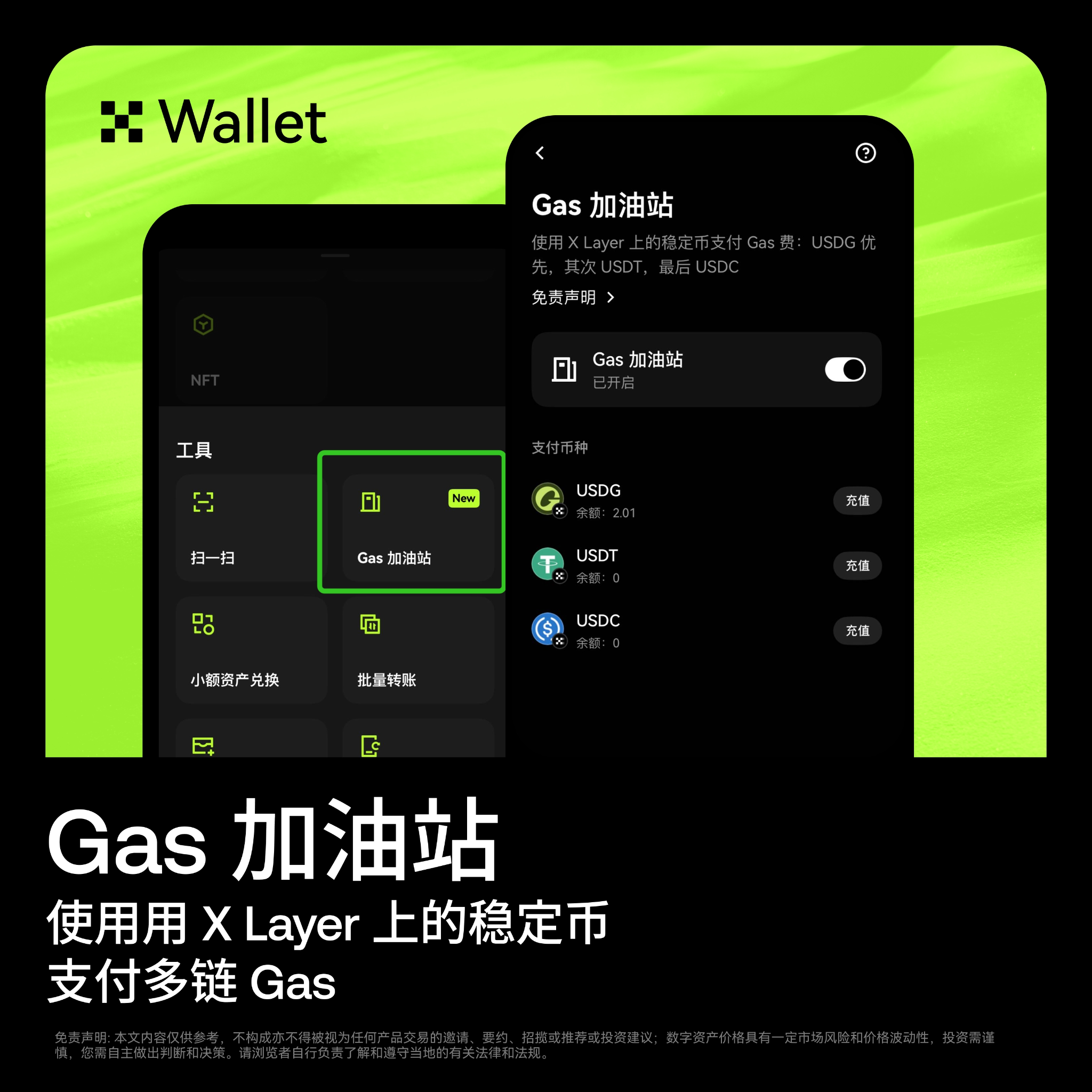
The newly launched Gas Station by OKX Wallet specifically addresses this pain point. According to the official OKX Wallet Chinese updates, the Gas Station supports using stablecoins on X Layer to pay for multi-chain Gas, so users do not need to separately prepare native Gas assets for different supported networks.
The supported stablecoins check balances in the following order:
USDG → USDT → USDC
The system will prioritize using the first stablecoin with sufficient balance to pay for network fees.
The Gas Station supports transfers, DEX transactions, and DApp interactions. For users who frequently participate in on-chain transactions, liquidity activities, RWA exchanges, and DApp operations, this is not just a simple interface optimization, but simplifies the "preparing Gas" step out of the main transaction process.
Why is insufficient Gas a frequent barrier to on-chain transactions?
In traditional trading platforms, the quoted currency in the user's account can usually be used directly to pay transaction fees. However, in a multi-chain Web3 environment, assets and fees are often not the same token.
For example, a user may hold stablecoins but need another network's native token to pay fees. If the asset is on X Layer or another network, the user also needs to determine:
- Which network the current asset is on;
- On which network the transaction occurs;
- Which native token is needed to pay for Gas;
- Whether they need to cross-chain or exchange first;
- Whether transferring Gas will incur new fees;
- Whether the balance is sufficient to cover the current transaction.
For users familiar with on-chain operations, this is just a few extra steps. For new users, however, it may lead to transaction failures, or even risks due to incorrect network selection.
The Gas Station of OKX Wallet reduces the complexity of such operations through the stablecoin payment mechanism. The official tutorial states that the Gas Station allows users to pay for Gas with their selected stablecoins without needing to hold the corresponding network's native tokens; its working mechanism involves a third-party relayer first covering the native Gas, and then settling in stablecoins chosen by the user in the same transaction.
How does the Gas Station work specifically?
The core of the Gas Station is not to "waive network fees" but to change the asset used for Gas payment.
Users still need to bear network transaction fees; the payment method simply shifts from native tokens to supported stablecoins. This way, users do not need to be unable to trade with their stablecoins due to a lack of ETH, SOL, or other native assets.
According to official explanations, the workflow of the Gas Station can be summarized as:
- The user initiates a transfer, DEX transaction, or DApp interaction;
- The wallet checks whether the current native Gas balance is insufficient;
- The system checks balances for USDG, USDT, and USDC;
- It selects a stablecoin with sufficient balance in the order USDG → USDT → USDC;
- The relayer first covers the network Gas;
- The user completes settlement in stablecoins within the same transaction.
The official tutorial also explains that users can switch stablecoin payment methods in the Network fee area on the transaction confirmation page; when the native token balance is insufficient, the wallet will prompt or automatically choose an available stablecoin.
What types of transaction scenarios are supported?
The official updates from OKX Wallet specifically mention that the Gas Station supports three common operations:
1. Transfers
Users can transfer supported assets to other addresses. For occasional new users making transfers, the most common problem is "having a balance of stablecoins but no native tokens to pay transaction fees." The Gas Station can reduce such interruptions.
2. DEX Transactions
When exchanging RWA, stablecoins, or mainstream assets on a DEX, users do not need to prepare another native token to pay for Gas. This allows for smoother execution of small tests, portfolio adjustments, and asset exchanges.
3. DApp Interaction
When participating in staking, liquidity pools, on-chain activities, or other DApp operations, users often need to submit authorizations, deposits, claims, or withdrawals. Each step may require network fees, and the Gas Station can reduce failures caused by insufficient native Gas.
It should be noted that the official tutorial states that the Gas Station does not apply to transferring native tokens, such as ETH or OKB; the supported status may also be affected by network, wallet version, and regional limitations.
What is the significance of the automatic selection order for USDG, USDT, and USDC?
The latest official updates provide a clear order: USDG → USDT → USDC.
This means that users do not have to manually determine which stablecoin to use for payment each time. As long as the balance of the first asset is insufficient, the system will continue to check the next supported asset.
This design is suitable for the following scenarios:
- Users holding multiple stablecoins;
- Not wanting to frequently exchange assets just to pay for a few Gas;
- Needing to quickly participate in on-chain activities;
- Frequently interacting across multiple networks;
- Smaller transaction sizes but more operational frequency.
However, automatic selection does not mean users can ignore balances and fees. Before submitting a transaction, they should still confirm that there is enough USDG, USDT, or USDC in the wallet, and check the network fees displayed on the transaction confirmation page.
How does this help RWA and on-chain U.S. stock users?
Recently, more users are encountering tokenized stocks, gold, and other RWA assets through wallets. Compared to traditional stock accounts, the operation pathways for on-chain RWA typically involve wallet connections, network confirmations, token exchanges, and DApp interactions.
In these scenarios, Gas is often not the user's main focus but can affect whether transactions can be completed. Users may have studied assets like SPYx, QQQx, NVDAx, TSLAx, PAXGy, and only realize that their wallet lacks the necessary network Gas when they are ready to execute a trade.
The importance of the Gas Station is that it allows users to concentrate more on:
- Asset prices and liquidity;
- Transaction depth and slippage;
- RWA mapping mechanisms;
- Activity rewards and profit rules;
- Transaction costs and risk management.
It does not eliminate the risks in prices, issuers, liquidity, and mapping of RWA assets themselves but does reduce the foundational barrier of "not being able to operate due to a lack of native Gas."
How does this help participants in liquidity and Boost activities?
When participating in X Liquidity, X Launch, X Stake, or other on-chain activities, users often need to repeatedly perform deposits, authorizations, trading, claims, and withdrawals.
If each step requires separately preparing network Gas, users may face:
- Insufficient Gas balance during the transaction;
- Paying additional exchange costs for a small amount of native tokens;
- Cross-chain transfers of Gas leading to increased waiting times;
- Incorrect network selection;
- Missing the activity time window due to a failed transaction.
The value of the Gas Station becomes more apparent in high-frequency interactions. It connects stablecoin balances with network fees, reducing the need for users to switch back and forth between different assets.
However, users should still read the rules before participating in activities. Some events may require entry from specified points or only count operations on certain networks, specified trading pairs, and designated products. The Gas Station solves the payment issue but does not change the valid trading conditions of the activity.
Specific usage pathways
The official updates provide the following usage pathways:
App or browser plugin
Open OKX Wallet and go to:
More → Tools → Gas Station
Then select the supported stablecoin and network according to the page prompts.
Web version
Open the Web version of OKX Wallet and go to:
Account Menu → Gas Station
During the transaction confirmation phase, you can also view network fees and current available stablecoin payment options.
If you do not see the Gas Station option, the official tutorial suggests confirming that the App, browser plugin, or related products have been updated to the latest version, and checking whether the current network and transaction types support this feature.
The Gas Station is not "zero-cost trading"
The most common misunderstanding when promoting the Gas Station is to write "stablecoin pays Gas" as "no fees needed." A more accurate statement is:
Users do not need to have native Gas assets but still need to pay actual network fees using stablecoins.
The official tutorial explains that the Gas Station does not require extra upgrades or separate activation fees; but this does not mean the blockchain network fees disappear.
Users should also note:
- When stablecoin balances are insufficient, transactions may still not be submitted;
- Supported networks and transaction types may change;
- Relayer services may be affected by network conditions;
- Check actual network fees before transaction confirmation;
- Transferring native tokens may not support the Gas Station;
- Stablecoins themselves bear risks related to issuers, de-pegging, and regulation.
Why is this an important upgrade for wallet experience?
OKX Wallet positions itself as a multi-chain Web3 wallet, offering asset storage, on-chain data analysis, token exchange, DEX trading, staking, and multi-chain connectivity functions, and natively supports more than 130 networks.
The more networks there are, the more complex asset and Gas management becomes. The value of the Gas Station lies not just in adding another tool entry but in making the operation of multi-chain wallets closer to a payment logic that ordinary users can understand:
If there are available stablecoins in the wallet, users can complete supported on-chain operations more directly.
For users of data analysis platforms, this also means lower operational friction. Users can check prices, liquidity, large transactions, and market signals on OKX Wallet before deciding to exchange, trade, or participate in DApps, without having to spend a lot of time preparing the native Gas for different networks first.
Conclusion: The next step of on-chain trading is not just finding opportunities but also executing them smoothly
The opportunities for on-chain trading may come from RWA, U.S. stock-mapped assets, stablecoins, liquidity incentives, or DApp activities, but if there is no correct Gas in the wallet, all research may falter at the last step.
OKX Wallet Gas Station supports using stablecoins on the X Layer to pay for multi-chain Gas, checks balances in the order of USDG, USDT, USDC, and covers transfers, DEX transactions, and DApp interactions.
It does not solve the issue of asset appreciation nor eliminate on-chain transaction risks, but it indeed lowers a high-frequency barrier in multi-chain trading: there is no need to prepare native tokens in advance for each network to pay for Gas.
Now open OKX Wallet, and enter More → Tools → Gas Station in the App or plugin; in the Web version, go to Account Menu → Gas Station to view the current network and supported assets.
Exclusive benefits for AiCoin users
Use OKX Web3 Wallet to "invest in assets around the world!"
Bind invitation code 【AICOIN88】 to enjoy a 20% reduction in trading costs (Gas optimization and other benefits)!
Immediately download/upgrade the OKX Web3 Wallet and catch the wave:
https://jump.do/xlink?checkProxy=true&proxyId=24
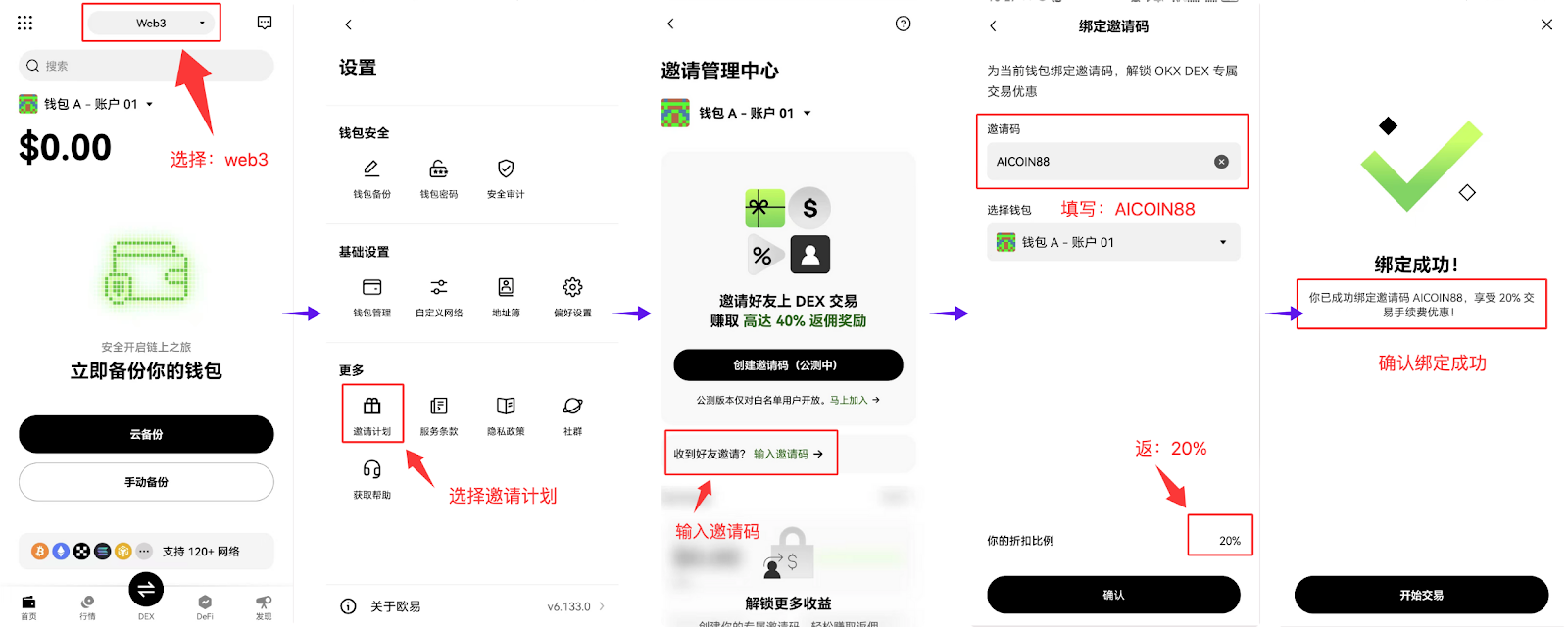
Use the exclusive invitation code 【AICOIN88】 to bind to OKX Wallet, an easy operation on the web!
https://web3.okx.com/ul/joindex?ref=AICOIN88
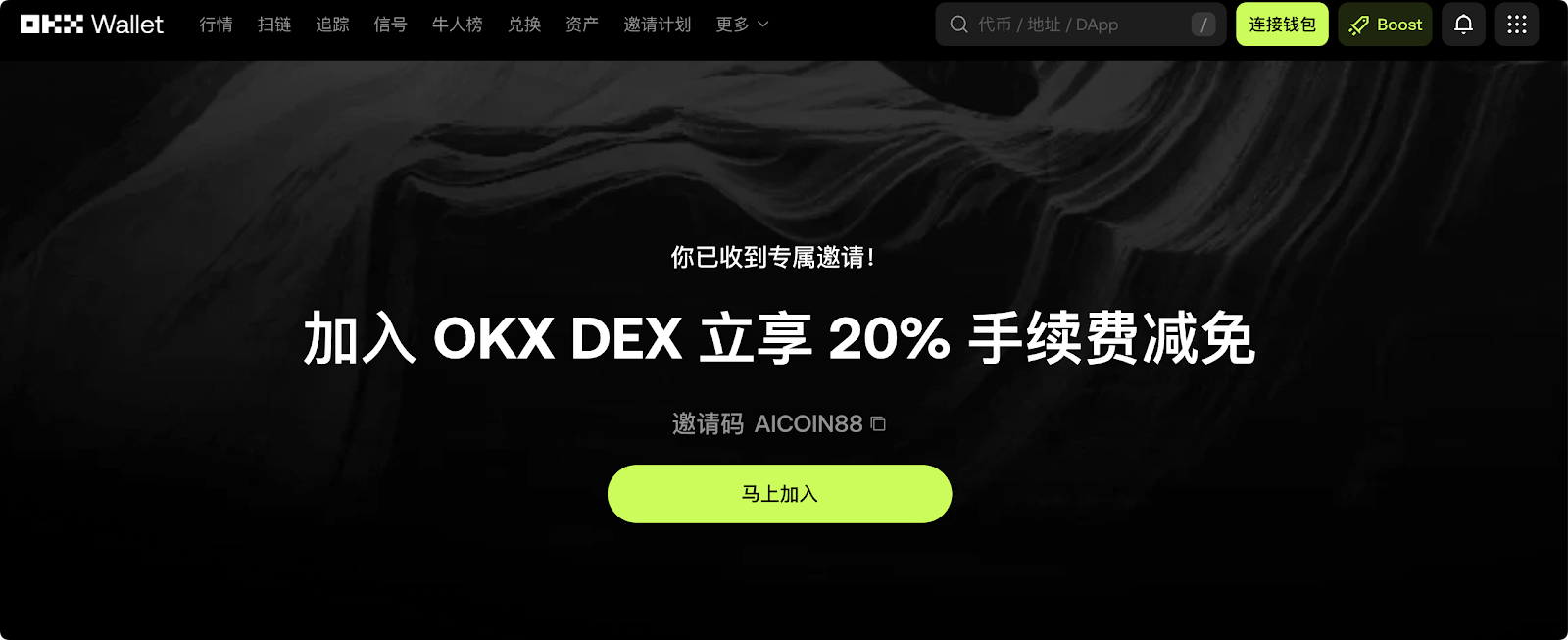
Don't wait, set up OKX Wallet, bind the discount, and gain new wealth!
免责声明:本文章仅代表作者个人观点,不代表本平台的立场和观点。本文章仅供信息分享,不构成对任何人的任何投资建议。用户与作者之间的任何争议,与本平台无关。如网页中刊载的文章或图片涉及侵权,请提供相关的权利证明和身份证明发送邮件到[email protected],本平台相关工作人员将会进行核查。