If you want to issue your own token using a smartphone, you do not necessarily need to write a smart contract. By connecting CiaoTool via TokenPocket (referred to as TP wallet), you can fill in the token parameters as prompted on the page, confirm the fees, and sign to complete the token creation on the respective network. TokenPocket provides a mobile wallet and an integrated DApp browser; CiaoTool offers no-code token creation, bulk transfer, and liquidity tools.
This article uses Solana token creation as the main example and introduces the operational process from preparing the wallet, connecting to the platform, to verifying post-creation. The pages, fees, and permission settings may vary for different networks, please refer to the actual interface and wallet transaction prompts.
CiaoTool official Chinese website: https://ciaotool.io/zh-Hans
1. What is CiaoTool? How to use it with TP Wallet?
CiaoTool is a multi-chain token tool platform that integrates no-code token issuance, asset distribution, liquidity operation, and token management in the same interface.
During smartphone operations, the two play different roles:
TokenPocket: Used to manage wallet addresses, connect to applications, and confirm on-chain transactions.
CiaoTool: Provides the operational interface for token creation and subsequent management.
Blockchain Network: Processes transactions and records the results of token creation and subsequent operations.
Note: Creating a wallet does not equal creating a token. A wallet is a tool for managing addresses and signing transactions; issuing tokens requires performing the corresponding creation operation on the selected network.
2. Which blockchains does CiaoTool support?
According to the CiaoTool official website, in addition to Solana, the platform also provides independent tool pages for networks such as BSC (BNB Chain), Base, opBNB, X Layer, IoTeX, Bot, and Robinhood Chain. The functionalities supported may vary by network, so please switch to the respective network to check before operating.
3. What do you need to prepare before issuing tokens with a smartphone?
1. Official TokenPocket Wallet
TokenPocket official website: https://www.tokenpocket.pro
Please download the application from the official website provided channels to avoid using installation packages from unknown sources. Users who already have a TP wallet can directly check if they have created a wallet for the target network.
During wallet creation, follow the application prompts to set a password and back up the mnemonic phrase. Do not send the mnemonic phrase or private key to customer service, group administrators, or any third party, nor input it on token issuance websites. CiaoTool's official website clearly reminds users not to disclose their private key or mnemonic phrase to anyone.
2. Wallet and fee balance for the corresponding network
This article takes Solana as an example. You need to prepare a usable Solana wallet in the TP wallet and reserve enough SOL to pay for the related on-chain operation fees.
If you choose another network, you should prepare the required fee assets for that network. Final expenditures should be judged based on the quotes on the creation page and wallet confirmation information, and do not directly apply fixed amounts from old tutorials.
3. Basic token information
It is recommended to organize the following information in advance:
Item | Filling Instructions |
|---|---|
Token Name | The full name of the project or community token |
Token Symbol | The abbreviated name for display |
Total Supply | Determined based on actual use |
Decimal Places | Select according to the page support range and project needs |
Logo | Use images you have the right to use |
Token Description | A brief description of the purpose and project positioning |
Social Links | Fill in according to the fields supported by the page |
4. Using TP Wallet on the Phone to Connect to CiaoTool
Step 1: Open the DApp Browser in TP Wallet
Open TokenPocket, go to the “Discover” or “Browser” or corresponding DApp entry in the application.
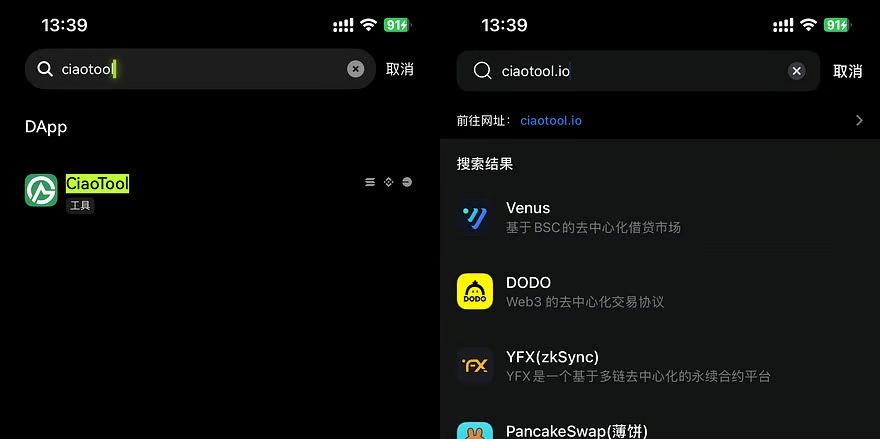
In the address bar, enter CiaoTool's official website:
After entering, first verify that the domain name is correct. Do not rely solely on the page name, logo, or advertisement title in search results.
Step 2: Select the network and connect the wallet
Select the target network in CiaoTool, this article chooses Solana, then click to connect the wallet.
Confirm that the following information is consistent:
The currently selected network;
The website shown in the wallet connection request;
The wallet address used for issuing tokens.
Step 3: Enter the token creation page
Find the token creation tool for the corresponding network.
CiaoTool's official website states that its Solana tool covers standard token and tax token creation, as well as token management, liquidity, and bulk transfer functions.
Step 4: Fill in the token parameters
Fill in according to the fields actually provided on the page:
Token Name;
Token Symbol;
Total Supply;
Decimal Places;
Optional information such as Logo, description, and social links.
Carefully verify each item before submission, especially the total supply and decimal places. Do not skip the parameter check in pursuit of “quick token issuance.”
Step 5: Check permission settings
If the creation page provides options for minting, freezing, metadata modification, or other management permissions, read the instructions first, then decide whether to retain or relinquish them.
These settings involve what management operations can still be performed after creation. Just because an option is marked “recommended” does not mean it is appropriate to ignore its impact on subsequent project operations; when relinquishing permissions, it is especially important to confirm whether the operation is irreversible.
Step 6: Verify the fees and sign
After clicking create, check the transaction details in the TP wallet pop-up window, including:
The website connected and the current network;
The asset changes involved in this operation;
The estimated fee;
Whether there are authorizations or transfers unrelated to token creation.
Sign only after confirming everything is correct, and carefully verify the transaction details in the wallet pop-up before signing.
5. What can you do after creating a token?
Follow-up tools listed on the CiaoTool official website include liquidity management, bulk transfers, multi-address bundling for buying and selling, and token creation and bundling purchases on platforms such as Pump.Fun, Bonk.Fun, etc.
1. Manage liquidity
Completion of creation does not represent that subsequent trading configuration has been finished. When liquidity tools are needed, check the trading pairs, invested assets, fees, and related permissions separately; do not assume that “creation success” means “all上线准备 is complete.”
2. Bulk distribution of tokens
The platform’s one-to-many transfer tool can be used to send SOL or tokens to multiple recipient addresses. When used for community rewards or other distribution scenarios, it is recommended to check the addresses, quantities, and networks first, and conduct small tests before executing the official batch.
3. Use bundling trading tools
The platform provides tools such as bundled purchases, but “supporting bundled transactions” does not equal “guaranteeing no bots,” “definitely not being front-run,” or “ensuring price stability.” The official page being verified did not provide verifiable evidence for the ratios such as “98% no sniping” and “95% no front running,” so these numbers should not be used as promotional promises.
6. Frequently Asked Questions
1. Do you need to write code to issue tokens with the TP wallet on your phone?
No need to write code when using the visual token management tools provided by CiaoTool. However, users still need to check parameters, permissions, fees, and transaction details by themselves.
2. How much does it cost to create a token?
The price should be based on the quotes on the creation page for the target network and wallet confirmation information. CiaoTool's official website provides service fee portals, but the required fees may vary by different functionalities.
3. Why doesn't it show up in the wallet after creation?
First, verify whether the transaction was successful, whether the current wallet address and network are correct, and then check the token address and wallet display settings. Do not resubmit the creation operation just because the icon does not temporarily appear in the asset list.
7. The final check before issuing tokens
Before formally submitting, confirm in order:
Downloaded is the official wallet;
Accessed the correct CiaoTool domain;
The wallet and platform selected the same network;
Name, symbol, total supply, and decimal places are filled in correctly;
Check retained or relinquished management permissions;
Check fees and transaction details before signing;
After creation, save the token address and transaction records.
Using the smartphone TP wallet to connect to CiaoTool, the core process is: preparing the wallet and fees for the corresponding network, accessing the official website, connecting the wallet, filling in token parameters, checking permissions and fees, signing and submitting, and finally verifying and saving on-chain records.
CiaoTool official website: https://ciaotool.io/zh-Hans
TokenPocket official website: https://www.tokenpocket.pro
免责声明:本文章仅代表作者个人观点,不代表本平台的立场和观点。本文章仅供信息分享,不构成对任何人的任何投资建议。用户与作者之间的任何争议,与本平台无关。如网页中刊载的文章或图片涉及侵权,请提供相关的权利证明和身份证明发送邮件到[email protected],本平台相关工作人员将会进行核查。