When I normally watch the market, what I fear most is not missing a good position, but when I have identified it, I can't open the software at the right price.
I believe many friends have had this experience: clearly identifying a key price in advance, but after being busy for a while or taking a nap, when you open the market again, the price has already surged or dropped below it. Trying to keep track of multiple cryptocurrencies and conditions becomes overwhelming.
The warning feature of AiCoin is simply understood as an all-weather market assistant. You set up the cryptocurrencies, prices, technical patterns, or conditions for capital movement you care about in advance, and when the conditions are met, the system will remind you through software pop-ups, sounds, APP notifications, and other means. It does not replace your trading but helps you with "market watching."
This task shifts from waiting manually to timely checking when conditions are triggered.
The most straightforward usage is price alerts.
For example, if you are monitoring BTC and believe a particular position is a key resistance level, you might want to wait for the price to break through before further observation. Or if you already hold a certain cryptocurrency and want to remind yourself to assess risks when the price falls to a certain level, you can set a price alert directly. It can monitor the price fluctuations of specific trading pairs and trigger notifications based on set prices or amplitude conditions. For instance, you don't need to constantly watch the K-line of BTC; just set up "remind me when BTC reaches a certain price," and when the market hits, the system will notify you, allowing you to open the chart and assess the next steps considering the trading volume, trends, and market environment at that time.
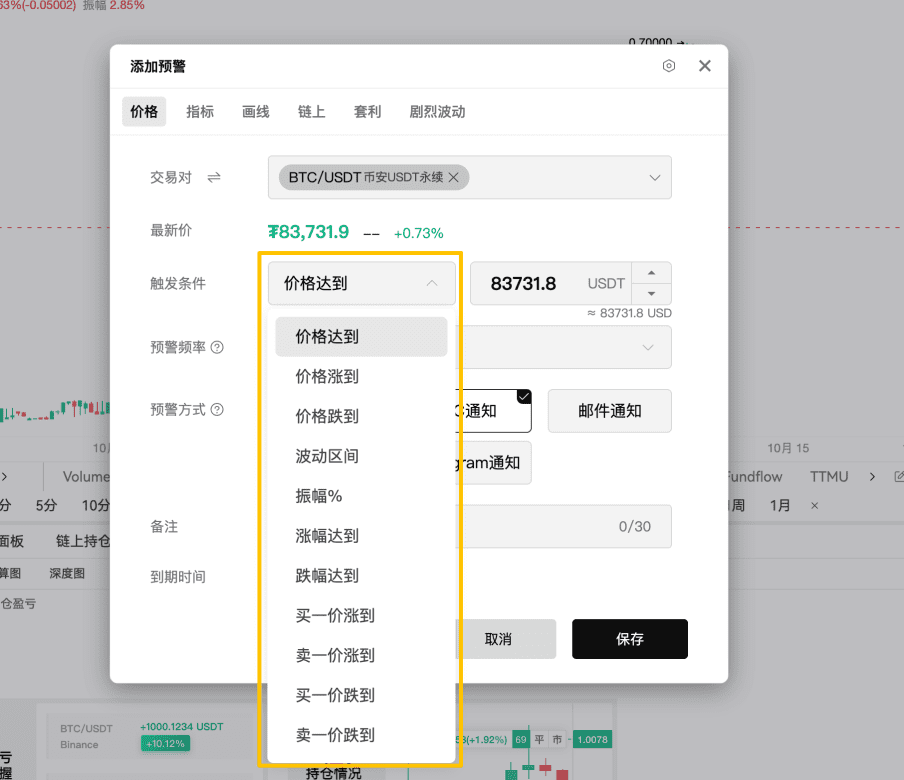
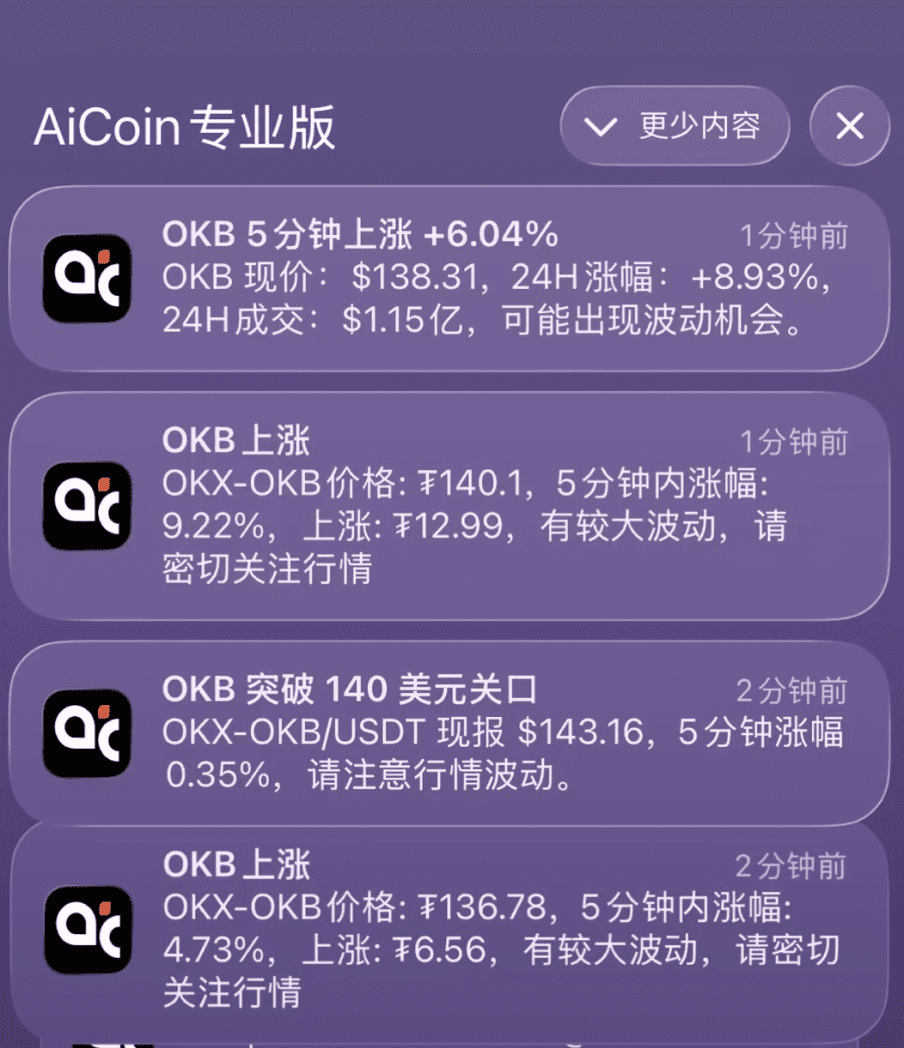
If you want to discover sudden market movements in real-time, you can also add volatile movement alerts.
This is more suitable for capturing obvious movements such as rapid increases or decreases within a short period. For example, when unexpected news hits the market or when there is a sudden acceleration, you don’t need to guess the specific price in advance but can receive notifications when significant fluctuations occur. This functionality is especially suitable for friends who regularly monitor multiple cryptocurrencies and worry about missing out on sudden market movements. After receiving an alert, first check which cryptocurrency it is, the time frame, and whether there is any news that might affect it before making a decision.
Next is the indicator and signal alerts, which are well-suited for those accustomed to technical analysis.
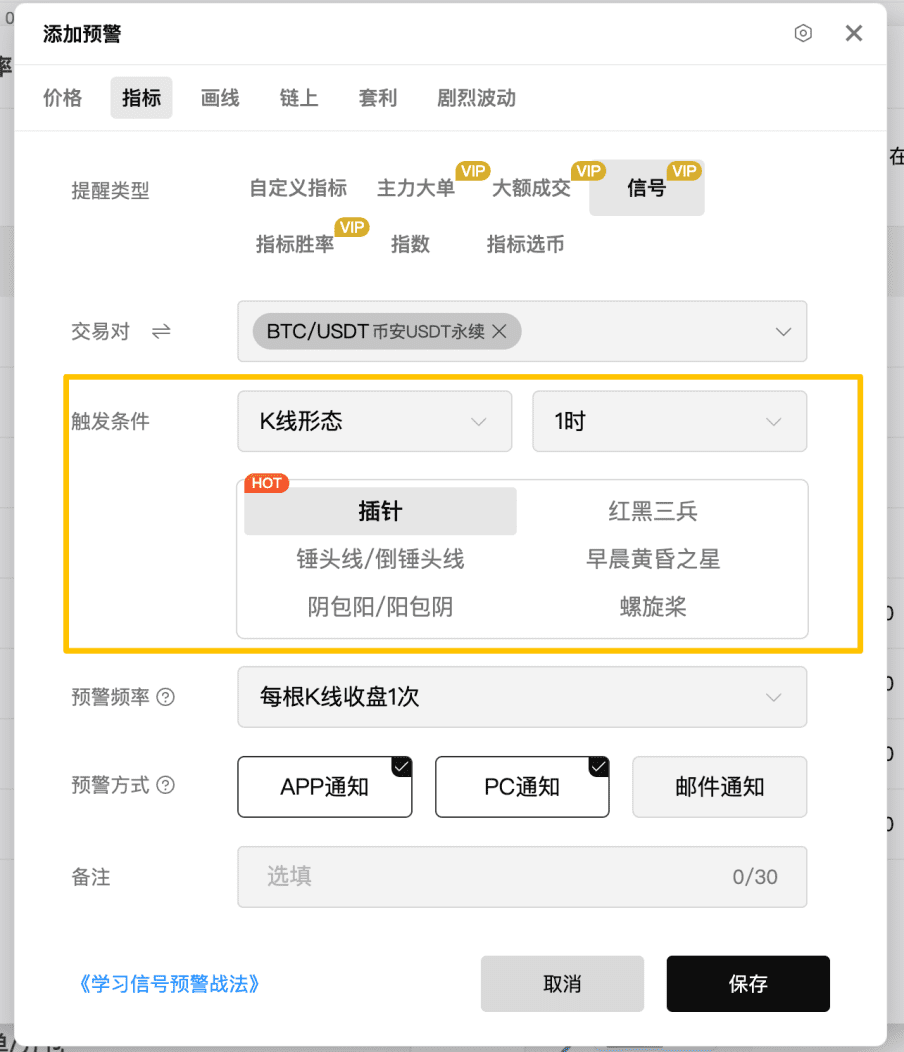
Classic signal alerts are relatively hassle-free to use. AiCoin has built-in some common technical analysis signals, such as MACD divergence, moving average golden crosses/death crosses, and candlestick patterns like three white soldiers, hammer candles, morning stars, and evening stars. Its advantage is that you don’t need to write code; you can simply select the signals you want to monitor. For instance, if you frequently look at moving average golden crosses, you can set the trading pair and time frame for alerts, and return to check when the signals appear.
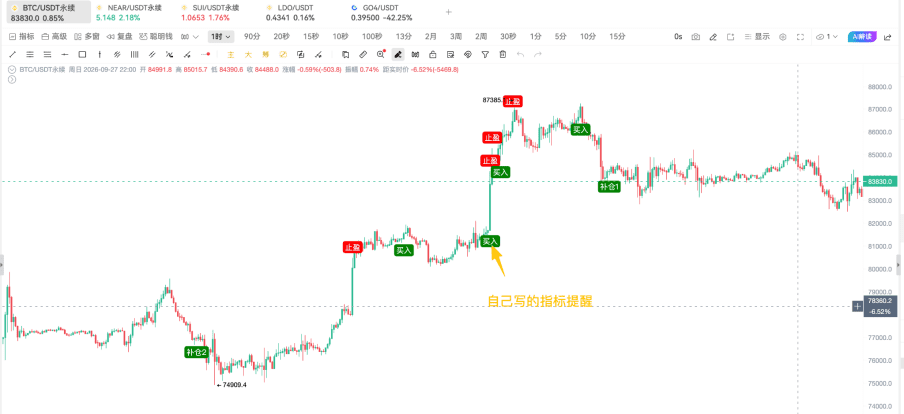
If the built-in signals are not enough, you can try custom indicator alerts.
If you have your trading logic, such as "CCI greater than a certain value while RSI is at a high," or "moving average crossover coupled with volume breakout," you can use AiCoin's custom indicator feature along with `alertcondition()` to set more complex conditions. This feature is better suited for those who already have a clear indicator system and want to automate their observation rules. Friends who are just starting with technical indicators need not feel pressured; they can start with price alerts and classic signals, and gradually try custom conditions as they develop their market watching habits.
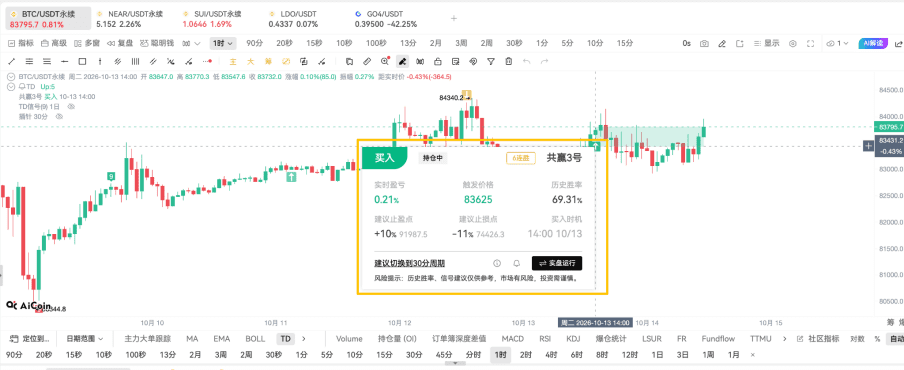
There is also an indicator win rate alert, which combines historical backtesting strategy signals, supporting alerts when buying and selling signals appear on the K-line. It is important to note: past performance does not equal future results; any strategy has applicable market conditions. We can consider it as an auxiliary observation entry, rather than a mechanical execution command.
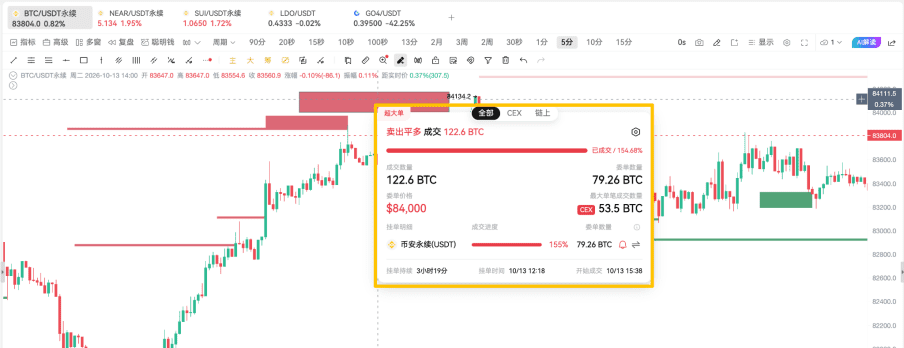
When observing fund movements, I pay attention to large order alerts. This is used to track large pending orders and the dynamic of large transactions in mainstream exchanges, helping us quickly notice potentially significant large fund behaviors. For example, if a significant large pending order suddenly appears at a key position or if a large transaction causes the price to respond quickly, we can open the chart to observe further: is this position forming support or resistance? After the transaction, did the price continue? Is there a correlation between holdings and transaction volume?
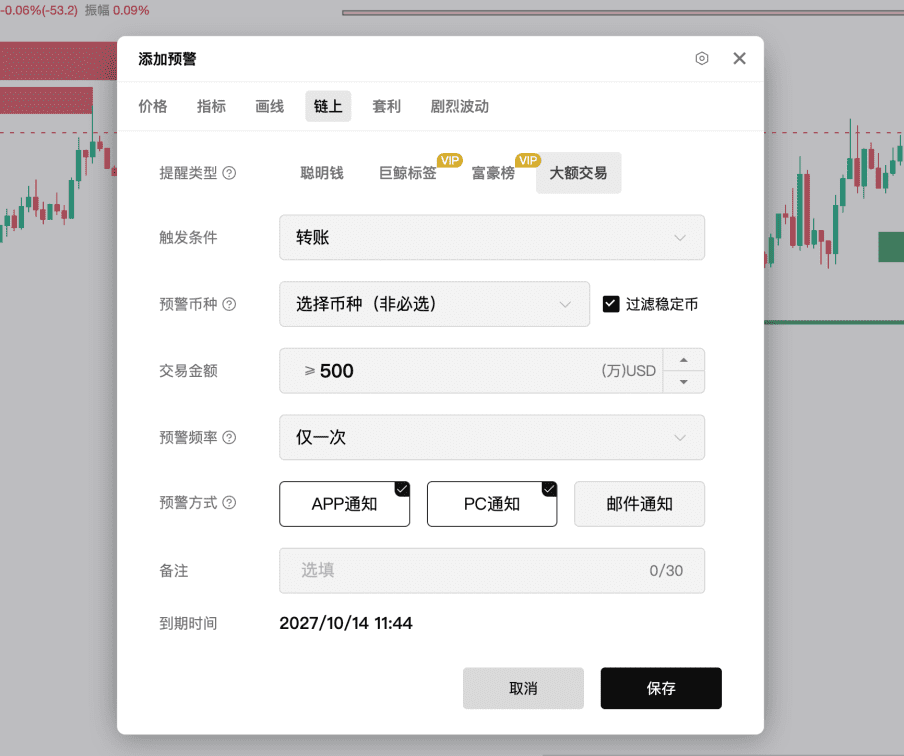
Next is large on-chain transaction alerts, which monitor large transfers and trading actions on-chain and also support filtering by direction. When significant fund movements occur on-chain, the system can prompt you to check in time. Understanding the context of large on-chain transfers is necessary: the transfer could be for reallocation, accumulation, exchange deposits, wallet transfers, etc. It only helps us quickly identify noteworthy fund movements for further analysis; large transfers themselves do not directly equate to buying or selling.
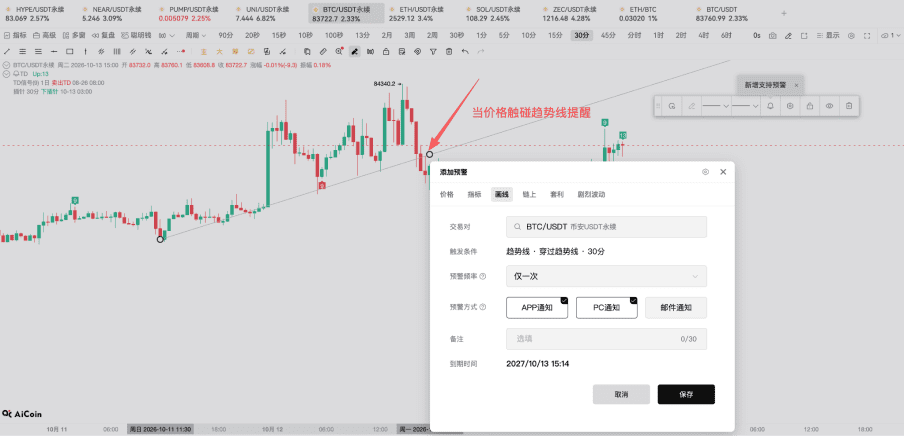
For those who are accustomed to marking positions on their charts, there is a line drawing alert.
Line drawing alerts can monitor whether the price touches the trend lines you have drawn on the K-line chart. People often draw trend lines, support lines, and resistance lines and fear that when the price approaches the line, they may not be present. For example, if you have drawn an ascending trend line and wish to observe when the price retraces to that line, you can set a line drawing alert so that when the price touches it, the system will remind you, eliminating the need to keep watching the chart for opportunities.
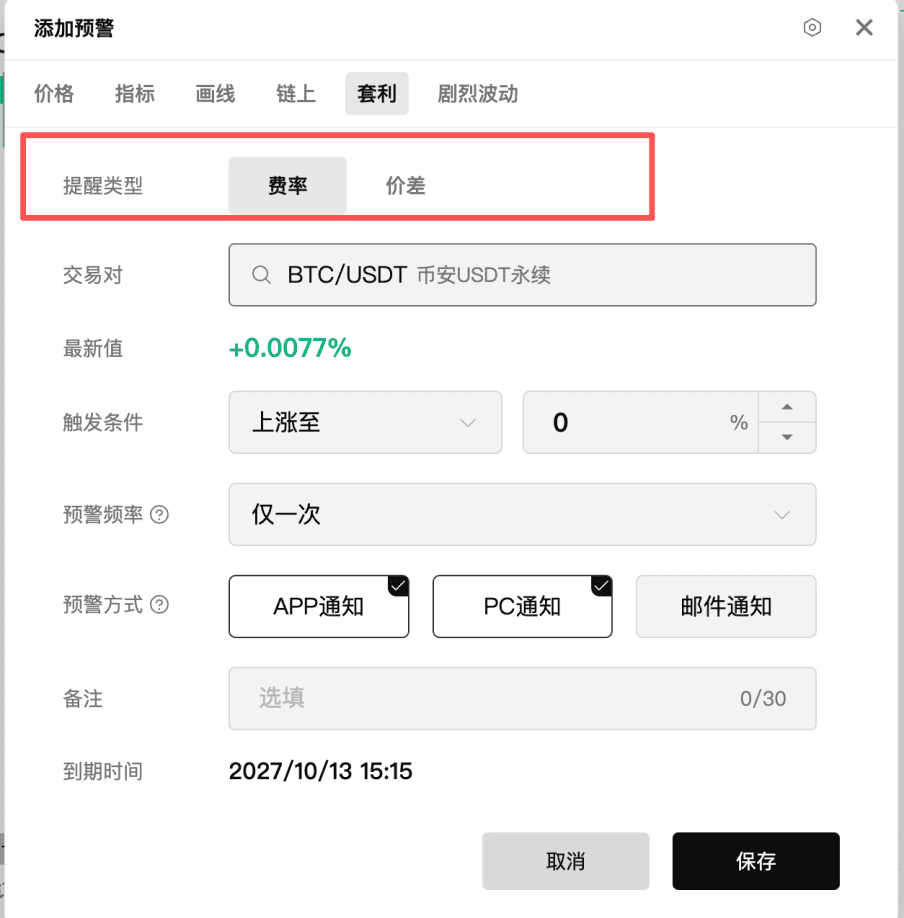
Another type is the spread/fee alert, which serves as an arbitrage alert. It can help you monitor price differences between spot and contract trades on different exchanges or changes in funding rates for perpetual contracts. For friends interested in spot-futures arbitrage, cross-platform price differences, or funding rate changes, this type of functionality can save time spent manually comparing.
Once you have completed setting up the alerts, the notification methods are also worth noting. AiCoin supports multiple notification methods: software pop-ups and sound reminders, email reminders, webhook push, and Telegram notifications. Specific channels may vary depending on the actual page.
If you often sit in front of your computer, prioritize enabling software pop-ups and sounds; if you mainly use your phone for monitoring, turn on app notifications; if you have bots or automated systems, you can also use webhooks for integration.
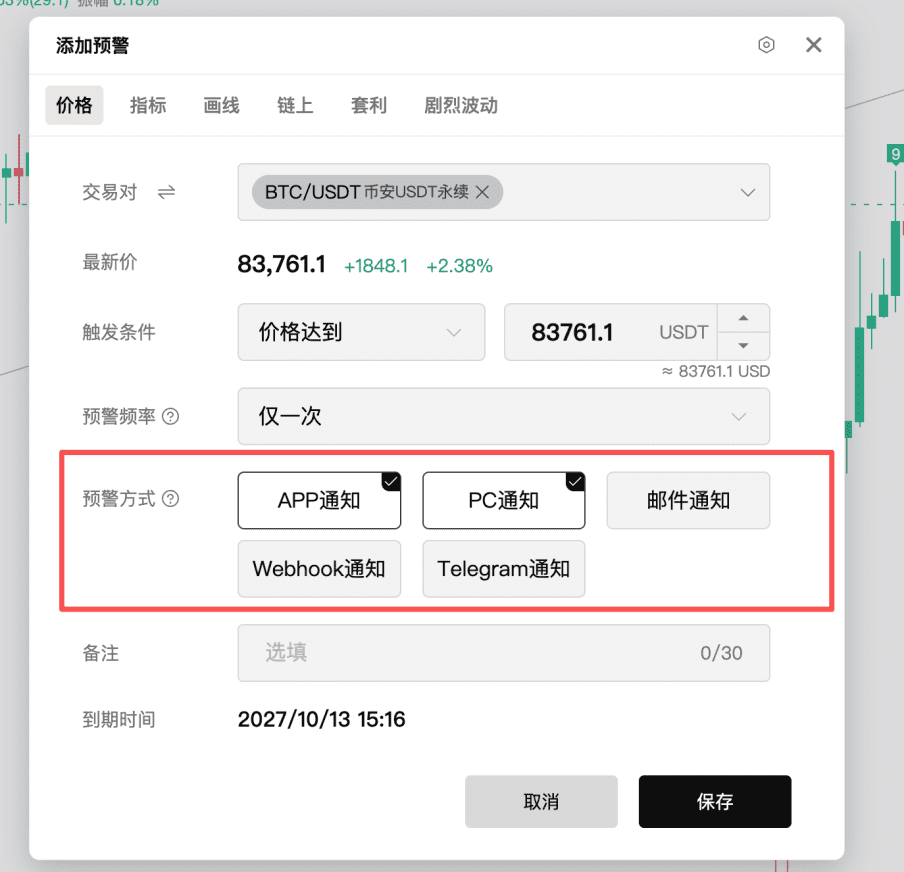
When getting started, it is recommended to set at least three alerts: one for the price of a cryptocurrency you commonly track; one for volatile movement alerts; and one for a classic signal or line drawing alert that interests you. Once you have set them, you will realize that alerts are not a complex tool but rather a way to entrust your focus to the system in advance.
Next, let’s discuss the entry points for alert settings on the PC and APP.
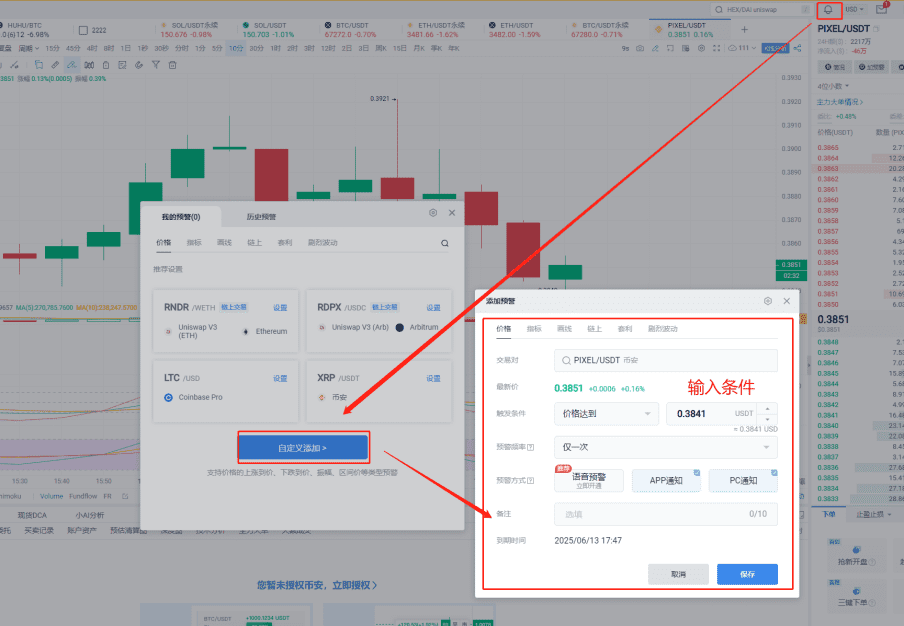
On the PC, you can usually click the bell icon at the top right of the page to enter "Add Alert", select the type of alert such as price, indicator, or on-chain, set specific conditions, and save.
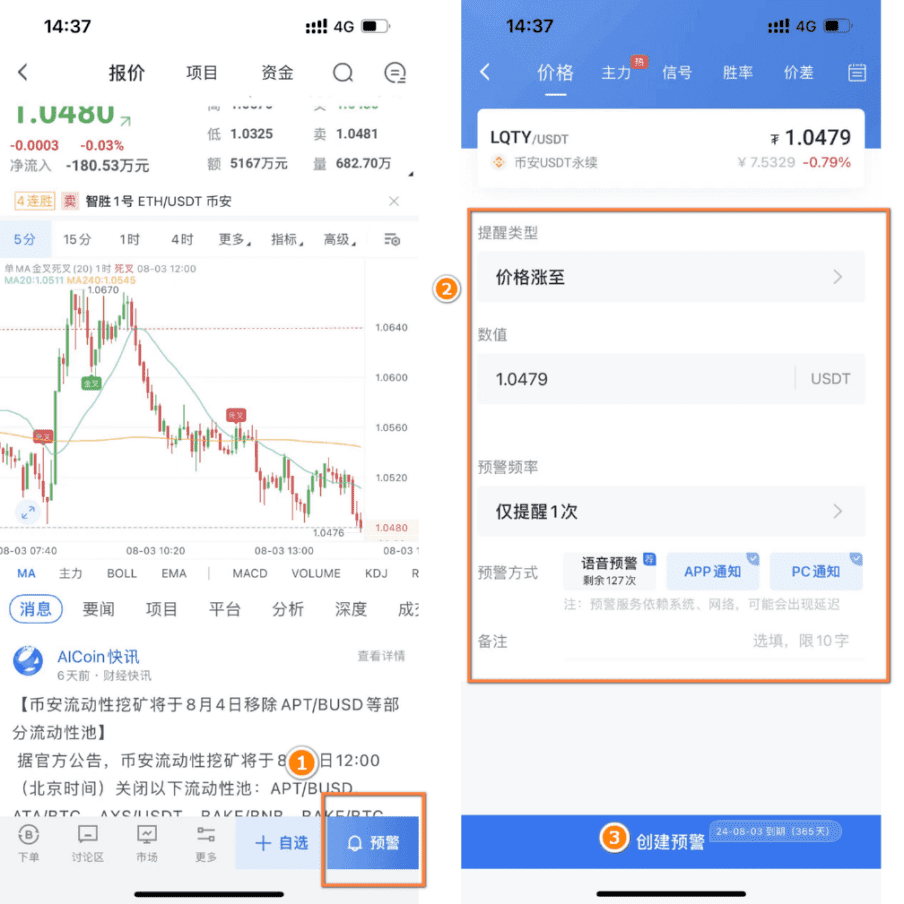
On the APP, go to the K-line page of any trading pair, click the bottom "Alert" icon, create an alert, select the type, adjust the conditions, and save.
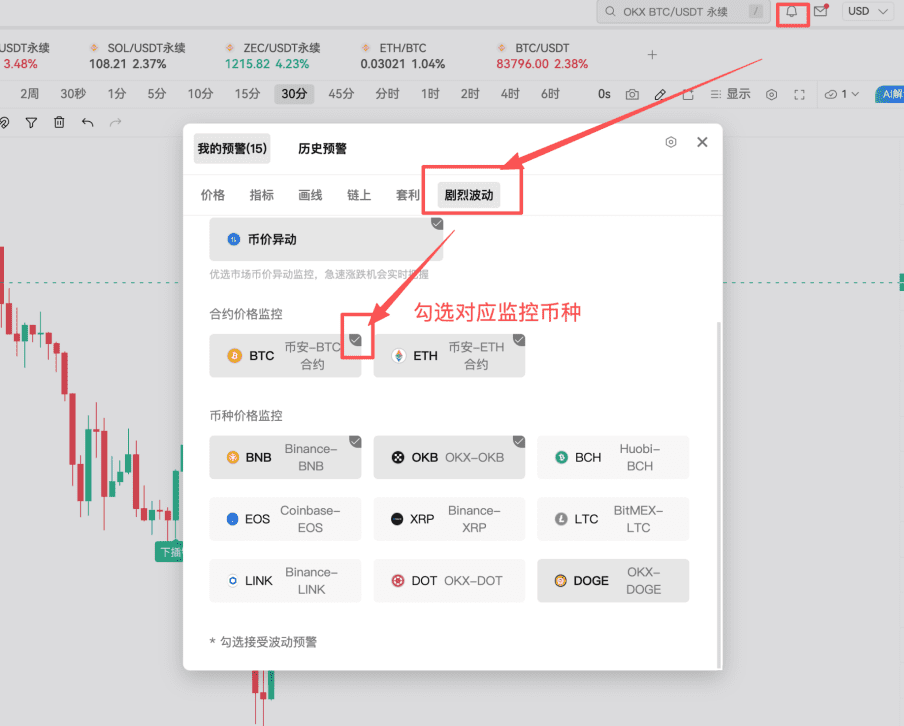
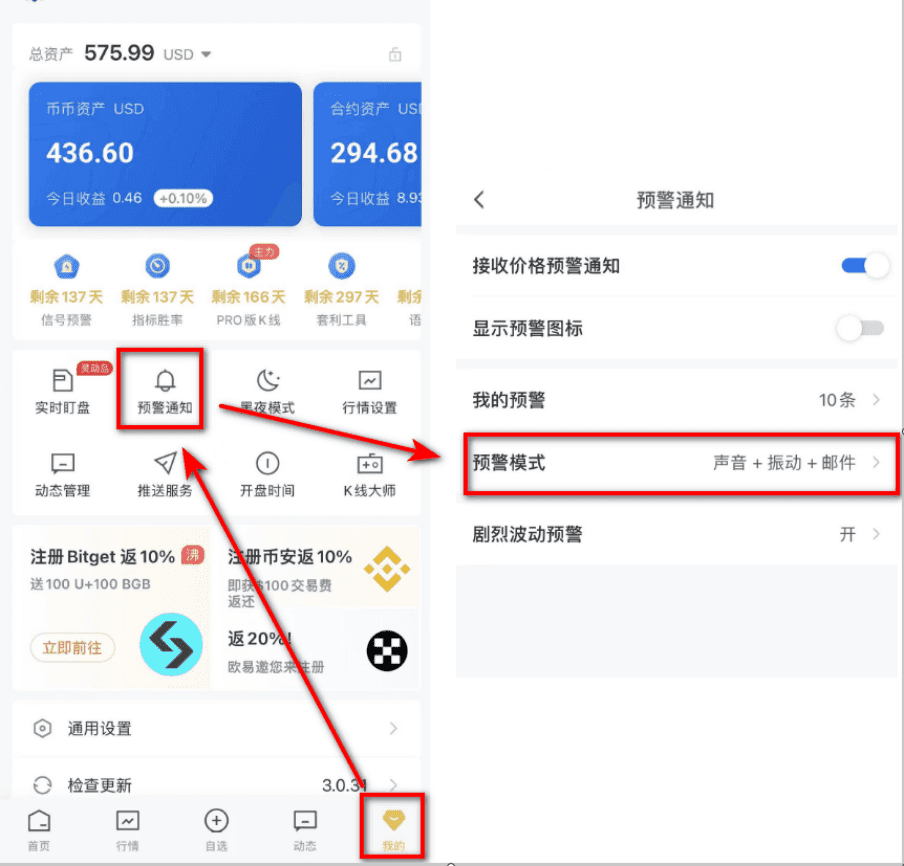
If you want to set up volatile movement alerts: on the PC, you can enter the "My Alerts" section and find the volatile movement alerts; on the APP, you can find the volatile movement settings in "My" or relevant alert notification pages.
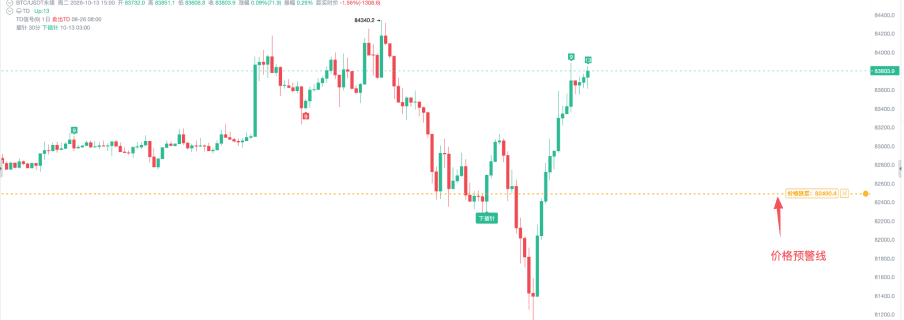
If you have already set up price alerts and want to display the alert lines on the K-line chart, on the PC, you can enable the display of alert lines in the K-line settings; the APP also allows you to enable price alert lines in the K-line settings.
I suggest that after setting your price alerts, you display the alert lines. This way, when you open the chart, you can clearly see why you set this reminder originally, avoiding forgetting your original observation logic.
Setting alerts is not just about "turning them on and forgetting"; notification management is also crucial.
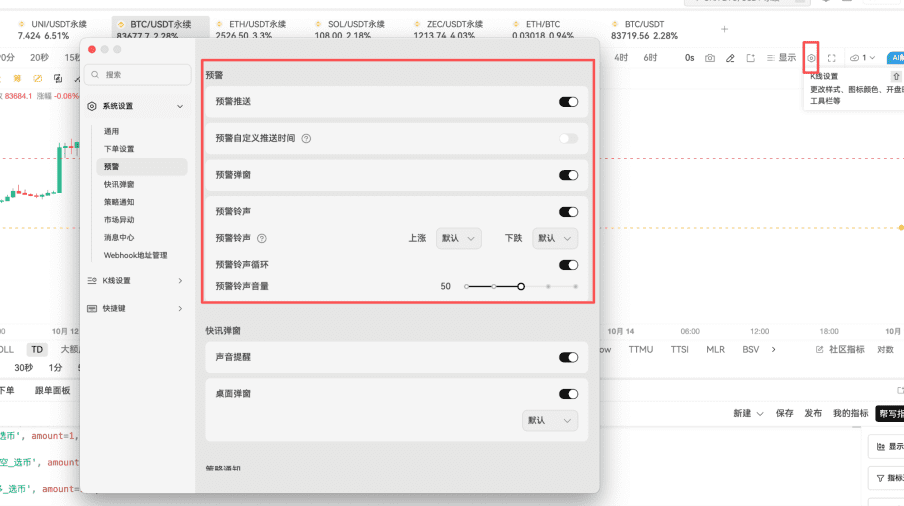
On the PC, you can manage push notifications, pop-ups, and sounds through the alert options in the system settings, and you can also set the alert push time according to your daily routine. For example, if you don’t want your computer to continuously pop up alerts late at night, you can adjust the PC notification time.
On the APP, you can enter the alert and updates section in "My," to adjust alert modes, sounds, or vibration settings.
After an alert is triggered, don’t rush to dismiss it. You can review in "Historical Alerts": why was it triggered at that time? How did the price move after the alert? Does your judgment need optimization? This step is actually very important; alerts are not only reminder tools but also review tools. After reviewing for a period of time, you will increasingly understand which conditions are more useful, which reminders are too frequent, and need optimization.
As of October 23, 2026, the basic price alert limit for ordinary users is 100 alerts, without restrictions on trading pairs. The specific limits and functional permissions are subject to the actual account and current version page display.
You can remember these core purposes:
Price Alerts: Keep an eye on key price levels
Volatile Movement Alerts: Capture short-term anomalies
Indicator and Signal Alerts: Automate technical analysis conditions
Large Order and On-Chain Alerts: Quickly identify significant fund movements worth further analysis
Line Drawing and Arbitrage Alerts: Monitor your defined key positions and price differences
Multi-Platform Notifications and Historical Review: Make alerts more timely, rhythmically aligning with your habits
Alerts are merely auxiliary tools for observation and judgment; they do not execute trades automatically. By using them effectively, we can significantly reduce meaningless market-watching time and have more energy for planned observations and reviews.
Currently, live broadcasts are available every day, and we welcome you to continue following AiCoin friends! Reserve in advance 👇
https://www.aicoin.com/zh-Hans/live/list?tab=upcoming
Join our community to discuss and grow stronger together!
Official Telegram Community:
AiCoin Chinese Twitter:
Hype Rebate:
https://app.hyperliquid.xyz/join/AICOIN88
Binance Rebate:
https://jump.do/zh-Hans/xlink-proxy?id=3
Invitation Code: aicoin668
Coinbase Rebate:
https://jump.do/xlink?checkProxy=true&proxyId=25
Invitation Code: Y8L23JL
免责声明:本文章仅代表作者个人观点,不代表本平台的立场和观点。本文章仅供信息分享,不构成对任何人的任何投资建议。用户与作者之间的任何争议,与本平台无关。如网页中刊载的文章或图片涉及侵权,请提供相关的权利证明和身份证明发送邮件到[email protected],本平台相关工作人员将会进行核查。