Robinhood Chain is becoming one of the emerging EVM ecosystems, providing a fast and low-cost deployment environment for ERC-20 Tokens. Whether you want to issue a Meme Coin, community token, or test a new Web3 project, it can be completed in minutes.
With CiaoTool Robinhood Chain token creation, no Solidity writing or any smart contract development experience is required. Simply connect your wallet, fill in the token information, and confirm the transaction to deploy the token to Robinhood Chain.
This article will guide you step by step through the process of creating a Meme Coin and introduce the next steps after creation.
Why choose to create a Meme Coin on Robinhood Chain?
Robinhood Chain is an EVM Layer2 network built on Arbitrum Orbit, featuring advantages like fast transaction speeds, low gas costs, compatibility with the Ethereum ecosystem, and uses ETH as the gas token.
For Meme Coin projects, a new ecosystem means more opportunities. Compared to mature public chains, Robinhood Chain is still in a rapid development stage, making it easier for new projects to gain community attention and early traffic.
Currently, Robinhood Chain supports:
Fast transaction confirmations
Lower network fees
Complete EVM compatibility
ETH as the gas token
Support for Uniswap V2, V3, V4, and UniswapX
A continually evolving ecosystem
With CiaoTool, you can quickly deploy a Robinhood Chain ERC-20 Token through a visual interface without writing any code.
Why choose CiaoTool?
CiaoTool is designed specifically for Web3 users, making token issuance simpler.
Whether it's your first token issuance or managing multiple projects, you can quickly accomplish it through a graphical interface.
Key features include:
No programming required — Create ERC-20 Tokens in minutes
Multi-chain support — Supports Robinhood Chain, Solana, Base, BNB Chain, IoTeX, X Layer, etc.
Variety of token types — Supports standard tokens, tax tokens, Mint, Burn, and more
One-stop tool — Supports adding pools, bulk transfers, batch trading, market-making, etc.
Non-custodial design — All transactions are signed by the user's wallet, with assets always under personal control
How much does it cost to create a Meme Coin?
Creating a Meme Coin on Robinhood Chain using CiaoTool is very low-cost.
CiaoTool service fee: only 0.0052 ETH per creation
Gas fee: Pay a small amount of Robinhood Chain network gas
After transaction confirmation, your ERC-20 Token will be immediately deployed on the chain.
Tip: It is recommended to reserve a small amount of ETH in your wallet to pay for network gas.
Meme Coin creation tutorial
Step 1: OpenCiaoTool Robinhood Chain token creationpage
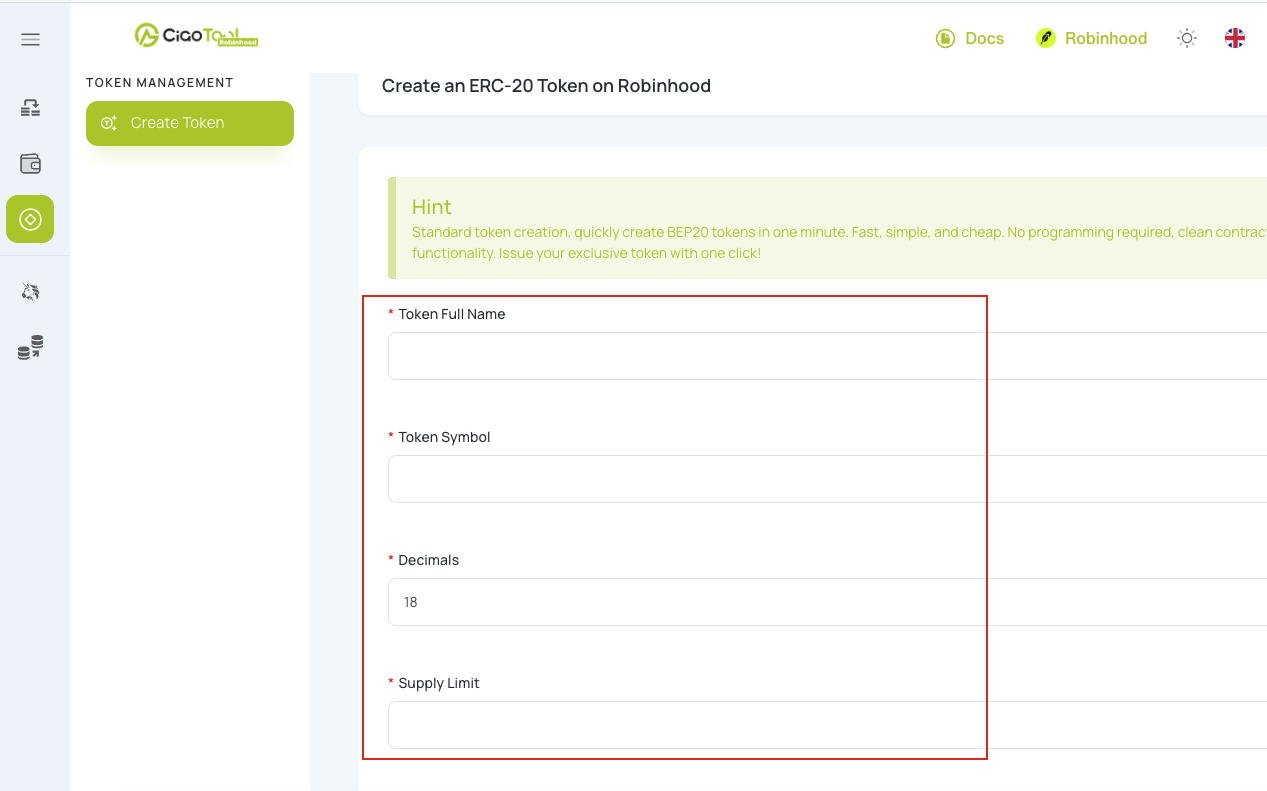
Go to CiaoTool Robinhood Chain standard token creation.
This tool helps you quickly create tokens that comply with the ERC-20 standard without writing smart contracts.
Step 2: Connect your wallet
Click Connect Wallet to connect an EVM wallet that supports Robinhood Chain.
Before starting the creation, please ensure you have enough ETH in your wallet to pay for gas.
Step 3: Fill in token information
Enter your token's basic information:
Token full name
Token abbreviation
Precision
Issue amount
Please carefully check the filled content, as some parameters cannot be modified after deployment.
Step 4: Create the token
Click Create Token, then confirm the transaction in your wallet.
After the transaction is completed, your standard ERC-20 Token will be deployed to Robinhood Chain.
What can you do after creation?
Once the token is successfully created, you still need to complete some steps to officially list it for trading.
Create a liquidity pool
The newly created Token can only be transferred and cannot be traded.
You can use CiaoTool Liquidity Pool Creator to create a V2 or V3 liquidity pool to start trading your Token on DEX.
View token information
After successful deployment, please save your Token Contract Address.
You can then go to the Robinhood Chain block explorer to view:
Contract information
Number of tokens held
Transaction history
If the Token does not automatically display in your wallet, you can manually import it using the contract address.
Use more CiaoTool tools
As the project develops, you can also use more tools to manage your tokens, such as:
Helping projects operate more efficiently.
Summary
Now, creating a Meme Coin on Robinhood Chain is very simple. With CiaoTool standard token creation, no coding or smart contract development experience is required, and you can complete the ERC-20 Token deployment in just a few minutes.
After completing token issuance, you can continue to use CiaoTool to create liquidity, manage wallets, execute bulk transactions, and use more operational tools to prepare for project launch.
Whether you want to create a Meme Coin, a community token, or start a new Web3 project, CiaoTool can help you quickly complete the first step on Robinhood Chain.
免责声明:本文章仅代表作者个人观点,不代表本平台的立场和观点。本文章仅供信息分享,不构成对任何人的任何投资建议。用户与作者之间的任何争议,与本平台无关。如网页中刊载的文章或图片涉及侵权,请提供相关的权利证明和身份证明发送邮件到[email protected],本平台相关工作人员将会进行核查。