FourMeme is one of the important Meme Token Launchpads in the BNB Chain ecosystem. As FourMeme continues to expand its Token issuance, trading, and community incentive mechanisms, project parties can choose different Open Modes when creating Tokens, making initial purchases, and conducting subsequent on-chain operations.
For project parties and on-chain operators, understanding the mechanisms of different Open Modes, as well as how to utilize corresponding on-chain tools to execute operations, is becoming increasingly important.
This article will introduce the basic concepts of FourMeme Open Mode and the corresponding modes and operations currently supported on the CiaoTool page, helping project parties to better understand the complete process from Token Creation to Initial Buy and subsequent on-chain operations.
What is FourMeme Open Mode?
FourMeme is a Meme Token Launchpad built on the BNB Chain, where project parties and users can participate in the creation, issuance, and trading of Meme Tokens through the platform.
As the FourMeme ecosystem continues to expand, the methods of Token issuance are no longer limited to a single mode. Open Mode / OpenFour allows projects to choose corresponding issuance or on-chain functions based on different Token mechanisms and application scenarios.
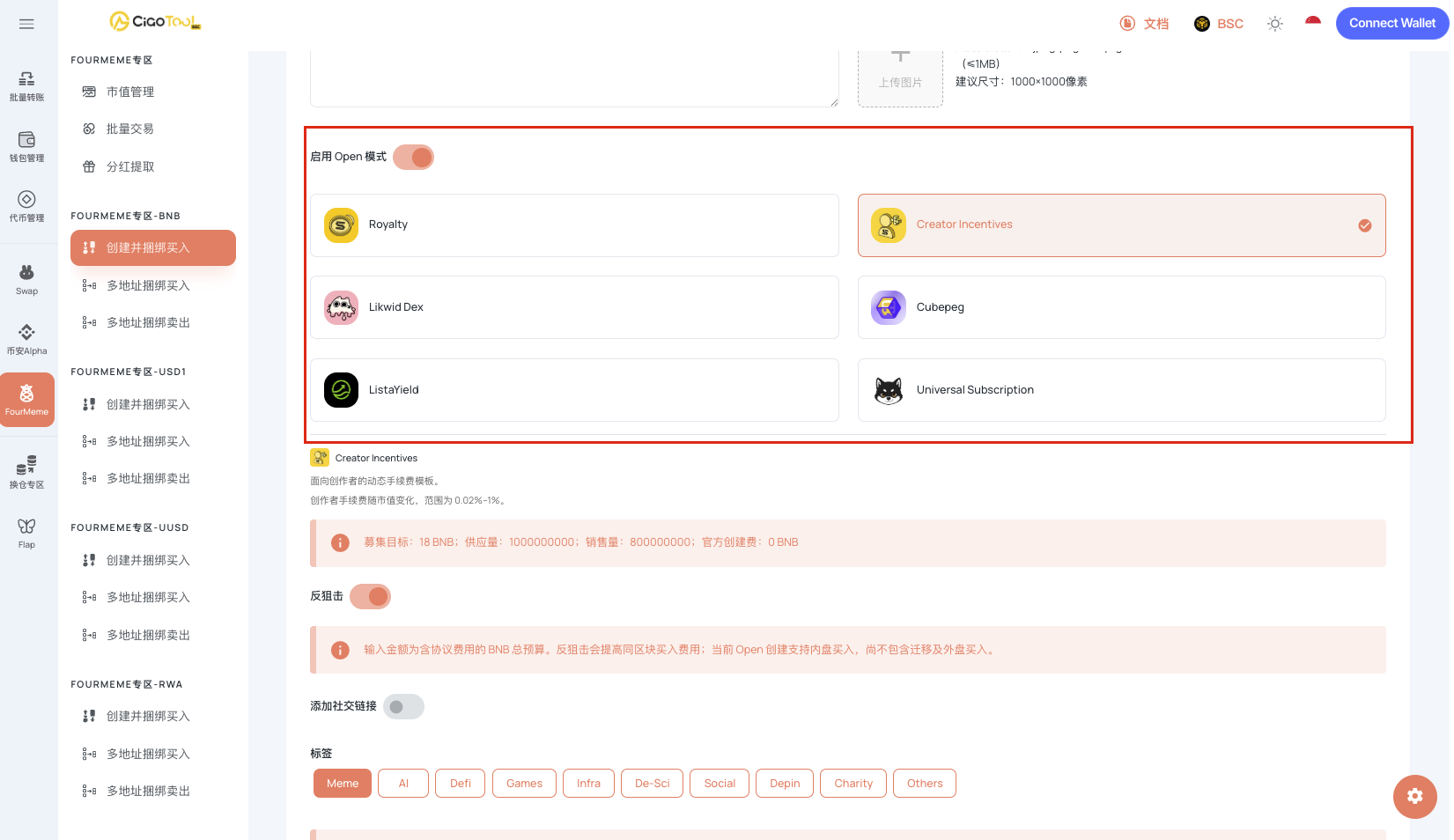
Currently, the CiaoTool page supports the following FourMeme Open Modes:
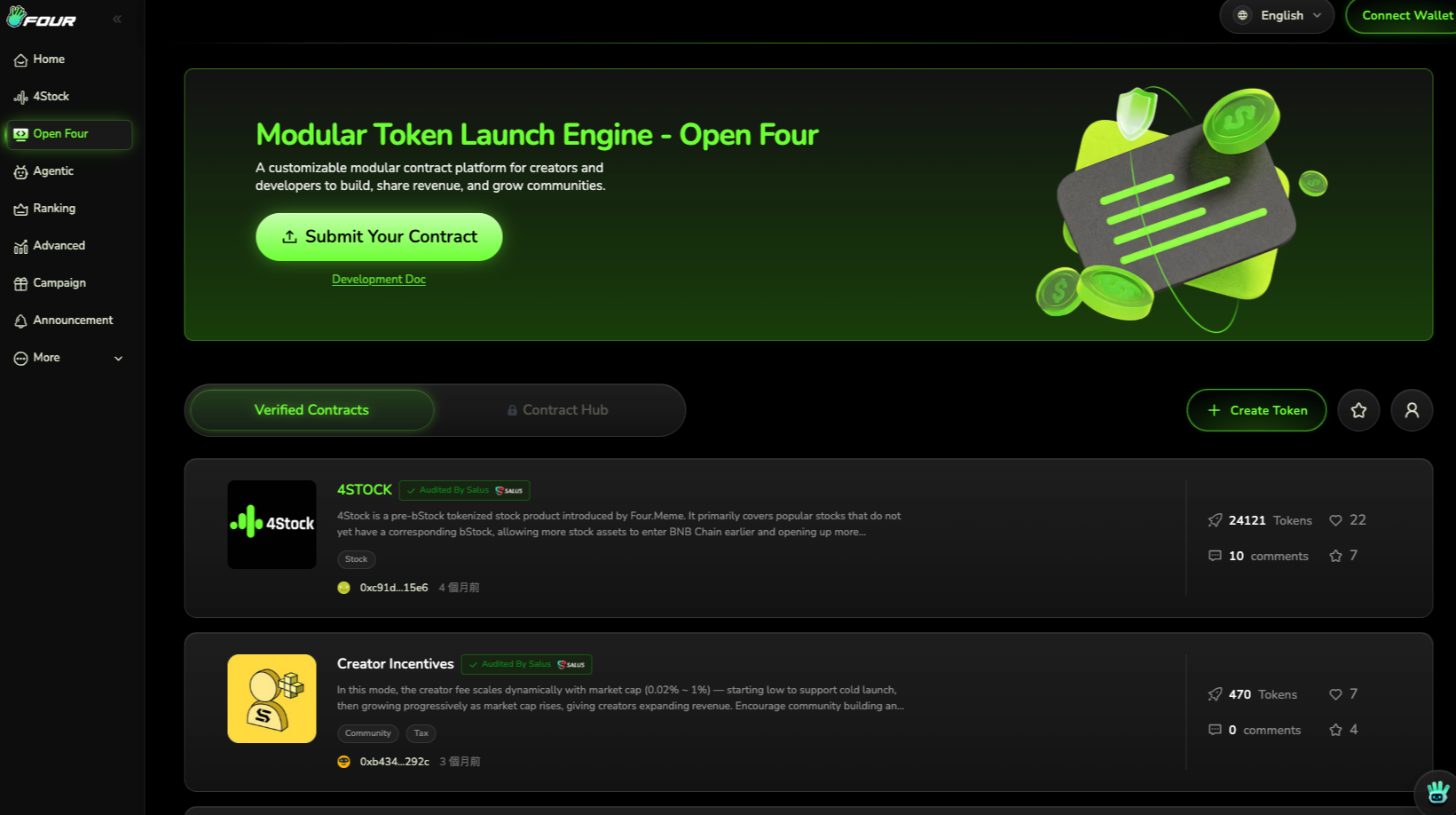
4STOCK
Royalty
Likwid Dex
Lista Yield
Creator Incentives
Cubepeg
Universal Subscription
Different Open Modes correspond to different Token issuance, revenue distribution, liquidity, incentives, or subscription mechanisms. Therefore, prior to using CiaoTool for FourMeme Token operations, it is necessary to confirm the specific mode used by the project.
The specific available parameters of Open Mode, wallet quantity limits, and function support may vary with updates to the CiaoTool page, so the actual operations should be based on the information currently displayed on the CiaoTool page.
Which FourMeme Open Modes are Supported by CiaoTool?
CiaoTool provides corresponding tools for Token Creation, Initial Buy, and on-chain operations related to Open Mode for the FourMeme ecosystem.
4STOCK
4STOCK primarily targets RWA and Stock Meme projects, used to issue Tokens related to stock-themed assets.
For popular stock themes, some assets may not yet have corresponding bStock products. 4STOCK can be used to create these stock-themed Tokens, providing an alternative issuance method for Stock Meme projects. Project parties looking to create BNB Chain Tokens around stock, RWA, or Stock Meme narratives can select appropriate 4STOCK modes according to specific issuance needs.
Royalty
Royalty is a mechanism for distributing trading fees associated with Tokens.
According to the specific Royalty configuration of FourMeme, related trading fees can be allocated according to set rules. The current Royalty mechanisms include different configuration methods, such as:
Code Royalty
Twitter Verification Mode
Buyback & Burn Mode
For project parties, the core of Royalty lies in integrating Token trading activities with the fee distribution mechanism to form various Token economies and community incentive designs.
CiaoTool currently supports corresponding FourMeme Open Mode operations, allowing project parties to complete relevant on-chain operations based on the parameters provided on the page.
Likwid Dex
Likwid Dex primarily focuses on DEX trading and DeFi scenarios after Token graduation.
After the Token completes the corresponding stages, it can enter Likwid DEX. Besides basic Swap trading, this mode can also combine lending and leveraged long and short DeFi features to provide richer trading and liquidity application scenarios for the Token.
Therefore, Likwid Dex is more concerned with how Tokens are used after they transition from the Launch phase into subsequent DEX and DeFi stages.
When using CiaoTool, the specific executable operations and parameters should be based on the current FourMeme-related page.
Lista Yield
Lista Yield combines the subsequent liquidity of Tokens with the yield mechanism within the Lista ecosystem.
After the Token completes the relevant stages, liquidity can enter ListaDEX, while related taxes can enter Liste's Staking Pool according to the mechanism.
This mode is suitable for projects looking to further associate Token liquidity with yield mechanisms, providing another path for liquidity management after Token graduation.
CiaoTool's current page provides corresponding support for the Open Mode with specific operational parameters based on what is displayed on the page.
Creator Incentives
Creator Incentives are primarily used to incentivize Creators and project parties.
This mechanism can dynamically adjust the Creator Fee based on changes in Token market value, with the current fee ratio range being 0.02%–1%.
For projects looking to establish Creator incentive mechanisms through Token trading activities, this Open Mode can combine trading activities with the incentives for project parties or Creators.
Project parties using CiaoTool can complete relevant operations based on the parameters supported by the current page.
Cubepeg
Cubepeg is a mechanism within FourMeme Open Mode that combines Tokens with NFTs, based on the underlying logic of PancakeSwap Infinity Hook.
Under the corresponding mechanism:
Holding a certain amount of Tokens corresponds to NFTs;
The current rule is holding 100,000 Tokens corresponds to 1 NFT;
When the Tokens are sold, the corresponding NFT will be destroyed;
Project parties can also use a custom NFT Rendering Contract.
This design combines the holding behavior of Meme Tokens with NFTs, adding community and asset presentation forms that differ from traditional Meme Tokens.
Universal Subscription
Universal Subscription is a subscription-based Token issuance mechanism. Users can deposit BNB during the Subscription phase. After the subscription ends, Tokens will be allocated according to the user's actual contribution ratio.
In case of oversubscription, users will not receive Tokens based on the total deposited amount but will calculate the actual amount received according to the final allocation rules, with excess BNB returned as per the mechanism.
For project parties, Universal Subscription can expand Token issuance from the traditional direct purchase method to a Subscription model.
What is the relationship between FourMeme Open Mode and Token Launch?
For a FourMeme Token project, Token Creation is usually just the beginning of the entire Launch process.
A more complete on-chain process may include:
Token Creation → Initial Buy → Open Mode → Liquidity → DEX Trading → Market Operations
Different Open Modes will affect the subsequent mechanisms for Token issuance, fee distribution, liquidity, and trading methods.
Therefore, before creating Tokens, project parties need to confirm the following:
Which Open Mode to use;
The basic issuance parameters of the Token;
Whether Dev Buy is needed;
Whether Multi-Address Bundled Buy is needed;
Which liquidity or DEX environment to enter subsequently;
How to execute on-chain operations corresponding to the Open Mode.
This is also why Open Mode cannot be simply understood as an ordinary option on the Token creation page, but should be planned in conjunction with the entire Token Launch process.
CiaoTool + FourMeme: From Token Creation to Initial Buy
CiaoTool's FourMeme tools mainly help project parties reduce repetitive on-chain operations in the Token Launch process.
Token Creation
Project parties can create FourMeme Tokens through CiaoTool and configure the corresponding parameters based on the current page.
The entire process does not require writing smart contract code, and project parties can complete Token Creation directly through the page.
Dev Buy
During the Token creation process, if project parties need to make an initial purchase, they can use Dev Buy to complete the initial transaction for the developer's wallet.
Multi-Address Bundled Buy
If a project needs multiple wallets to make initial purchases during the opening phase, they can use the Multi-Address Bundled Buy.
Executing related purchase operations through multiple addresses can reduce the repetitive operations that arise from manually executing transactions for each wallet.
For already created FourMeme Tokens, the FourMeme Multi-Address Bundled Buy can also be used based on the functions provided on the current CiaoTool page.
Open Mode Related Operations
In addition to Token Creation and Initial Buy, the current CiaoTool page also provides support for corresponding FourMeme Open Mode. Project parties can select corresponding functions based on the mode used and execute on-chain operations according to the parameters provided on the page.
It should be noted that the specific mechanisms and configurable parameters of different Open Modes are not identical. Therefore, actual operations should be based on the functions displayed on the current CiaoTool page, rather than executing based on outdated parameters from other tutorials.
Why do FourMeme projects need more comprehensive on-chain tools?
The Launch process for Meme Tokens is gradually evolving from merely “creating Tokens” into a combination of multiple on-chain steps.
The traditional process might simply be:
Create → Buy → Trade
After using different Open Modes, a project may involve:
Create → Open Mode → Initial Buy → Liquidity → DEX → Incentives → Market Operations
If each step relies on different tools, project parties may need to repeatedly:
Switch between different websites;
Connect different wallets;
Reconfigure parameters;
Manually execute repetitive trades;
Check the transaction status on different pages.
For projects that need to quickly complete multiple operations during the opening phase, this will increase operational costs.
CiaoTool's positioning is to consolidate more FourMeme-related on-chain operations into a single tool platform, allowing project parties to complete Token Creation, Initial Buy, Bundled Buy, and current page supported Open Mode related operations in the same operational environment.
How to Use CiaoTool to Operate FourMeme Open Mode?
Step 1: Confirm Open Mode
First, confirm which mode the project needs to use.
Currently, CiaoTool supports:
4STOCK
Royalty
Likwid Dex
Lista Yield
Creator Incentives
Cubepeg
Universal Subscription
Different modes correspond to different Token mechanisms, so it is necessary to determine the project's issuance and operational needs first.
Step 2: Prepare Tokens and Wallets
Prepare according to specific functionalities:
FourMeme Tokens;
Project operational wallet;
Dev Wallet;
Funds required for Initial Buy;
Wallets required for Multi-Address Bundled Buy.
If using multiple address operations, it is also necessary to confirm the number of wallets and current page-supported address limits in advance.
Step 3: Enter CiaoTool
Open the relevant FourMeme functionality page on CiaoTool and connect your wallet.
Select the corresponding function based on the Open Mode currently used by the project.
CiaoTool adopts a page-based operational process, so project parties do not need to write code or deploy additional scripts themselves.
Step 4: Configure Parameters and Execute
Complete the configuration based on the parameters displayed on the current page, and then submit the on-chain transaction.
For Token Creation and Initial Buy, the Token can be created and purchased according to the corresponding functionality.
If using Multi-Address Bundled Buy, then configure the participating wallets according to the page requirements and execute related operations.
For Open Mode, the execution should be based on the parameters and on-chain mechanisms of the specific mode.
Step 5: Continue Token Operations
After completing the Launch, project parties can continue related on-chain operations based on actual needs.
For example:
Token Creation → Initial Buy → Open Mode → Liquidity → DEX Trading → Market Operations
Specific subsequent operations depend on the Open Mode used by the project and the Token's operational plan.
Frequently Asked Questions about FourMeme Open Mode
What is FourMeme Open Mode?
FourMeme Open Mode is an open model used in the FourMeme ecosystem to support different Token issuance, trading, incentive or DeFi mechanisms.
Different modes correspond to varied on-chain application scenarios, such as Royalty, Likwid Dex, Lista Yield, Creator Incentives, Cubepeg, Universal Subscription, and 4STOCK.
Which FourMeme Open Modes does CiaoTool support?
Currently, the CiaoTool page supports:
4STOCK, Royalty, Likwid Dex, Lista Yield, Creator Incentives, Cubepeg, and Universal Subscription.
The specific scope of support may change with page and product function updates.
Can CiaoTool create FourMeme Tokens?
Yes. CiaoTool provides FourMeme Token Creation functionality, allowing project parties to complete Token creation through the page without needing to write code.
Does CiaoTool support FourMeme Bundled Buy?
Yes. CiaoTool offers FourMeme-related Dev Buy and Multi-Address Bundled Buy functionalities, which can be used for initial purchase operations following Token creation.
Are the parameters of different Open Modes exactly the same?
No. Different Open Modes correspond to different Token mechanisms and on-chain logics, so the configurable parameters, wallet limits, and specific operation methods may differ.
CiaoTool: FourMeme Token Operations
The expansion of FourMeme Open Mode provides more mechanism choices for Meme Token issuance on the BNB Chain.
From 4STOCK, Royalty, Likwid Dex, Lista Yield, Creator Incentives, Cubepeg to Universal Subscription, different modes correspond to different scenarios such as stock-themed Tokens, fee distribution, DEX/DeFi, yields, Creator incentives, NFTs, and subscriptions.
For project parties, choosing an Open Mode is just the first step. They still need to handle Token Creation, Initial Buy, Multi-Address Bundled Buy, and other on-chain operational activities.
CiaoTool consolidates these common FourMeme operations into a no-code Web3 tool platform, helping project parties reduce tool switching and repetitive tasks.
Please refer to the information currently displayed on the CiaoTool page for the OpenFour modes, specific parameters, wallet quantity limits, and other functions supported by CiaoTool.
免责声明:本文章仅代表作者个人观点,不代表本平台的立场和观点。本文章仅供信息分享,不构成对任何人的任何投资建议。用户与作者之间的任何争议,与本平台无关。如网页中刊载的文章或图片涉及侵权,请提供相关的权利证明和身份证明发送邮件到support@aicoin.com,本平台相关工作人员将会进行核查。