In the traditional financial system, if a bank card is lost, it can be reported; if a password is forgotten, it can be recovered. However, in the encryption world, the wallet private key is the very control of the assets. Once the mnemonic phrase is leaked, asset transfer is almost irreversible. Chainalysis pointed out in its latest "2026 Crypto Crime Report" that in 2025, losses of cryptocurrency assets due to scams and fraud amounted to approximately $17 billion. For ordinary users, the biggest risks are often not complex blockchain vulnerabilities but one wrong click, one malicious authorization, or one mnemonic phrase leak.
This article will revolve around three core questions:
- What is the difference between hot wallets and cold wallets?
- How should private keys be properly stored?
- How to recognize and avoid common wallet phishing attacks?
1. Hot Wallets vs Cold Wallets: The Balance Between Security and Convenience
Essentially, a cryptocurrency wallet does not store your tokens.
On-chain BTC, ETH, or other assets are always recorded in the blockchain ledger; what the wallet truly manages is:
Private Key — the only proof that signs and controls asset transfers. Depending on whether the private key is connected to the internet, wallets are typically classified into two categories:
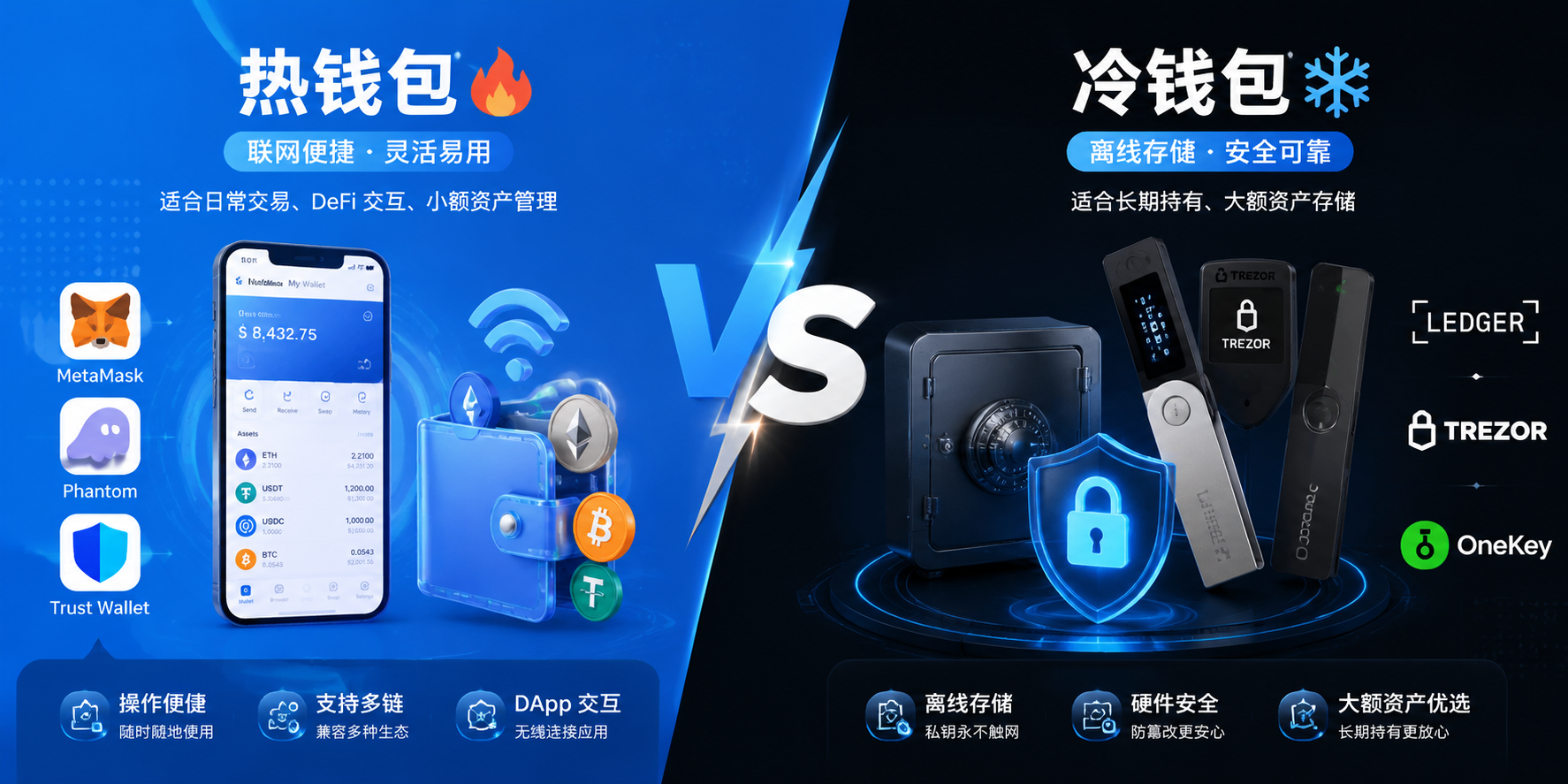
1. Hot Wallets: High Convenience but Greater Exposure
Hot wallets refer to wallets where the private keys operate on internet-connected devices, such as:
- Common Types: Browser plugins or mobile apps like MetaMask, Phantom, Trust Wallet, etc.
- Advantages: Ready to use, convenient for transactions, suitable for frequently interacting with DeFi, NFTs, and on-chain activities.
- Risk Points: Since the private key or signing environment is online for an extended period, if the device is infected with malware (such as clipboard trojans, silent screenshot programs), or if users mistakenly sign malicious phishing transactions, assets may face real-time penetration risks.
- Positioning: Similar to carrying a small change wallet for frequent funds, it is not suitable for storing heavy assets.
2. Cold Wallets: Physically Isolated, Security First
Cold wallets refer to devices that store private keys offline through hardware environments for an extended period, such as:
- Common Types: Hardware wallets like Ledger, Trezor, OneKey, etc.
- Core Mechanism: The transaction signing process is completed within the hardware chip, and the private key never touches the internet. Even if a computer or phone is infected, attackers cannot directly read the private key within the hardware wallet through the network.
- Applicable Scenarios: Storage of large assets, long-term holders of BTC/ETH, low-frequency trading users.
- Special Note: Cold wallets are not "absolutely invincible." If the mnemonic phrase is photographed and uploaded, or purchased a tampered device repackaged for secondary sale, or the mnemonic phrase of the hardware wallet is manually entered on a phishing website, the cold wallet will be compromised as well.
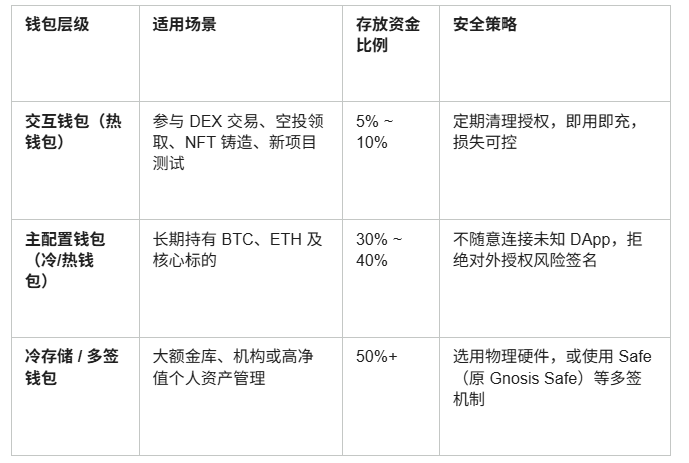
2. Asset Layered Configuration: Rejecting "Single Point of Failure"
One of the most common mistakes for many newcomers is to store all assets in a single wallet address. Once there is a signing error or a private key leak, it can lead to total loss.
The industry standard risk isolation solution is funds layered management:
Multi-signature Mechanism (Multi-sig): By setting up an "M-of-N" threshold (for example, requiring 2 out of 3 private keys to confirm fund transfers), the risk of funds being transferred due to a single private key leak is avoided. This is commonly used for project treasury or high-net-worth asset custody.
3. Private Key and Mnemonic Phrase Storage: Safeguarding the "Highest Authority" of Digital Assets
A mnemonic phrase (usually consisting of 12 or 24 English words) is a visual representation of the private key, and it holds the highest control over all assets under that address.
1. Absolutely Do Not Digitally Save Mnemonic Phrases
❌ No Screenshots / Photos
❌ No Storage in Mobile Notes / WeChat Favorites / DingTalk Documents
❌ No Uploads to Cloud Services like Baidu Netdisk, iCloud, Google Drive, etc.
❌ No Transmission via Social Software
Reason: All online environments may face risks such as cloud synchronization leaks, third-party app permissions being too high for reading, and system backups being hacked.
2. Insist on Physical Isolation Backups
- Recommended Practice: Handwrite on paper (make 2-3 copies for comparison), or use a metal mnemonic phrase board that is corrosion-resistant and heat-resistant.
- Storage Location: Store in a decentralized and confidential manner, such as in a home safe, anti-moisture box, or other secure areas, to avoid fire, water damage, and physical loss.
3. Iron Law: Any website asking for online input of the mnemonic phrase is a scam
This is the highest security principle in the crypto world: Standard on-chain connections, transaction authorizations, and airdrop claims will only call for interactive interfaces of wallet plugins and will never require users to input 12/24 mnemonic phrases in a web textbox.
If the following pop-ups appear, you must immediately close the page:
- "Verify wallet identity to continue"
- "Node synchronization failed, please input mnemonic phrase to recover"
- "Receiving tokens requires binding the mnemonic phrase"
4. On-chain Phishing Pitfall Guide: From Attack Code to Attack Behavior
As the security of wallet hardware has improved, attackers have gradually shifted their focus to using psychology to induce users to voluntarily sign malicious transactions.
Common On-chain Phishing Tactics and How to Avoid Them
- Fake Airdrops / Malicious Scam Tokens
○ Attack Method: Tokens or NFTs with unknown names suddenly appear in the wallet, with names containing "claim URL," enticing users to connect their wallet and sign.
○ Prevention: Ignore, do not click, do not attempt to exchange any airdropped junk tokens on unknown DEX.
- Malicious Unlimited Authorization (Unlimited Approval)
○ Attack Method: Forged popular Mint interfaces or Swap pages, replacing ordinary interactions with Approve or Permit2 malicious authorization instructions to deceive assets transfer permissions.
○ Prevention: Carefully read wallet pop-up prompts, avoid signing "unlimited authorization"; regularly use Revoke.cash to check and revoke expired authorizations.
- Fake Customer Service in Communities / Forged Official Websites
○ Attack Method: Purchase ads on search engines to display fake official websites or impersonate official Admin private messages in Discord/Telegram.
○ Prevention: Do not click on advertising links promoted by search engines, only enter the correct official website from authoritative channels like official Twitter, and close social software private messages.
- Clipboard Replacement Trojan (Poison Address)
○ Attack Method: Viruses monitor the clipboard, automatically replacing copied transfer addresses with attacker addresses that have similar beginning and ending characters when users copy.
○ Prevention: Verify the complete address character-by-character before transferring (especially the middle characters, do not just look at the first and last 4 characters).
5. Transaction Signature Protection: Understand the Instructions Behind "Confirm"
Many users mistakenly believe that "as long as the mnemonic phrase is not leaked, the wallet is absolutely safe," but in reality, malicious signatures can directly empty the wallet balance without obtaining the private key.
Before clicking "confirm," clarify the following sensitive signature types:
1. Approve / SetApprovalForAll: Allows smart contracts to access your ERC-20 tokens or complete NFT Collections.
2. Permit / Permit2: Gas-free offline signature authorization, which attackers can use to extract corresponding assets at any time after obtaining it.
3. Eth_sign: Blind signing instructions (mostly disabled by mainstream wallets), which may contain any unmasked malicious operations.
Suggestion: Install wallet plugins with security interception and transaction result preview functions, such as Rabby Wallet, Scam Sniffer, to visually check "expected asset changes" when signing.
6. If Unfortunately Stolen, How to React Quickly?
When unauthorized transfer records appear in the wallet, calmly stop losses by following these steps:
1. Isolate Assets Immediately: Immediately create a completely new wallet (with a new mnemonic phrase and new address) and quickly transfer the remaining untransferred assets to the new address.
2. Cut Off Authorization Permissions: Use Revoke.cash or the Token Approval tool of the corresponding blockchain explorer to cancel all smart contract authorizations of the original wallet to prevent subsequent incoming funds from being automatically deducted.
3. On-chain Evidence and Traceback: Save the time of theft, transaction hash (TxHash), and hacker address, report to blockchain security companies like SlowMist and PeckShield, and contact related centralized exchange risk control teams to mark and intercept the implicated addresses on-chain.
Conclusion: The Biggest Security Vulnerability Often Lies in "Operational Habits"
Statistics from security agencies like Chainalysis remind us that the risks in the crypto world are shifting to front-end applications and user behaviors.
In the decentralized world of Web3, there is no central customer service to fall back on; the private key is the only asset control.
Preventing hacker threats relies not only on hardware tools but also on rigorous operational processes:
- Layered Isolation: Hot wallet interaction, cold wallet storage;
- Physical Defense Line: Offline handwritten mnemonic phrases, refuse online input;
- Cautious Signing: Understand authorization limits, regularly revoke old permissions.
Securing the digital vault is the first lesson to unlock the exploration of Web3.
免责声明:本文章仅代表作者个人观点,不代表本平台的立场和观点。本文章仅供信息分享,不构成对任何人的任何投资建议。用户与作者之间的任何争议,与本平台无关。如网页中刊载的文章或图片涉及侵权,请提供相关的权利证明和身份证明发送邮件到support@aicoin.com,本平台相关工作人员将会进行核查。