What is contract following?
Contract following allows users to automatically copy the actions of experienced contract trading experts on Bitget. After following trading experts, your account will automatically replicate their positions, allowing you to participate in the contract market without needing advanced trading knowledge.
Bitget offers two types of following trading modes designed to meet different user needs:
1. Diverse Exploration
- Use a fixed amount (margin) to copy every trade of the trading expert.
- The positions of multiple trading experts will share the same fund pool and jointly bear risks.
- No need to prepare separate investment fund pools for each trading expert in advance.
- A single fund pool can be used to follow different trading expert strategies.
2. Smart Ratio
- Set up a dedicated fund pool for each trading expert you follow.
- Copy their trades and learn their strategies.
- Follow the position sizes of trading experts in proportion.
- The investment amount and risk of each following trade will match the trading expert's investment.
- Followers can proportionally assess each trading expert's risk control level and confidence.
Before starting to follow, you must transfer funds into a dedicated following account.
- The funds in the following account are isolated from the main account funds.
- The first transfer requires at least 50 USDT.
- If the trading expert you want to follow has set a minimum following amount, the funds you transfer must meet or exceed that requirement.
- During the following process, you can recharge or withdraw funds at any time. However, note that your total asset value must always be greater than your initial investment amount, otherwise, the following will be interrupted.
- If the pending profit-sharing amount exceeds 30% of the remaining total assets after withdrawal, the system will freeze the pending profit-sharing amount to protect the trading expert's earnings. If there are no open positions that day, the frozen amount will automatically unfreeze at 00:00 of the same day (UTC+8). Therefore, your actual withdrawal amount may differ from your expected amount.
- If you stop following, all remaining assets will automatically return to your spot or fund account.
Also, note that Bitget currently supports withdrawals that include unrealized profit and loss (PnL) funds. If the balance after withdrawal is negative, loan interest will be incurred, which you can check in your transaction history.
Start Following (Web Version)
Step 1: Go to the "Follow" section
1. Find the "Trade" tab in the main menu.
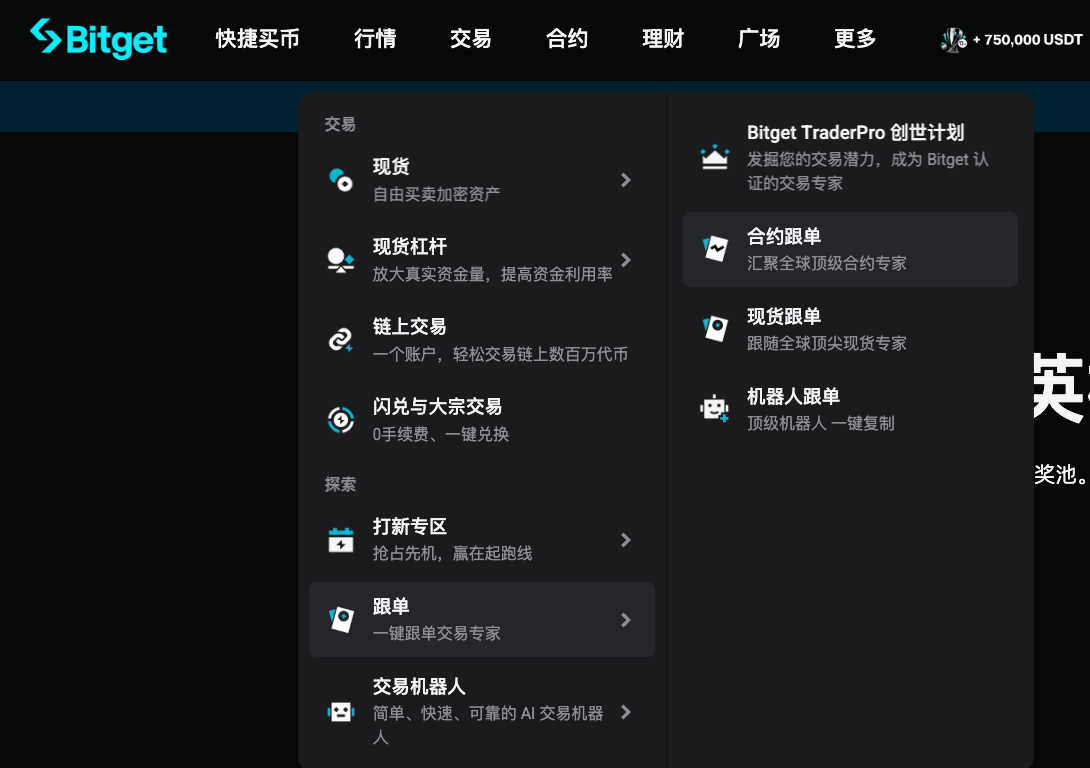
2. Select “Contract Following” from the dropdown menu.
Step 2: Choose a trading expert to start following
1. Browse the list of trading experts displayed on the Contract Following page.
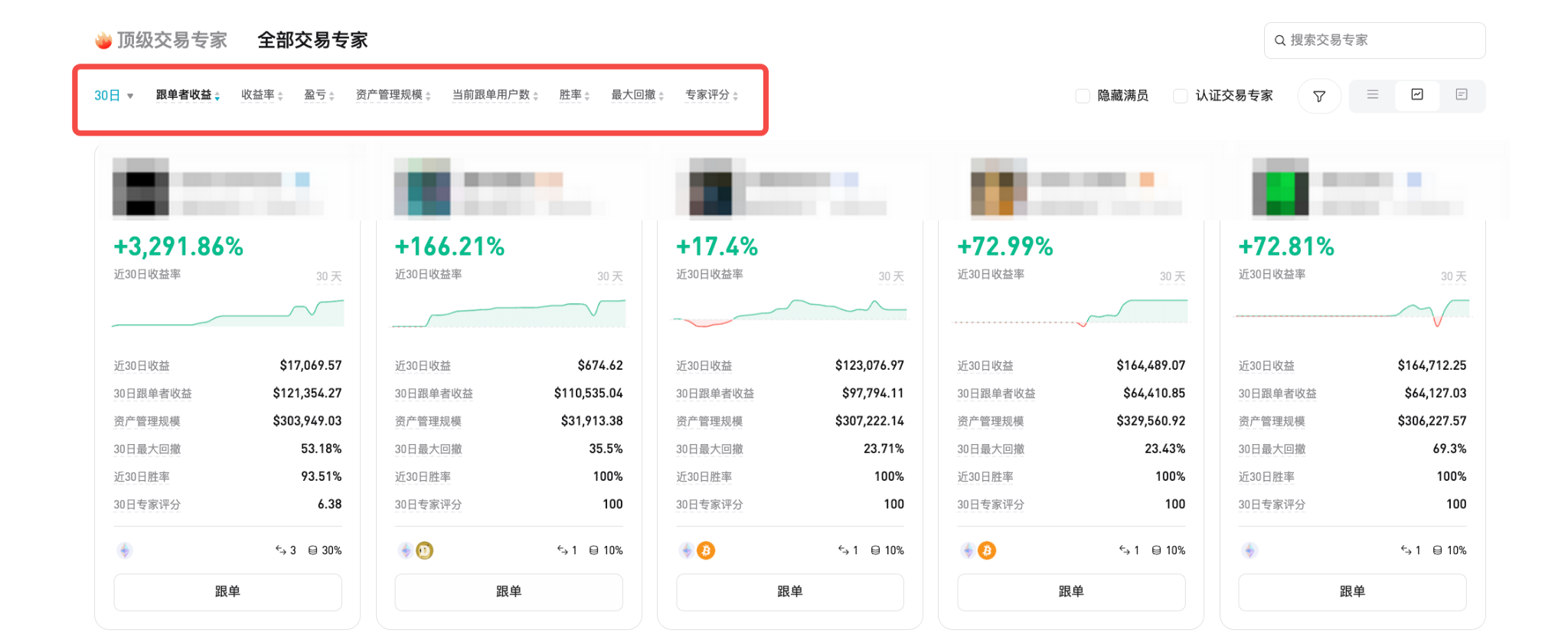
2. Check key indicators, including win rate, return rate and follower earnings.
3. Click on the trading expert's profile to view detailed statistics and trading history.
4. After selecting a trading expert, click “Follow.”
Step 3: Configure following parameters
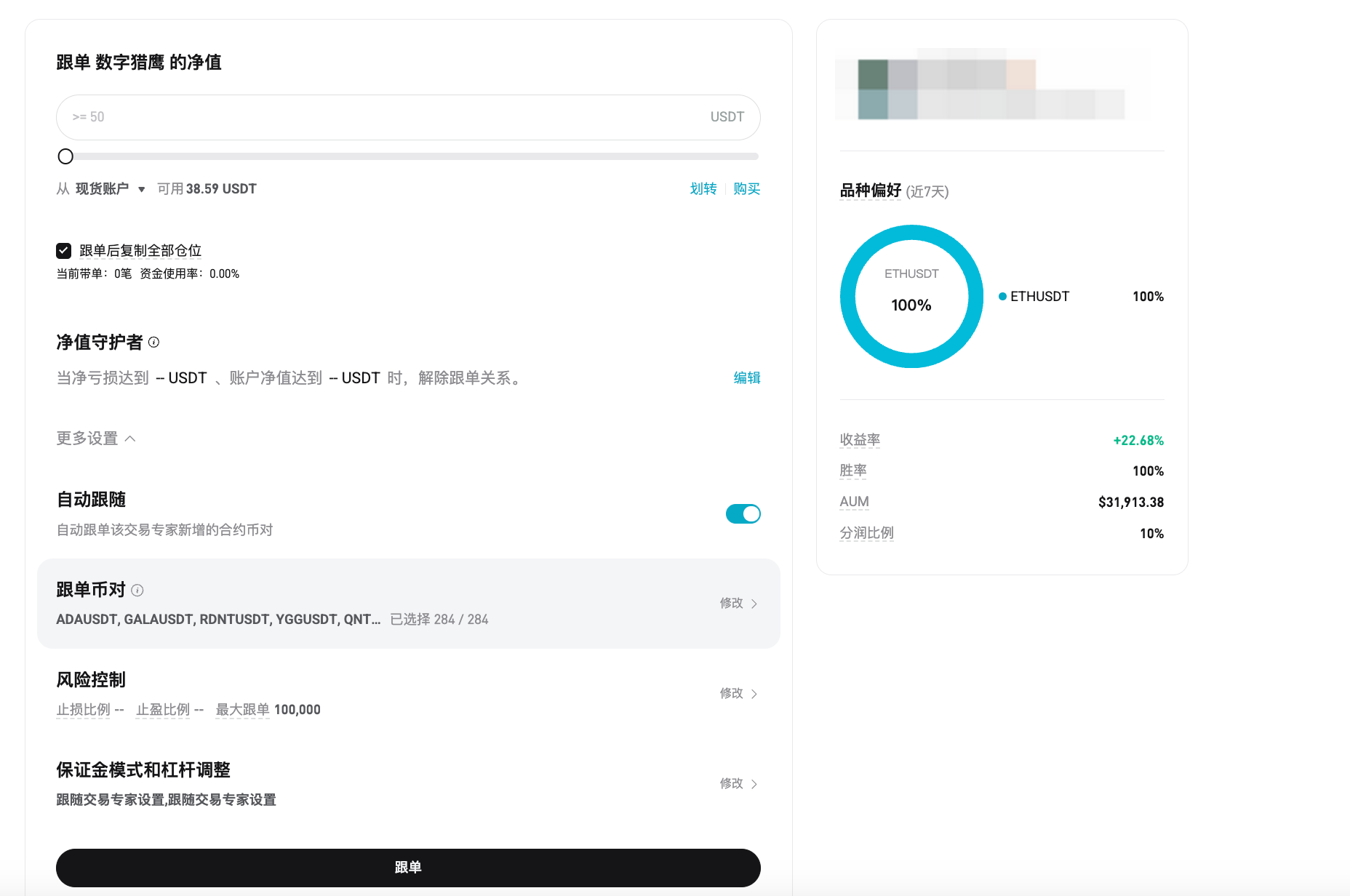
1. Following Net Value
- Set the amount of USDT (minimum 50 USDT) used for following the trading expert.
2. Follow and replicate all positions
- Enabling this option will replicate all open positions of the selected trading expert.
3. Net Value Guardian (optional)
- This safety feature helps reduce losses.
- Set thresholds to automatically stop following under certain conditions:
- Your net loss reaches a certain amount of USDT.
- Your account net value falls below a set amount.
4. Automatic Following
- Enabling this feature allows automatic following of newly added contract pairs by the trading expert.
5. Following Pairs
- View and customize which contract pairs to follow.
6. Risk Control
- Configure:
- Stop Loss Ratio: When losses exceed the set ratio, the following order will be automatically closed. For example, if your stop loss ratio is set at 10%, any order with losses exceeding 10% will be automatically closed at market price.
- Take Profit Ratio: When profits exceed the set ratio, the following order will be automatically closed. For example, if your take profit ratio is set at 10%, any order with profits exceeding 10% will be automatically closed at market price.
- Maximum Following: The maximum margin limit used for each pair (measured in USDT). Once the margin used for the current trade reaches this limit, following will cease. Following will resume after positions are closed and used margin decreases.
- Slippage Ratio: 'If slippage exceeds the set ratio, the system will not follow the trading expert's opening position.
7. Margin Mode and Leverage Adjustment
- Configuration
- Follow the trading expert's settings
- Cross Margin Mode
- Isolated Margin Mode
8. Leverage
- Configuration
- Follow the trading expert's settings: Use the same leverage level as the trading expert.
- Fixed Leverage: Set the same leverage (e.g., 10x) for all trades.
- Custom Leverage: Manually set different leverage for each pair.
Step 4: Track Trading Performance
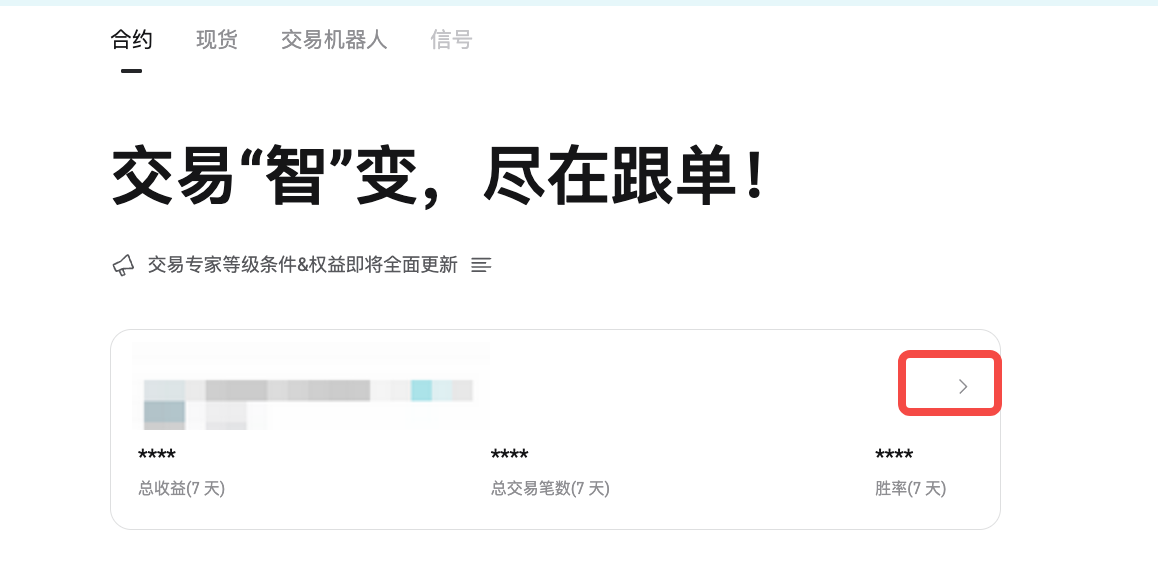
1. Go to “Follow” > “Contract”.
2. Click the arrow ( > ) to view detailed trading performance.
3. View your statistics, such as profits and losses, win rate, and open positions.
4. Click “Details,” to manage following for each trading expert.
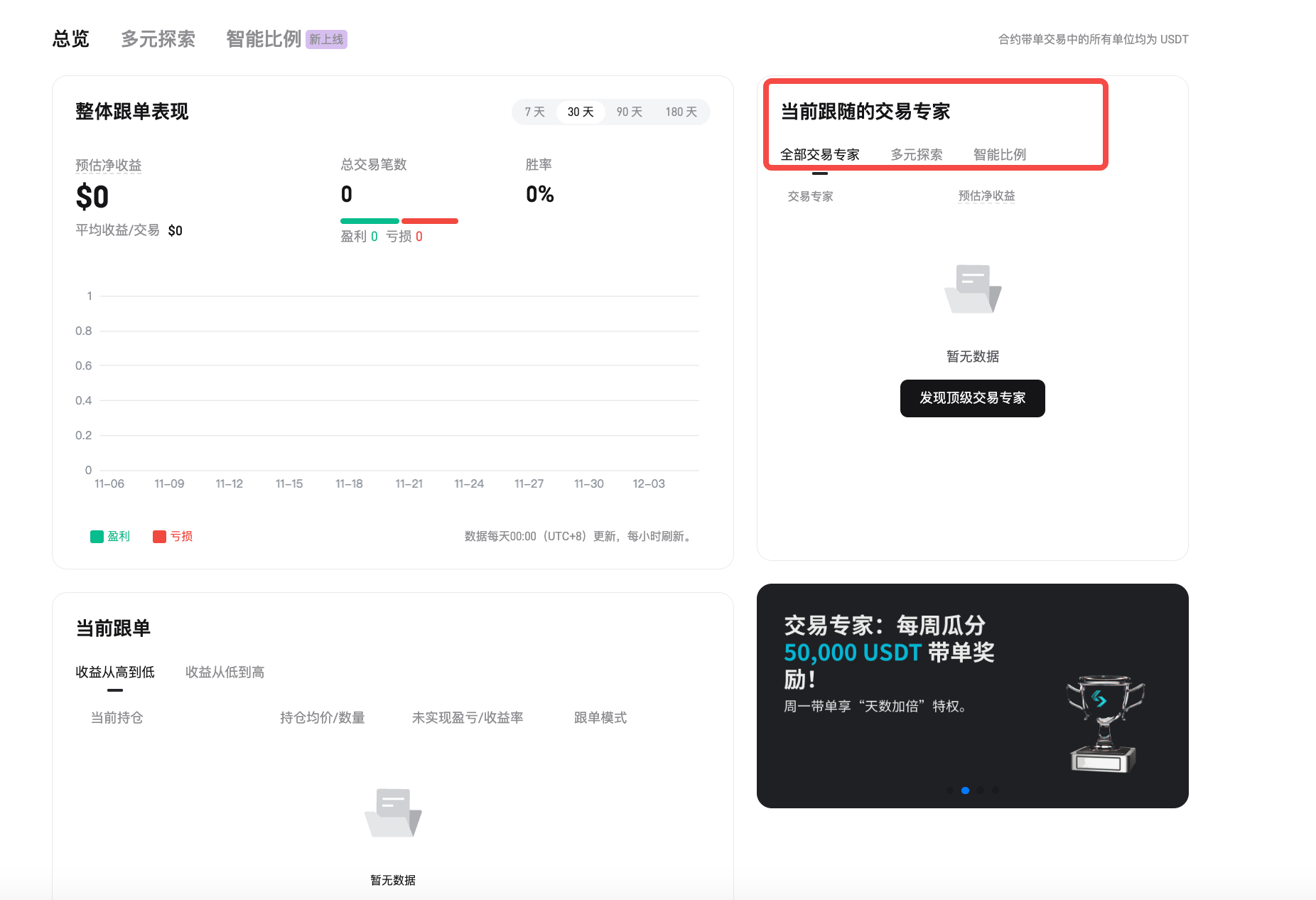
5. The menu supports the following actions:
- Add Funds
- Withdraw Assets
- Stop Following
6. Click “Edit” to modify risk settings, leverage, or following pairs.
Start Following (APP Version)
Step 1: Go to the Follow section
1. Open Bitget App, click on the “Trade” or “Contract” in the bottom menu.
2. Click on “Tools” in the top navigation bar.
3. Select “Follow” to enter the following panel.
Step 2: Select a contract trading expert
1. Click on the “Contract” tab at the top of the following page.
2. Check their key indicators, including win rate, return rate, and follower earnings.
3. Click on the trading expert's homepage to view detailed data and trading history.
4. After selecting a trading expert, click “Follow.”
Step 3: Configure your following settings
1. Agree to Terms: Accept the “Bitget Following Agreement.”
2. Choose Following Mode:
- Smart Ratio: Follow in proportion to the number of orders placed by the trading expert.
- Diverse Exploration: Each following trade uses a fixed amount or multiple of USDT margin.
Step 4: Set Margin, Pair Preferences, and Advanced Settings
Before starting to follow, please configure key parameters to manage your risk and trading behavior. These settings ensure that your trades align with your risk tolerance and trading goals.
1. Following Amount
- To start following, at least 50 USDT is required.
- If the trading expert you want to follow has set a minimum following amount, the funds you transfer must meet or exceed that requirement.
2. Pair Preferences
- By default, all supported pairs will be selected.
- You can manually deselect specific pairs from the list.
- You can also disable the automatic following of newly added contract pairs to have full control over your trading assets.
3. Advanced Settings
- Margin Mode
- Both Isolated Margin Mode and Cross Margin Mode are supported.
- Isolated Margin will be updated to support in the future.
- You will automatically follow the trading expert’s margin mode settings.
- Leverage
- Follow trading expert settings, or
- Set a fixed leverage ratio between 1–10x.
- Fixed leverage helps to keep the risk exposure stable.
- Maximum Slippage
- Default slippage ratio : 0.5%
- Custom range : 0.1%–3%
- If the trade exceeds your slippage settings, the system will not follow that trade.
Note: Lower slippage helps protect your order price, but may increase the chances of order rejection due to price fluctuations.
- Maximum Margin Per Order
- Set the maximum percentage of total assets that can be used as margin for a single trade.
- If the trade exceeds this limit, the system will use the margin amount according to your set limit.
- This helps prevent excessive exposure in a single trade.
Maximum Position Value
- Default value : 1,000,000 USDT
- If your total position value reaches this limit:
- The system will stop following new opening orders
- Closing orders will still be followed and executed
- This setting controls the total risk exposure of all your open positions.
Step 5: Start Following
1. After completing all configurations, the system will transfer the set following amount from your contract account to a dedicated following account.
2. Each trading expert you follow will have a separate sub-account for operation. Once set up, you will be redirected to the trading expert's “Following Details” page.
How to stop following a trading expert?
If you choose to cancel contract following, all current positions in your following account will be closed. Due to real-time price fluctuations during the market sale process, the final amount you receive may vary slightly.
Step 1: View your following details
1. Go to view the trading details of the trading expert you are following.
Step 2: Check and confirm cancellation
1. Click “Cancel Following.”
2. In the pop-up, choose your preferred closing method:
- Immediately close all positions at market price
- Follow the trading expert to close
3. Please read the instructions carefully.
4. Click “Confirm” to proceed.
Key points to note:
1. Close at market price:
- All open positions will be closed immediately at market price.
- Profit-sharing will be settled immediately based on the final profit and loss.
2. Follow the trading expert to close:
- No new positions will be followed.
- Existing positions will continue to be held and follow the trading expert's closing actions.
- You can still:
- Manually close
- Set stop loss/take profit
- Increase or decrease margin
- After all positions are closed, the system will settle profit-sharing based on the final profit and loss.
- After settlement, the remaining amount will automatically transfer to your spot or fund account.
What factors can lead to following failure?
Due to system protection measures or trading restrictions, some following actions may not be executed.
Common reasons include:
- The trading expert reaches the token upper limit. If the total value of the token’s following exceeds the platform limit, new followers cannot follow to buy that token.
- The trading expert exceeds the trading frequency limit. Bitget limits trading experts to one opening every 3 seconds to prevent followers from suffering slippage losses.
- The trading expert has canceled partially filled orders. Only fully filled buy orders will trigger following. Partially filled and canceled buy orders will not be followed.
- The follower has insufficient balance. If your available balance is below the minimum order amount, the trade will fail.
- Slippage exceeds limits. Bitget sets a default slippage limit of 0.5% for all contract following orders. You can manually adjust the slippage limit in the settings.
Note: If the price deviates during execution beyond this threshold, the corresponding following will be rejected.
Profit-sharing Freeze
To protect the profit-sharing earnings of trading experts, the system may temporarily freeze unsettled profit-sharing amounts when you transfer funds out of the following account.
Conditions for Freezing
- Applicable situations: If your account has pending settlement amounts that exceed 30% of your account balance after the transfer, the system will freeze pending profits before processing your withdrawal request.
- Impact on withdrawals:
- If your available balance is insufficient, the actual amount you receive may be less than you requested to withdraw.
- A pop-up reminder will clearly indicate that the freeze may affect your estimated liquidation price and prompt you for a second confirmation to help manage your risk.
- Duplicate transfers:
- If you initiate multiple fund transfers, the system will recalculate the required freeze amount based on the latest pending settlement amount.
- If the existing frozen amount is equal to or greater than the current pending profit, no further freezing will occur.
- Details on freezing:
- You can view the frozen amounts and explanations directly on the “Following Details” page.
- Freezing only occurs when you actively initiate a withdrawal.
- If there is already a frozen amount, the system will only make up the difference if the newly calculated freeze amount is higher.
Note: This frozen amount does not count towards your available margin, so it may affect your estimated liquidation price.
Automatic Unfreeze Rules
- The system checks your account daily at 00:00 (UTC+8).
- If there are no open positions, the entire frozen amount will automatically be refunded to your available balance.
- If there are open positions, no freezing or unfreezing operations will occur regardless of how the pending amount changes.
How to view freeze records
Step 1: View your following history
1. Go to Contract Following > Following Details > Transaction Records to see:
- Profit-sharing freeze deductions
- Profit-sharing freeze refunds
- To ensure transparency and ease of tracking, each transaction will be recorded in detail.
The most important thing about following
1. Avoiding pitfalls: First step, see through the “fake data” on the homepage
The data on the exchange homepage is often used to "whitewash" things. We need to learn to see through the tricks:
1. Trading Days: Don't touch "newbies" who have just hit a "full moon"
- On the surface: This teacher has been leading trades for 20 days with a 100% win rate, very impressive!
- Reality: They might just be lucky to have hit a bull market for those 20 days. Once the market turns, they might run slower than you.
- Hard standard: The number of days leading trades must exceed 30 days, preferably above 60 days. Only traders who have experienced both significant rises and falls can boast a credible win rate.
2. Maximum Drawdown: Test the teacher’s “resistance” ability
- On the surface: The maximum drawdown represents the worst single loss the teacher has incurred.
- Hard standard: For conservative teachers (trading major coins like Bitcoin and Ethereum), drawdowns must be capped at 30% or less; for aggressive teachers (who enjoy trading altcoins), the maximum can be loosened to 50%. Beyond this line indicates they probably don't set stop-losses, and following them carries a risk of total loss.
2. Avoiding pitfalls: Second step, teach you to identify the three most dangerous types of people
Looking at a trader's earnings curve is like looking at an ECG. If you see these three types of patterns, steer clear immediately:
⚠️ Type One: “Steady Climb” suddenly “Freefalling”
In the early phases, the curve moves up like a staircase, then suddenly drops straight down one day. This indicates that they typically do not set stops and are used to holding their positions through losses. If they survive 99 times, they might be a god; if they fail the 100th time, you’ll be taken with them to meet your maker.
⚠️ Type Two: “Past Star” (Rounded Top)
Initially, they earn at a vigorous pace, but in recent weeks the curve begins to flatten or even decline. This indicates that as more people start following them, their capital has grown, rendering their prior short-term strategies ineffective. Avoid hopping on board with this type.
⚠️ Type Three: “Heart Monitor” (Big Ups and Downs)
The curve looks like a rollercoaster, with rapid profits followed by rapid losses. Generally, this type of instructor is high-leverage, fully investing in altcoins/MEME coins. They themselves do not know whether the next order will double or go to zero, so following them is simply gambling with your principal.
3. Core Insight: Look at “Character Value” (Total Profit of Followers)
This is the most important point of the entire piece! Please remember an industry insider secret:
Some leading teachers earn 10% from your profits. If you lose money, they don’t bear any loss of principal.
This leads many unethical teachers to “do evil”: they trade wildly, even holding through losses. As long as there is a 1% chance to recover, they can keep their 100% win rate and continue earning profits; if they blow up, they can just switch accounts and start over, while your principal is gone.
🎁 Exclusive Benefits for AiCoin Users
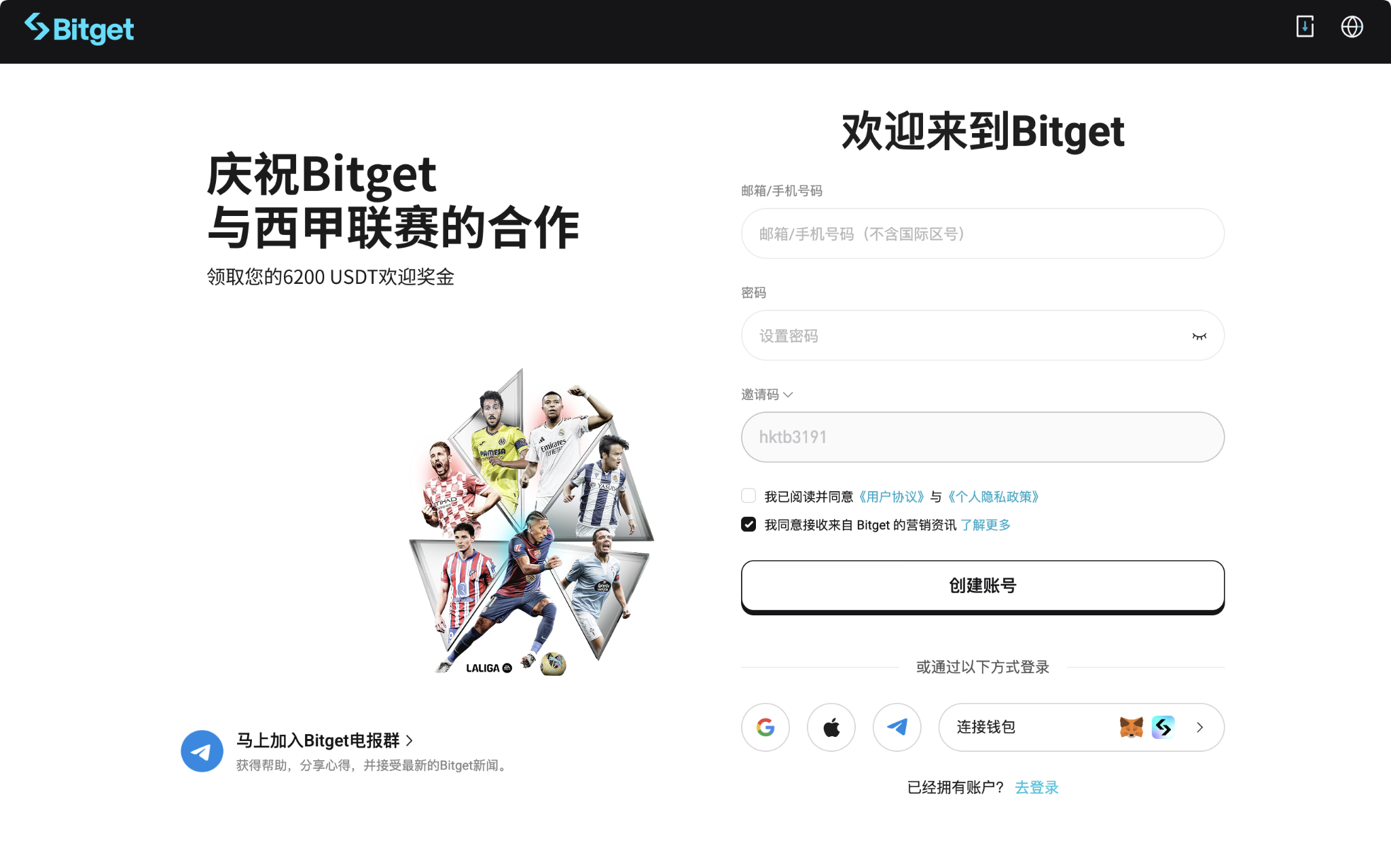
After learning this complete cycle of risk control for following, combined with the official solid protections, you can be completely at ease! Now, register on Bitget through the exclusive link to not only enjoy 10% refund on trading fees but also receive a valuable 6,200 USDT newbie gift package—superb value!
Invitation code: hktb3191
Link:
https://jump.do/zh-Hans/xlink?checkProxy=true&proxyId=6
免责声明:本文章仅代表作者个人观点,不代表本平台的立场和观点。本文章仅供信息分享,不构成对任何人的任何投资建议。用户与作者之间的任何争议,与本平台无关。如网页中刊载的文章或图片涉及侵权,请提供相关的权利证明和身份证明发送邮件到support@aicoin.com,本平台相关工作人员将会进行核查。