1. What is "Quantitative By Loss"?
"Quantitative By Loss" is an advanced ordering mode. You no longer need to manually calculate how many lots or how much currency to open; just tell the system: "If this trade hits the stop loss, how much am I willing to lose at most?" The system will automatically calculate the most suitable position size based on your stop loss distance.
2. Operation Entry
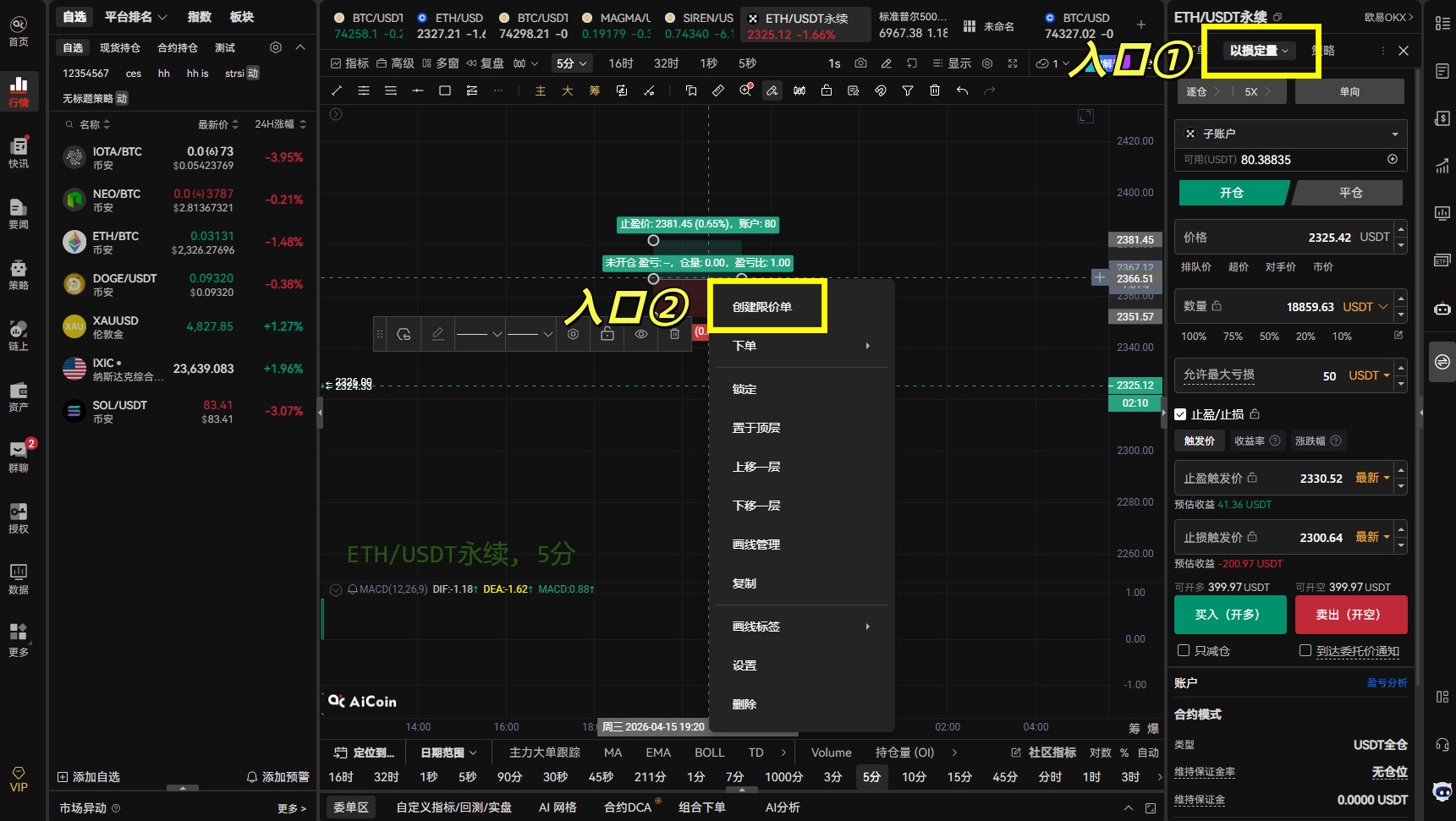
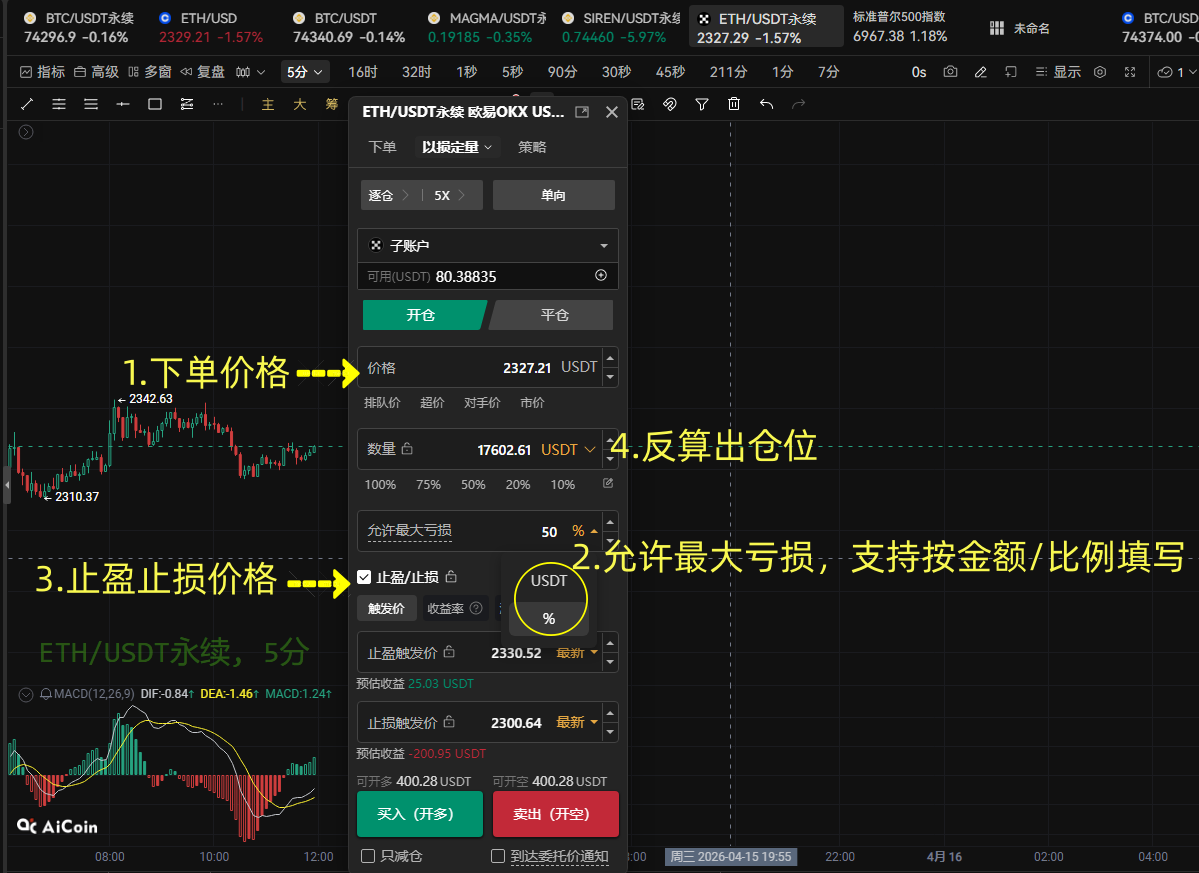
1.Regular Order Panel: Switch to 【Quantitative By Loss】 mode in the dropdown menu on the order page.
2.Drawing Tool Linkage: Use the "Long/Short Profit and Loss Ratio Tool" on the K-line chart, right-click on the tool, and select 【Create Limit Order】. The system will automatically bring in the take profit and stop loss levels set by the tool.
3. Core Parameter Settings
In the order panel, you need to pay attention to the following key fields:
- Price: Anticipated entry limit price or market price
- Maximum Allowable Loss (Core):
By Amount (USDT): For example, entering 100 means stopping loss when the loss reaches 100 USDT.
By Percentage (%): For example, entering 1% means stopping loss when the loss reaches 1% of the total account assets.
- Take Profit and Stop Loss: A stop loss price must be set, so the system can calculate the position backwards based on the "Opening Price - Stop Loss Price" distance.
- Order Quantity: This field will be automatically linked and generated based on the above parameters.
4. Detailed Explanation of Automatic Calculation Logic
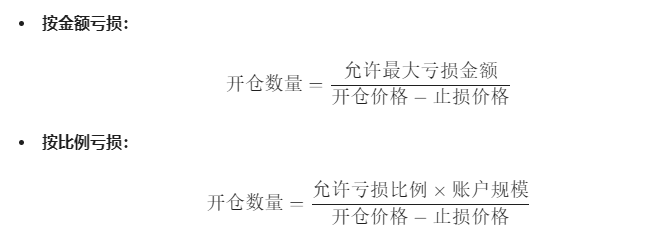
The system will apply different mathematical formulas based on your operation direction (long or short):
1. Long Calculation
2. Short Calculation
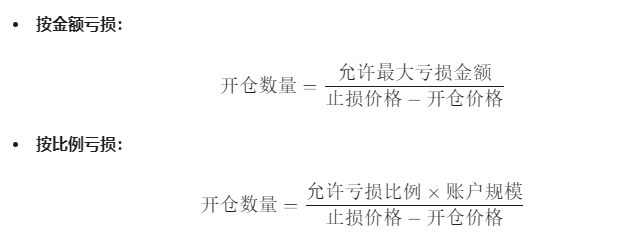
Note: The take profit and stop loss parameters are interrelated with the maximum loss and order quantity. When you modify any one value, the other values will update in real-time.
5. Operation Process (Illustrated Steps)
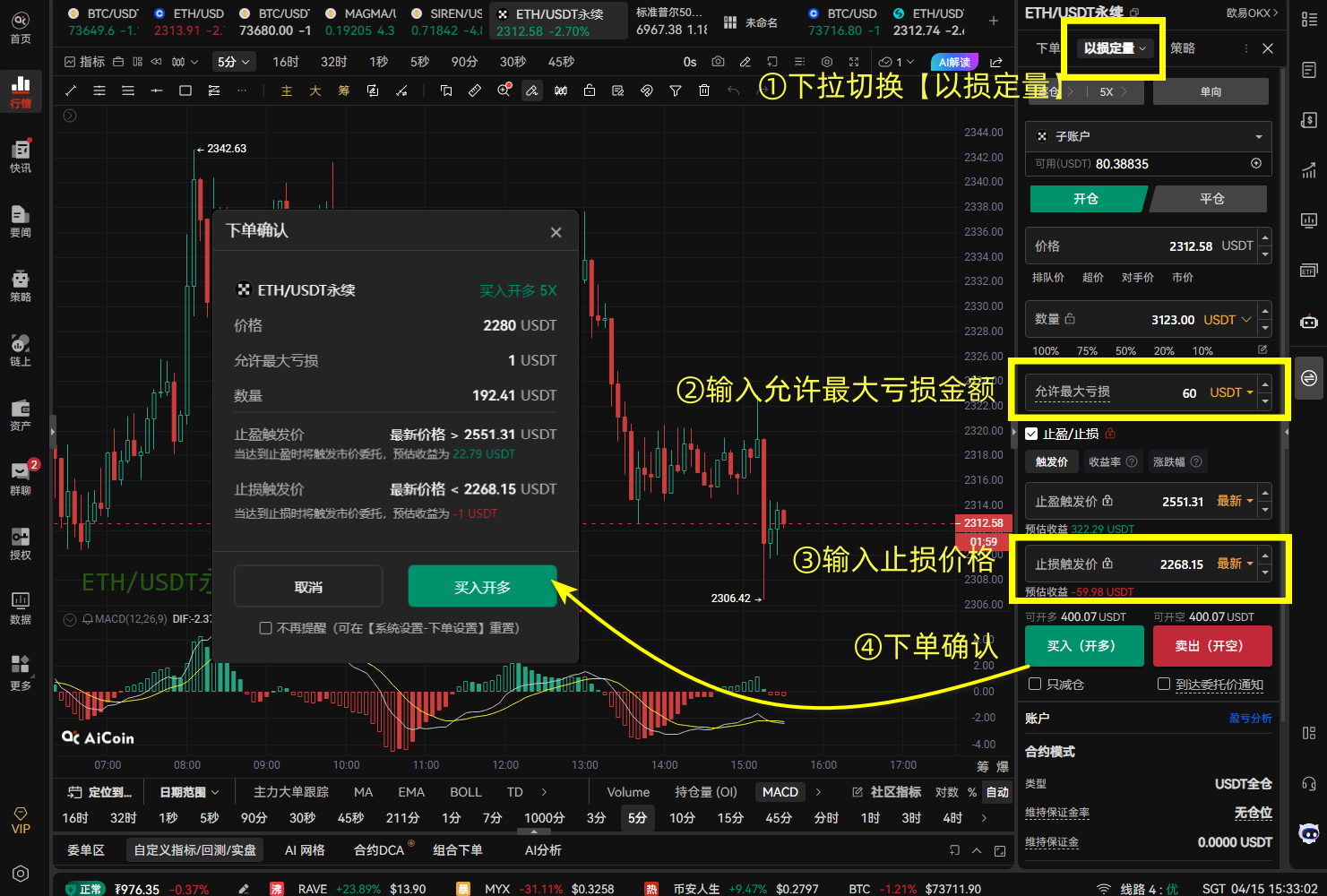
1.Activate Mode: Turn on the "Quantitative By Loss" switch in the order panel.
2.Set Risk Anchor Point:
In the "Maximum Allowable Loss" field, enter the loss that your order absolutely cannot exceed (like 100 USDT).
3.Determine Stop Loss Line:
Input the stop loss price. At this point, you will notice that the "Order Quantity" will automatically increase or decrease.
Logic: The farther away the stop loss is set, the smaller the opening quantity; the closer the stop loss is set, the larger the opening quantity.
4.Order Confirmation:
Clicking on the order will pop up a secondary confirmation window. Be sure to check whether the maximum loss amount matches your expectations.
Scenario Simulation: Suppose you have 10,000 USDT in your account, and you observe that BTC is challenging the resistance level of 70,000 points; you decide to go long when it breaks.
- Your Plan: Buy at 70,000 USDT, and if it drops below 68,500 USDT, stop loss out.
- Your Risk Control: No matter what, I only allow the loss to be 1% of the total account amount (i.e., 100 USDT).
Operation Steps:
- Select 【Quantitative By Loss】 in the order panel.
- Opening Price enter 70000.
- Maximum Allowable Loss enter 1% (system automatically recognizes as 100 USDT).
- Stop Loss Trigger Price enter 68500.
Calculate Price Difference: 70,000 - 68,500 = 1,500.
Based on the formula: Opening Quantity = 100 USDT / 1,500 ≈ 0.066 BTC
Result: You just need to click to place the order. If the market falls to 68,500, you will lose exactly 100 USDT, no more, no less.
6. Frequently Asked Questions (FAQ)
- Q: Why is my quantity still 0 despite filling in the stop loss?
A: Please check if you have filled in the "Maximum Allowable Loss" amount. There must be a risk amount for the system to calculate the quantity backwards.
- Q: What should I do if the balance is insufficient?
A: If the calculated position exceeds your account balance, the order will fail. It is recommended to lower the maximum allowable loss amount or tighten the stop loss distance.
- Q: Which exchanges are supported?
A: Currently, supported exchanges include OKX spot and contract, Binance spot, Bitget contract, HTX contract, and Bybit contract.
免责声明:本文章仅代表作者个人观点,不代表本平台的立场和观点。本文章仅供信息分享,不构成对任何人的任何投资建议。用户与作者之间的任何争议,与本平台无关。如网页中刊载的文章或图片涉及侵权,请提供相关的权利证明和身份证明发送邮件到support@aicoin.com,本平台相关工作人员将会进行核查。