Written by: Deep Thought Circle
Are you still switching back and forth between tabs, copying and pasting information, manually completing repetitive tasks? Most people still use AI in a very basic way: inputting questions, getting answers, and then doing the work themselves. But a small group has already crossed into a completely different dimension, where they let AI agents automatically manage emails, calendars, ad placements, and daily operations, achieving productivity increases of 10 to 20 times. This is not an exaggeration but a reality that is happening.
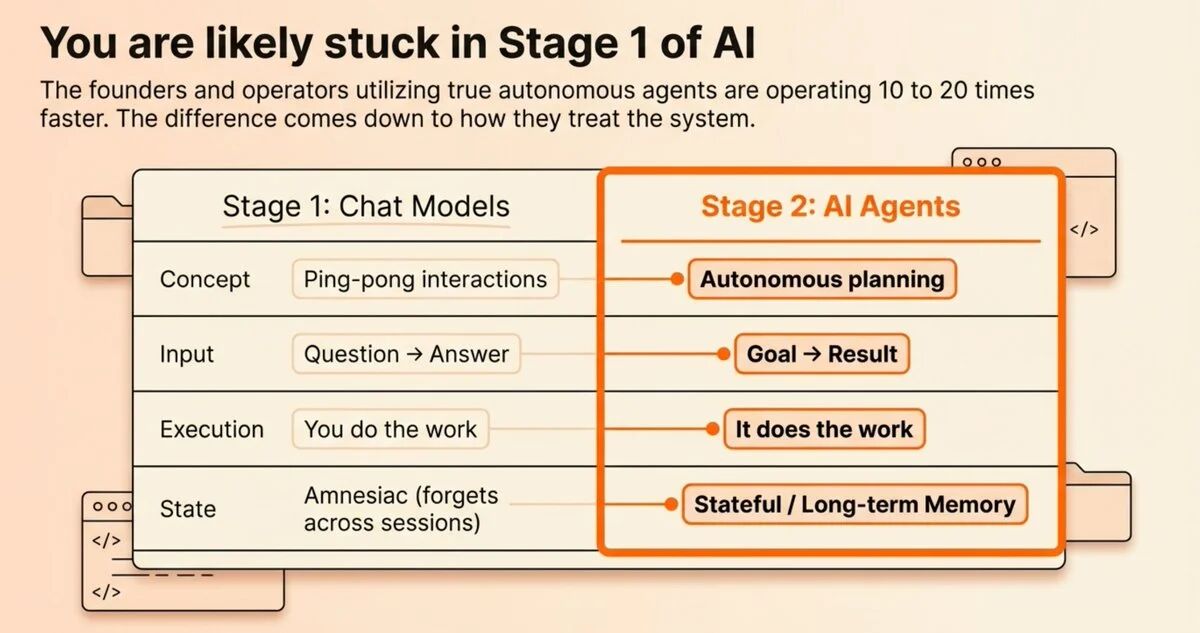
Recently, I delved into a set of AI agent workflow systems shared by Remy Gaskill on The Startup Ideas Podcast, which completely reshaped my thinking on how to use AI. Remy succinctly summarized this transformation with a simple comparison: "from Q&A mode to goal-results mode." Traditional chatting is like playing ping-pong; you go back and forth, but in the end, it's still you doing the work. An AI agent is completely different; you give it a goal, and it will plan the steps, execute tasks, and deliver results on its own. This difference may seem small, but it is, in fact, a generational leap in productivity. When this efficiency advantage accumulates over weeks and months, you will find yourself far ahead of those still doing things manually.
I spent a long time digesting this methodology because it touches on a deeper issue: our relationship with AI is shifting from tool user to team manager. You are no longer using software; you are managing a team of digital employees. This shift requires not only technical understanding but also a fundamental change in mindset.
How Agents Work: Observe-Think-Act Loop
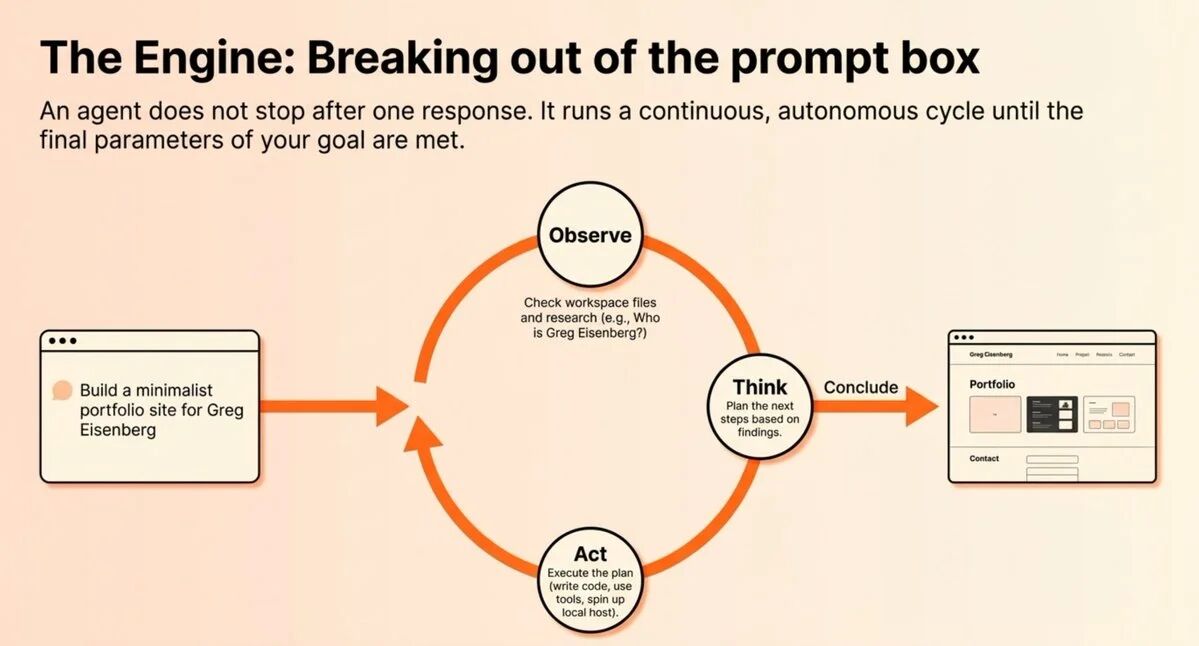
Before diving into how to build an AI agent system, I believe it is necessary to first understand the underlying operational logic of agents. Every agent follows the same three-step loop: observe, think, act. Understanding this loop is key to mastering the entire methodology, as it explains why agents can autonomously complete complex tasks rather than simply responding to individual commands.
Remy demonstrated this loop with a specific case. Suppose you give the agent a task: "Build a portfolio website for Greg Eisenberg." The agent will not start writing code immediately but will initiate the loop. First, it checks whether there are existing files in the workspace (observe). Finding no relevant information, it determines it needs to research who Greg Eisenberg is (think). Then it executes this research task (act). After completing the research, the loop starts again. Now equipped with research results, it thinks, "I need to make a plan." So it writes down the plan. Another loop starts, and it begins coding. Again, it loops to launch the website. One more loop, it takes a screenshot to verify completion of the task.
When I first saw this process, I felt both excited and a bit uneasy. The excitement came from the realization that the agent could indeed decompose complex tasks and make decisions like a human employee. The unease stemmed from the requirement that we must clearly define the criteria for task completion; otherwise, the agent might get stuck in an infinite loop or go in the wrong direction. But therein lies the key: the agent will continually execute the "observe-think-act" loop until it can determine, based on the parameters you set, that the task is complete. This autonomy is something traditional automation tools completely lack.
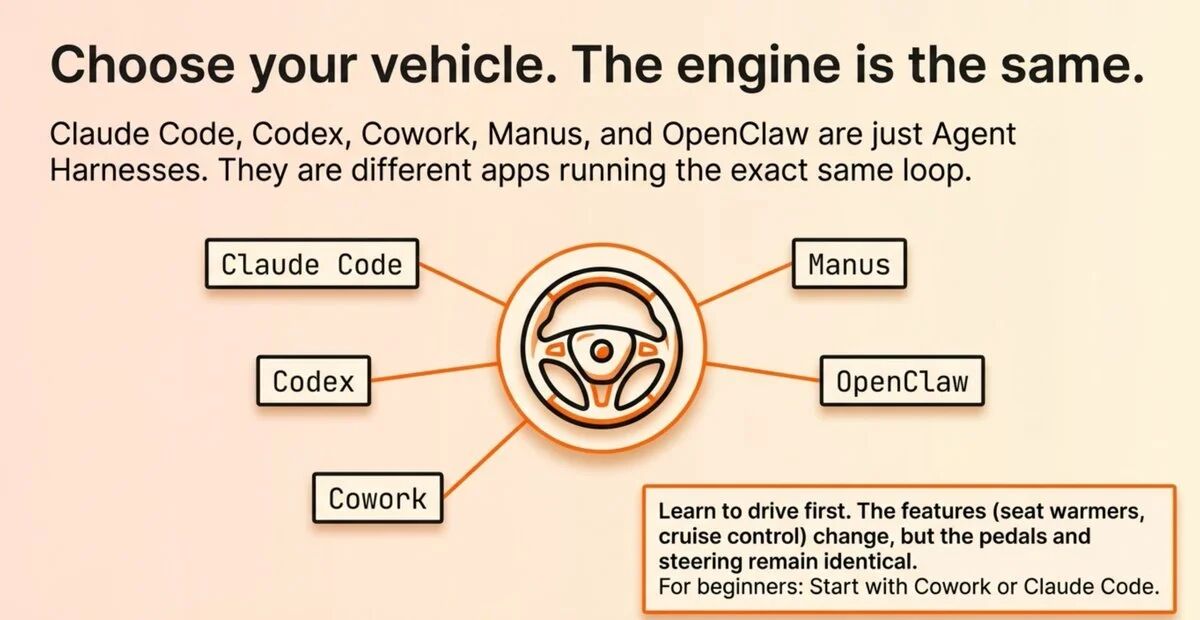
What impressed me even more is that this loop logic is cross-platform universal. Claude Code, Codex, Antigravity, Cowork, Manus, OpenClaw, these are just different "agent harnesses" (agent containers or frameworks). Remy compared them to different car brands. Once you learn how to drive—press the gas, brake, steer—you can drive any car. Whether it’s Toyota or Land Rover, although the configurations differ (seat heating, cruise control, etc.), the basic principles are the same. Remy demonstrated building a portfolio website on Claude Code, Codex, and Antigravity with the same prompts, and all three succeeded. The same loop, different flavors. This insight is crucial because it means that the skills you learn are transferable, not locked to any specific tool.
Building the Agent's Brain: agents.md File
Having understood the operational principles of agents, the next step is the practical part. The first step is to create the agent's "brain"—an agents.md file. This sounds very technical, but in reality, it is very simple and intuitive. I tried this method based on Remy's guidance and finally understood why this file is so critical.
First, create a folder on your computer, perhaps called "executive assistant." Now this folder is empty. If you let the agent write a business development email for you directly, it has no idea who you are, what product you sell, or who your target customers are. The result will be a generic, non-targeted email that you'll then need to spend time significantly editing. This is the problem most people encounter when using AI: having to repeatedly provide background information each time, leading to inefficiency and frustration.
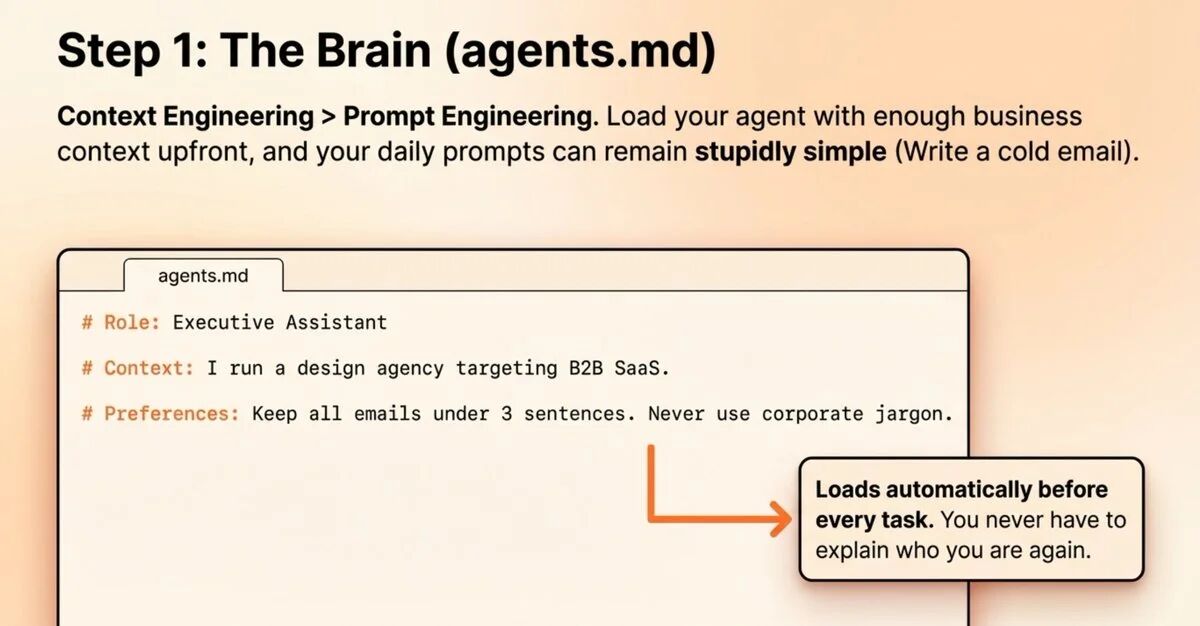
The solution is the agents.md file. This is your agent’s system prompt, which will load before each task begins. You can include your role, business background, personal preferences, tools used, and preferred working styles in it. Different agent frameworks have slightly different names for this file: in Claude Code it's called claude.md, in Codex and OpenClaw it's agents.md, and in Gemini it's gemini.md. But the concept is entirely the same: a markdown file that provides context before the agent starts working.
Here’s a very practical tip. You can use any chat model to build this file. Just say, "Ask me questions in an interview style to extract all the contextual information you need, and then help me create an agents.md file." The model will dig out information from your mind and structure it. I tried this method, and the results were amazing. The model asked me about 15-20 questions, extracting details from my job role, company business, target customers, communication style, commonly used tools, to my preferences for email signatures, and generated a complete agents.md file.
This marks a significant transition from "prompt engineering" to "context engineering." When you load enough information about your business into the agent, your prompts can be laughably simple. "Write me a business development email" is enough, as all the context is already there. The agent knows who you are, what you are selling, your tone style, and even how you like to sign off your emails. This shift in working style leads to exponential efficiency improvement since you no longer need to repeatedly provide background information and can dive directly into the core work.
Equipping Agents with Memory: memory.md File
After building agents.md, the next step is to tackle a key issue: memory. I often encounter this situation when using chat models like ChatGPT: you tell it, "My favorite color is lavender," and it responds, "Got it." But in the next conversation, it completely forgets. This is extremely frustrating because you have to repeatedly correct the same issues.
ChatGPT and similar chat models have an automatic memory function, saving information in the cloud, but you can't control it. The agent operates differently; you can control the memory yourself. Remy’s solution is very elegant: add two lines of instructions in the agents.md file. The first line: "Read the memory.md file before starting each task." The second line: "When I correct you or you learn something new, update the memory.md file." Then, create a blank memory.md file in the same folder.
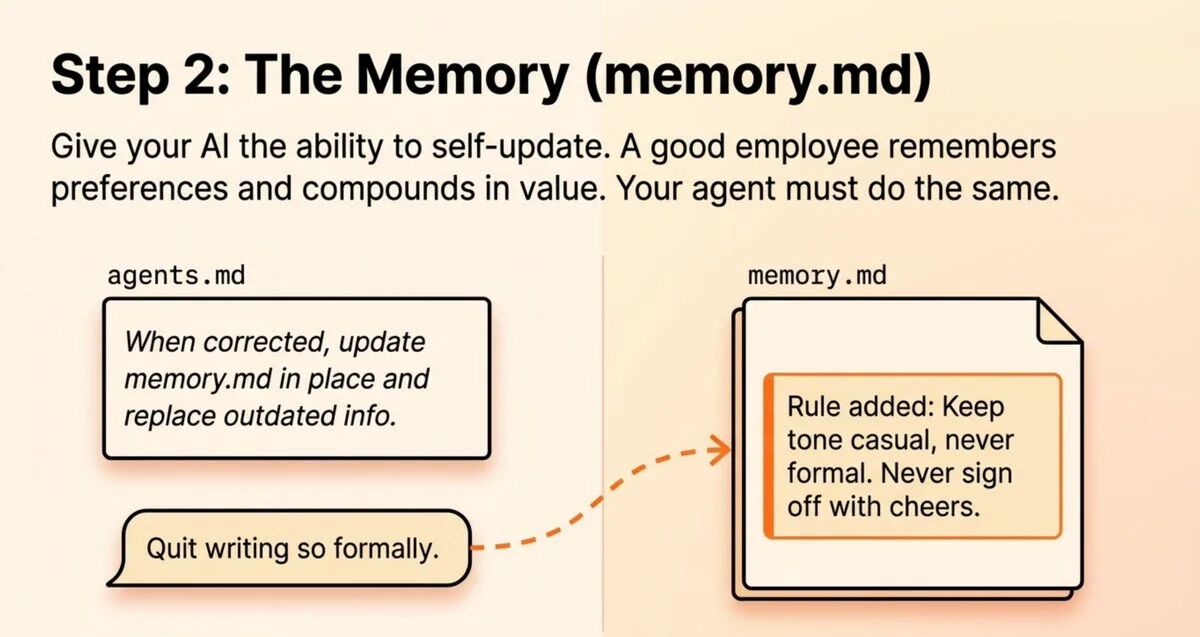
Now, when you say, "Don’t write so formally," the agent will update the memory.md: "Keep the tone casual; never be formal." Every future conversation will inherit this preference. It’s like training a real employee. A great employee will remember your preferences and improve over time; your agent should do the same. After configuring it this way, I found that the agent does indeed align more with my expectations over time. It remembers that I don’t like to use the word "significantly," that I tend to back my points with data, and that I prefer short paragraphs rather than lengthy discourse.
Remy provided a best practice recommendation: keep the agents.md file under 200 lines. If your memory.md starts retaining some minor corrections, you can update the instruction to say, "Only save substantial corrections." You can manually clean this file whenever you need. This advice is important because if the memory file becomes too large and cluttered, it would negatively impact the agent's performance. Keeping the information concise and structured is key to allowing the agent to operate efficiently.
Connecting Your Tools: MCP Protocol
With the brain and memory set up, the agent is still isolated. It can only work within its own little world and cannot access the various tools and platforms you use daily. This introduces the next key component: MCP (Model Context Protocol).
By default, most agent frameworks only come with web search functionality. Just that one function. To connect Gmail, Google Calendar, Notion, Stripe, Granola, or other tools you use, you need the MCP. Remy used a very simple metaphor to explain the value of MCP. Before MCP, your agent had to learn the "language" of each tool. Claude speaks English, Notion speaks Spanish, Gmail speaks French, and Slack speaks Chinese. Connecting them required customized development for each tool, which was costly and complex.
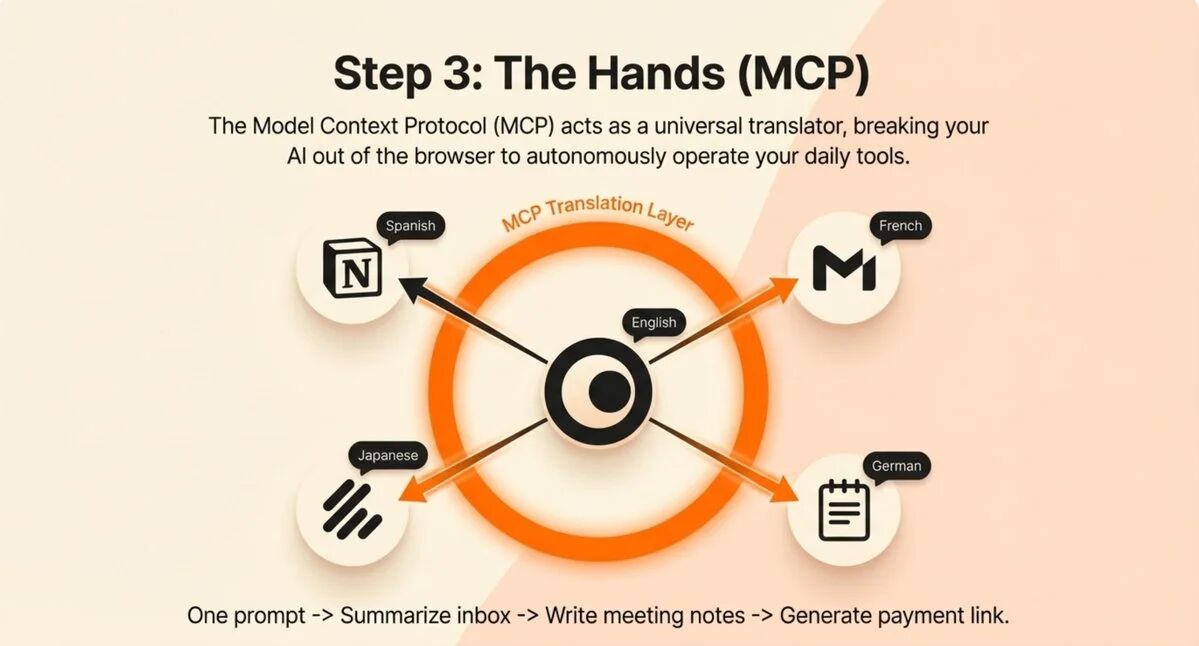
Anthropic developed MCP as a universal translator. Your agent still speaks English, your tools still speak their respective languages, and MCP sits in the middle handling two-way translation. The emergence of this protocol has greatly reduced the barrier to building agent systems. Now, most frameworks make connections very simple. Cowork, Codex, Manus, and Perplexity all have "connectors" or "skills" menus where you can browse applications, log in, and complete setups with a click.
Once the connections are complete, this is where the real productivity leap occurs. Remy performed a live demonstration that left a deep impression on me. He had an agent summarize the inbox, extract meeting notes from Granola, create a Stripe payment link, set up a project in Notion, and draft a follow-up email. One prompt, and the agent touched every tool, without Remy switching any tabs. He said, "Even if you can just do one thing seven times faster without needing to enter all these tools, this kind of efficiency really starts to compound."
After I tried this myself, the experience was indeed shocking. I had the agent check my calendar, summarize today’s meetings, extract project status from Notion, send team updates on Slack, and create a follow-up task. The entire process was completed in two minutes. If I did it manually, it would take at least 15-20 minutes, switching back and forth between multiple applications and being constantly interrupted in my thoughts. This seamless workflow integration is where the true value of AI agents lies. They do not replace a specific tool but become the coordinator of all tools, allowing information and actions to flow freely between different platforms.
Building Skills: Standard Operating Procedures for AI
If agents.md is the brain, memory.md is the memory, and MCP are the limbs, then skills are the accumulation of expertise and experience. This is the part of the entire system that has the most compounding effect and the component I believe is most underrated.
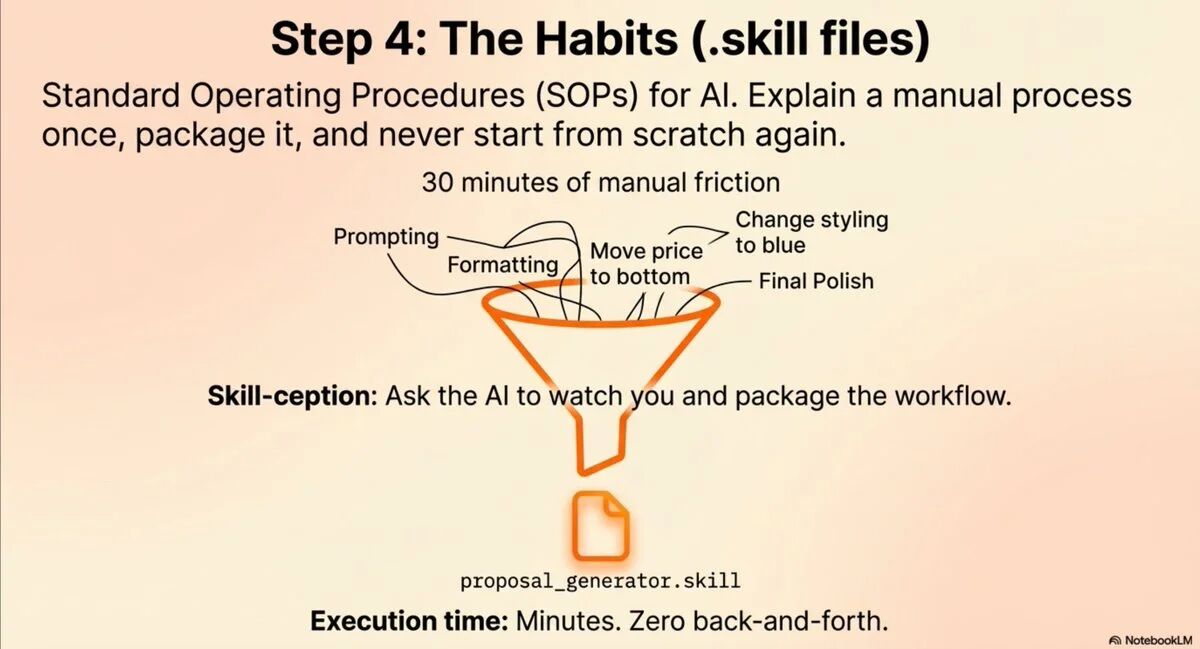
Think of skills as standard operating procedures (SOPs) tailored for your agent. You explain a process once, and the agent can perfectly repeat it every time. Without skills, it goes like this: you ask the agent to write a client proposal, and you exchange messages for 30 minutes, changing formats, moving prices to the bottom, adjusting to this shade of blue. In the end, you get a decent result. But next week, you have to start from scratch again. With skills in place: the agent loads your proposal skill, knowing precisely the format, colors, and where the price should go. Done in minutes.
Remy introduced two methods for creating skills. Method one: provide source material. He took a complete course text on viral hooks, uploaded it to the agent, and asked, "Based on this course, create a viral hook skill for me." The agent packaged it into a .skill file containing instructions and reference materials. Method two: build from actual conversations. You manually walk through a process with the agent, and when you’re satisfied with the result, say, "Create a skill for what we just did." It will encapsulate the entire workflow.
Remy shared a real case that particularly illustrates the value of skills. He built an ad library analysis skill by walking through the entire process with Claude: scraping competitor ads, taking screenshots of landing pages, analyzing copy and creative, generating a main report. This process used to take 3-4 hours. Now he just inputs two words, and the skill runs. I calculated that if he does this analysis twice a week, he can save 300-400 hours a year. This time can be redirected to more strategically valuable work, rather than mechanical information gathering and organization.
More importantly, skills can accumulate. If you automate 3-5 small manual processes weekly, you'll eventually automate entire workflows. This does not happen overnight, but is a gradual process. However, because it is gradual, it is sustainable and manageable. You're not suddenly handing all your work over to AI and hoping it doesn't mess up; instead, you're incrementally converting those repetitive, rule-based tasks into skills, optimizing and refining them step by step, until the entire system is stable and reliable.
Linking Skills and Task Scheduling
Once you've accumulated enough skills, the real magic begins to reveal itself: skill linking. Individual skills are useful, but when you combine multiple skills, you can create fully autonomous workflows.
Remy gave an example of preparing for a meeting. A meeting preparation skill would research guests and organize talking points. A podcast research skill would delve deep into the guest's background. A morning briefing skill checks your calendar, and if it sees a podcast scheduled, it automatically triggers the research skill. This cascading call of skills creates an almost magical experience: you wake up, open your computer, and the morning briefing is ready, complete with the background information for today’s podcast guest lying there; you just need to skim quickly and start recording.
Most frameworks now support scheduled tasks. You can set the morning briefing skill to run every morning at 9 AM. It will check your calendar, summarize your inbox, pull project updates from Notion, and deliver a daily action plan. After setting up such a process, I found it completely transformed the way I start my workday. In the past, I would spend 30-45 minutes "getting into the zone," checking emails, looking at my calendar, and reviewing tasks. Now, all of that is completed before I even sit down, allowing me to dive right into deep work.
Remy shared an even more radical case. He is in the market for a car of a specific color and configuration. Every three hours, an agent automatically scrapes market platforms like CarMax, Cars.com, and Autotrader; if a matching car appears, it sends him a notification. This saves him about an hour a day that he would have spent refreshing tabs. This example made me realize that agents can not only handle work tasks but also take over time-consuming yet important monitoring tasks in life.
I started thinking about more possibilities. An agent could monitor news on specific topics and generate daily industry summaries. Another could track competitors' product updates and pricing changes. Yet another could monitor social media mentions regarding your brand, identifying significant comments that need responses. These are tasks that previously required dedicated roles or were completely neglected, now fully automatable.
Folder Structure for Operating the Entire Business
As you start to systematically build your agent team, organization becomes crucial. Remy shared his complete setup, and this structure is very enlightening.
He creates a large folder for each company or client. Inside, there are subfolders categorized by department: executive assistant, content team, head of marketing, sales. Each subfolder has its own agents.md, memory.md, skills folder, and MCP connections. The marketing agent knows advertising creative rules, the content agent understands brand tone, and the executive assistant knows how you sign emails. At the top level, a master agent manages all of this.
This structure reminded me of the actual organizational structure of companies. Each department has its own knowledge base and way of working, but they all strive toward the same goals. Remy also mentioned the distinction between global skills and project-level skills. Some skills apply across all contexts, like the "make this simpler" skill, which should be stored globally. Skills like "refer someone to Sebastian" belong only in the executive assistant folder, so they should remain at the project level.
I organized my agent system along these lines and found that this organization greatly enhanced manageability. In the past, I stuffed everything into one folder, resulting in conflicting skills, bloated memory files, and difficulty tracking which agent was responsible for what. Now, each agent has a clear scope of responsibilities and knowledge boundaries, making the entire system clear and controllable.
More importantly, this structure is scalable. When you want to add a new function, you simply create a new folder, configure the respective context and skills, and it can be used immediately. When an agent underperforms, you know exactly where to adjust. This modular design makes the entire system both powerful and flexible.
How to Get Started
At this point, you might feel this system is complex and unsure where to start. Remy provided a clear starting path, which I believe is both practical and step-by-step.
The first step is to choose an agent framework. Remy recommends Cowork as the best choice for beginners because its interface is the friendliest and setup is the simplest. But as mentioned earlier, once you understand the basic principles, it’s very easy to switch to other frameworks. The second step is to create a folder called "executive assistant." Starting with the executive assistant is wise because this role involves the broadest types of tasks, allowing you to quickly see value.
The third step is to use interview-style prompts to build your agents.md file. Don’t rush this step; take time to establish the context, as it will save you a lot of time later. The fourth step is to add a memory.md file with automatic update instructions. The fifth step is to connect the tools you use most through MCP. Don't connect all tools at once; start with the 3-5 most core ones.
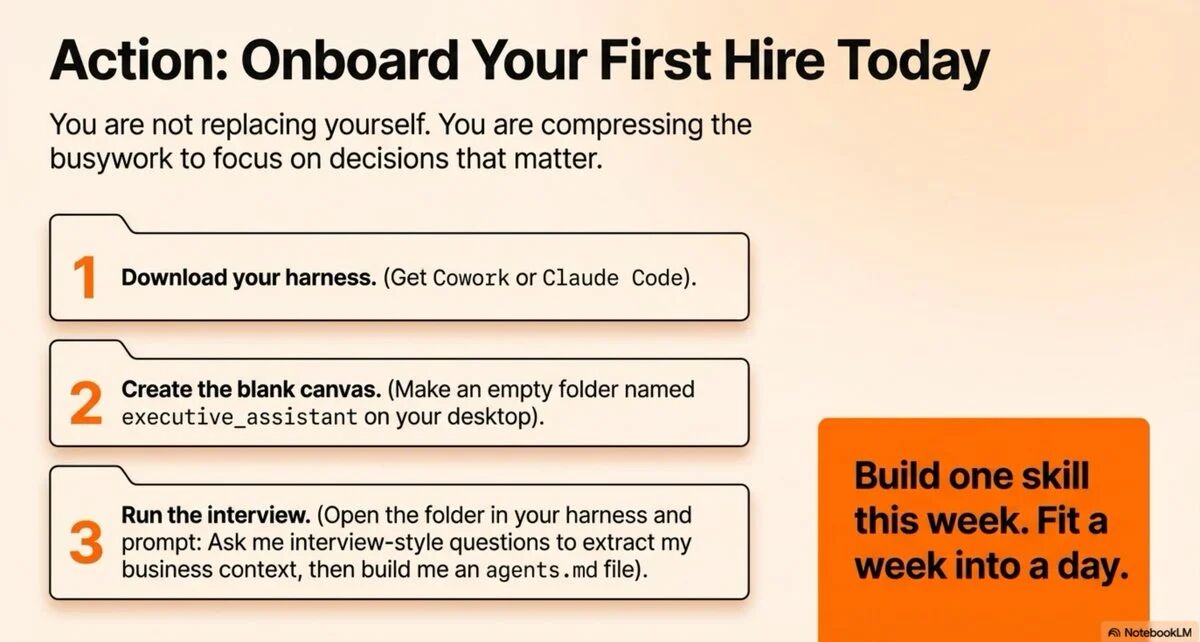
The sixth step, the most critical: begin using the agent to handle real tasks. Don’t just test; engage it in your actual work. When you find yourself repeatedly executing a specific process, convert it into a skill. The seventh step is to automate 3-5 small processes each week. This pace is sustainable, won’t overwhelm you, but will steadily accumulate.
From my own experience, the first two weeks can feel a bit awkward as you learn to communicate effectively with the agent and how to build proper contexts and skills. But once you pass this stage, efficiency improvements become very noticeable. My first task every morning isn’t checking emails and calendars manually anymore; it’s reviewing the morning brief prepared by the agent. My time writing emails has dropped from an average of 5-10 minutes per email to 1-2 minutes because the agent has grasped my writing style and common templates.
Remy emphasized a point with which I wholeheartedly agree: the truly future-oriented tech stack is the markdown files on your computer. Various frameworks will continually change, but your context files, memory, and skills can transfer to any of them. This means that your time and effort spent will not be wasted if a tool becomes obsolete. You are building a set of transferable digital workflow assets.
My Deep Reflection on This Method
After deeply studying and practicing this AI agent workflow system, I've had some deeper thoughts that surpass the technical details and touch upon the essence of our relationship with AI.
I believe the most profound aspect of this method lies in its redefinition of "automation." Traditional automation is pre-programmed, rigid, and can only handle identical scenarios. In contrast, AI agent-based automation is adaptive and context-aware. It doesn’t just execute fixed steps; it makes judgments based on specific situations. This difference is fundamental. A traditional automation script might crash when it encounters unexpected conditions, while an AI agent can adjust its strategy. This means you can automate tasks previously thought to be "too complex and variable."
I also noticed an interesting paradox: the more intelligent the agent, the less technical skill you need, but the higher the requirement for business understanding. In the past, building an automation system required programming ability, but not necessarily a deep understanding of business logic. Now, you don’t need to write code, but you must be able to clearly articulate task objectives, define completion criteria, and identify key decision points. This is a different type of skill, leaning more towards strategic thinking and process design.
From a broader perspective, this method reflects a new work philosophy: compressing tedious work to focus on critical decisions. Remy concluded the article by saying, "You're not replacing yourself; you're compressing the minutiae so you can focus on the truly important decisions." This statement hits the core. The value of AI agents is not to put you out of work but to redirect your time to more valuable pursuits. Repetitive, rule-based, non-creative tasks should be automated, while work requiring judgment, creativity, empathy, and strategic thinking should receive more time and attention.
I’ve also contemplated the compounding effect of this system. Each skill may carry little value, but once you accumulate 50 or 100 skills, your entire way of working transforms drastically. Like compound interest, the difference may not be apparent in the early stages, but over time, the curve will steeply rise. Remy said, "Compress a week's work into a day," which isn't an exaggeration but a mathematical inevitability. If every task is 5-10 times faster, you can indeed complete the workload of a past week in just a day.
However, I also see some potential pitfalls. Over-automation might lead to a loss of perception of details, and excessive reliance on agents could weaken your own skills. My countermeasure is to regularly review the agent's outputs to ensure quality does not decline; consciously retain some manual tasks to keep skills active; treat the agent as an assistant rather than a replacement, with final decision-making authority always remaining with humans.
Finally, I believe this method signals a larger trend: the significant increase in individual productivity will redefine competition. In the past, a person's output was limited by time and energy; now, with AI agents, a person can possess the output capability of a small team. This will give small teams and individual entrepreneurs unprecedented competitiveness because they can achieve what previously required large teams at a very low cost. We may be witnessing the true arrival of the "one-person company" era.
Underlying Logic: From Tools to Teams
Returning to the initial question: why do most people still linger in the elementary stage of AI usage? I believe the fundamental reason lies in the difference in mindset. Most people view AI as a tool, a smarter search engine or writing assistant. But those individuals who have increased productivity by 10-20 times see AI as a team member.
This is not just a verbal distinction but a completely different way of use. When you treat AI as a tool, you call on it when needed and shut it down when done. When you see AI as a team member, you provide it with ongoing context, teach it to remember preferences, build its skill library, and allow it to proactively take on responsibilities. Just like managing human employees, the more training and guidance you invest, the better its output.
This system, shared by Remy, is essentially a methodology for "managing digital employees." agents.md is the employee handbook, memory.md is the work log, skills are professional competencies, and MCP is the work permissions. The entire structure maps out the management logic of human organizations. Once you understand this, you can grasp why this system is so powerful: it’s not optimizing tool usage, but instead, building a scalable, self-improving digital workforce.
The loop is very simple: connect tools → build context → create skills → automate processes → repeat. Start with an executive assistant, build one skill this week, and then another next week. Stack this process over months, and you can compress a week’s work into a day. This is not science fiction, but a reality you can achieve right now.
免责声明:本文章仅代表作者个人观点,不代表本平台的立场和观点。本文章仅供信息分享,不构成对任何人的任何投资建议。用户与作者之间的任何争议,与本平台无关。如网页中刊载的文章或图片涉及侵权,请提供相关的权利证明和身份证明发送邮件到support@aicoin.com,本平台相关工作人员将会进行核查。


