Overview
AICoin has launched the automated live trading feature, allowing users to define trading instructions through AICoin Script and execute live trades automatically. Click to join the community and discuss automated trading with more friends!
Usage Tutorial
Live Trading Example
// @version=2
// Convert date to comparable time
t1 = parse_time("2023-11-01 22:42:00")
t2 = parse_time("2023-11-01 22:43:00")
t3 = parse_time("2023-11-01 22:44:00")
t4 = parse_time("2023-11-01 22:45:00")
// Define conditions
s1 = time == t1
s2 = time == t2
s3 = time == t3
s4 = time == t4
// Define trading instructions
// Open long position / spot buy
enterLong(s1, price='market', amount=1)
// Close long position / spot sell
exitLong(s2, price='market', amount=1)
// Open short position
enterShort(s3, price='market', amount=1)
// Close short position
exitShort(s4, price='market', amount=1)
// Plot closing price on chart
plot(close, title="Closing Price")
For more examples, please click the links below:
Automated Live Trading - Live Example of Signal Alert
Automated Live Trading - Live Example of Indicator Win Rate
Automated Live Trading - Live Example of Custom Indicator
1 Trading Function Explanation
1.1 Global Trading Configuration
tradeConfig(price="market", amount=1)
Parameter Explanation
|
Parameter |
Explanation |
|||||||||||||||||||||||||||||||||||||||||||||||||||||||||||||||||||||||||||||||||||||||||||||||||||||||||||||||||||||||||||||||||||||||||||||||||||||||
|
price |
last: limit order at the latest price; over: overpriced order, with the overprice percentage following the PC system settings; queue: queued price; market: market order |
|||||||||||||||||||||||||||||||||||||||||||||||||||||||||||||||||||||||||||||||||||||||||||||||||||||||||||||||||||||||||||||||||||||||||||||||||||||||
|
Parameter |
Explanation |
|
price |
last: limit order at the latest price; over: overpriced order, with the overprice percentage following the PC system settings; queue: queued price; market: market order |
|
amount |
Order quantity, default unit is consistent with the default unit of the trading variety, can be changed when starting live trading |
2.2 Spot Contract Trading Configuration
Open Long Position / Spot Buy
Close Long Position / Spot Sell
Open Short Position
Close Short Position
Parameter Explanation
|
Parameter |
Explanation |
|
condition |
Boolean, specifies the condition under which the trade is executed |
Note: The parameters price/amount have the same meaning as the global trading configuration. If these parameters are declared in the global configuration, they can be omitted in this function and will default to the global trading configuration
2 Function Usage Explanation
2.1 Specified Execution Order
Trading instructions will be executed in the order defined in the script. Please pay attention to the order of instructions. Additionally, please note that the execution order of instructions only guarantees the order of placing orders. The order of execution is influenced by the delegation method and the exchange's matching engine behavior. If you encounter issues with order execution, you can contact customer service for assistance.
exitLong(dead_cross)
enterLong(golden_cross)
// If written in this format, it will first execute the open long position instruction, then execute the close long position instruction
enterLong(golden_cross)
exitLong(dead_cross)
2.2 Instruction Quantity
You can only declare each type of instruction once. Repeated declaration of instructions will result in compilation errors
enterLong(a)
enterLong(b)
2.3 Conditional Expression
The condition parameter in the trading functions is a boolean type, and the trade will only be executed when the condition is true
For more details and examples, please refer to the official documentation or contact customer service for assistance.
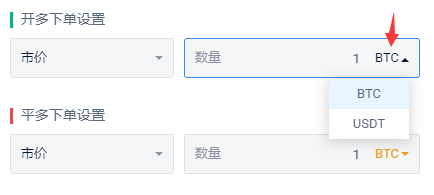
```3 Instruction Quantity UnitAs you can see, the quantity parameter `amount` of the instruction does not specify the unit. The actual unit of quantity when placing an order is determined by the unit selected on the live trading page. You can always check the setting of this unit in the live trading details.
2.4 Allowing Multiple Entries
Specifies whether the entry instruction is allowed to trigger multiple orders before the corresponding exit instruction appears; if unchecked, the entry instruction is not allowed to continuously trigger orders, and consecutive entry instructions will not trigger orders; if checked, multiple entry instructions are allowed to trigger orders, and the number of times is determined by the configuration of multiple entries
For example:
|
Assuming the signal list to be triggered is as follows |
Not checked for multiple entries | Checked for multiple entries, with a count of 2 | Checked for multiple entries, with a count of 3 |
|
enterLong |
Triggers order | Triggers order | Triggers order |
|
enterLong |
Does not trigger | Triggers order | Triggers order |
|
enterLong |
Does not trigger | Does not trigger | Triggers order |
|
Does not trigger |
Does not trigger | Triggers order | ||||||||||||||||||||||||||||||||||||||||||||||||||||||||||||||||||||||||||||||||||||||||||||||||||||||||||||||||||||||||||||||||||||||||||||||||||||||
|
exitLong |
Triggers order | Triggers order | Triggers order | |||||||||||||||||||||||||||||||||||||||||||||||||||||||||||||||||||||||||||||||||||||||||||||||||||||||||||||||||||||||||||||||||||||||||||||||||||||
|
enterLong |
Triggers order | Triggers order | Triggers order | |||||||||||||||||||||||||||||||||||||||||||||||||||||||||||||||||||||||||||||||||||||||||||||||||||||||||||||||||||||||||||||||||||||||||||||||||||||
Additionally, only the corresponding exit instruction can reset the status of the corresponding entry instruction. The exit instruction for enterLong is exitLong, and the exit instruction for enterShort is exitShort. See another example below:
|
Assuming the signal list to be triggered is as follows |
Not checked for multiple entries | Checked for multiple entries, with a count of 2 | Checked for multiple entries, with a count of 3 | |||||||||||||||||||||||||||||||||||||||||||||||||||||||||||||||||||||||||||||||||||||||||||||||||||||||||||||||||||||||||||||||||||||||||||||||||||||
|
enterLong |
Triggers order | Triggers order | Triggers order | |||||||||||||||||||||||||||||||||||||||||||||||||||||||||||||||||||||||||||||||||||||||||||||||||||||||||||||||||||||||||||||||||||||||||||||||||||||
|
Triggers order |
Triggers order | Triggers order | |||||||||||||||||||||||||||||||||||||||||||||||||||||||||||||||||||||||||||||||||||||||||||||||||||||||||||||||||||||||||||||||||||||||||||||||||||||
|
enterLong |
Does not trigger | Triggers order | Triggers order | ||||||||||||||||||||||||||||||||||||||||||||||||||||||||||||||||||||||||||||||||||||||||||||||||||||||||||||||||||||||||||||||||||||||||||||||||||||
|
enterLong |
Does not trigger | Does not trigger | Triggers order | ||||||||||||||||||||||||||||||||||||||||||||||||||||||||||||||||||||||||||||||||||||||||||||||||||||||||||||||||||||||||||||||||||||||||||||||||||||
|
exitLong |
Triggers order | Triggers order | Triggers order | ||||||||||||||||||||||||||||||||||||||||||||||||||||||||||||||||||||||||||||||||||||||||||||||||||||||||||||||||||||||||||||||||||||||||||||||||||||
|
enterLong |
Does not trigger | Does not trigger | Triggers order | ||||||||||||||||||||||||||||||||||||||||||||||||||||||||||||||||||||||||||||||||||||||||||||||||||||||||||||||||||||||||||||||||||||||||||||||||||||
Additionally, only the corresponding exit instruction can reset the status of the corresponding entry instruction. The exit instruction for enterLong is exitLong, and the exit instruction for enterShort is exitShort. See another example below:
|
Assuming the signal list to be triggered is as follows |
Not checked for multiple entries | Checked for multiple entries, with a count of 2 | Checked for multiple entries, with a count of 3 | |||||||||||||||||||||||||||||||||||||||||||||||||||||||||||||||||||||||||||||||||||||||||||||||||||||||||||||||||||||||||||||||||||||||||||||||||||||
|
enterLong |
Triggers order | Triggers order | Triggers order | |||||||||||||||||||||||||||||||||||||||||||||||||||||||||||||||||||||||||||||||||||||||||||||||||||||||||||||||||||||||||||||||||||||||||||||||||||||
|
Does not trigger |
Does not trigger | |||||||||||||||||||||||||||||||||||||||||||||||||||||||||||||||||||||||||||||||||||||||||||||||||||||||||||||||||||||||||||||||||||||||||||||||||||||
2.5 Profit Calculation
Profit-related data is based on historical transaction information for statistical purposes. Funding fees and special cases of transaction fees (such as fee deductions) are temporarily not included in the statistics, so there may be some errors. It is for reference only. We recommend that you enable the asset statistics feature to view the overall profit analysis of your account. Learn more about the asset statistics feature.
In addition, there are two points to note: first, you need to ensure that the PC end is running normally in order to correctly calculate the profit; second, manual closing of positions may cause abnormal statistics of profit-related data.
Related Reading:
AICoin Automated Live Trading - Real-life Example of Signal Alerts
AICoin Automated Live Trading - Real-life Example of Win Rate Indicators
AICoin Automated Live Trading - Real-life Example of Custom Indicators
AICoin Automated Live Trading - Handling Common Issues
```
免责声明:本文章仅代表作者个人观点,不代表本平台的立场和观点。本文章仅供信息分享,不构成对任何人的任何投资建议。用户与作者之间的任何争议,与本平台无关。如网页中刊载的文章或图片涉及侵权,请提供相关的权利证明和身份证明发送邮件到support@aicoin.com,本平台相关工作人员将会进行核查。
Selected Articles by 信息测试
Related Articles









X
Telegram
CopyLink