Charts
DataOn-chain
VIP
Market Cap
API
Rankings
CoinOSNew
CoinClaw🦞
Language
  • 简体中文
  • 繁体中文
  • English
Leader in global market data applications, committed to providing valuable information more efficiently.

Features

  • Real-time Data
  • Special Features
  • AI Grid

Services

  • News
  • Open Data(API)
  • Institutional Services

Downloads

  • Desktop
  • Android
  • iOS

Contact Us

  • Chat Room
  • Business Email
  • Official Email
  • Official Verification

Join Community

  • Telegram
  • Twitter
  • Discord

© Copyright 2013-2026. All rights reserved.

简体繁體English
|Legacy

Google一次性密码双重验证教程

CN
AiCoin
Follow
8 years ago
AI summarizes in 5 seconds.

       Google一次性密码双重验证也称两步验证,两步验证功能会在您登录帐号时要求进行第二步验证,从而可为您的帐号提供更强的安全保障。启用两步验证功能后,在登录帐号时,您除了要输入密码外,还需要输入Google身份验证器应用在您的手机上生成的验证码。

   为方便大家使用两步验证,AICoin团队特地整理了此篇Google一次性密码双重验证教程,希望能够帮到大家!

启用谷歌一次性密码双重验证步骤

第一步:下载并安装“Google Authenticator (身份验证器)”

{{account_list}}

(1)以安卓手机为例,可在Google play中搜索“Google Authenticator”,点击“安装”:
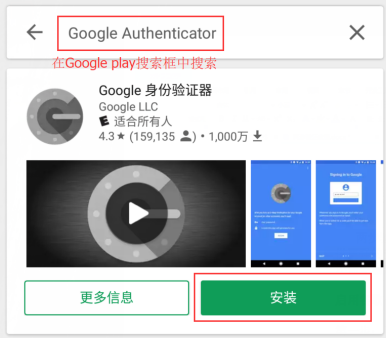
Google一次性密码双重验证教程_aicoin_图1

Google一次性密码双重验证教程_aicoin_图2

(2)   苹果手机可在 App Store中搜索“Google Authenticator”,点击“Get”:
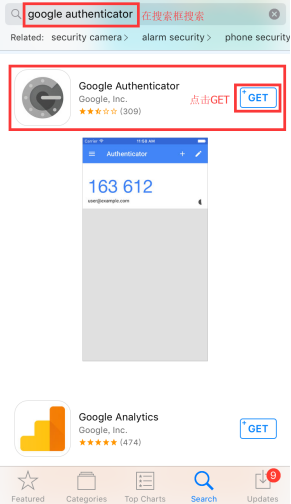
Google一次性密码双重验证教程_aicoin_图3

Google一次性密码双重验证教程_aicoin_图4

第二步:选择支持Google两步验证的网站,登录成功后,启用双重身份验证。

(1)以gate.io为例,找到双重验证入口,点击进入
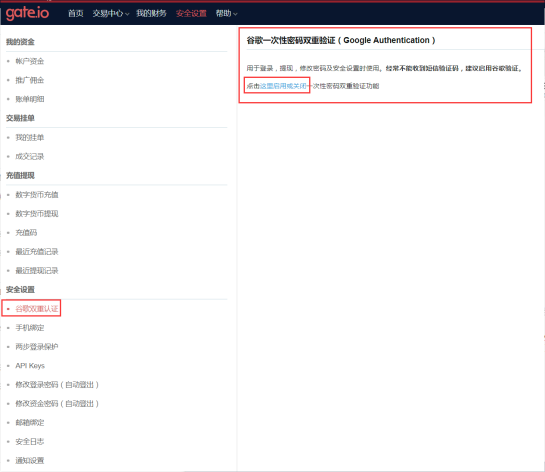
Google一次性密码双重验证教程_aicoin_图5


(2)我们可以看到二维码和密钥,接下来需要使用Google Authenticator扫描二维码或者将密钥填写到Google Authenticator中,Google Authenticator会生成6位验证码,我们需要将6位验证码输入到“一次性验证密码”中,然后点击“启用双重验证功能”,这样就能启动该账号在该网址的双重验证功能。接下来的步骤会介绍如何使用Google Authenticator。
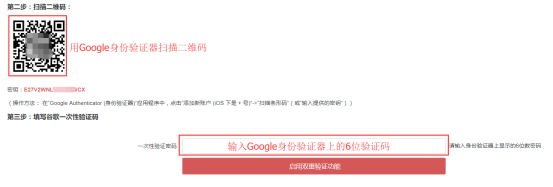
Google一次性密码双重验证教程_aicoin_图6

(3)安卓手机:在Google身份验证器应用程序中,点击右下角的“+”号,选择扫描二维码或输入提供的密钥,扫描上一步的二维码或输入密钥;
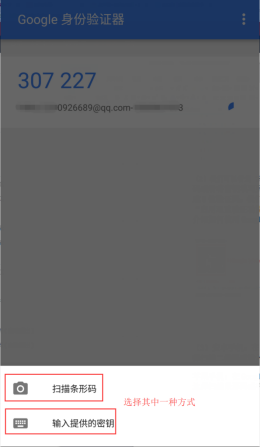
Google一次性密码双重验证教程_aicoin_图7

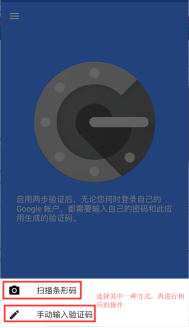
苹果手机:在Google Authenticator应用程序中,点击首页的“开始设置”,选择扫描条形码或手动输入验证码,扫描上一步的二维码或输入密钥;
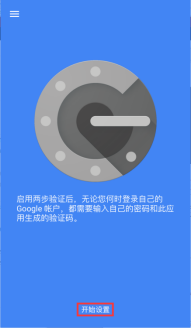
Google一次性密码双重验证教程_aicoin_图8

Google一次性密码双重验证教程_aicoin_图9

第三步:填写谷歌一次性验证码

  继上一步扫描二维码或输入密钥后,Google Authenticator会生成一个六位数验证码,每隔30秒变化一次,要将最新的六位验证码填写到一次性验证密码框中。然后点击“启用双重验证功能”,这样就能启动该账号在该网址的双重验证功能。
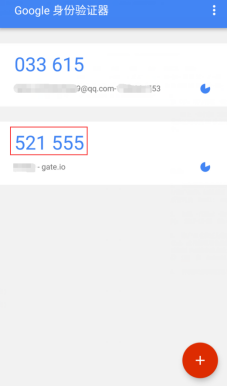

Google一次性密码双重验证教程_aicoin_图10

Google一次性密码双重验证教程_aicoin_图11

以后每次在该网站登录后,都要进行二步验证,只需要打开Google Authenticator,查看验证码输入到下框中就可以了,不需要重复扫描二维码或输入密钥哦。
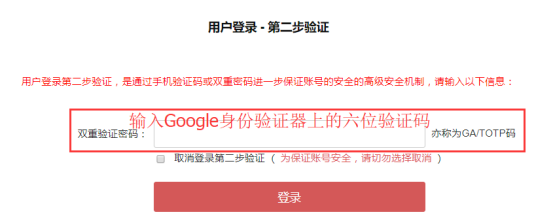
Google一次性密码双重验证教程_aicoin_图12


注意事项:如果一直提示一次性密码不对,请检查和校准手机时间。

步骤如下:

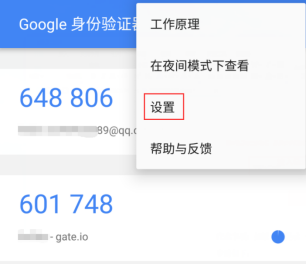
1、点击Google Authenticator 首页右上角三点图标
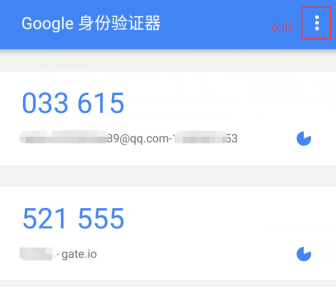
 

Google一次性密码双重验证教程_aicoin_图13

2、选择“设置”

Google一次性密码双重验证教程_aicoin_图14

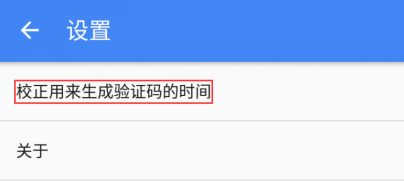
3、选择“校正用来生成验证码的时间”

Google一次性密码双重验证教程_aicoin_图15

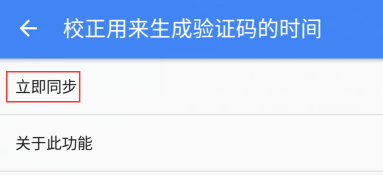
4、选择“立即同步”

Google一次性密码双重验证教程_aicoin_图16

要详细了解两步验证,请访问以下网站:https://g.co/2step

      有了这篇教程就可以安心地登录账号啦!

如果您在使用AICoin的过程中遇到任何问题,欢迎加入AICoin官方交流QQ群:559756285 进行咨询、反馈。


免责声明:本文章仅代表作者个人观点,不代表本平台的立场和观点。本文章仅供信息分享,不构成对任何人的任何投资建议。用户与作者之间的任何争议,与本平台无关。如网页中刊载的文章或图片涉及侵权,请提供相关的权利证明和身份证明发送邮件到support@aicoin.com,本平台相关工作人员将会进行核查。

复活节狂欢,瓜分1万USDT!
广告
|
|
APP
Windows
Mac
Share To

X

Telegram

Facebook

Reddit

CopyLink

|
|
APP
Windows
Mac
Share To

X

Telegram

Facebook

Reddit

CopyLink

Selected Articles by AiCoin

17 hours ago
【AiCoin | 4.5 Snapshot: Giant Whales Purchase, Natural Gas Recovery, Quantum Resistance Test】
1 day ago
【AiCoin丨4.4 Snapshot: Geopolitical Risks, Crackdown on Fraud, Large Whales Depositing】
2 days ago
At 4 PM, AiCoin NPC live broadcast: Copy trading on the chain, following the right person is very important (membership giveaway)
View More

Table of Contents

|
|
APP
Windows
Mac
Share To

X

Telegram

Facebook

Reddit

CopyLink

Related Articles

avatar
avatarAiCoin研究院
3 days ago
Is Old Te again doing something? Is the Taco market suffering losses? Today, let's take advantage of Bitget and regain our investments.
avatar
avatarAiCoin研究院
3 days ago
Why does it drop as soon as you buy?
avatar
avatarAiCoin研究院
5 days ago
Big pullback in the cryptocurrency market? I quickly bought oil with one click! Come experience the cross-border joy of Aster!
avatar
avatarAiCoin研究院
9 days ago
After ten years of trading cryptocurrencies, is there no opportunity left in the crypto market? Will you turn to the US stock market?
avatar
avatarAiCoin研究院
11 days ago
Trump turns against! BTC makes a fortune, only 60 hours left.
APP
Windows
Mac

X

Telegram

Facebook

Reddit

CopyLink