Author: Denise I Biteye Content Team
In the cryptocurrency market, what retail investors often lack is not funds, but timely information reserves, professional contract auditing capabilities, and calm trading execution.
Previously, these "superpowers" only belonged to whales or quantitative institutions with professional teams. But just last night, Binance launched Binance Skills Hub, completely breaking down this barrier. By encapsulating Binance's core trading and risk control capabilities into an AI skill package, now with just one sentence, you can equip your AI agent with a "Binance-level" super brain.
Whether you want to track the movements of smart money in the early hours or conduct a comprehensive "contract health check" before jumping into meme coins, this skill package will be your most powerful crypto guardian.
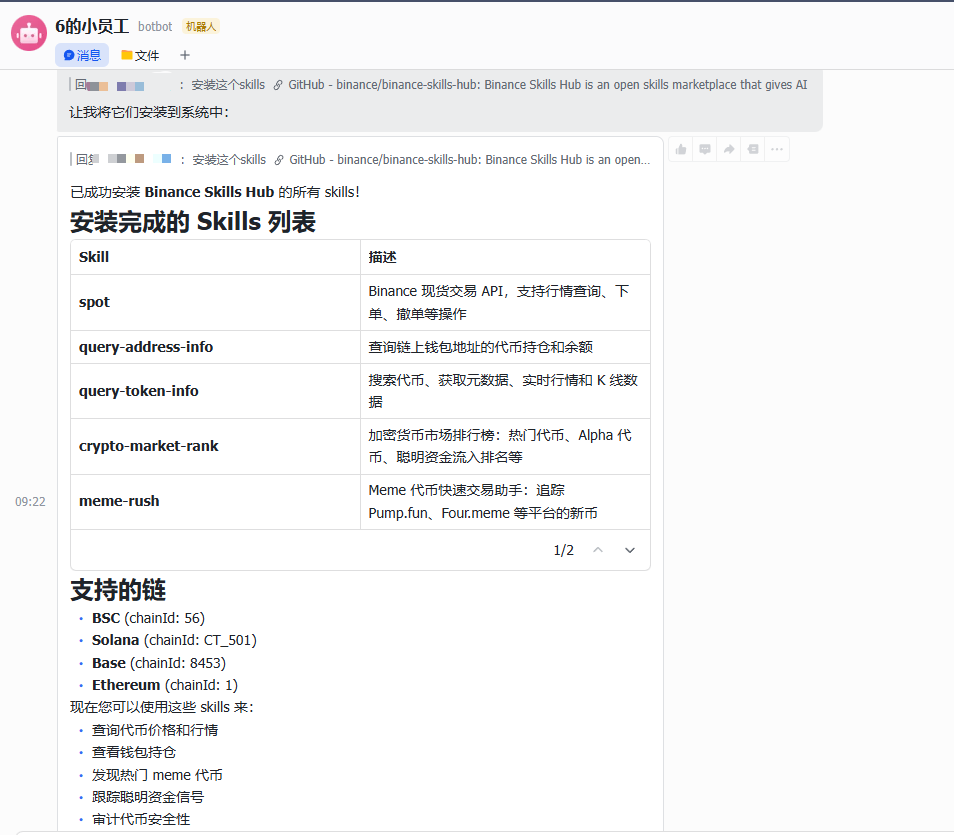
1. Overview of the First Batch of 7 "Super Skills"
The 7 skills released this time cover the entire process from "discovering opportunities" to "executing trades":
Spot Trading (Binance Spot Skill): Supports market queries, placing/canceling orders, and account information management, compatible with mainnet and testnet.
Address Insights (Query Address Info): Analyzes wallet holdings, valuations, and 24h changes, known as the "whale monitoring artifact."
Token Details (Query Token Info): Acquire token liquidity, holders, and trading activity in seconds, essential for filtering new coins.
Market Rankings (Crypto Market Rank): Integrates hot searches, net capital inflows, and other indicators to inform you about "today's focal points."
Meme Rush: Precisely tracks the narrative phase of meme coins (new issuance/migration) and builds a hot topic structure.
Trading Signals (Trading Signal): Provides trigger prices, maximum profits, and signal reviews to filter out market noise.
Token Contract Audits (Query Token Audit): Automatically detects risks such as issuance increases and freezes, conducting a "health check" before trades.
2. How to Install and Configure
To make these skills work for you, just follow three simple steps:
1. In the private chat window with the bot (taking Feishu as an example), simply send:
“Install this Skill: https://github.com/binance/binance-skills-hub”
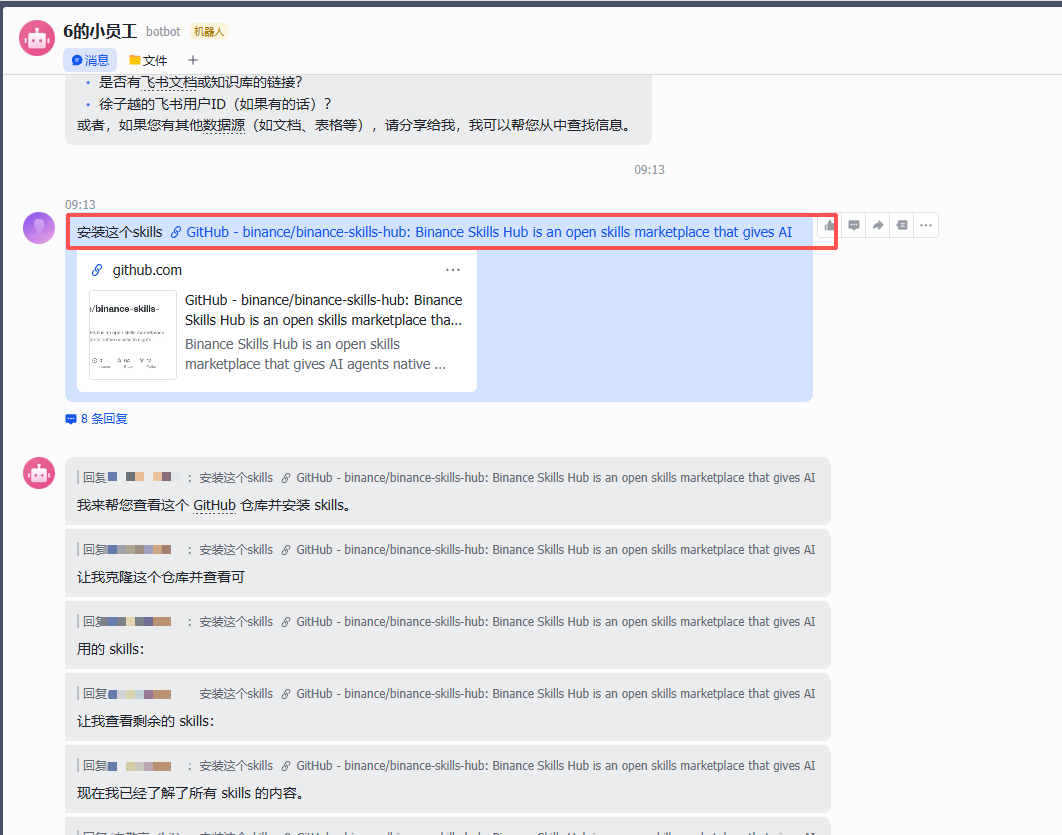
The AI Agent will automatically execute the task, and it will be installed in 1-2 minutes.
2. Get your "Credentials" (API Key)
Before proceeding, please clarify your usage needs. Remember: Security is the bottom line for AI trading.
Step One: Clarify Functional Needs
CEX (Centralized Trading): Involves placing orders, canceling orders, and holding position queries as mentioned in spot.md, must configure API Key and Secret Key.
DEX (On-chain Tools): Involves meme-rush.md, query-token-audit.md, etc., all are public data and can be used directly without API Key configuration.
Step Two: Create API on the Binance official website
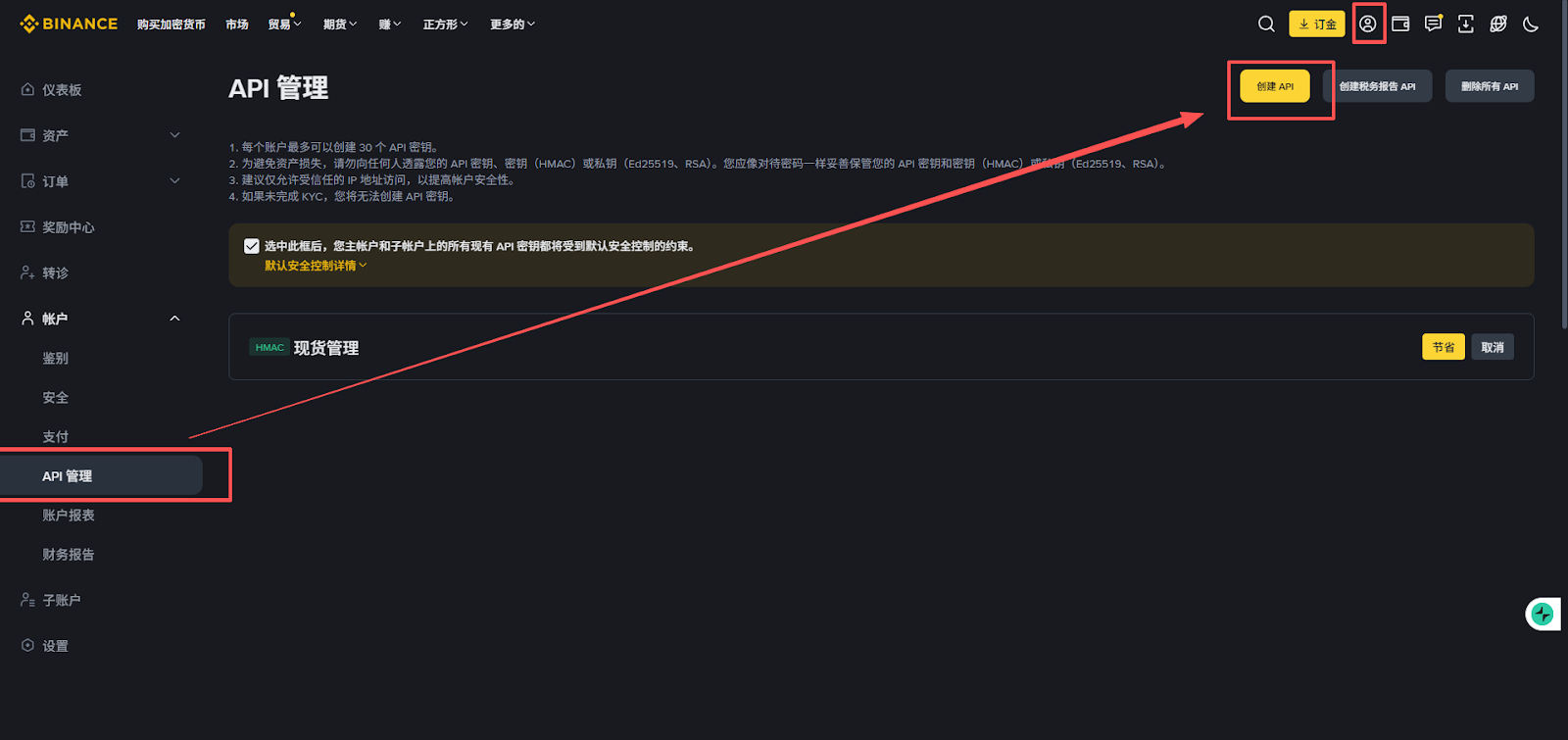
Log in to the Binance official website, go to [Personal Center] -> [API Management].
Click [Create API], choose "System Generated Key" and complete identity verification.
Be sure to properly save the popped-up API Key and Secret Key.
Step Three: Fine-tune Permissions (Security Red Line)
1. Set Trusted IP (Key!)
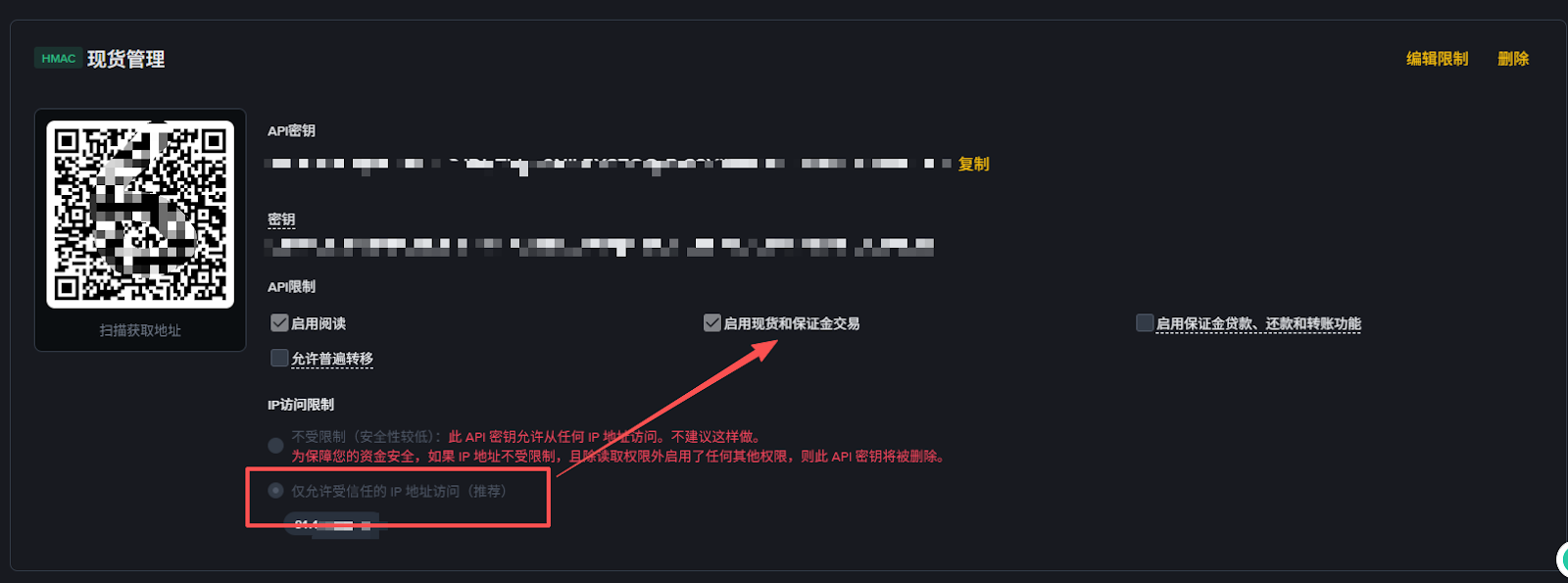
? Tips: Before checking trading permissions, be sure to select "Only allow trusted IP addresses to access" in the "IP Access Restriction" section at the bottom of the page and fill in your server's IP. Only by binding with trusted IP can Binance enable high permission options such as "spot trading".
2. Precisely Check Permissions
Correctly selecting permissions is key to balancing "function" and "security". Please strictly follow the instructions below:
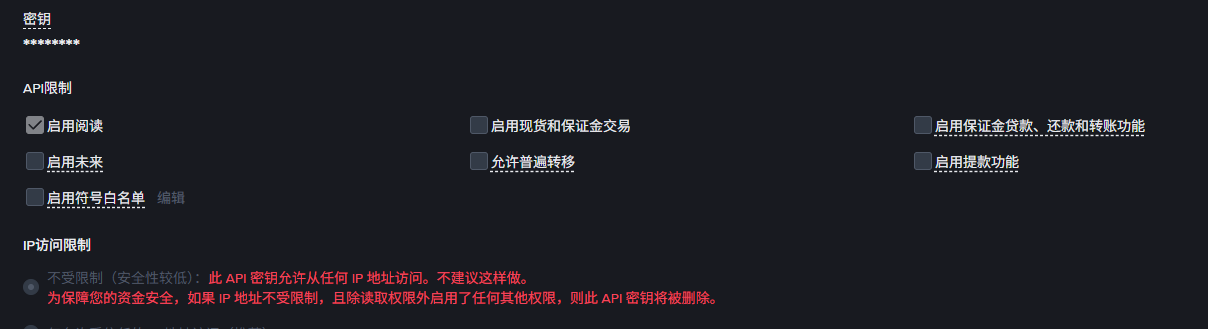
Enable Reading: [default checked]. Allows AI assistants to view your asset balances, holdings, and trading history. This is the basis for all AI skills operations.
Enable Spot and Margin Trading: If you want AI agents to execute buy/sell orders for you, this option must be enabled.
Enable Margin Loans, Repayments, and Transfers: Only enable this option when leveraging borrowing strategies.
Enable Futures: If you plan to let AI operate futures trading for you, this option needs to be selected; it is recommended that beginners keep it off first.
Allow General Transfers: [recommended to turn off]. This permission involves fund transfers between different sub-accounts, and routine trading skills usually do not require it.
Enable Withdrawal Function: [strictly prohibited to check]. This is the most important safety principle. AI skill packages do not require withdrawal permission to execute trading logic. By turning it off, even if the API Key accidentally leaks, your funds cannot be transferred out of the platform.
3. Start the Conversation
Once the configuration is complete, you can directly ask the AI: “Help me analyze what this address has been buying lately?” The AI will call the corresponding Skill to give you results immediately.
3. Practical Use Cases
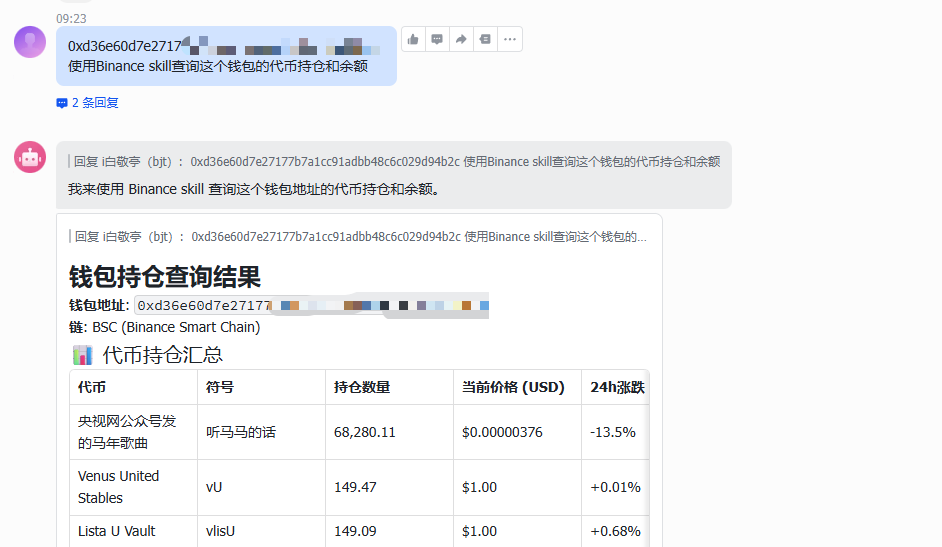
1. Query Token Holdings and Balances of Wallet Address
Currently, the wallet query function of Binance Skills Hub only supports these 3 chains:
BSC (Binance Smart Chain)
Base
Solana
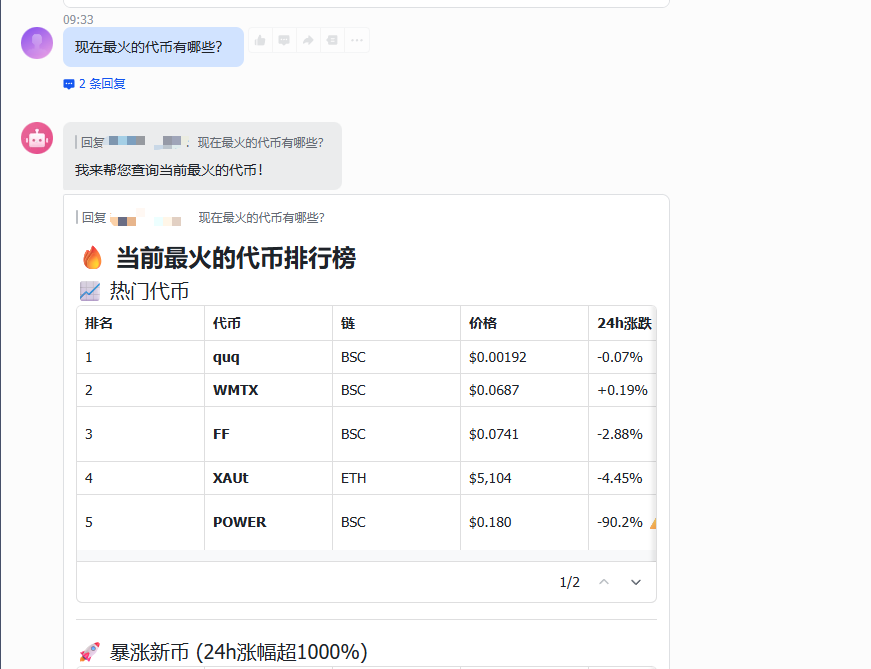
2. Query the Hottest Tokens
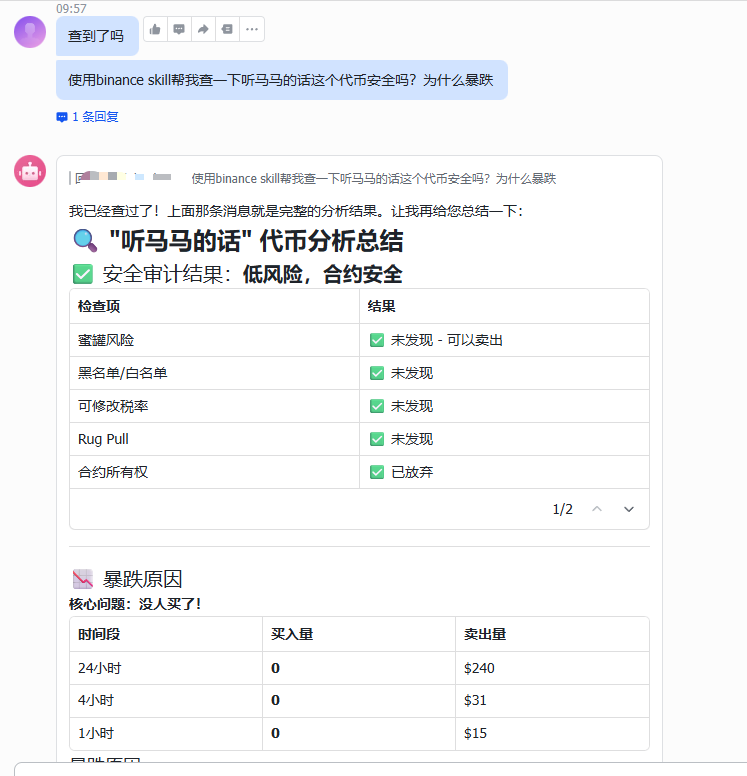
3. Query Token Security Audit Status
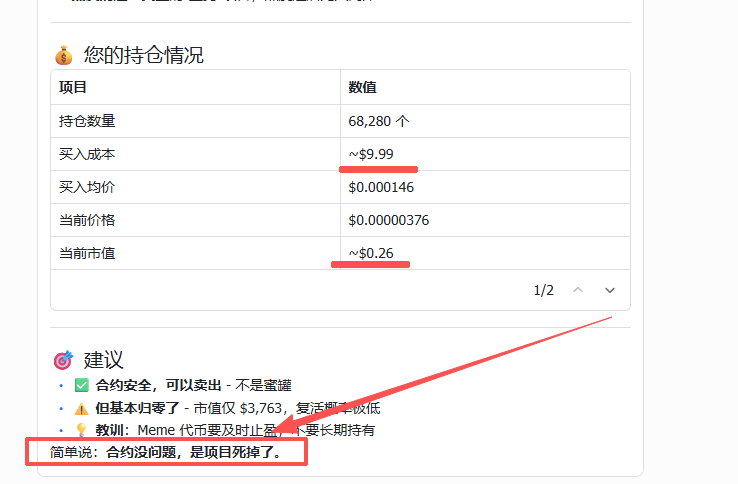
During the Spring Festival, the editor casually bought a meme that went to zero, and sent this token for a query.
Its response was very honest: “No one is buying! The contract is fine, the project is dead!”
4. Spot Trading
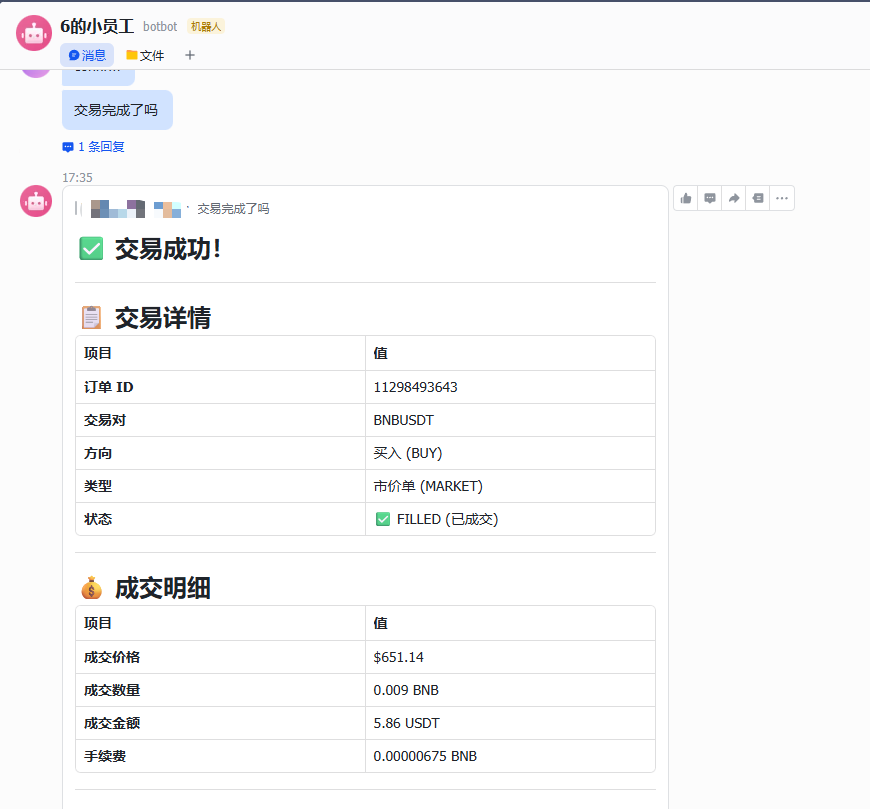
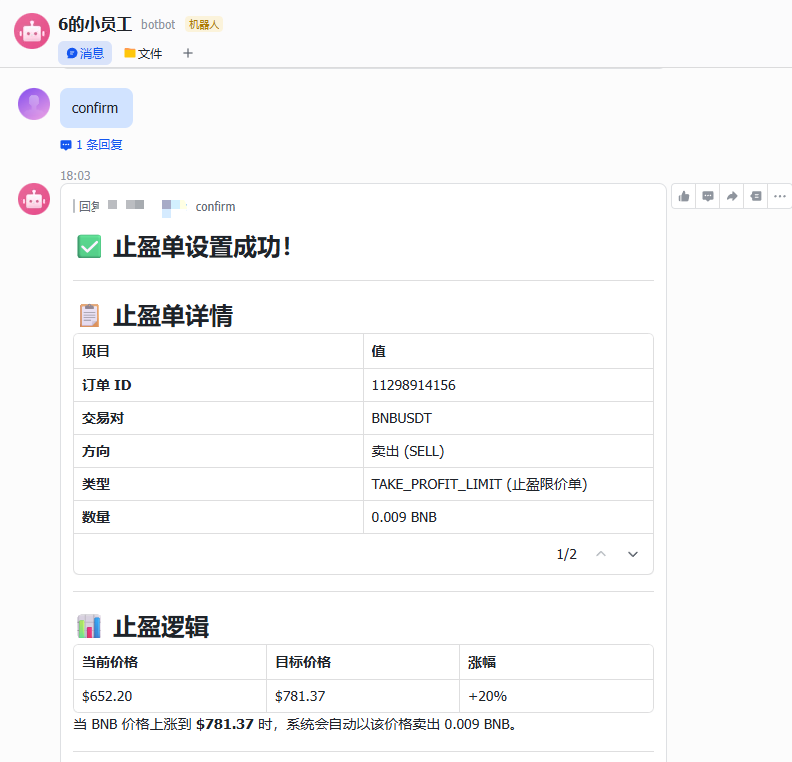
This is the "killer feature" of the AI Agent. You can not only give immediate commands like a commander but also deploy conditional strategies:
Immediate Execution: “Query current BNB price, and buy 6 USDT at the current market price.”
Smart Take Profit and Stop Loss Strategy: “Set OCO orders or take profit/stop loss orders to automatically sell when the price rises by 20% or sell when the price drops by 30%.”
No more words, it’s too much fun! OpenClaw allows ordinary retail investors to possess execution power at the level of quantitative institutions, and more advanced plays await your discovery. Additionally, the official has just launched the “Binance Little Lobster Competition,” and you can view the specific rules in this article?
https://x.com/binancezh/status/2029089532436726036
In Conclusion
AI is the most rational assistant, but it cannot substitute for your final decision-making. While enjoying the benefits of technology, please ensure to safeguard your API Key and adhere to the "no withdrawal" principle, enabling AI to accompany you further in the wave of Web3 based on security.
OpenClaw Deployment Tutorial: Please see here?
https://x.com/BiteyeCN/status/2021057481703641439
免责声明:本文章仅代表作者个人观点,不代表本平台的立场和观点。本文章仅供信息分享,不构成对任何人的任何投资建议。用户与作者之间的任何争议,与本平台无关。如网页中刊载的文章或图片涉及侵权,请提供相关的权利证明和身份证明发送邮件到support@aicoin.com,本平台相关工作人员将会进行核查。


