What is Hyperliquid?
Hyperliquid is a decentralized perpetual exchange with the following core features:
- Fully on-chain order book — Every transaction is transparently recorded on-chain
- No KYC — Trade by connecting your wallet without identity verification
- High leverage — Up to 50x leverage
- Zero Gas fees — No network fees
- High-speed trading — 0.2 second block time, supporting over 200,000 TPS
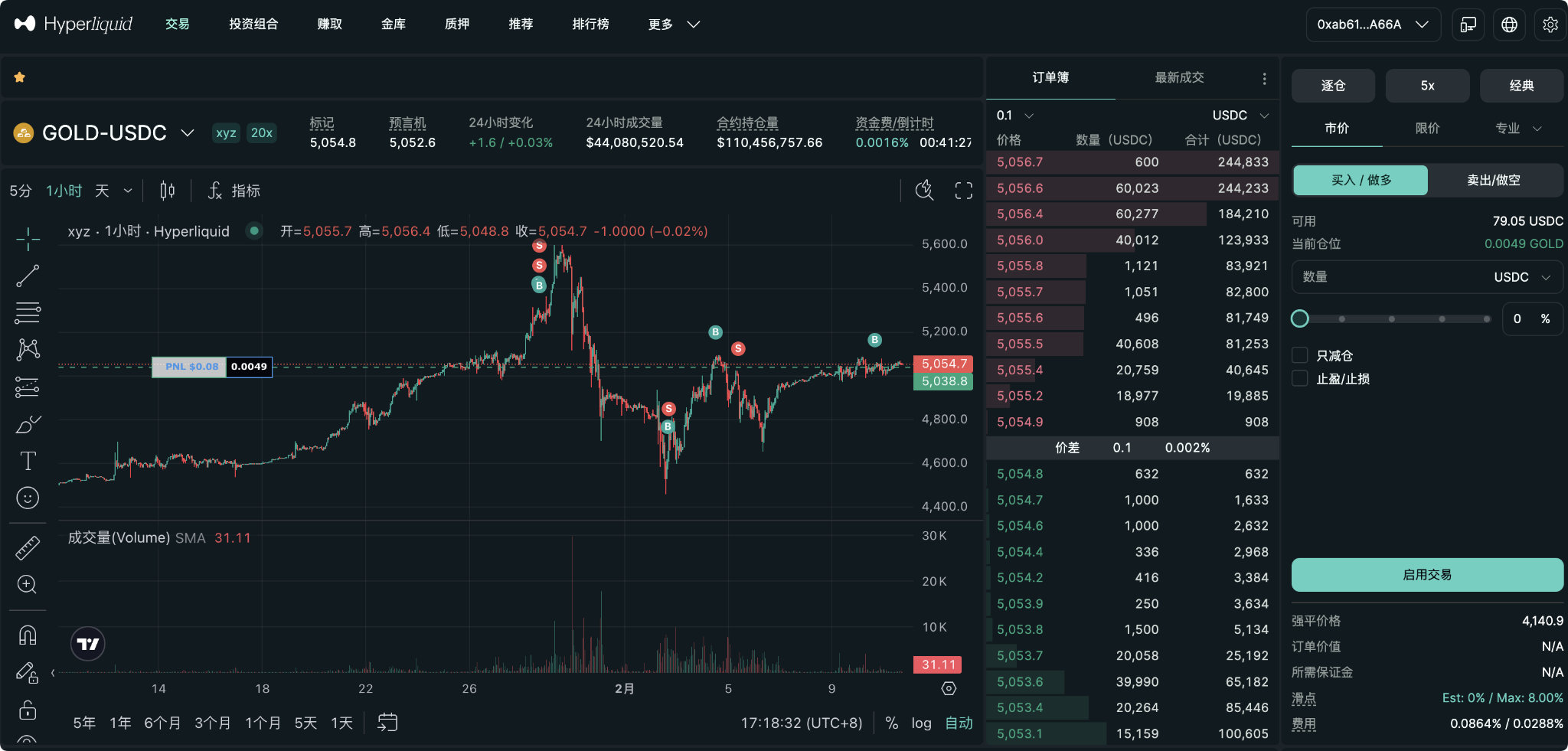
Technical Architecture of Hyperliquid
Hyperliquid runs on its own Layer 1 blockchain, optimized for high-frequency trading.
Performance Metrics:
Transaction speed: 0.2 seconds/block
Throughput: 200,000+ TPS
Average latency: 0.07 seconds
Network fees: $0
Comparison with Other DEXs
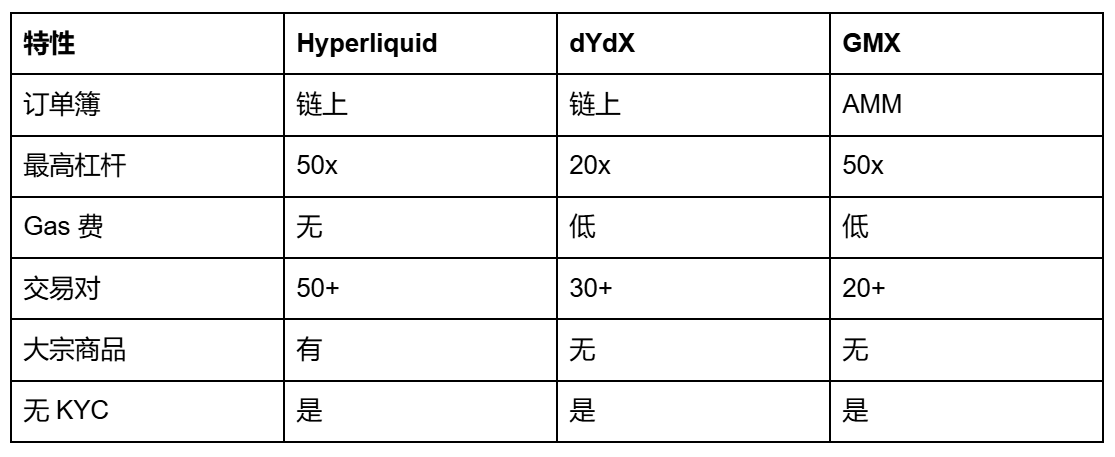
Core Advantages of Hyperliquid
Advantage 1: Fully On-chain Transparency
What is an on-chain order book?
Traditional DEXs use the AMM (Automated Market Maker) model, where prices are determined by smart contract algorithms.
Hyperliquid uses a on-chain order book, just like traditional exchanges:
- Buy and sell orders are both on-chain
- Prices are determined by supply and demand
- Every transaction is verifiable
Advantages:
- More accurate price discovery
- Better trade liquidity
- Lower slippage
- Fully transparent
Advantage 2: No KYC
What does this mean?
You can:
- Connect any wallet
- No need to submit identification documents
- No bank account required
- Start trading immediately
Privacy protection:
Traditional exchanges: require ID, address, phone number, etc.
Hyperliquid: only requires a wallet address
Advantage 3: Zero Gas Fees
Why are there no Gas fees?
Hyperliquid operates on its blockchain, not on Ethereum.
Fee Comparison:
Ethereum transaction: $10-50
Arbitrum transaction: $0.1-1
Hyperliquid transaction: $0
Advantage 4: High Leverage + Low Fees
Leverage Options:
- Spot trading: 1x
- Perpetual contracts: up to 50x
- Commodities: up to 20x
Fee Structure:
- Maker fee: -0.02% (you earn instead)
- Taker fee: 0.05%
- Funding fee: based on market conditions
Fee Comparison:
Binance: Maker 0.1%, Taker 0.1%
Hyperliquid: Maker -0.02%, Taker 0.05%
Savings: save $1,500 for every $1 million traded
Advantage 5: User-friendly Interface
Supported Wallets:
- MetaMask
- Trust Wallet
- Coinbase Wallet
- All WalletConnect compatible wallets
Interface Features:
- Sleek trading interface
- Real-time market data
- Advanced charting tools
- Risk management tools
How to Start Using Hyperliquid
Step 1: Connect Wallet
Prerequisites:
- Have a wallet (preferably OKX wallet)
- https://static.rmgvx.com/upgradeapp/okx-android_aicoin20.apk
- The wallet should have USDC or other supported tokens
Connection Steps:
1. Visit
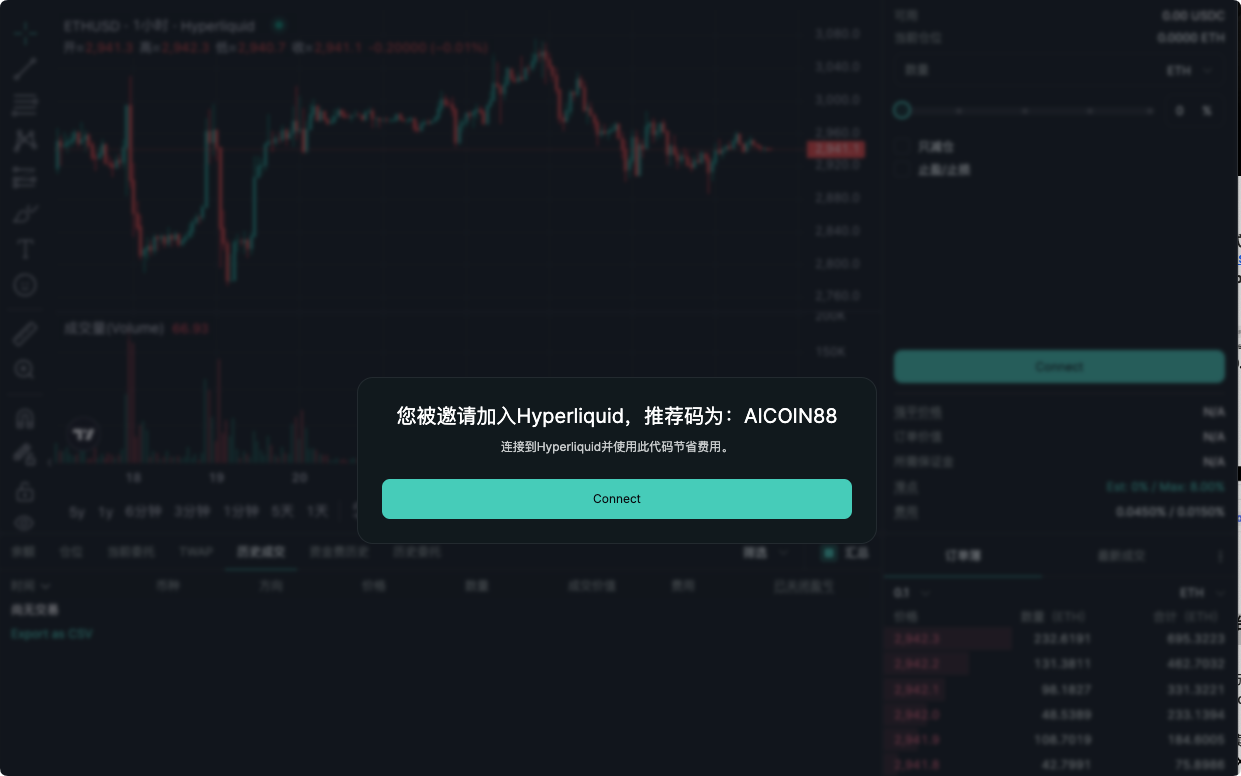
https://app.hyperliquid.xyz/join/AICOIN88
2. Click "Connect Wallet"
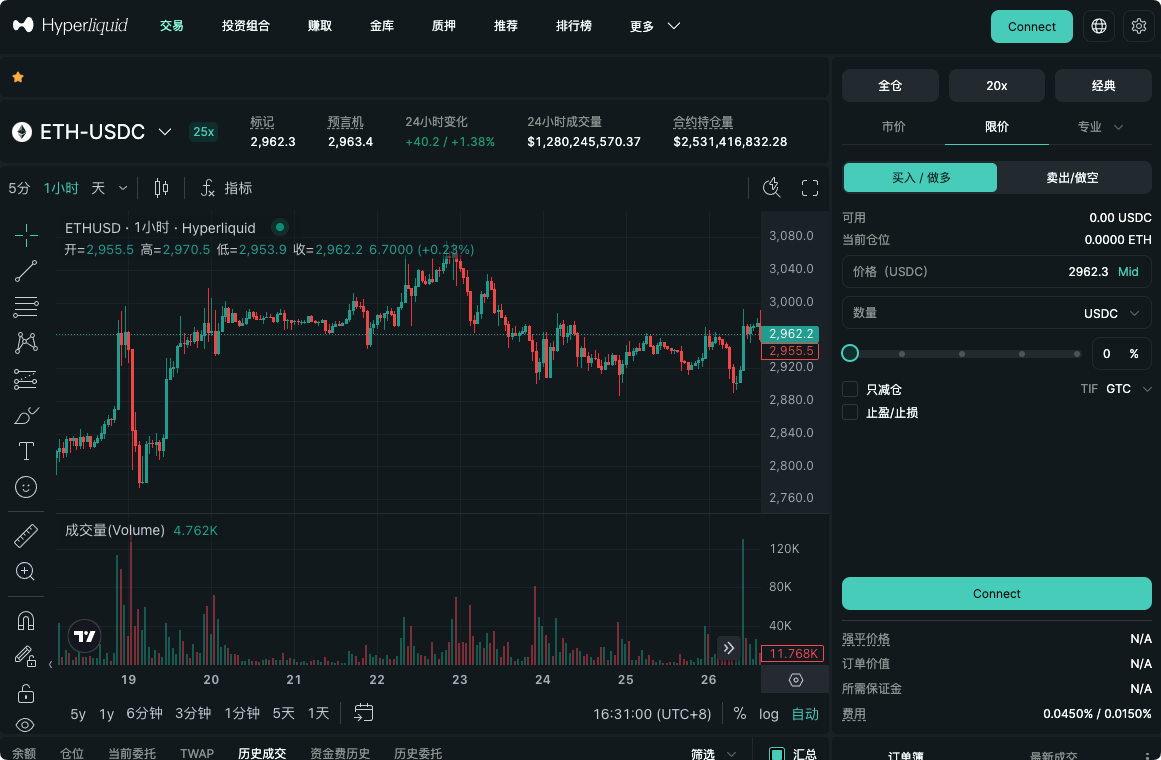
3. Select your wallet type
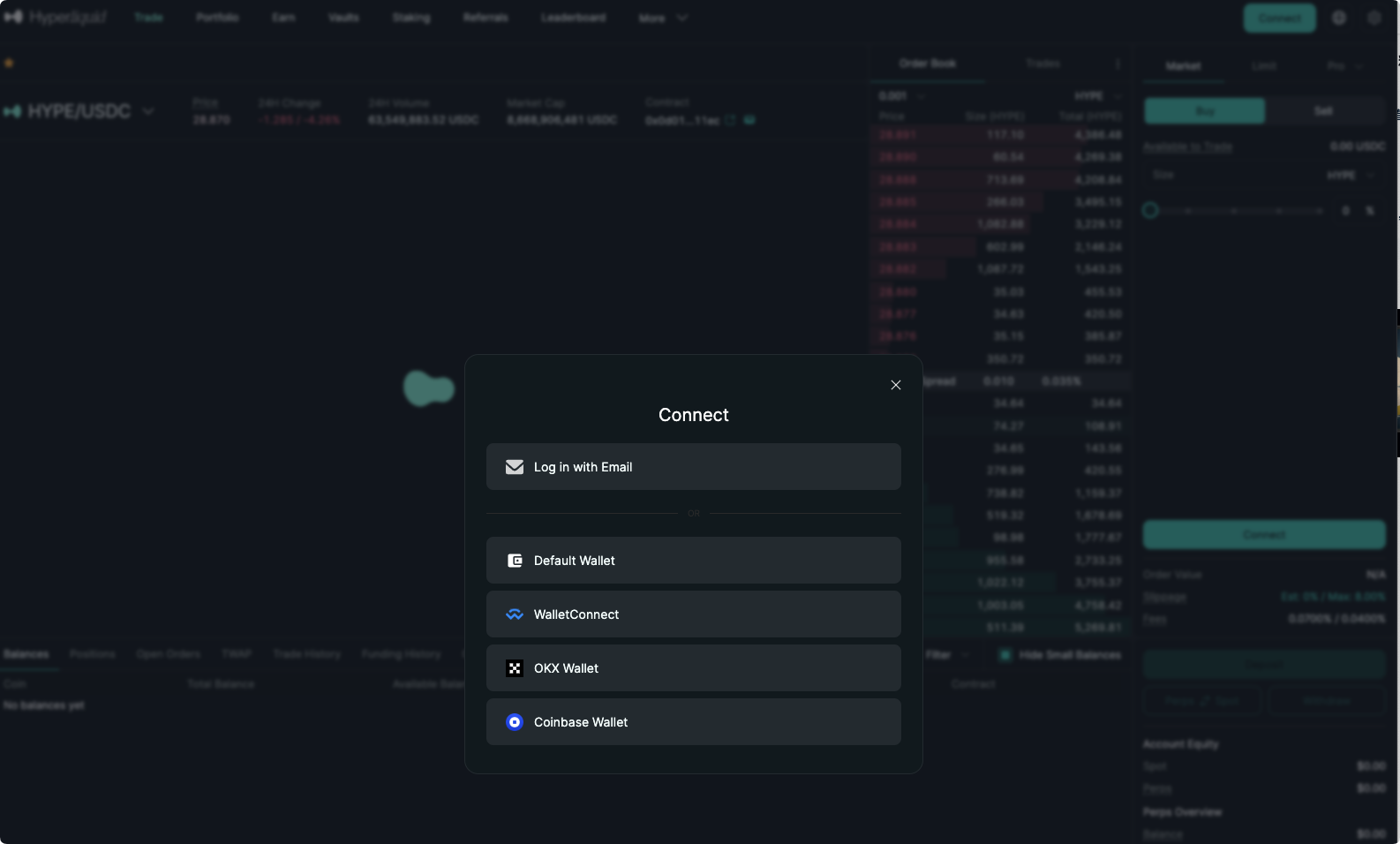
4. Confirm the connection in your wallet
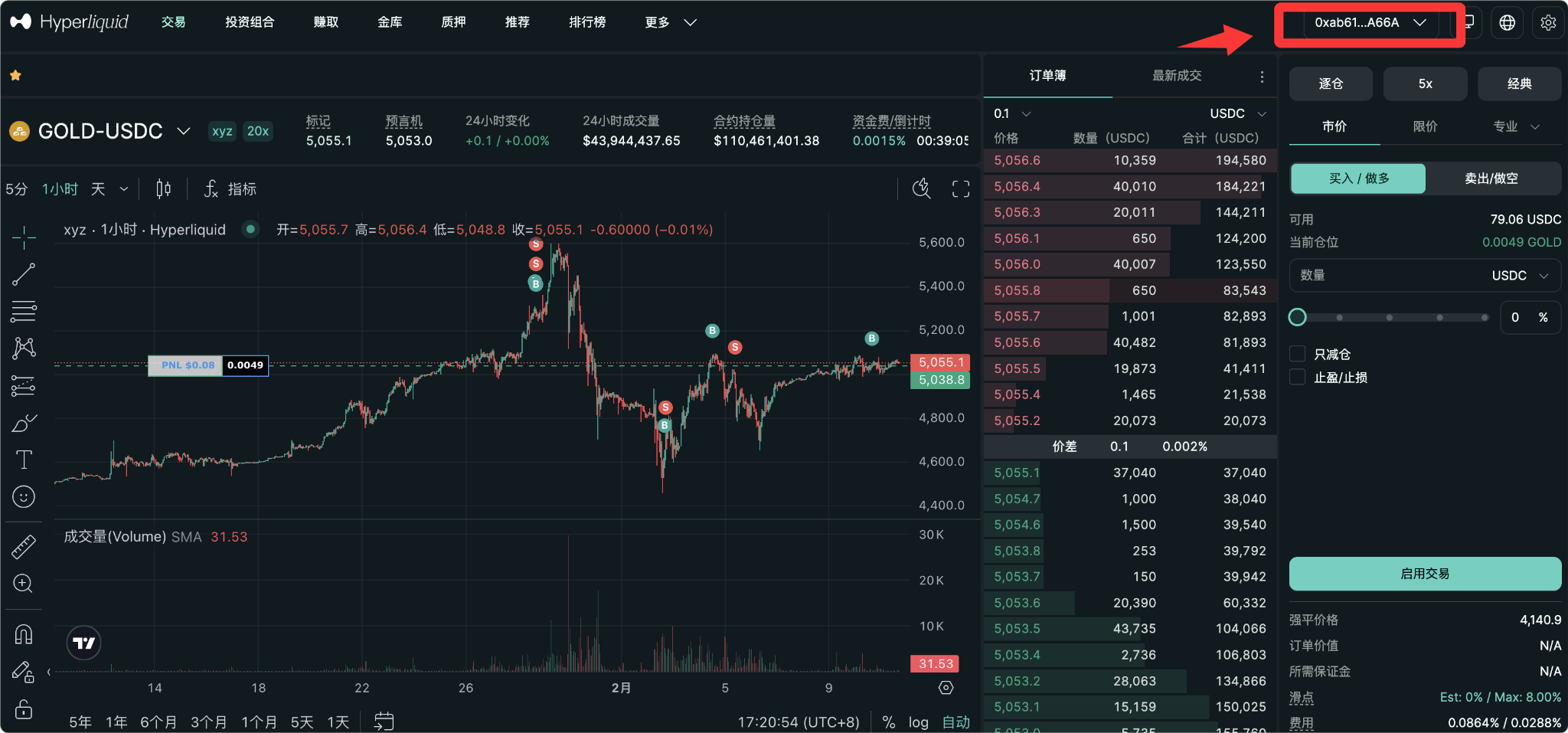
5. Done!
Step 2: Deposit Funds
Deposit Methods:
Method 1: Directly Deposit USDC
1. Click "Deposit" on Hyperliquid
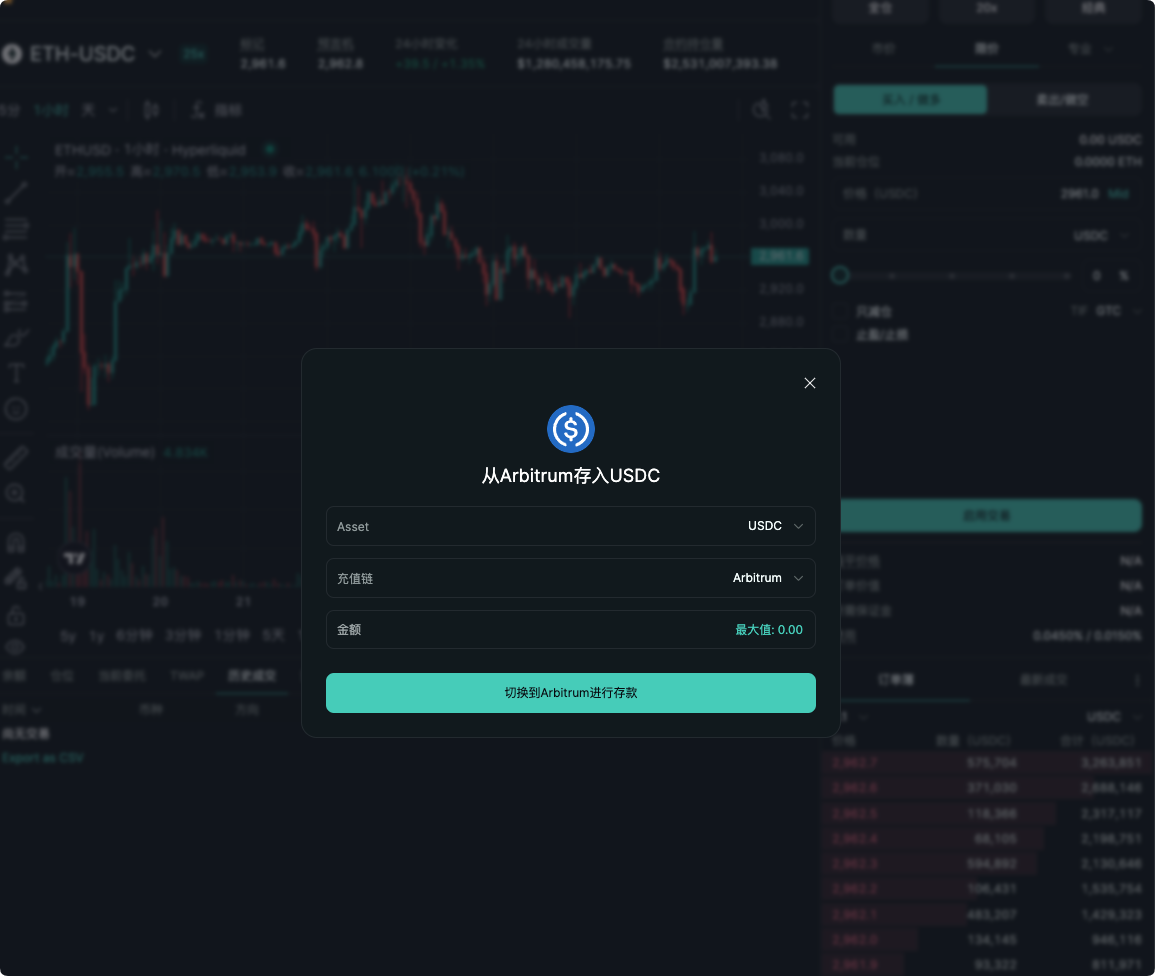
2. Select USDC
3. Enter the amount
4. Confirm the transaction
5. Wait for 1-2 minutes
Method 2: Cross-chain Bridging
If your USDC is on another chain (like Arbitrum):
1. Use a cross-chain bridge (like Stargate)
2. Transfer USDC to Hyperliquid
3. Receive it on Hyperliquid
Deposit Fees:
Hyperliquid: $0 (no Gas fees)
Cross-chain bridging: $1-5 (depending on the network)
Step 3: Understand the Trading Interface
Main Components:
1. Price Chart
- Displays real-time prices
- Supports multiple time frames (1m, 5m, 15m, 1h, 4h, 1d)
- Supports various indicators (MA, RSI, MACD, etc.)
2. Order Book
- Left side: Sell orders (red)
- Right side: Buy orders (green)
- Displays depth and liquidity
3. Trading Panel
- Select trading pair
- Select trade type (spot/perpetual)
- Enter price and quantity
- Select leverage multiplier
4. Position Panel
- Displays current position
- Displays unrealized profit and loss
- Displays liquidation price
- Displays margin ratio
Step 4: Place Your First Trade
Spot Trading (recommended for beginners)
1. Select trading pair (e.g., BTC-USDC)
2. Click "Buy"
3. Enter quantity or amount
4. Click "Place Order"
5. Confirm the transaction
Perpetual Trading (requires more experience)
1. Select trading pair (e.g., BTC-USDC)
2. Select "Perpetual"
3. Select leverage multiplier (recommended 5x)
4. Choose direction (Long/Short)
5. Enter quantity
6. Set stop-loss and take-profit
7. Click "Place Order"
Order Types Explained
Order Type 1: Market Order
What is a market order? Immediately executed at the current market price
When to Use:
- Want to enter the market quickly
- Do not care about exact price
- Urgently want to execute
Advantages:
- Quick execution
- Will not fail
Disadvantages:
- May experience slippage
- Higher fees (Taker fees)
Example:
Current BTC price: $80,000
You place a market order to buy 0.1 BTC
Executed price: $80,050
Execution fee: $80,050 × 0.05% = $40
Order Type 2: Limit Order
What is a limit order? Executed at a specified price or better
When to Use:
- Want a precise price
- Willing to wait
- Want Maker fees
Advantages:
- Exact pricing
- Lower fees (Maker fee -0.02%)
- May receive a rebate
Disadvantages:
- May not execute
- Requires waiting
Example:
Current BTC price: $80,000
You place a limit order: $79,500 to buy 0.1 BTC
If the price drops to $79,500, it will execute
Execution fee: $79,500 × (-0.02%) = -$16 (rebate)
Order Type 3: Stop Loss Order
What is a stop loss order? Automatically sells when the price reaches a specified level
When to Use:
- Want to limit losses
- Protect a position
- Automatically manage risk
Example:
You buy BTC at $80,000
Set a stop loss order: $75,000
If BTC drops to $75,000, it will automatically sell
Maximum loss: $5,000
Order Type 4: Take Profit Order
What is a take profit order? Automatically sells to take profit when the price reaches a specified level
When to Use:
- Want to take profit automatically
- Avoid greed
- Lock in gains
Example:
You buy BTC at $80,000
Set a take profit order: $85,000
If BTC rises to $85,000, it will automatically sell
Profit: $5,000
Risk Management Tools
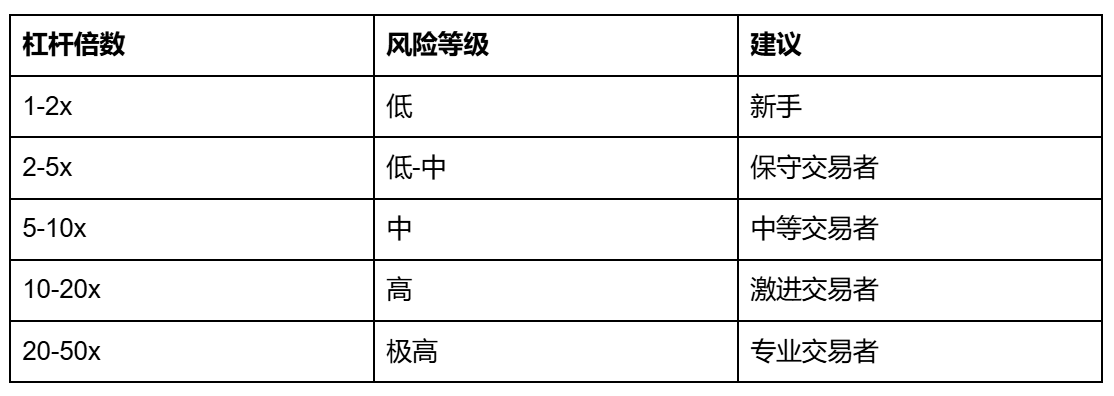
Tool 1: Leverage Adjustment
How to set leverage?
1. Find the leverage setting in the trading panel
2. Enter the leverage multiplier (1-50x)
3. Confirm
Choosing Leverage Multipliers:
Tool 2: Liquidation Price Monitoring
What is liquidation? When your losses reach the margin, the position is automatically liquidated
Liquidation Price Calculation:
Long liquidation price = entry price × (1 - 1/leverage)
Short liquidation price = entry price × (1 + 1/leverage)
Example:
Entry price: $80,000
Leverage: 5x
Liquidation price: $80,000 × (1 - 1/5) = $64,000
How to avoid liquidation:
- Use reasonable leverage
- Set stop losses
- Maintain sufficient margin ratio
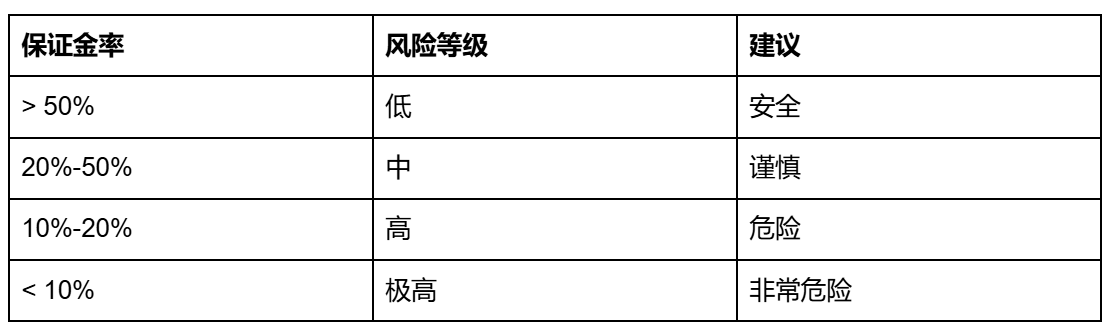
Tool 3: Margin Ratio Monitoring
What is margin ratio? The ratio of usable margin in the account to the value of the position
Margin Ratio Calculation:
Margin ratio = usable margin / position value × 100%
Margin Ratio Risk Levels:
Summary
The core value of Hyperliquid:
- No KYC — Complete privacy
- Zero Gas Fees — Lowest cost
- High Leverage — Up to 50x
- On-chain Transparency — Fully decentralized
- User-friendly — Simple and easy to use
Hyperliquid is suitable for:
- Users who want KYC-free trading
- Traders looking for low fees
- Traders seeking high leverage
- Investors looking to trade commodities
- Users who want to participate in the ecosystem
Invite code: AICOIN88 Use the invite code to register and receive a trading fee discount.
Quick Start (Save 4% on trading costs)
Use invite code: AICOIN88
Website:
https://app.hyperliquid.xyz/join/AICOIN88
Join our community, let's discuss and grow stronger together!
Official Telegram Community: t.me/aicoincn
AiCoin Chinese Twitter: https://x.com/AiCoinzh
Group Chat - Wealth Group:
https://www.aicoin.com/link/chat?cid=10013
免责声明:本文章仅代表作者个人观点,不代表本平台的立场和观点。本文章仅供信息分享,不构成对任何人的任何投资建议。用户与作者之间的任何争议,与本平台无关。如网页中刊载的文章或图片涉及侵权,请提供相关的权利证明和身份证明发送邮件到support@aicoin.com,本平台相关工作人员将会进行核查。


